Why an AI-ready Zoho implementation is a different project
A Zoho implementation used to answer one question: does the team have the records, the pipeline and the reports it needs? A second question now comes up before signing. Will an AI assistant be able to work in this system next year, without a second project to clean it up?
The honest answer depends on decisions taken in the first weeks, not on the assistant you choose later. An assistant reads the fields you defined, under the permissions of the person who connected it, from the data centre you picked at sign-up. If those three were decided for a team of people only, the assistant inherits every shortcut.
This guide lists the seven decisions we take differently when AI is on the roadmap. Each one comes with the setting in Zoho and the reason an assistant needs it. The product facts were read on the Zoho and Anthropic pages on 23 October 2026. For the AI side of the work, our practice has its own site at svennis.ai; this article stays on the Zoho side.
On the Zoho CRM editions that include these features, none of the seven adds licence cost. Most of them are settings a good implementation makes anyway. The difference is that they are taken on purpose, documented, and tested before go-live, because an assistant will rely on them every day.
Decision 1: a data model an assistant can read
People tolerate a messy CRM. They know that the real phone number sits in the notes and that "Status" means three different things in three teams. An assistant does not know that. It reads the field, takes the value at face value and acts on it.
So the first decision is the data model: one record per customer, one owner per record, and closed pick lists where a free-text field would invite variants. A pick list with twelve stages is readable; a text field with forty spellings of "qualified" is not. Where a value must be computed, it lives in a formula field, not in a colleague's head.
The second half of the decision is hygiene from day one. Duplicate rules, mandatory fields on the records an assistant will touch, and a short written definition of every custom field. Our guide on CRM data quality, duplicates and ownership covers the rules and who enforces them.
A practical test before go-live: pick ten real customer records and ask a colleague from another team to answer five questions from the record alone, without opening the notes. If they cannot, neither can an assistant.
Decision 2: roles, profiles and sharing rules, because the assistant inherits them
An assistant connected to Zoho does not get its own account. It works through the account of the person who connected it. Zoho's own page on Zoho MCP states the rule plainly: "Agents operate under user-level permissions, so they can only perform actions that the user is authorized to do." Access is authorised through OAuth.
That turns roles, profiles and sharing rules from an admin chore into the assistant's safety fence. A sales profile that cannot delete deals cannot delete them through an assistant either. A role that sees only its own territory keeps the assistant inside that territory.
The decision, then, is to design permissions for two audiences at once. Each person gets what their job needs, and the same profile defines what an assistant on their seat may read and write. Where the assistant should do less than the person, a dedicated profile with fewer rights is the clean answer.
The trap we see most often is one administrator connecting an assistant with their own account "for everyone". Every colleague then works through the administrator's rights. Each person connects with their own Zoho account, and the rules in Zoho CRM roles, profiles and sharing rules do the rest.
Decision 3: where Zoho holds the data and where the assistant's provider processes it
Two locations matter, and they are decided by two different parties. The first is Zoho's data centre, fixed at sign-up by the domain you register on. A European company signs up on the EU data centre. On the EU data centre your data is stored in the EU.
Zoho states that support staff in India may access it in limited cases, under standard contractual clauses. The privacy notice and the record of processing mention that safeguard too. Zoho's GDPR page asks you to name that data centre when you request its Data Processing Addendum. Our Zoho CRM EU data centre guide walks through the choice and its consequences.
The second location belongs to the assistant's provider. Anthropic's privacy centre, read on 23 October 2026, says that data is stored in the United States. By default, traffic may be routed to the US, Europe, Asia and Australia. No Claude plan keeps a seat's data only in the European Union today.
Under Anthropic's commercial terms, content from Claude Team, Enterprise and the API is not used to train models. The exception is feedback a user chooses to send, which the plan owner can switch off. For a company using Claude Team or Enterprise, Anthropic acts as processor under its Data Processing Addendum. The addendum incorporates the EU standard contractual clauses for the transfer to the United States. The company, as exporter, still documents a transfer assessment before go-live.
For an agent we build for a client, the model runs in the client's own cloud account. That means Amazon Bedrock in an EU Region or through the EU cross-Region inference profile, or Google Cloud in an EU region. A global inference profile would route requests outside the EU, so we do not use one for personal data. The cloud provider is then the processor for the model, under the client's own agreement with it.
The decision before go-live is to write both locations down and to name the provider as a recipient in the privacy notice. The data security page of our AI practice describes the Claude side in detail, including what an agent on your own cloud changes.
Decision 4: audit log on, sandbox before production
When a person changes a record, a colleague can ask them why. When an assistant changes a record, the only witness is the log. So the audit log and field history are switched on from the first day of an AI-ready implementation, not after the first surprise.
Field history on the fields an assistant will write, the audit log for setup changes, and a weekly look at both during the first months. The log is also what you show a customer or an auditor when they ask what the assistant did on their account.
The sandbox is the other half of the decision. Every workflow, function and connector that an assistant will trigger is built and tested in a sandbox with realistic data, then deployed. The same applies to the assistant's own instructions. A prompt that worked on ten test records is tested on a hundred real ones before it touches production.
Our guide Zoho CRM sandbox: test before release describes the sandbox types and the deployment path. The addition for AI is one rule: nothing an assistant can trigger reaches production without a sandbox run and a named person who signed it off.
Decision 5: how the assistant reaches Zoho, connectors or Zoho MCP
An assistant reaches Zoho through one of two doors, and the choice is made during implementation. The first door is the connector directory of the assistant's vendor. On 23 October 2026 the Claude directory lists a Zoho CRM connector built by Zoho and marked "Anthropic verified".
It exposes 41 tools, from search and record reads to creating notes, updating records and deleting them. It offers a separate connector URL for the Europe region. Listings for Zoho Books, Zoho Projects and Zoho Desk sit in the same directory.
The second door is Zoho MCP, Zoho's own product for exposing app tools and data to AI agents. It lets you build a server with a restricted list of tools. An assistant can then read deals and create tasks but never delete anything, whatever the person's profile allows. Our guide on using Zoho MCP with an AI assistant shows the setup.
The rule we apply has two halves. The vendor connector serves a pilot on one seat, where the person's own permissions and an approval mode are the fence. A restricted Zoho MCP server serves anything that runs for the whole company or without a person watching. Both doors use OAuth and the person's Zoho permissions; only the second lets you shorten the tool list.
Whichever door you choose, the decision is taken before the data model is frozen. A connector that needs a field the model does not have is a change request after go-live, not a setting.
Decision 6: Zia for what lives inside Zoho, an assistant for what crosses systems
Zoho ships its own AI, Zia, inside CRM, Desk, Mail and Books. Lead scoring, suggested replies, anomaly alerts and data enrichment work on Zoho data. They need no seat from another vendor, and the data does not leave Zoho unless a third-party model is connected to Zia. An AI-ready implementation switches those on where they fit, and tests them, before anyone talks about an external assistant.
An external assistant earns its place where the work crosses systems. A quote needs the price list from a shared folder and the customer history from CRM. A support reply needs the contract from Zoho WorkDrive and the ticket from Zoho Desk. A Monday report needs CRM, Books and the project tracker at once. Zia stays inside one app; the assistant works across several.
We wrote the comparison up once, in AI inside your Zoho: Zia, Claude or both, and we do not repeat it here. The decision for the implementation is only this: list the tasks and mark which ones stay inside one Zoho app. Plan Zia for those and an assistant for the rest.
One example of the second kind is Salus Controls, whose Zoho and SAP integration we built. Its Romanian support team now works with a Claude support assistant that reads the knowledge base and the ticket history together.
Decision 7: the human checkpoint and the two AI Act duties
The last decision is where a person stays in the loop. Our default for the first months is strict. The assistant drafts and a person sends; it reads financial records and a person pays; it proposes a status change and a person confirms. A rule is relaxed only after someone has checked its results for a few weeks.
Three Zoho settings carry it: approval processes on the records an assistant can change, a separate field for its output, and a profile that cannot delete. The separate field keeps the assistant from overwriting the value people rely on. The checkpoint is a setting, not a promise.
Two duties from the EU AI Act, Regulation (EU) 2024/1689, belong in the same decision. Article 4 asks providers and deployers to take measures that support AI literacy. It covers their staff and other persons who operate or use the systems on their behalf, and no specific level of literacy must be guaranteed. It has applied since 2 February 2025 and was reworded by the Digital Omnibus in July 2026. A documented training at go-live is such a measure.
Article 50 requires that an AI system which talks directly to people is designed to tell them they are dealing with an AI. It says so at the first interaction, unless that is obvious. The duty sits with the provider of the system. A company that builds its own customer-facing assistant can be that provider. In practice, when an assistant answers customers directly, the reply says so.
Neither duty is heavy for a company that planned the checkpoint. The training is the go-live session with the assistant's rules written down. The disclosure is one sentence in the reply template.
The seven decisions on one card, and what changes in the partner's method
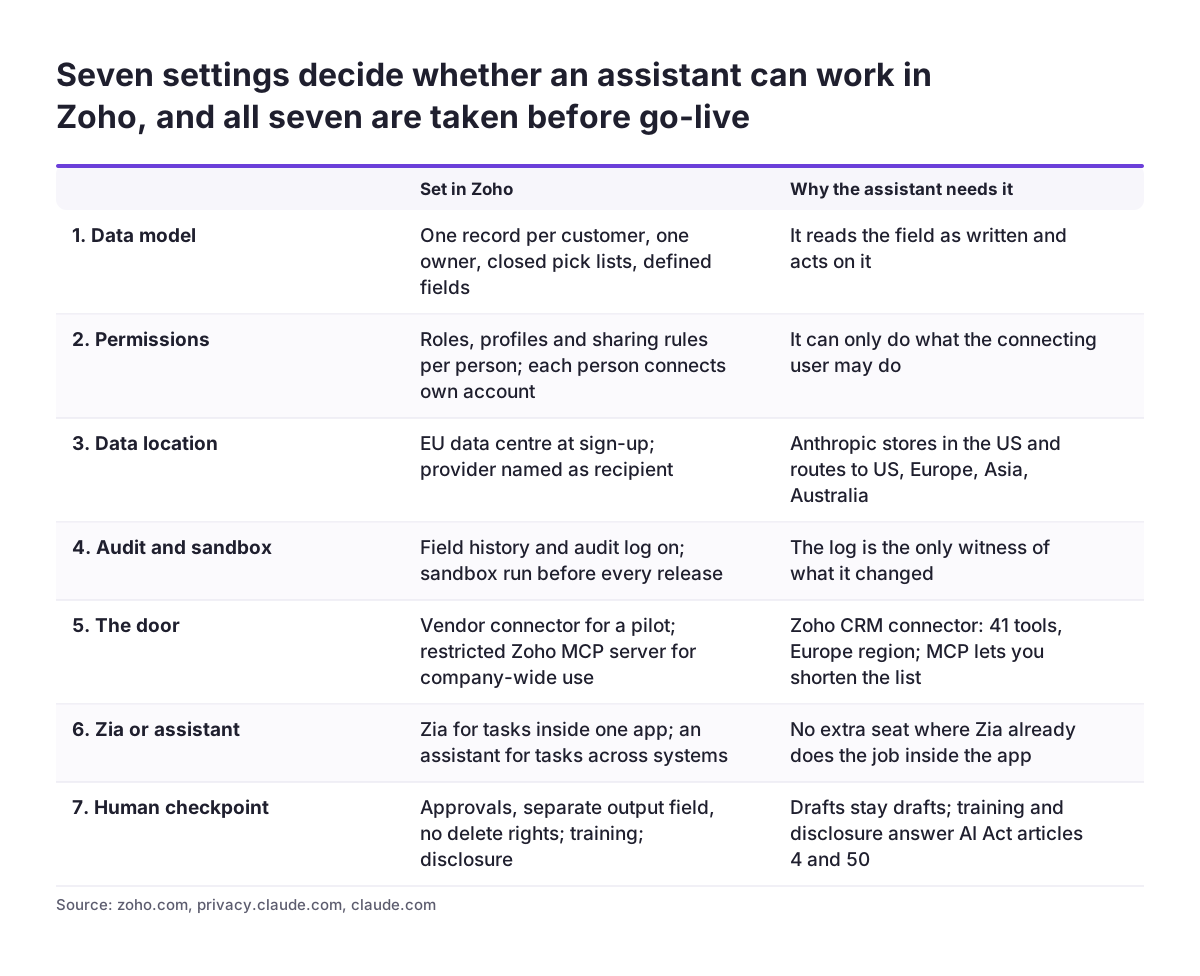
The card below puts the seven decisions side by side: what is set in Zoho and why an assistant depends on it. None of them is exotic. What changes is the order and the discipline. Permissions and data model are frozen before the assistant is chosen. The audit log is on before the first test, and the sandbox is part of the plan, not a favour.
For the partner, an AI-ready implementation also changes the handover. The client receives a written map of the assistant's fields, its profile, where both providers process data, and who signs off a change. That document is the input for the AI project that follows, and it is what makes that project short.
Svennis has worked with Zoho since 2011, is a Zoho Premium Partner, and has more than 200 implementations behind it. Svennis Cloud Solutions is a Select Partner in the Claude Partner Network. The two practices work on the same projects. At Asset Services Group, the IT service desk runs in Microsoft Teams on Claude, fronting Zoho Desk: 99.7 percent first-time-right routing, 40 percent efficiency gain. The case study describes the service desk and its results.
What this means for a company in the EU
Under the GDPR, Zoho processes your customers' data on your instructions, under its Data Processing Addendum. Zoho's GDPR page says the addendum is based on model contractual clauses and is available on request. An assistant's provider becomes a second processor, and the same documents are needed. You need a processing agreement and a transfer mechanism where data leaves the European Economic Area. The privacy notice names the recipient or its category, the transfer safeguard, and how to obtain a copy of it.
The record of processing activities is updated at go-live with both providers. A one-page AI policy decides which data an assistant may see. Where processing is likely to result in a high risk to the people concerned, a data protection impact assessment under Article 35 GDPR comes first. Anything the assistant does not need for its task stays out, and special categories stay out entirely; Anthropic's Data Processing Addendum lists none. Our guide GDPR inside your CRM shows the Zoho settings that support this.
The AI Act's obligations are the same in every member state; enforcement and penalties are national. The two duties from decision 7 do not change from country to country. What does change is the supervisory authority you deal with, and any national rule on employee monitoring or on consulting employee representatives. In several member states those rules apply as soon as a tool can record individual use. Those questions go to the person responsible for data protection in your company, or to a lawyer, before the pilot.
Next steps
If your Zoho implementation is still ahead of you, take the seven decisions as a kick-off checklist. Write the answers into the project plan. If Zoho is already live, the same seven are a readiness review: most take a week to put right, and none needs a migration.
- Measure where you stand with the AI readiness test of our AI practice, ten minutes, no account needed.
- Map the processes an assistant would take over, and the data each one needs, in the Claude readiness workshop; the output is the field map and the permission plan described above.
- Decide Zia first for everything that stays inside one Zoho app, and plan the assistant for the tasks that cross systems.
- Switch on the audit log and the sandbox this week, on the Zoho CRM editions that include them, whatever else is decided.
What a partner adds, and what you can do yourself, is described on the Claude Partner Network page of our AI practice. For the Zoho side, our team has done this two hundred times. The AI-ready version is the same project, with seven decisions taken on purpose.
Sources
- Zoho: Zoho MCP
- Claude connectors: Zoho CRM
- Anthropic Privacy Center: where are your servers located
- Anthropic Privacy Center: is my data used for model training
- Zoho: GDPR compliance and the Data Processing Addendum
- EUR-Lex: Regulation (EU) 2024/1689, the AI Act
- Zoho Help: Configure Zoho MCP server
- Zoho Help: how Zoho handles support operations for EU users