What Zoho CRM EU actually means
Zoho CRM EU is the version of Zoho CRM hosted in Zoho's European data centre. If your company sells into several EU member states, it is the natural choice when you want customer records, deal history and consent evidence to stay inside the European Union.
The software is the same product Zoho sells worldwide. The differences are where your data is stored, which support team answers your tickets and how you set up the account on the first day. Get those three right and the rest of the implementation follows the normal path.
This guide works through the decisions in the order you will meet them. First, where your data lives and what that does for your GDPR position. Then how to open the account, how to reach EU support, and how to configure one CRM for several countries, currencies and languages. Finally, which plans and licences fit which teams, and when outside help pays for itself.
Prices below are in euros per user per month, billed annually, and exclude VAT. If you are not yet sure you need a full CRM rather than a simpler pipeline tool, read our comparison of Zoho Bigin and Zoho CRM before you go further. Everything below assumes you have settled on Zoho CRM itself.
Where your data lives on the EU data centre
Zoho states that it stores data for EU customers in its Amsterdam and Dublin data centres. Check Zoho's data processing terms and list of sub-processors as well, because access from outside the EU, for example by support staff, can still count as a transfer. For a business that has to explain to customers, auditors or a works council where personal data is held, that gives you a clear starting point.
Zoho also states that it prefers to operate its entire technology stack itself, including its own data centres around the world. That matters because it reduces the number of parties between your records and the infrastructure that stores them.
The business model behind the data
Zoho says it neither owns nor sells its customers' data, and that the software licence fees you pay are its only way of making money. It also states that it does not sell, share or mine your data for advertising. When you assess vendors for GDPR purposes, this is worth recording in your vendor file, because it tells you the incentive structure, not only the technical controls.
What residency does not do for you
Hosting in the EU is one part of your compliance picture, not the whole of it. You still decide what personal data you collect, why you collect it, who inside the company can see it and how long you keep it. If you plan to connect AI tools to your CRM data later, review your wider data security approach at the same time, so the residency decision is not undone by an integration that sends records elsewhere.
The GDPR tools built into Zoho CRM
Zoho CRM includes GDPR tooling that you configure rather than build. The main pieces are consent tracking fields, which record how and when each contact gave permission to be contacted, automated right-to-erasure workflows, data processing records and a data portability export.
These features only help if you set them up to match how your business actually collects data. A consent field left empty on half your contacts means you cannot show consent for those people. Ask them again only through a channel where you are allowed to contact them, rely on another lawful basis only where one genuinely applies, or stop contacting them.
How to configure each one
- Consent tracking: define the channels you use, such as email, phone and events, and make the consent source mandatory on every web form and import template.
- Right to erasure: agree which records must be deleted and which must be kept for legal or accounting reasons, then test the workflow on dummy contacts before a real request arrives.
- Data processing records: document which modules hold personal data and for what purpose, so you can answer a regulator or customer query quickly.
- Data portability: run a test export for one contact and check that the output is complete and readable by someone outside your team.
Treat this as a design task in the first weeks of the project, not a clean-up job after go-live. Retrofitting consent data onto thousands of imported contacts is slow, and some of it cannot be recovered at all.
Setting up the account in the right region
Signing in to Zoho CRM requires a Zoho account, and users without one are directed to sign up first. Because that account is the anchor for your organisation, create it deliberately: use a company-owned administrator address rather than a personal mailbox, start the sign-up from the EU domain, and confirm with Zoho or your implementer that the organisation sits in the EU data centre before you import a single record.
Piloting before you commit
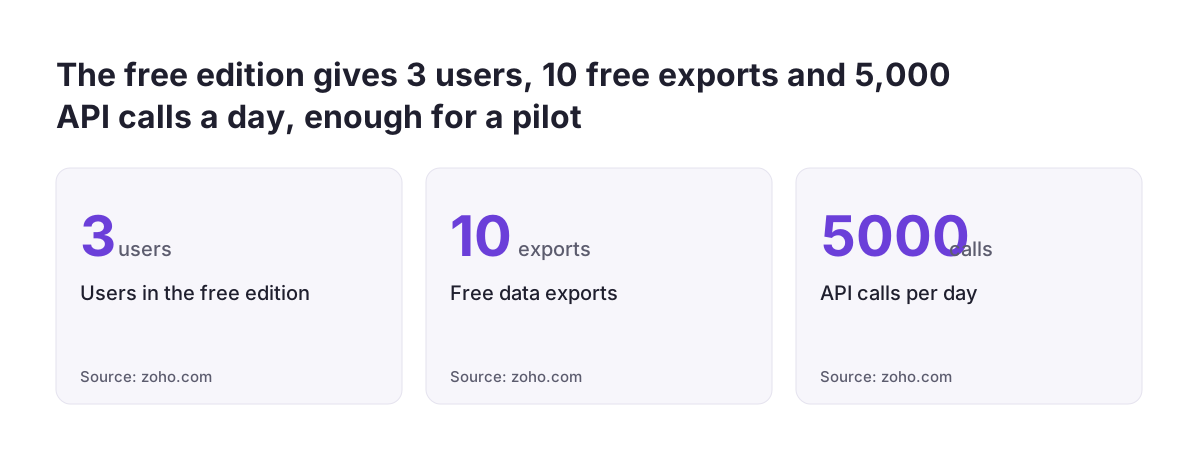
The free edition supports up to 3 users and includes core modules such as leads, documents and mobile apps. It allows data exports up to 10 times at no cost and 5,000 API calls per day, which is enough to test a small pipeline and one or two integrations. Zoho CRM is billed on a pay-as-you-go basis, monthly or yearly, without a contractual commitment, and you can move your plan up or down at any time.
Zoho accepts Visa, MasterCard, American Express and PayPal, and for annual subscriptions also bank or cheque transfer. Finance teams that prefer paying by bank transfer should plan for an annual contract.
Bringing existing data across
Zoho offers a Jumpstart service that covers requirements gathering, setup and onboarding. For companies leaving Salesforce or HubSpot, Zoho advertises free migration assistance and six months of Zoho CRM at no cost if you are locked mid-contract. Whichever route you take, plan the field mapping and history import carefully; our guide on how to migrate to Zoho CRM without losing your sales history covers the sequence step by step.
Getting help from Zoho's EU support team
Zoho runs a dedicated support team for users of its EU data centre and asks them to submit requests through help.zoho.eu. Zoho presents this as part of its commitment to GDPR compliance and secure data handling. It also states that its standard support policy remains unchanged across Zoho, so the EU route changes who handles your ticket, not what you are entitled to.
The addresses to use
Zoho lists dedicated EU support addresses for 33 products. The ones most CRM projects need are:
- Zoho CRM:
support@eu.zohocrm.com - Zoho Desk:
support@eu.zohodesk.com - Zoho Creator:
support@eu.zohocreator.com
What happens if someone uses the wrong channel
If an EU user opens a new ticket through help.zoho.com or a non-EU support address, Zoho forwards it to help.zoho.eu and the dedicated EU address, automatically closes the non-EU ticket and lets the EU team take over. Older closed tickets stay in the IN data centre and can still be viewed at help.zoho.com. If one of them is reopened, the reply comes from that same portal.
The practical step is simple. Put the EU addresses in your internal admin notes and brief everyone who raises tickets, especially if screenshots or exports containing customer data might be attached. Paid editions include Zoho's Classic support automatically, so you do not need to buy anything extra to use this route.
Configuring one CRM for several countries
Most European companies using Zoho CRM EU work across borders, and the configuration choices here shape how usable the system is for every sales team. Decide early whether you run one organisation with country territories or separate setups per market. For most mid-sized companies, one organisation with clear territory rules gives management a single pipeline view without duplicating customisation.
Currencies
Zoho CRM natively supports EUR, GBP, SEK, NOK, DKK, CHF and PLN, with exchange rates taken from ECB feeds updated daily. Set a home currency for consolidated figures and let each deal carry its own currency, so a Warsaw sales manager quotes in złoty while the board sees totals in euros. If you trade in a currency outside that list, confirm how it will be handled during the design phase rather than after go-live.
Languages
Zoho CRM is available in 28 languages. Let users work in their own language, but keep field names, picklist values and stage names consistent in one working language behind the scenes, or cross-country comparisons break down quickly.
Local rules and data formats
Company identifiers, address formats and invoicing obligations differ by member state, so build country-specific fields and validation rather than one generic layout. In Romania, for example, companies commonly validate a customer's tax identifier against the national tax authority, which our ANAF validation for Zoho CRM handles inside the record. That is Romanian practice, not an EU-wide rule; map the equivalent checks for each country you sell into.
Choosing plans and licences
Zoho CRM has four paid plans. The table shows the annual price per user per month and the features that usually decide the choice. Zoho advertises savings of up to 34% on yearly plans compared with monthly billing. Prices exclude VAT, which is either charged on the invoice or reverse charged to you, depending on your country and VAT registration.
| Plan | Price | Features that usually decide it |
|---|---|---|
| Standard | €14 | Sales forecasting, custom modules, data enrichment, Teams, Slack and Zoom integration |
| Professional | €23 | Process management, Blueprint guidance, inventory management, CPQ, AI agents |
| Enterprise | €40 | Zia for sales forecasts, anomaly detection and product recommendations |
| Ultimate | €52 | Highest feature limits, expert consultation, data migration support |
To put the figures in context, 20 users on Professional cost €460 a month, or €5,520 a year before VAT. Zoho CRM is also included in Zoho One at €37 per user per month, which covers more than 45 Zoho applications. Salesforce publishes its own per-user list prices for comparable editions, and the features included in each plan differ, so check both vendors' current pricing pages before you decide. Our Zoho CRM vs Salesforce comparison goes through where each fits.
Team users for colleagues outside sales
Zoho offers team user licences for colleagues in finance, legal and service roles. They can view records and add notes, tags and attachments in up to 10 org modules, but they cannot use reports and dashboards, manage automation or access AI and Zia features there. Team users are only available in the new CRM for Everyone interface, so check which interface you plan to roll out before budgeting on them.
Integrations and AI on the EU instance
Zoho states that Zoho CRM integrates with more than 1,000 applications. The integrations it lists include QuickBooks, Adobe Sign, PandaDoc, Mailchimp, Shopify, Zapier, Dropbox and WhatsApp. For most European companies the integrations that matter most are the ERP and the accounting system, because that is where orders and invoices meet the CRM record.
Every integration is also a data flow. Before you connect a tool, check where that provider stores and processes the data it receives, and whether your GDPR records need updating. An EU-hosted CRM that pushes full contact records to a service outside the EU without your knowledge has lost much of the benefit you chose it for.
AI features and connections
Zoho CRM can be accessed via MCP with AI tools such as Claude and ChatGPT for your own sales operations. Custom agents can be built in Zia Agent Studio, which also works via command line with tools such as Cursor, VS Code and Claude Code, while the Zia Agent Store offers pre-built agents for common business use cases.
Plan AI automation the same way as any other integration: define which modules an agent may read, which fields it may change and who reviews its output. Start with one narrow, measurable use case, confirm it respects your consent and retention rules, then extend it once the results are clear.
When a local Zoho Premium Partner helps
Not every company needs outside help. If you operate in one country, have fewer than ten users and follow a standard sales process, the free edition, Zoho's own documentation and the Jumpstart service can take you a long way. The cost of a partner rises with the scope, and some consultancies will propose more configuration than a simple pipeline needs.
A partner starts to earn its fee when the project carries risk you cannot easily undo:
- several countries, currencies and languages in one organisation
- a migration where years of deal history and consent records must survive intact
- integration with an ERP or accounting system that finance relies on
- a licence mix of full users and team users that needs careful design
- country-specific validation and data formats across several markets
Svennis is a Zoho Premium Partner, the highest partner tier, and our Zoho CRM implementation page shows how a European rollout of this kind is scoped.
Questions to ask any partner
Whoever you speak to, ask how they confirm the organisation is in the EU data centre, how they design consent fields and erasure workflows, how they test the migration before cut-over, and who owns the administrator account once the project ends. The answer to the last question should always be your company.
| Set up yourself | Local Zoho Premium Partner | |
|---|---|---|
| Countries | One country | Several countries, currencies and languages in one organisation |
| Users | Fewer than ten | A mix of full users and team users |
| Sales process | Standard pipeline | Territories and validation rules per market |
| Data history | Fresh start or a small import | Years of deal history and consent records to move |
| Integrations | One or two standard apps | ERP or accounting system that finance relies on |
| Main help | Free edition, Zoho documentation and Jumpstart | Partner led design, migration and testing |
Practical next steps
You can move from decision to a working pilot in a few weeks if you take the steps in order. The sequence below keeps the choices that are hardest to change at the front.
- Confirm the region. Create a company-owned Zoho account from the EU domain and verify the organisation is hosted in the EU data centre before loading any data.
- Pilot on the free edition. Use up to 3 users to test your pipeline stages, one country's fields and one integration.
- Design GDPR controls. Configure consent tracking, erasure workflows, processing records and a test portability export before real contacts arrive.
- Map your countries. List the currencies, languages, identifiers and validation rules for each market, and decide on one organisation or several.
- Price the licences. Match each role to a plan or a team user licence, and calculate annual cost including VAT.
- Record the support routes. Share help.zoho.eu and the EU support addresses with every administrator.
- Plan the migration and integrations. Map fields and history, and check where every connected tool processes data.
Once these steps are documented, you have a clear brief whether you complete the rollout in-house or bring in outside help for the more complex parts.
| Step | What you do | Before you move on |
|---|---|---|
| 1. Confirm the region | Create a company account from the EU domain | Verify the organisation is hosted in the EU data centre |
| 2. Pilot on the free edition | Test pipeline stages, one country's fields and one integration | The pipeline works for your pilot users |
| 3. Design GDPR controls | Configure consent tracking, erasure workflows and processing records | A test portability export has been run |
| 4. Map your countries | List currencies, languages, identifiers and validation rules per market | Every market has its settings written down |