Zoho Desk pricing in short: from free to €40 per agent a month
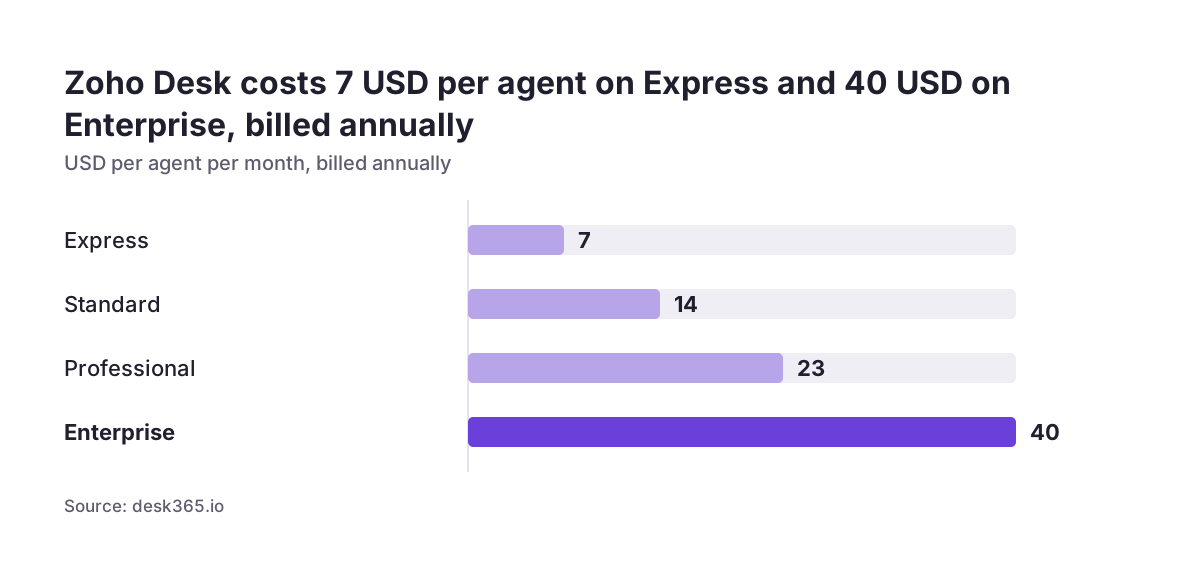
Zoho Desk pricing runs from a free plan for three agents to €40 per agent per month on Enterprise. Paid prices assume annual billing, and VAT comes on top. What your support team actually pays depends on four choices. These are the edition, how many full agents you license, add-ons such as light agents and telephony, and whether Zoho One works out cheaper overall.
Zoho Desk is a customer support platform that turns incoming requests into tickets, helps agents collaborate and tracks support performance. Zoho sells it in five editions: Free, Express, Standard, Professional and Enterprise. Each step up adds features and, on the two cheapest plans, raises a hard user limit.
The price list is only the starting point. A team can end up well above the headline seat price. That happens when it pays monthly, runs AI on its own provider key, adds phone support and buys a premium support plan. A team that uses light agents for internal readers can end up below it.
Every edition can be tested first. Zoho offers a 15-day free trial of any plan without a credit card. The account drops to the Free plan when the trial ends. Are you still deciding whether Desk is the right helpdesk at all? Our overview of Zoho Desk as customer support software covers what it does beyond pricing.
The five Zoho Desk editions compared by price, user limit and AI
The five Zoho Desk editions differ in seat price, user limit and how much AI is built in. The table below uses the euro list prices published by Chatarmin's breakdown of Zoho Desk plans and the US dollar annual and monthly prices published by Featurebase. All prices are per agent per month, before VAT.
| Edition | User limit | Annual billing | Monthly billing (US$) | AI and notable inclusions |
|---|---|---|---|---|
| Free | 3 users | €0 | Free | Email ticketing, predefined SLAs, tags |
| Express | 5 users | €7 / $7 | $9 | Generative AI with your own provider key |
| Standard | Unlimited | €14 / $14 | $20 | Answer Bot, sentiment analysis, one live chat channel |
| Professional | Unlimited | €23 / $23 | $35 | Zia AI built in, telephony integration, one Blueprint per department |
| Enterprise | Unlimited | €40 / $40 | $50 | 50 light agents included, pre-built AI agents in some data centres |
Zia AI is Zoho's built-in generative, predictive and analytical AI. Zoho's own pricing page lists it from Professional upwards. The Answer Bot, which replies to customers from your knowledge base, starts on Standard.
Regional pricing can differ from these figures. Zoho's own pricing page shows prices in the currency of the region you view it from, so check the figure your account is quoted before you budget.
Annual or monthly billing: monthly costs 25% to 52% more per seat
Paying monthly for Zoho Desk costs between 25% and 52% more per seat than paying annually. Zoho's own Zoho Desk pricing page states the same gap from the other side: yearly billing saves up to 34%.
The premium is not the same on every edition. Macha's breakdown puts it at these levels:
- Express: 29% more month to month ($9 against $7).
- Professional: 52% more ($35 against $23), the steepest gap.
- Enterprise: 25% more ($50 against $40).
Monthly billing still makes sense while your agent count is moving. It lets you add or drop seats without committing for a year. Once your team size is stable, annual billing on Professional saves the most per seat.
Local taxes come on top of every listed price. Zoho's comparison page says VAT and similar taxes are charged in addition to the prices shown, so EU companies should budget the net price plus the VAT treatment that applies to them.
Payment options are broad. Zoho accepts Visa, MasterCard, American Express and PayPal, and bank transfer for yearly subscriptions. Non-profits and educational institutions can ask Zoho for special pricing.
Agent count decides the edition: the three-user and five-user limits
Agent count is the first thing that forces a Zoho Desk edition choice, because the two cheapest plans have hard user limits. Free stops at three users and Express stops at five. Standard, Professional and Enterprise have no user limit.
The Express limit is the one that catches growing teams. Macha's breakdown notes that a sixth agent means moving everyone to Standard. That doubles the seat price from €7 to €14 for the whole team, not just for the new hire. If you expect to pass five agents within the year, start on Standard and avoid the migration.
Process complexity is the second driver. A Blueprint in Zoho Desk is a drag-and-drop automation that guides tickets through defined stages and required actions. Featurebase reports that Professional includes one active Blueprint per department and Enterprise includes 20. A team with several structured processes per department, such as returns, warranty claims and escalations, may need Enterprise for that reason alone.
Departments themselves can also cost extra. Zoho's comparison page lets you buy additional departments as an add-on, up to a maximum of 450. Map your departments before you choose an edition, since each one carries its own Blueprint allowance.
Light agents cut the cost of people who only read tickets
Light agents are the cheapest way to give internal colleagues access to Zoho Desk. Zoho defines them as users who can view tickets and leave comments but cannot respond to customers directly. Supervisors, engineers and sales staff who check on a case are typical light agents.
Light agent pricing depends on the edition. Zoho's pricing page offers light users on Professional and Enterprise, not on Free. Enterprise includes 50 light agents at no extra cost. Featurebase and Desk365 list them at about $6 per light agent per month as an add-on. Featurebase also lists them for Standard while Chatarmin does not, so confirm in your own account.
The saving is large when many people only need to read. A $6 light agent seat against a $23 Professional seat means internal readers cost about a quarter of a full agent. Licensing every interested colleague as a full agent is the most common way a Desk bill grows without anyone noticing.
When Svennis sizes Zoho Desk for a client, we list every person who will touch tickets and mark who replies to customers and who only reads and comments. That split, made before choosing an edition, decides how many full seats you pay for and whether the 50 included light agents on Enterprise tip the choice.
AI costs in Zoho Desk depend on edition, provider key and data centre
AI in Zoho Desk is not sold as a separate per-agent add-on, but what you pay for it still varies. The cost depends on your edition, on whether you use your own AI provider key, and on the Zoho data centre that hosts your account. If you want the wider picture first, our sister site covers AI for customer support.
Your own provider key on Express and Standard
Express and Standard support generative AI through your own provider key. Featurebase points out that the provider bills that usage, so your Desk subscription does not cover it. Zoho lists OpenAI keys as available in the EU data centre, among others.
Zia built in from Professional
Professional and Enterprise add native AI. Zia sorts tickets by customer sentiment, tags incoming tickets and suggests answers from your knowledge base. Zoho lists sentiment analysis in 12 languages, ticket summaries in 35 and the Answer Bot in 30.
AI agents and token allowances
Zia Agent Studio is Zoho's environment for building autonomous AI agents. Zoho-hosted models include up to 30 million tokens per month, and Featurebase reports extra usage at $1 per million tokens. Zoho's pre-built Desk AI agents are an Enterprise feature available only in the US and India data centres. An account hosted in the EU data centre should not budget for them.
Add-ons that raise the bill: telephony, live chat and API credits
Several Zoho Desk capabilities cost money outside the seat price. These are the add-ons that most often change the total:
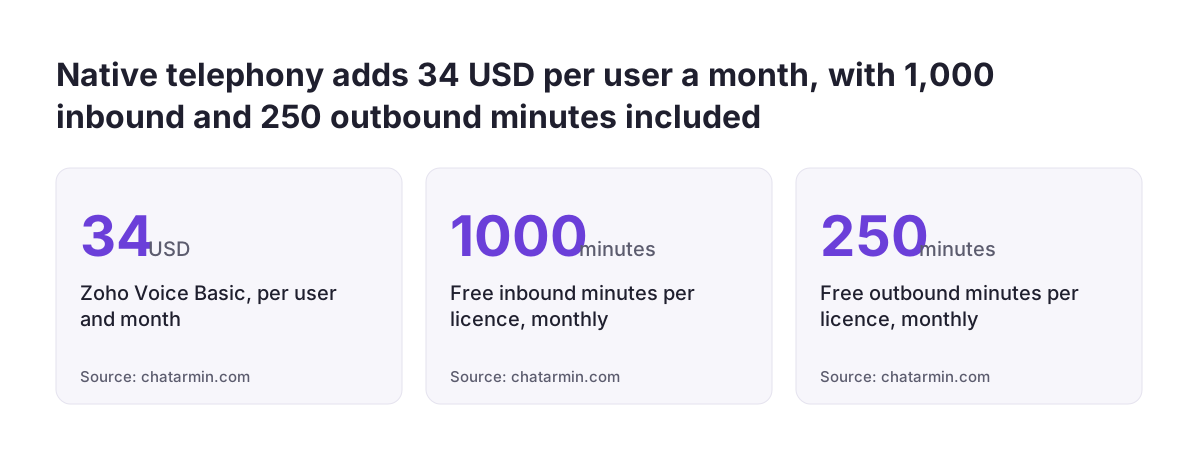
- Telephony. Professional integrates with Twilio, Zoho Voice, Amazon Connect, Zoho PhoneBridge and 85 other providers. Chatarmin notes that native telephony runs through Zoho Voice, a separate product, from $34 per user per month. Each licence includes 1,000 inbound and 250 outbound minutes per month.
- Live chat. Business Messaging live chat starts on Standard with one channel. Live chat through Zoho SalesIQ sits on Enterprise.
- Messaging fees. Since July 2025, Meta charges WhatsApp Business per message rather than per 24-hour conversation. That cost comes from Meta, not from Zoho.
- API credits. The Free plan has 5,000 API credits. Enterprise has 100,000 plus 1,000 per user, and extra credits are an add-on.
API credits matter once Desk connects to other systems. Every integration, sync and custom script draws on the same pool. A team that links Desk to an ERP or a web shop should estimate call volumes before going live.
No-code integrations sit outside Desk too. Zoho Flow connects Zoho Desk with more than 800 apps without code, but it is its own product with its own subscription.
Zoho's paid support plans add 20% or 25% to the licence fee
Zoho's own technical support for Zoho Desk comes in four tiers, and the two top tiers are priced as a share of your licence fee. Basic support covers Free users. Customers on paid editions get Classic support automatically. Premium support costs 20% of the licence fee and Enterprise support costs 25%, according to Zoho's Desk support plans page.
The tiers differ mainly in response time and availability:
| Support tier | Price | Maximum response time | Live chat and phone hours |
|---|---|---|---|
| Basic | Free edition | 24 hours | Not included |
| Classic | Included with paid editions | 8 hours | 8 hours x 5 days |
| Premium | 20% of licence fee | 3 hours | 24 hours x 5 days |
| Enterprise | 25% of licence fee | 1 hour | 24 hours x 7 days |
Enterprise support adds a dedicated technical account manager and quarterly reports with usage statistics and suggestions. It requires at least 25 users and an annual term. Live chat support from Zoho is only available on the Professional and Enterprise editions.
A premium support plan is worth pricing in if Desk is your only customer channel. For a team on Professional, Premium support raises the effective seat cost by a fifth.
What a ten-agent team pays on Standard, Professional and Enterprise
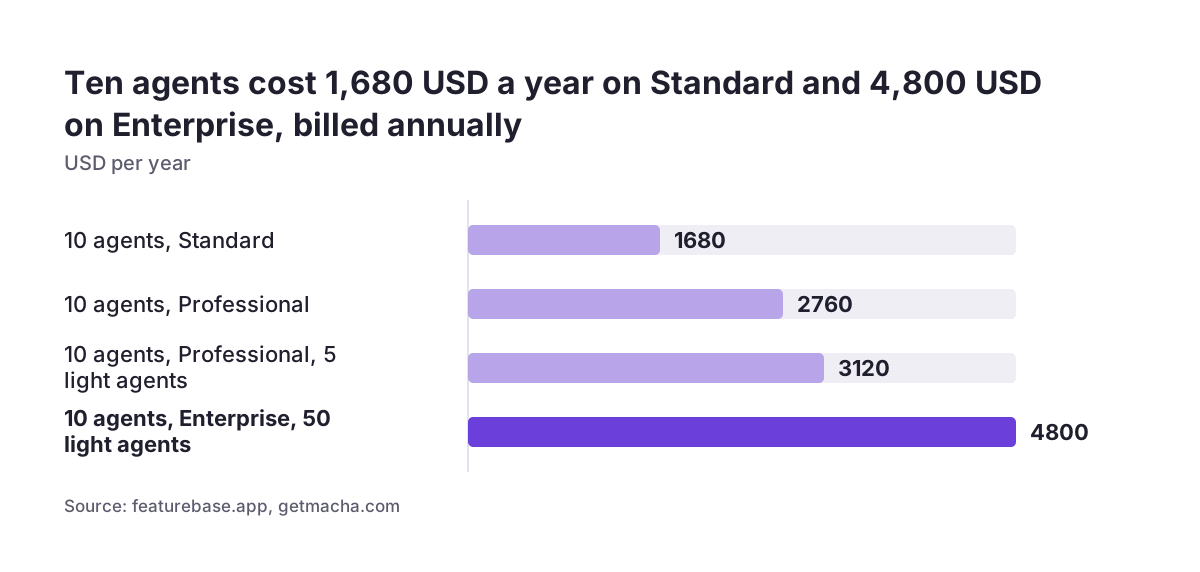
A ten-agent Zoho Desk team pays between about $1,680 and $4,800 a year on annual billing, depending on edition and light agents. The figures below come from worked examples by Featurebase and Macha, before VAT and before any support plan.
| Setup, billed annually | Cost per year | Light agents |
|---|---|---|
| 10 agents on Standard | $1,680 ($140 a month) | None |
| 10 agents on Professional | $2,760 ($230 a month) | None |
| 10 agents on Professional plus 5 light agents | About $3,120 | 5 paid |
| 10 agents on Enterprise | $4,800 | 50 included |
The gap between Professional and Enterprise narrows as light agents grow. Professional with five paid light agents stays well below Enterprise. A company where dozens of colleagues need to read tickets gets those seats included on Enterprise, along with 20 Blueprints per department.
Two further costs sit on top of every row. Monthly billing would raise each figure by the premium for that edition. A support plan would add 20% or 25% of the licence fee. AI usage on your own provider key and telephony are billed separately again.
Zoho One instead of Zoho Desk alone: when the bundle pays off
Zoho One is cheaper than Zoho Desk alone only when your company would use several Zoho apps across most of its staff. Zoho Desk is one of dozens of apps inside Zoho One, Zoho's all-in-one suite, and the bundle has two pricing models.
The two Zoho One models, as reported by Macha and Desk365, work very differently:
- All-Employee: about $37 per user per month billed annually, or $45 monthly. You must license every employee on payroll, not just support staff.
- Flexible-User: about $90 per user per month billed annually, or $105 monthly. You license only the users you need.
For a support team that only needs a helpdesk, Desk alone wins. Enterprise at $40 per agent is well under the $90 Flexible-User price. All-Employee looks cheaper per head, but it applies to every person in the company.
The bundle starts to pay when Desk is one of several Zoho apps you already plan to buy, such as CRM and finance. Our guide to Zoho One versus single-app licences walks through that calculation. If CRM is the other big line item, compare it with Zoho CRM pricing by edition before deciding.
Next steps: size your Zoho Desk licence before the trial ends
The best way to control Zoho Desk pricing is to size the licence before the 15-day trial ends and the account drops to Free. Work through these steps in order:
- List everyone who will touch tickets. Mark who replies to customers and who only reads and comments.
- Check the user limits. If you expect more than five full agents within the year, skip Express.
- List the features you need now: Blueprints per department, Zia, telephony, live chat. Pick the lowest edition that covers them.
- Check your data centre. Pre-built AI agents are not offered in the EU data centre, and your own AI key is billed by the provider.
- Run the trial on the edition you intend to buy, with real tickets from your own channels.
- Switch to annual billing once the team size is stable, and add VAT and any support plan to the budget.
If you are moving from another helpdesk, Zoho offers migration support from Zendesk and Freshdesk. Our Zoho Desk vs Freshdesk comparison for EU teams helps if you are still weighing the two.
Keep the sizing sheet after go-live. Review it each time the team grows, because the next hire can be the one that changes the right edition.
Sources
- Zoho Desk Pricing & Editions
- Zoho Desk pricing plan comparison
- Zoho Desk Premium support plans
- Desk365: Zoho Desk Pricing 2026, The Real Cost Breakdown
- Featurebase: Zoho Desk Pricing 2026
- Chatarmin: Zoho Desk Pricing 2026, All 5 Plans Compared
- Macha: How Much Does Zoho Desk Cost in 2026
- Zoho Desk help desk ticketing system
- SaasHunter: Zoho Desk Review (2026)