
CRM data quality, duplicates and ownership: the short answer
CRM data quality, duplicates and ownership are one problem, not three. In Zoho CRM, most duplicate records appear because nobody is clearly responsible for an account or lead. A second person then creates it again. Fix who owns each record, enforce that at entry, and the duplicates stop at the source.
Record ownership is the rule that names one user as responsible for a record. That user keeps it accurate, follows it up and decides whether a new entry is really new. In Zoho CRM this responsibility shows up as the record owner on each lead, contact and account.
CRM data quality is how accurate, consistent and usable your CRM records are for decisions and workflows. That is the definition CX Today uses in its piece on CRM data decay. Duplicates damage all three qualities at once. They split the history of one customer across two records, and they confuse any report or automation that reads them.
This guide covers four things. It shows the duplicate tools Zoho CRM gives you and walks through an assignment rule that sets the owner automatically. It also gives a checklist of rules with the person who enforces each, plus a routine that keeps the data clean after a migration.
Why duplicates start with unclear ownership, not typing errors
Duplicate records rarely come from careless typing alone. Zoho defines duplicate data as records with the same email or the same phone number stored under different names. That pattern points to people, not keyboards. A rep cannot tell whether a customer already belongs to someone, so the rep creates a fresh record to be safe.
CX Today names four forces behind customer data decay:
- role churn and organisational change
- integration drift
- manual entry fatigue
- identity fragmentation
Each force gets worse when ownership is vague. When a rep leaves, their accounts go quiet. When a web form or an integration drops in a lead with no owner, nobody checks whether it already exists.
At Svennis, when we review a Zoho CRM after a migration, we start by listing accounts and leads whose owner has left the company or is a shared admin login. In our experience the duplicates cluster around exactly those records, because nobody felt entitled to update them.
The software usually reflects the management standard around it, as one commenter on Edward Serwanja's LinkedIn post on CRM data checks put it. Plauti's guide to CRM data purity makes the same point from the other side. A governance framework with documented processes and clear ownership is what stops clean data from decaying.
What Zoho CRM offers against duplicates: unique fields and de-duplication
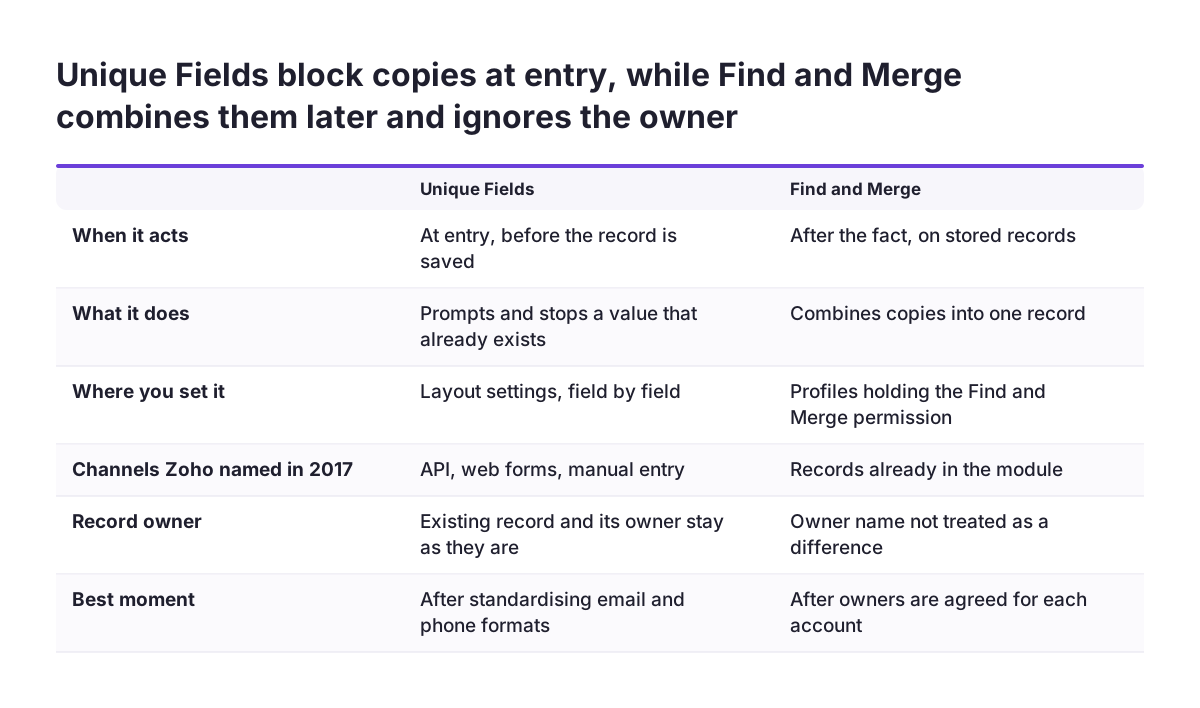
Zoho CRM gives you two tools against duplicates: Unique Fields, which block a copy at entry, and de-duplication, which merges copies after the fact. Zoho announced both in a 2017 Zoho blog post on duplicate data. Some limits described there may have changed since, so check your own account before relying on them.
Unique Fields block duplicates at entry
You mark a field as unique through the layout settings, for example the email or phone field. When someone tries to create a record with a value that already exists in that field, Zoho CRM shows a prompt and does not allow the action. At the time of the post, this block applied to entries through the API, web forms and manual entry. Imports and contact sync were not yet covered.
De-duplication merges copies that already exist
The de-duplicate option works in the Leads, Contacts, Vendors and Accounts modules. You choose fields, and a background process merges records whose values in those fields are completely identical. Where duplicates hold conflicting values, you pick the records to merge by hand.
Zoho also stated three limits in 2017. De-duplication ran on leads and contacts separately, not across modules. Combinations of fields were not possible. Custom modules were not yet included.
If you also use Zia to enrich records, read our guide to Zia data enrichment and duplicates in Zoho CRM. It covers what to configure first.
The record owner in Zoho CRM decides what happens when duplicates merge
The record owner does not protect a record from being merged in Zoho CRM. Zoho stated that it does not treat the owner name as a differentiating factor when all other field values are the same. Two identical records owned by two different reps can therefore collapse into one, and one rep loses a record they thought was theirs.
That behaviour is why ownership has to be settled before any merge runs. Decide which rep keeps the account, tell the other one, then merge. If you merge first and argue later, the losing rep often recreates the record, and you are back where you started.
Zoho CRM also limits who can merge. According to Zoho, only profiles with the "Find and Merge" permission can run de-duplication. Give that permission to one or two people who act as data stewards, not to the whole sales team.
Two points from the LinkedIn discussion on ongoing CRM checks support this. First, you need evidence before you change a record, and you need to know you are authorised to change it. Second, a quick change can create another data problem.
The cost of skipping this step is practical, not abstract. Messy data leads to duplicate emails, wrongly assigned leads, inaccurate reports and missed follow-ups.
Worked example: a Zoho CRM lead assignment rule that sets the owner at entry
A lead assignment rule gives every new lead an owner the moment it arrives, so no lead sits unowned waiting to be re-entered. Zoho's help centre shows a use case that assigns leads from a particular source to selected reps. It applies to the Professional edition and above.
In Zoho's example, a travel company sends every cold-call lead to one rep, Martha Hills. The steps are:
- Go to Setup > Automation > Assignment Rules.
- Choose the module Leads and click Create New Lead Assignment Rule.
- Under Criteria, enter the condition: Lead Source is Cold Call.
- Under Ownership, choose the user: Martha Hills.
- Under Follow up Task, select the option to add a follow-up task to the record owner.
- Click +Create Rule Entry to add further entries for other lead sources under the same rule.
You can reuse an existing task in another rule entry. Zoho's example reuses a task called "Send Travel Preferences Survey".
Three settings matter for ownership. Ownership can go to specific users or follow a round-robin pattern. You can leave the criteria empty, which makes a catch-all entry so no lead escapes without an owner. Assignment Threshold sets an upper limit on the number of records each user receives, which stops one rep from drowning in leads.
Rules that keep Zoho CRM clean after migration, and who enforces each
Clean data after a migration depends on a small set of rules, each with a named person who enforces it. A rule without an enforcer decays within weeks. The table below is a checklist you can adapt. The "where it lives" column uses the Zoho CRM features described in this guide.
| Rule | What it prevents | Where it lives | Who enforces it |
|---|---|---|---|
| Every new lead gets an owner on creation | Unowned leads that someone re-enters later | Lead assignment rule with a catch-all entry | CRM administrator |
| Email and phone are unique | A second copy created by hand, web form or API | Unique Fields in the layout settings | CRM administrator |
| Only data stewards merge records | Merges that drop the wrong owner's history | "Find and Merge" permission on selected profiles | CRM administrator |
| Ownership is agreed before any merge | Reps recreating records they lost in a merge | Team process | Sales manager |
| Leavers' records are reassigned | Orphaned accounts that nobody updates | Offboarding checklist | Sales manager |
| Key fields have a named owner | Fields that everyone edits and nobody checks | Data dictionary | Data steward |
The last row follows CX Today's advice to set ownership for "golden fields", the few fields your decisions depend on. Plauti describes the same groundwork as a data dictionary, documented naming conventions and field-level formatting rules. Keep the dictionary short. Every extra field creates a responsibility to maintain it, secure it and decide who can access it.
Imports and integrations: where record ownership breaks most often
Imports and integrations bypass the habits of your sales team, so they are where ownership breaks most often. Zoho's 2017 post said the Unique Fields block did not yet cover imports or contact sync. Treat every bulk load as a moment when duplicates can enter, and check ownership in the file before you upload it.
Zoho Desk's import documentation shows how much the owner and the match field matter. The Zoho Desk import guide sets these rules:
- The Ticket Owner must be the agent's email address or Agent ID, not the agent's name.
- When an update finds several matching records, the system updates the first one it returns.
- Accounts go in first, then Contacts, then Tickets, then other dependent modules.
- You can revert an import only within two weeks, and updated records cannot be reverted.
The second rule is the dangerous one. With duplicates in place, an update can land on the wrong copy, and you cannot undo it.
Integrations cause slower damage, which CX Today calls integration drift. An ERP or web shop that creates contacts in Zoho CRM needs its own ownership rule, the same as a web form. Our pages on the SAP Business One and Zoho CRM integration and on migrating to Zoho CRM without losing sales history cover the planning side.
Ongoing checks: a routine for owners and duplicates in Zoho CRM
CRM data quality is not a one-time cleanup, so plan a recurring check. Edward Serwanja's LinkedIn post describes the cycle as check, verify, correct and monitor. It lists what to look for:
- duplicate contacts
- missing information
- incorrect owners
- outdated deal stages
- records with no next step
Incorrect owners appear on that list for a reason. A wrong owner is the early warning for the next duplicate, because the rep who actually works the customer cannot find it under their name.
Add measures that show drift before it becomes visible in reports. CX Today suggests tracking bounce rates, invalid domains and fields left as "unknown".
Separate two kinds of check, as Plauti does. Validation confirms that an entry has the right format, such as a valid email pattern. Verification confirms that the entry corresponds to something real. A correctly formatted email can still bounce.
The routine matters more once you add AI. CX Today's customer data management guide is blunt: AI will not fix bad data, it will scale it. Plauti adds that duplicates confuse a model trained on the data, because redundant history skews its predictions. If you plan AI for lead management, settle ownership and duplicates first.
What this means for a company selling across EU member states
A company selling in several EU member states faces a higher risk of duplicates, because separate country teams often meet the same customer. CX Today calls this identity fragmentation: one company or buyer split into several records. It gets worse when each team formats names, phone numbers and addresses its own way.
Agree one rule for who owns a cross-border account. The simplest version names a single account owner and lets other country teams work on it through their own contacts and deals. Whatever you choose, write it down, because the merge behaviour described above will not respect informal agreements.
Standardise the fields that identify a company before you mark them unique. Phone numbers need one format across all countries, or the same number stored two ways slips past the block. Where a national register exists, validate against it. In Romania, for example, you can check company tax codes with our ANAF validation for Zoho CRM. Other member states have their own registers and rules, so do not assume one country's setup fits all.
Consent and preference fields need the same care. CX Today lists consent fields that lag behind reality among the places where CRM accuracy collapses. With two copies of one contact, one copy can hold a consent status that the other lacks. CX Today frames CRM trends for 2026 around trusted customer data plus privacy-first governance.
Next steps for fixing ownership and duplicates in Zoho CRM
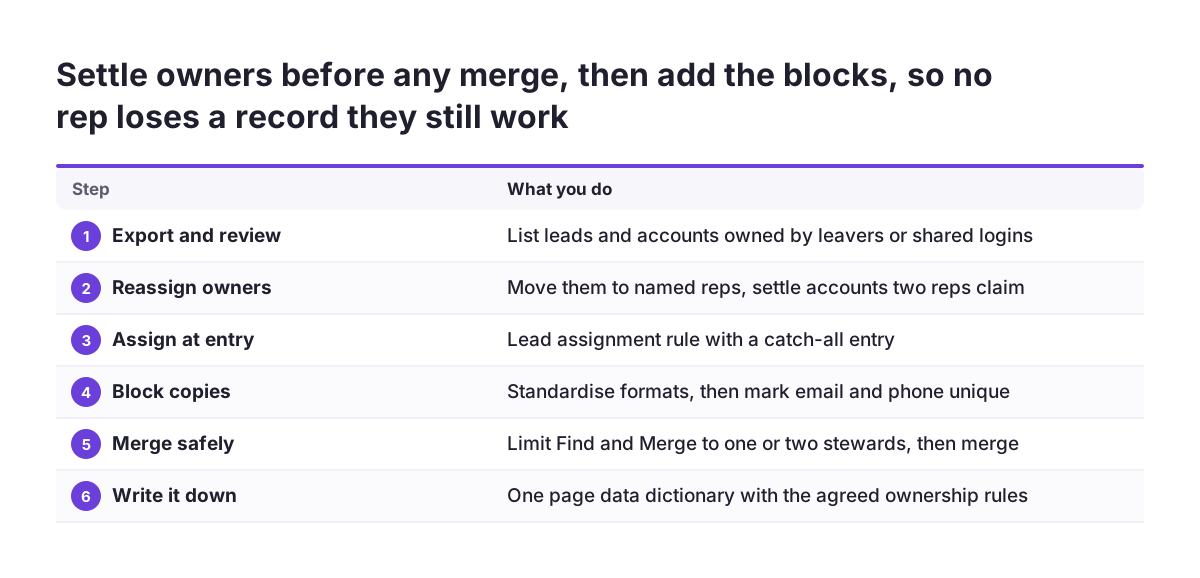
Start with ownership, then add the technical blocks, then set the routine. Working in that order stops you from merging records before anyone has agreed who keeps them. These steps fit into a normal working month:
- Export your leads and accounts and list records owned by leavers or shared logins.
- Reassign those records to named reps, and agree ownership for any account two reps both claim.
- Create a lead assignment rule with a catch-all entry, as in the worked example above.
- Mark email and phone as unique in the layout settings, after standardising their formats.
- Restrict the "Find and Merge" permission to one or two data stewards, then run de-duplication.
- Write a one-page data dictionary naming the owner of each key field.
- Schedule a monthly check of owners, duplicates, bounce rates and "unknown" fields.
If your Zoho CRM is new or about to be rebuilt, put these rules into the design rather than adding them later. Our Zoho CRM implementation page explains how we set up ownership, assignment and data rules for companies across Europe.
Sources
- Zoho CRM help: Automatically assign leads from a particular source to selected reps
- Zoho Blog: Hop, skip, and jump over the pitfalls of duplicate data
- Zoho Desk help: Importing Data in Zoho Desk
- CX Today: CRM Data Decay, why your records get less accurate daily
- Plauti: CRM Data Purity, dedupe, validate, enrich, standardize
- Edward Serwanja on LinkedIn: Maintaining CRM data quality requires ongoing checks