The choice in plain terms
AI inside your Zoho: Zia, Claude or both is a practical decision for any company already running Zoho CRM, Zoho Desk or Zoho Mail. Zia is the assistant Zoho builds into its own applications. Claude is a large language model from Anthropic, and Zoho now lets you switch it on as an alternative model inside some of its apps. This guide explains what each one does, how they connect to your data and when the second one justifies the effort.
The short version is this. Zia handles in-app summaries, suggestions and writing help well enough for many teams, and it comes with the applications. A Claude layer earns its place when the work is mostly language, for example reading long and untidy requests, deciding where they belong and writing the first reply.
For a sales or service manager, the useful question is not which model is smarter. The useful question is which tasks stay inside one Zoho screen and which ones cross channels, systems and languages. The first group usually suits Zia. The second group usually needs something built around it.
What Zia is and how Zoho positions it
Zoho describes Zia as its AI assistant, "equipped with a range of skills to help you in all areas of your business." On its Zia product page, Zoho splits it into three parts. Each part is a different way of putting AI to work.
- Zia Skills: AI features spread through the Zoho applications, such as summaries in a CRM record or writing suggestions in Mail.
- Zia Agents: purpose-built AI agents that support a specific business process.
- Zia Chat: a conversational interface that, in Zoho's words, "understands context, answers, and acts for you."
Zoho's main argument for Zia is ownership. It states that it owns every layer of its technology stack, from data centre infrastructure to the application layer. It calls the result "private AI": AI that trains and runs on your data without exposing it to external vendors' models. Zoho also points to a decade-long commitment to AI development.
Zia is still changing. Zoho has announced native agents in Zoho CRM that let administrators configure settings in natural language. It also invites businesses to submit their own AI use cases and says it will build solutions for scenarios that apply to key industries. Check the current state in your own account before you plan around a specific feature.
What Zia does natively in CRM, Desk and Mail
Zoho CRM
According to Zoho's CRM help page on Models, Zia offers several summaries on a record:
- A Record Summary that brings the essentials into one view.
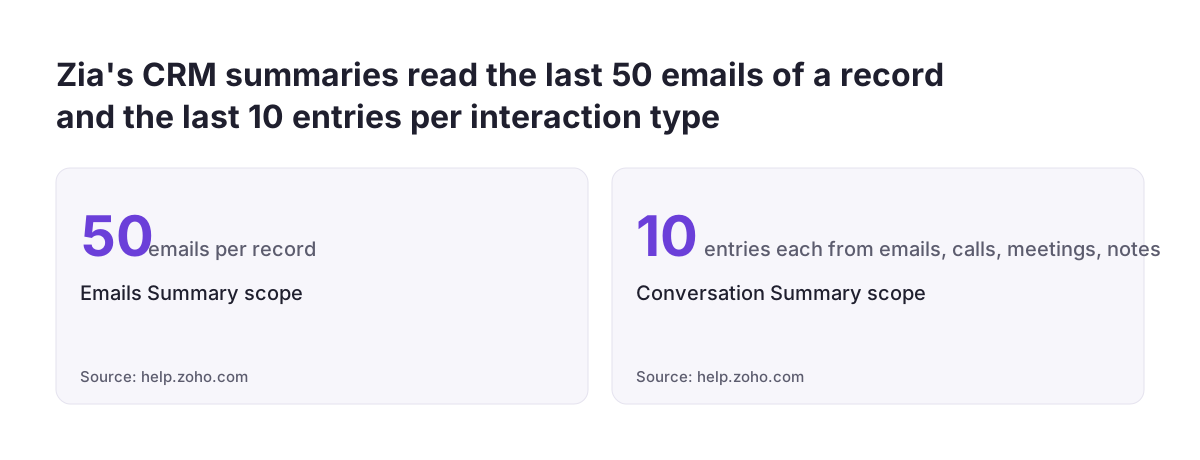
- A Conversation Summary built from the last 10 emails, calls, meetings and notes.
- An Emails Summary covering the last 50 emails of a record, including threads.
- A Note Summary, available as an overall summary or a summary of the latest note.
A Template Assistant helps write subject lines and email templates to a chosen tone, style or length.
Zoho Desk
In Zoho Desk, Zia is the support assistant for agents. One customer's feature request on the Zoho community states that Zia there "only supports the English language" and asks for multilingual support and regular model upgrades. This is a user's statement, not a Zoho specification, so test it in your own languages. The same page notes that Zoho Desk has partnered with Microsoft's M365 for customer service teams.
Zoho Mail
The Zia for Mail help page lists writing new emails from your prompt, summarising the inbox and suggesting text as you type. You can set the tone to Formal, Informal, Friendly or Persuasive. A summary can become a task description or a note.
Zoho Books
If you run Zoho Books for accounting, it shares the same platform. The help pages used for this guide do not document Zia features for Books, so confirm what your edition offers before you plan around it.
Where Claude fits: two different routes
Claude can reach your Zoho data in two ways. They differ in who controls the workflow and how much you need to build.
Route 1: Claude as the model behind Zia
In Zoho CRM, the Models feature lets you choose the language model behind Zia's generative features. The options are Zia (Zoho's native model), ChatGPT, Gemini, Anthropic, Cohere, Deepseek and SiliconFlow. Zoho Mail offers a similar approach called Bring Your Own Key (BYOK): you give Zoho your own API key from a provider such as GPT, Gemini, Claude or Cohere.
On this route, Zoho still controls the screen and the task. Claude writes the note or the email, but only where Zoho has placed the feature.
Route 2: Claude as a separate layer
On the second route, Claude works outside the Zoho screens and connects to Zoho to read and act. Zoho provides an MCP server for this. MCP stands for Model Context Protocol, a standard way for an AI assistant to call a system's actions within the permissions you grant. A custom integration built on Zoho's APIs does the same job with more control.
This route suits work that starts outside Zoho. A request in a chat tool, a long email in another language or a form from a supplier can all be read, classified and written into the right Zoho record. It takes design, testing and ownership, so it only makes sense when the volume of language work justifies it.
| Zia native | Claude via Models or BYOK | Claude as a separate layer | |
|---|---|---|---|
| Who sets the task | Zoho, inside its own apps | Zoho, wherever it places the feature | Your team, per workflow |
| Where text is processed | Within Zoho's own stack | Sent to Anthropic under your API key | Sent to Anthropic through your integration |
| What you set up | Settings only | An API key and admin settings | An integration with Zoho Desk or CRM |
| Cost lines | Existing Zoho subscription | Subscription plus provider API usage | Subscription, API usage and build effort |
| Best fit | Summaries and writing help in apps | Comparing drafts on one Zoho task | High volume language work across systems |
Worked example: switching on Claude in Zoho CRM
Here is the Route 1 setup, using the settings on Zoho's help page. The example company is a sales team that wants to compare Claude's email drafts with Zia's before it commits.
- Check the edition. Models is supported in the Professional, Enterprise and Ultimate editions of Zoho CRM.
- Check who does it. Only administrators can enable or disable Models for an organisation.
- Get a key. Connecting an external model requires an alphanumeric API key, which you create in your own account with the provider.
- Enable the model. Go to
Setup > Zia > Models. On the Model Configuration page, switch on the toggle for Anthropic and enter the key. Keep Zia enabled as well. - Use it. For external models such as Anthropic, Models is available in the note editor and the email composer. The Record Assistant button at the top of a record appears only when the Zia model is enabled.
- Compare. With both models active, a dropdown inside the Record Assistant lets you switch between active models and compare their responses.
Two limits matter in daily use. In the email composer, Models processes only the text in the composer window, not the full email thread. Recipient details and attachments are never sent to the model.
Run the comparison for two weeks on real follow-up emails. If Claude's drafts need noticeably less editing in your languages, keep it. If not, you have lost nothing but the test.
| Step | What happens | Who |
|---|---|---|
| 1. Check the edition | Professional, Enterprise or Ultimate edition of Zoho CRM | Administrator |
| 2. Get a key | Create an alphanumeric API key in your Anthropic account | Administrator |
| 3. Enable the model | Setup > Zia > Models, switch on Anthropic and enter the key | Administrator |
| 4. Record your data decision | Decide on opting out of model improvement and file it | Administrator |
| 5. Compare drafts | Keep Zia on and compare email drafts side by side for two weeks | Sales team |
When the work is language-heavy: routing service requests into Zoho Desk
Route 1 helps one person write one email faster. It does not decide what happens to a request that arrives as free text in a chat window. Service desks spend a large part of their day on exactly that: working out what the requester wants, which team owns it and what the ticket should say.
This is where a separate Claude layer pays for itself in customer support. The model reads the request, asks a follow-up question if something is missing, classifies it and creates a clean ticket in Zoho Desk for the right team. The key measure is first-time-right routing: the share of tickets that reach the correct team on the first attempt, without being passed on.
For Asset Services Group (Message Direct), we built an IT service desk on Claude inside Microsoft Teams that fronts Zoho Desk. Their Head of Technology reports 99.7% first-time-right routing and a 40% efficiency gain in the published case study. Zia still has a role behind the scenes, but the reading and routing happen in the Claude layer.
The helpdesk behind the layer still matters, because routing is only as good as the teams, categories and rules it writes into. If you have not settled on a helpdesk yet, our comparison of Zoho Desk and Freshdesk covers that decision first.
Zia, Claude or both: a decision table
Use this table to sort your own tasks. The columns follow the two routes above, with native Zia first.
| Task | Zia native | Claude via Models or BYOK | Claude as a separate layer |
|---|---|---|---|
| Summarising a CRM record's history | Enough: Record, Conversation, Emails and Note summaries | Optional, for comparing quality | Not needed |
| Drafting a follow-up email in CRM or Mail | Enough for many teams | Worth testing if drafts need heavy editing | Not needed |
| Adjusting the tone of a draft | Enough: four tone settings in Mail | Optional | Not needed |
| Reading and routing requests from a chat tool into Zoho Desk | Limited to what Zoho has placed in Desk | Not designed for this | The right fit |
| Work that crosses Zoho and other systems | Limited | Limited | The right fit |
| Fields with health information | Check per feature | Not available: Models excludes these fields | Needs its own data review |
Most companies end up with both. Zia stays the default inside the apps because it needs no extra setup. Claude is added where a clear, repeated language task exists, and each addition has its own measure of success, such as routing accuracy or editing time saved.
What each option costs
Zoho states that it offers AI "as an inherent part" of its software rather than through "pricy AI licenses or per-use fees." For native Zia, the cost is mostly your existing subscription and the edition you are on. The CRM Models feature, for instance, requires Professional, Enterprise or Ultimate.
Usage is not unlimited everywhere. The Zia for Mail help page states that the number of generations, summaries and suggestions is limited by the plan limit you have subscribed to in AI Models. A team that writes heavily with Zia should check that limit before rolling it out to everyone.
Claude through Models or BYOK adds a second cost line. The API key comes from your own account with the provider, so that provider's terms and charges apply, not Zoho's. Check current prices on the provider's own pricing page before you budget, and set a spending cap on the key.
A separate Claude layer costs the most up front. You pay for design, build and testing, then for model usage and someone to maintain the prompts, routing rules and Zoho connection. The case for it is a measurable saving in staff time on a high-volume task, which is why routing service requests is a common first candidate.
Where your data flows
With native Zia, Zoho's position is that your data stays within its own stack and is not exposed to external vendors' models. For many companies this is the main reason to start with Zia and add nothing else.
Once you enable an external model, the text you send goes to that provider. Zoho's CRM help page says of Anthropic's Claude that "it may retain and use user interactions for model improvement unless opted out." Check the provider's current terms and record your opt-out decision as part of your data security file.
Zoho does limit what reaches external models in CRM:
- No model processes PHI-encrypted fields, and Models is not available for fields containing health-related information.
- Recipient details (to, cc, bcc) and attachments are not processed by any model.
- In the email composer, only the composer text is processed, not the whole thread.
- Only administrators can enable or disable Models, so the decision sits with a named role.
A separate Claude layer has its own data path, which you design. Decide which Zoho modules it may read, which records it may create or change and where its logs are kept. Write those decisions down before the build, not after.
What this means for a company in the EU
Hosting location sets the first boundary. Zoho's help page states that OpenAI, Google, Anthropic and Cohere models are available in all data centres except CN, and that Deepseek and SiliconFlow are available only in the CN data centre. A Zoho account hosted in the EU can therefore enable Claude through Models, but not the last two options.
Mail depends on region too. Where Zia for Mail is available, administrators can offer several providers, including Claude. Where it is not, users can use OpenAI only, and only if an administrator has configured the ZiaExtension with an OpenAI API key.
Language is the second point. Teams across the EU write in many languages, and the community report of English-only Zia in Desk is exactly the kind of limit to test before rollout. Run your comparison in every language your customers actually use.
The third point is compliance. Under GDPR, you need to know which provider sees which personal data and for what purpose. Add each external model to your records and note the retention and opt-out position.
The EU AI Act applies as well and was amended in July 2026, so check with your advisers what it asks of the way you use AI. Check national requirements with them too, because member states can add their own rules.
Practical next steps
- List your language tasks. Write down the five tasks where staff spend the most time reading or writing text in Zoho, and estimate the weekly volume of each.
- Start with Zia. Turn on the CRM summaries and Mail writing help for one team, and note where the output needs heavy editing or fails in your languages.
- Test Claude on one task. Have an administrator enable Anthropic under
Setup > Zia > Models, record the opt-out decision and compare drafts for two weeks. - Scope a layer only where volume justifies it. If one task, such as routing incoming requests into Zoho Desk, is both high-volume and language-heavy, define the success measure before anything is built.
- Measure before and after. Track routing accuracy or editing time in a report, for example in Zoho Analytics, so the decision to keep or drop the layer rests on your own figures.
If routing service requests is your first candidate, settle the helpdesk structure first. Our Zoho Desk and Freshdesk comparison is the right starting point before you add any AI on top.