What GDPR inside your CRM actually means
GDPR inside your CRM means that the evidence your company needs under the General Data Protection Regulation sits on each customer record. It does not live in a separate spreadsheet that drifts out of date. For every person in the system you can see why you hold their data, where it came from, whether they consented and what they have asked you to do with it. This guide shows how to set that up in Zoho CRM, using the settings Zoho documents in its own help centre.
The GDPR is Regulation (EU) 2016/679. It was adopted on 27 April 2016, published in Official Journal L 119 on 4 May 2016, and repealed Directive 95/46/EC. It also applies to companies outside the Union when they offer goods or services to people in the EU, whether or not a payment is involved, or when they monitor the behaviour of people in the EU.
Pseudonymised data still counts as personal data if additional information could link it back to someone, while anonymous information falls outside the data protection principles altogether.
One caveat before you start. Zoho states that its GDPR help content is not to be construed as legal advice, and the same applies here. The CRM holds your evidence, but the decisions behind it, such as which lawful basis applies, remain yours.
Who is responsible: controller and processor
The GDPR splits responsibility between two roles. According to the European Data Protection Board's guide for small businesses, a data controller determines the purposes and means of processing personal data, meaning the how and why. A data processor processes personal data on behalf of the controller and only on its instructions.
When you run your sales and service records in Zoho CRM, your company is the controller. Zoho states that Zoho CRM is equipped to comply with the GDPR as a data processor. That split matters, because the controller is liable both for its own compliance and for the compliance of the processor it chose. If the processor breaches its obligations, the controller could be held responsible and fined.
The controller and processor relationship must be governed by a contract that documents the processing operations and means. That contract has to state, among other things, that the processor:
- processes personal data only on your instructions, including for transfers outside the EEA;
- does not engage another processor without your prior specific or general written authorisation;
- deletes or returns all personal data at the end of the service, at your choice.
In practice, keep the data processing agreement for Zoho on file, and do the same for every integration that reads or writes CRM data. A sub-processor contract must give the same protection as the original contract, so each tool in the chain needs one.
Step one: switch on GDPR compliance in Zoho CRM
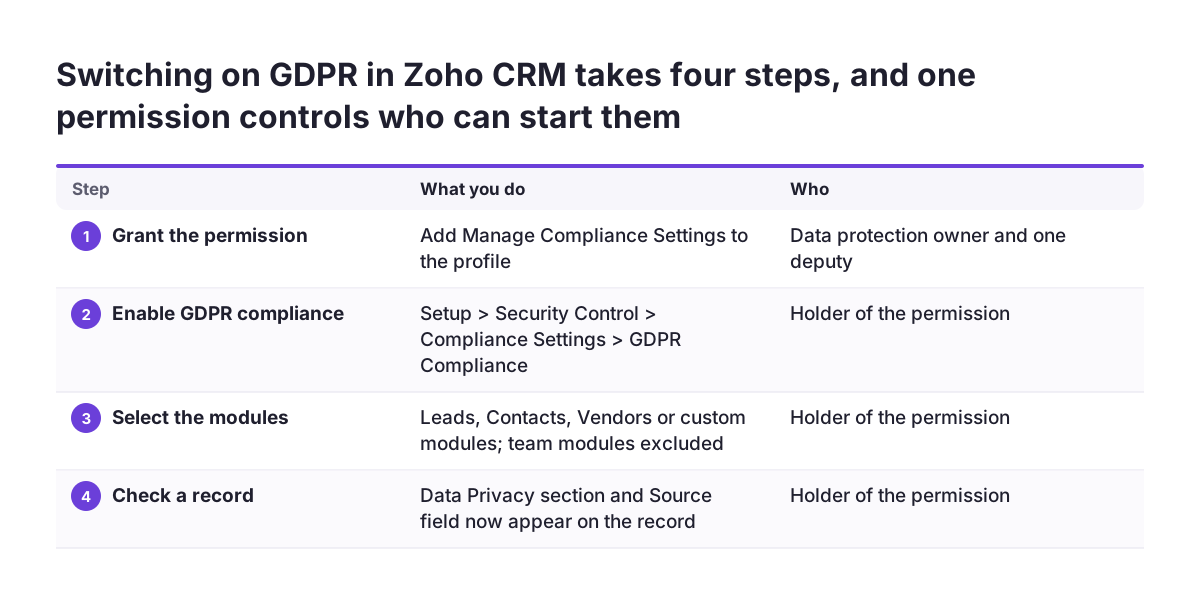
The GDPR features are off until someone switches them on, and only users whose profile includes the Manage Compliance Settings permission can do it. Give that permission to the person who owns data protection in your company and one deputy, not to every administrator.
According to Zoho's GDPR introduction, the steps are:
- Go to
Setup > Security Control > Compliance Settings > GDPR Complianceand enable it. - Select the modules that need GDPR compliance. Zoho supports Leads, Contacts, Vendors and custom modules. Team modules cannot be selected.
- Open a record in one of those modules and check that a new Data Privacy section appears next to Info and Timeline, together with a Source field.
Once enabled, the Compliance Settings Overview dashboard shows three things: how many records still have the lawful basis Not Applicable, how many have been updated with a lawful basis, and a chart of consent status split into Pending, Waiting and Obtained. Use that dashboard as your progress measure for the rest of this setup.
Note one detail from Zoho's help pages: any user with permission to view a record can view and edit its Data Processing Basis section. Your existing record sharing rules therefore decide who can change a lawful basis, so review them before you roll this out.
Step two: record a lawful basis on every record
A lawful basis is the legal ground on which you process someone's data. The GDPR sets out six, and Zoho's lawful bases page stresses that no one basis is better than the others. The right one depends on why you hold the data.
| Lawful basis | When it fits | Typical CRM case |
|---|---|---|
| Consent | The person took a deliberate action to opt in | Newsletter subscribers |
| Contract | You supply goods or services the person requested | Active customers with an order |
| Legitimate interests | A genuine business reason, where the processing is necessary for it and the person's interests and rights do not outweigh it | Follow-up on an enquiry the person sent |
| Legal obligation | A law requires you to process the data | Records you must keep by law |
| Vital interests | Protecting someone's life or an emergency | Rare in a sales CRM |
| Public task | A task in the public interest or official authority | Mostly public bodies |
When you enable GDPR, every existing record in the selected modules starts with the Data Processing Basis set to Not Applicable. You can change it in three ways: on a single record by choosing from the drop-down and entering remarks, in bulk from a list view, or automatically with a workflow rule for records that meet set criteria.
Every change to this section is logged chronologically in the record's history. Use the remarks field to write why you chose the basis, because that note is what you will show if anyone asks later.
Step three: capture consent that holds up
The GDPR is explicit that silence, pre-ticked boxes or inactivity do not constitute consent. Where you rely on consent, you must be able to demonstrate that the person gave it, and consent is presumed not freely given if you make a contract or service depend on consent it does not need.
Zoho CRM handles this with a consent form. You customise it at Setup > Security Control > Compliance Settings > Consent Form and include a link to it in an email template or in an individual email. When the recipient submits the form, the consent details update automatically on the record, and the status moves through Pending, Waiting and Obtained on the dashboard.
Zoho's help page states the principle plainly: the controller must keep a proper consent management system in place. The consent form is that system for records already in the CRM, as long as you send it deliberately and do not treat an unanswered email as agreement.
Online shops need particular care, because checkout, account creation and marketing opt-ins are easy to bundle. The EDPB consulted on Recommendations 2/2025 on the legal basis for requiring user accounts on e-commerce websites, which shows the question is live. If you sell online, our page on Zoho CRM for e-commerce covers how shop data reaches the CRM, which is where the consent flags need to arrive intact.
Step four: know where each record came from
Accountability starts with provenance. According to Zoho's Data Privacy page, personal data can enter Zoho CRM through web forms, imports, APIs and third-party integrations. The Data Privacy section on each record holds three parts: Data Source, Personal Fields and Data Processing Bases.
Data Source
Data Source shows how a record was created and when it was last updated. For a web form it tracks the website, the IP address and the form name. For records migrated from an old system it tracks the file name, the account ID and the IP address. If you are moving from another CRM, plan this before the import, as our guide on how to migrate to Zoho CRM explains, because a clean source trail is much harder to rebuild afterwards.
Personal Fields
The Personal Fields part lists how many fields on the record are marked Sensitive and how many are marked Normal. Mark fields honestly: anything that reveals health, beliefs or similar categories belongs in Sensitive, and so does anything you would not want every user to read. Healthcare providers carry the heaviest load here, and our page on Zoho CRM for healthcare covers patient records specifically.
Name your web forms clearly, since the form name is what appears in the source trail. A form called "Form 3" tells an auditor nothing.
A worked example: one web enquiry, start to finish
Take a fictional machinery distributor with offices in two EU countries. A buyer named Anna Weber fills in a web form called "Quote request" on the company website and ticks an unticked box asking for the monthly newsletter. Here is how the record should look in Zoho CRM after setup.
- Record created. A new Lead appears in the Leads module. Its Data Source shows the website, the IP address and the form name "Quote request".
- Lawful basis set automatically. A workflow rule fires for leads from that form and sets the Data Processing Basis to Legitimate Interests, with the remark "Replying to a quote request she sent". The change is logged in the record history.
- Consent confirmed. Because Anna also asked for the newsletter, a workflow sends an email template that contains the consent form link. When she submits it, her consent details update automatically and the status shows Obtained.
- Deal won. Anna's company places an order and she becomes a Contact. Her basis stays Legitimate Interests, because the contract is with her company, not with her, and the team updates the remark to "Contact person for an active customer".
- Request received. Months later Anna logs into the customer portal, withdraws her newsletter consent and raises a request about her data. The team handles it on the record, not in an inbox.
At no point does anyone open a spreadsheet. The dashboard counts move by themselves, and the history on the record is the audit trail.
Step five: data subject requests, retention and breaches
The GDPR sets out data subject rights in Articles 12 to 23. Zoho CRM lets data subjects raise requests for their data rights through Portals. Where the lawful basis is Consent, portal users can see the Data Privacy section and update their own consent details, which removes a manual step for your team.
Retention is the part most companies leave undefined. Write a retention period for each lawful basis, for example how long a lead with no activity stays in the system, then build list views that surface records past that period so someone reviews them on a fixed schedule.
When something goes wrong
Decide in advance who assesses a personal data breach and who reports it to your supervisory authority, so nobody works it out under pressure. The EDPB consulted on a template for personal data breach notification from 10 June to 5 August 2026, so check its guidelines page for the final version.
Where the data lives: transfers outside the EEA
A CRM rarely works alone. Email tools, SMS gateways and analytics services may move personal data out of the European Economic Area. Under the GDPR, such transfers are allowed only under the conditions in Chapter V, and the EDPB's guide to international transfers sets out three cumulative criteria for deciding whether a transfer is taking place at all.
The simplest route is an adequacy decision, a Commission decision confirming that a country's data protection is essentially equivalent to the EEA's. The Commission's adequacy decisions include Japan, Switzerland, the United Kingdom and the United States for commercial organisations participating in the EU-US Data Privacy Framework. For a US vendor, check that it actually participates in that framework.
Without adequacy, the usual tool is the standard contractual clauses, standardised contracts the Commission adopted on 4 June 2021. They require a transfer impact assessment documenting the circumstances of the transfer, the laws of the destination country and the extra safeguards in place. The Schrems II judgment of 2020 stressed that supplementary measures may be needed.
The EDPB also makes you, as the exporter, responsible for monitoring whether the adequacy decisions you rely on stay in force. Put a yearly review of every integration on the calendar.
The setup mistakes we see most often
Most GDPR problems in a CRM are not missing features but half-finished configuration. At Svennis, the mistake we see most often at EU clients is GDPR compliance switched on and then left alone, so existing records still read Not Applicable months later. We now treat the bulk lawful basis update and the workflow rule for new records as one change, never as a later task.
| Mistake | Why it matters | Fix in Zoho CRM |
|---|---|---|
| Records left on Not Applicable | No documented reason to hold the data | Bulk update from list views, workflow rule for new records |
| Consent assumed from an unanswered email | Silence is not consent | Send the consent form and wait for status Obtained |
| Pre-ticked newsletter box on web forms | Pre-ticked boxes are not consent | Unticked checkbox mapped to the consent workflow |
| Imports with no source trail | You cannot show where data came from | Import through Zoho so Data Source records file and account |
| Wide record visibility | Anyone who views a record can edit its basis | Review profiles and sharing before go-live |
| Team modules assumed covered | Team modules cannot be selected for GDPR | Keep personal data in Leads, Contacts, Vendors or custom modules |
| No processor contracts for integrations | You are liable for your processors | Collect a data processing agreement per connected tool |
Work through the table in order. The first two rows usually take the most time and remove the most risk.
Practical next steps
You can complete the core setup in a working week if you keep the order below. Each step produces something you can show later, which is the point of keeping GDPR inside your CRM.
- Assign the Manage Compliance Settings permission to your data protection owner and one deputy.
- Enable GDPR compliance for Leads, Contacts, Vendors and any custom modules that hold personal data.
- Write a short policy mapping each record type to one of the six lawful bases, with a retention period for each.
- Bulk update existing records from list views and add workflow rules for new ones, with remarks.
- Customise the consent form and send it only to records where consent is the basis.
- Rename web forms clearly and mark personal fields as Sensitive or Normal.
- List every integration, confirm a processor contract and a transfer tool for each, and diary a yearly review.
- Write down your breach process, including who reports to your supervisory authority and how to reach it.
If your CRM is still being designed or needs restructuring before this will work, our Zoho CRM implementation page describes how we set up modules, permissions and workflows for European companies, which is the foundation these GDPR settings rely on.