
Performance reviews in Zoho People depend on clean employee records
Performance reviews and employee data in Zoho People belong together: an appraisal cycle is only as reliable as the employee records it reads. Before you start the first cycle, correct reporting lines, dates of joining, roles and field permissions. Then enable only the performance methods you will actually use.
The Performance Service in Zoho People is a set of tools to measure and evaluate employee performance. It covers self reviews, appraisals, continuous reviews and multi-rater reviews. Each of these reads data from the employee record. A wrong manager, a missing joining date or a duplicate profile then flows straight into ratings and salary decisions.
This post is part 3 of a three-part series on Zoho People for small and mid-sized employers. Part 1 covers setting up Zoho People for a growing company. Part 2 covers leave, attendance and time tracking. This part covers performance reviews, HR reports and employee data under the GDPR.
For an overview of what the product does, see our Zoho People page. The guide below stays hands-on.
Zoho People performance methods: KRA, goals, feedback, skills and summary
Zoho People assesses performance through performance methods, which are the ways an employee is evaluated. Zoho lists six primary methods: KRA, Goals, 360-degree feedback, Skill set, Competency and Summary. You switch them on under Settings > Performance > Configuration > Performance Methods.
Each method measures something different:
- KRA (Key Result Area) is an essential task an employee must perform to fulfil the job and meet organisational objectives.
- Goals should follow the SMART criteria, according to Zoho's help page: Specific, Measurable, Achievable, Realistic and Time-bound.
- Feedback supports peer-to-peer, reporting and 360-degree feedback.
- Skill sets are specific proficiencies, such as accounting or a programming language, grouped into domains and linked to employees.
- Competency is a blend of knowledge, skills, abilities and personal attributes, such as communication or people management.
- Summary is a questionnaire that helps managers understand their team members' performance.
Goals and KRAs work individually, side by side or linked, so goals can be aligned with KRAs and assessed against them. Skill sets and competencies can carry custom weightages, and a skill set matrix shows them across the team. If you also want objectives and key results, the OKR service is available on the Premium and Enterprise plans of Zoho People.
Employee record data that each review method reads
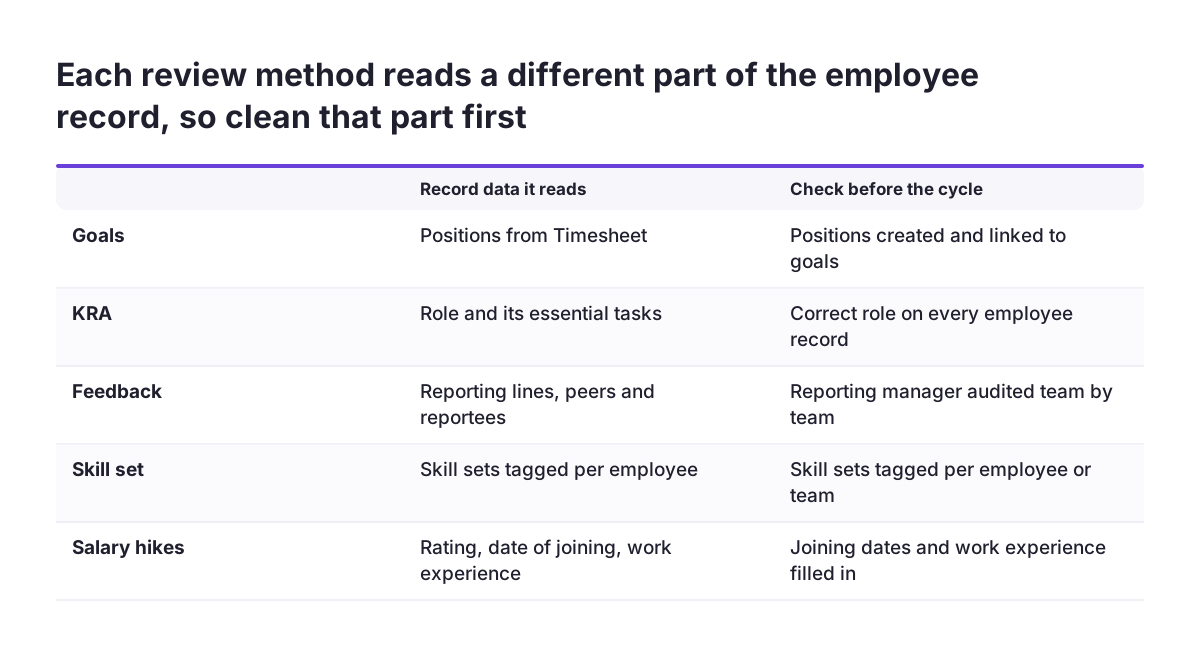
Every performance method in Zoho People leans on specific parts of the employee record. Knowing which part matters tells you what to clean before a review cycle starts.
Reporting lines come first. Managers see their team's and reportees' performance data, tag goals, competencies and skill sets, and handle approvals. A wrong reporting line therefore puts a review in front of the wrong manager and hides it from the right one.
Dates and experience come second. Zoho People lets you run salary hike cycles on their own or as part of an appraisal. Hike rules can be based on rating, date of joining, work experience and other criteria. A missing or wrong joining date gives a wrong hike result, even when the rating is fair.
Positions and skills come third. Goals can be associated with the positions created in Timesheet, and skill sets are linked to individual employees. If positions are missing or skill sets were never tagged, those methods have nothing to assess.
Roles and permissions come last. HR can set which fields each employee role may view or edit through self-service. Selected employees can also receive administrative access to Performance Service settings or data. Decide those roles before the cycle, not during it.
Worked example: a first quarterly appraisal cycle in Zoho People
Take a mid-sized distributor with a sales team and a warehouse team that wants quarterly reviews. Zoho People supports monthly, quarterly or half-yearly reviews, with employee self-appraisals and manager feedback. The company chooses quarterly, because monthly reviews would bury managers in forms.
Step 1: enable two methods only
In Settings > Performance > Configuration > Performance Methods, HR enables Goals and KRA and links them. Sales goals are associated with positions from Timesheet. The warehouse team gets KRAs such as order accuracy. Feedback is enabled with 360-degree feedback for team leads only.
Step 2: build the appraisal template
Administrators create appraisal templates in the Performance Service settings. Custom templates can include self-appraisal, multi-rater, normalisation and salary hikes. For the first quarter the distributor keeps self-appraisal and manager review, and leaves salary hikes out until the ratings have settled.
Step 3: check records, then start the cycle
HR corrects reporting lines and joining dates, tags KRAs and skill sets, and then starts the cycle from performance service operations. That is the central space for tagging KRAs, competencies and skill sets and for adding and starting appraisal cycles.
At Svennis we copy the finished configuration into a Zoho People sandbox and run a short trial cycle with two or three managers before the real one. That trial is where missing reportees and untagged KRAs show up, while nothing is yet at stake for employees.
Data problems that make appraisals unreliable, and how to fix them
Most unreliable appraisals in Zoho People trace back to a handful of record problems. The table below links each problem to what it breaks in a review cycle and to the fix that belongs before the cycle starts.
| Data problem | What it breaks | Fix before the cycle |
|---|---|---|
| Wrong reporting manager | The wrong person reviews and approves | Audit reporting lines team by team |
| Missing date of joining | Salary hike rules give wrong results | Fill joining dates and work experience |
| No positions in Timesheet | Goals cannot be tied to roles | Create positions, then link goals |
| Skill sets never tagged | Skill assessment and the matrix stay empty | Tag skill sets per employee or team |
| Too many methods enabled | Long forms, rushed and inconsistent ratings | Enable only the methods you will use |
| Loose field permissions | Employees edit data they should only view | Set view and edit rights per role |
One problem deserves special care: deleting performance data to "tidy up". In Zoho People, deleted performance records cannot be restored from the Recycle Bin. The next section explains the rules.
Deleting and correcting HR records: what the Zoho People Recycle Bin can restore
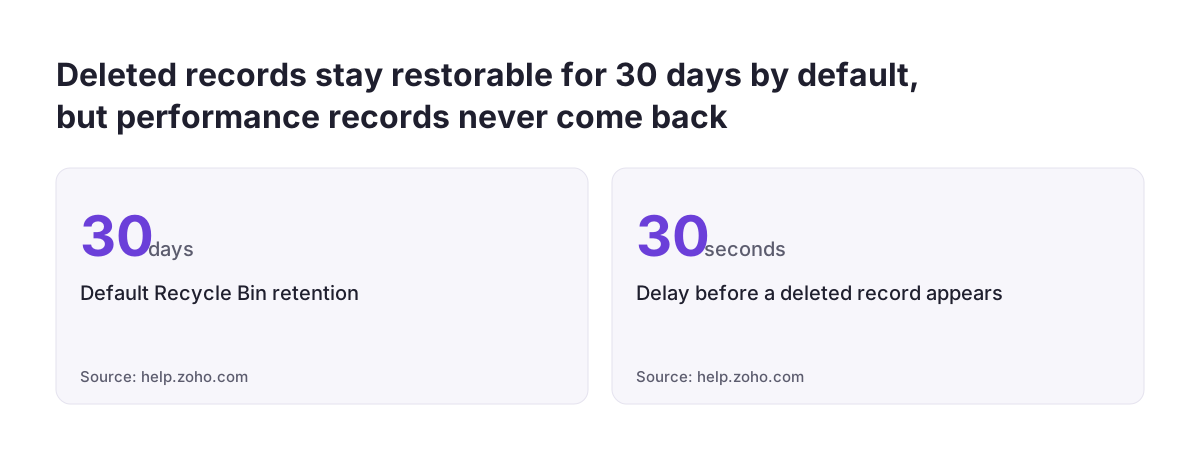
The Zoho People Recycle Bin keeps deleted records for 30 days by default, so administrators and HR staff can restore them. It sits under Operations > Data Administration > Recycle Bin. Deleted records appear there after about 30 seconds.
Not everything comes back. The help page lists what can be restored:
- all custom form records;
- employee records deleted from the Employee Form (System);
- records from certain old system forms, such as Travel Request, Travel Expense and Exit Details.
Records deleted in other core system forms, such as leave, attendance and performance forms, cannot be restored. Treat any deletion of review data as final. Correct a wrong rating instead of deleting it.
Two more details matter for employee data. Deleting an employee record automatically disables that person's user login. You can also set how many months deleted records stay before permanent removal, under Settings > Manage Accounts > Organization Setup > Organization Policy > Recycle bin preference. Retention in years and automatic employee data deletion are offered only for accounts associated exclusively with the Japan data centre. Data Administration also gives access to activity logs, from which similar data can be restored, and to data backups and sandboxes.
HR reports in Zoho People: organisation reports and the Zoho Analytics limit
Performance reports in Zoho People live under Reports, in the Organization Reports tab. That is where you read the results of an appraisal cycle inside the product.
Zoho Analytics is a different matter, and Zoho's own help page contradicts itself. Its opening says Analytics in Zoho People builds reports on HR data such as attendance, timesheets and employee performance. The same page later states that Analytics reports are not supported for the Performance service. Plan on the second statement: performance data does not reach Zoho Analytics reporting through this integration.
For the data that does sync, three rules apply:
- Attendance data syncs only after the configured pay period ends, and pay period configuration is mandatory for attendance reports.
- Employees who open a shared report see only records they have permission to view.
- The person who creates the first report becomes the analytics owner. If that person leaves or loses the analytics service, report data becomes inaccessible and sync stops.
Only the super administrator can transfer analytics ownership. The analytics owner's role, employee status and login status cannot be changed. Choose a stable owner, not a temporary HR assistant. The Report Scheduler can then email reports weekly or monthly at a set time.
GDPR features in Zoho People for employee and review data
The GDPR is the EU regulation on personal data, adopted on 27 April 2016 and applied from 25 May 2018. Personal data is any information relating to an identified or identifiable natural person. Ratings, feedback and salary hikes all fall under it.
Zoho's GDPR page for Zoho People lists these features:
- Access and rectification through self-service, with HR setting which fields each role can view or edit.
- Erasure of particular fields that HR or an admin selects when an employee asks.
- Restriction of processing, which the page names as a right under the GDPR.
- Portability, with password-protected exports.
- Audit logs that record the history of changes to employee data.
- Encryption of fields the admin chooses. Employee files and file upload fields are encrypted by default.
- IP and geo restrictions for location-based access control.
The page still says the GDPR "takes effect on 25 May 2018", so it predates that date. Its figure for fines stands: up to 20 million euros or 4% of annual turnover of the preceding financial year. Remember data minimisation: personal data must be limited to what is necessary for its purpose. A review form with ten open questions collects more than a form with three.
Zoho People inside Zoho One: sub-processors and the Zia assistant
When Zoho People runs inside Zoho One, the sub-processors of every product in the bundle apply. A sub-processor is a third-party data processor that Zoho engages and that has or may have access to service data. Your privacy review therefore covers each Zoho app you actually use, not only Zoho People. Our Zoho One review describes what the bundle contains.
Zoho publishes its sub-processor list per service and data centre. Admins can subscribe to notifications when sub-processors are added or changed. Some sub-processors are enabled by default with an option to turn them off. Others are off by default until the admin enables them.
AI deserves its own check. Zia is the AI assistant built into Zoho People, and Zoho says it "answers, acts, and analyzes". Zoho engages AI sub-processors whose services may process prompts, content or other inputs. If you plan to use AI in recruitment and HR, check the list for your data centre first. Zoho lets you disable a particular third-party service provider, except where it serves critical needs such as fraud prevention.
One account setting crosses the whole bundle. If you enable two-factor authentication by SMS, the SMS sub-processor of Zoho Accounts is used regardless of which Zoho services you use.
National employment data rules and works councils in EU countries
Employment data rules are not the same across the EU. Article 88 of the GDPR lets member states set more specific rules for processing employee data. Article 88(2) requires those rules to include suitable and specific measures to safeguard employees' human dignity, legitimate interests and fundamental rights. Each member state had to notify the Commission of such rules by 25 May 2018.
The Court of Justice tested this in Case C-34/21, judged on 30 March 2023. The case came from the Verwaltungsgericht Wiesbaden in Germany. It concerned live streaming of school classes by videoconference in the Land Hessen without teachers' consent. Pupils or their parents had to consent, but no provision was made for teachers. The Court held that a national rule failing Article 88(2) must be disregarded, unless it is a legal basis under Article 6(3) GDPR that meets the Regulation's requirements.
For your appraisal setup this means three things:
- Check the employment data rules of every country where you have staff, not only your head office.
- Consult a works council or employee representatives where national law requires it before you introduce new review methods.
- Consent is rarely a sound basis between employer and employee, because staff seldom feel free to refuse. If you do rely on it for a specific step, be able to demonstrate it. Silence, pre-ticked boxes or inactivity are not consent.
Article 30(5) GDPR exempts some organisations with fewer than 250 employees from keeping a record of processing, but not for processing that is regular. Running performance reviews is regular processing. The EU has proposed changing this rule, so check the current text. Until then, include your review processing in your record of processing activities.
Settings to decide before the first appraisal cycle in Zoho People
Before the first appraisal cycle, decide these settings in Zoho People and write the decisions down:
- Review frequency: monthly, quarterly or half-yearly.
- Performance methods to enable, and whether goals are linked to KRAs.
- Feedback types: peer-to-peer, reporting or 360-degree, and for whom.
- Appraisal template contents: self-appraisal, multi-rater, normalisation, salary hikes.
- Salary hike rules and the record fields they read, such as date of joining.
- Self-service view and edit rights for each employee role.
- Who gets administrative access to Performance Service settings or data.
- Recycle Bin retention in months, a rule that wrong ratings are corrected rather than deleted, and a retention period after which review data is deleted on purpose.
- Which fields to encrypt, and whether IP or geo restrictions apply.
- Whether Zia and any AI sub-processors stay enabled for HR data.
- Which national rules apply and whether employee representatives must be consulted.
Then correct reporting lines and joining dates, run a trial cycle in a sandbox and start the real cycle. If you want help deciding which of these settings fit your company, start from our Zoho People implementation page.
Sources
- Zoho People Help: Performance Methods
- Zoho People Help: Performance Service overview
- Zoho People: Performance Management System
- Zoho People Help: Recycle Bin and data retention
- Zoho People Help: Zoho Analytics reports
- Zoho People: GDPR compliance
- Zoho: Service specific sub-processors
- Zoho People: product home page
- EUR-Lex: Regulation (EU) 2016/679 (GDPR)
- EUR-Lex: Judgment in Case C-34/21