
Setting up Zoho People for a growing company: the order that works
Setting up Zoho People for a growing company works best in a fixed order. First pick the edition. Then confirm the EU data centre and build the organisation structure. After that, load employee records, switch on onboarding, set approval lines and connect the other Zoho apps. Each step then builds on data that is already correct.
Zoho People is Zoho's HR software. It holds employee records and runs onboarding, leave, attendance, timesheets and related HR processes. The order matters because some early choices are hard to undo. Your data centre is fixed at sign-up. Your organisation structure also decides how several companies share one account.
This guide is part 1 of a three-part series on Zoho People for small and mid-sized employers:
- Part 1, this post: setting up Zoho People.
- Part 2: leave, attendance and time tracking.
- Part 3: performance reviews, HR reports and employee data under the GDPR.
Each section below can be read on its own. The two-week plan near the end pulls the steps together for a 20-person company.
Zoho People editions and the trial: what a 20-person company must plan
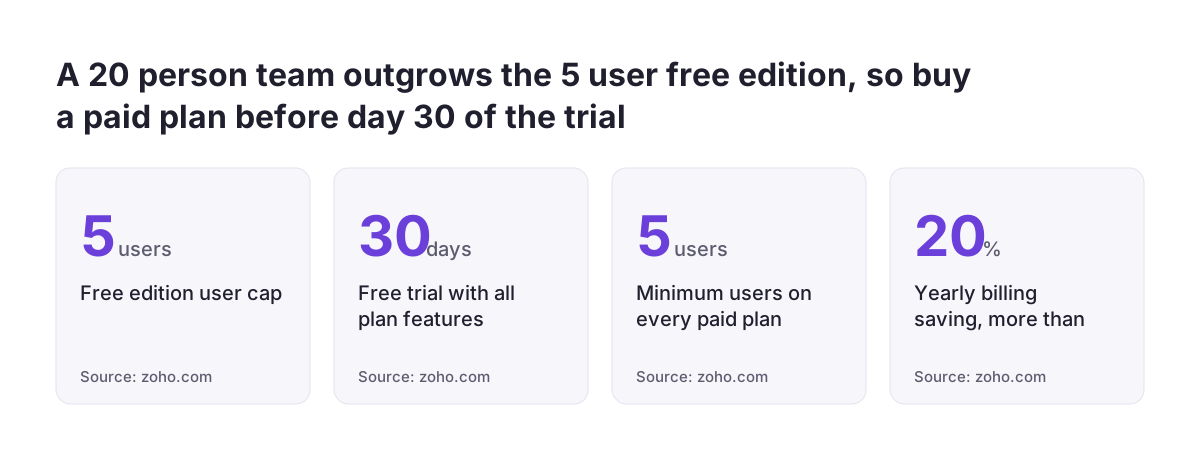
A 20-person company needs a paid Zoho People edition. The free edition covers up to 5 users only. Zoho People's pricing page lists four paid editions: Essential HR, Professional, Premium and Enterprise. Each paid edition requires a minimum of 5 users.
The 30-day trial needs a calendar reminder. During the trial you can use all plan features. When it expires, Zoho moves the account to the Free plan. For 20 people, that means dropping to a plan built for five. Buy the edition you need before day 30, so your setup work carries straight into the paid plan.
These pricing rules affect cost as headcount rises:
- Yearly billing saves more than 20% compared with monthly billing.
- Licences apply only to active users. When someone leaves and becomes inactive, their licence is revoked and can be reused for a new hire.
- Above 500 users, Zoho asks you to request a price quote.
- Email support is available 24/5 on all plans at no extra cost.
Two edition details matter for a growing company. The Enterprise edition adds an HR help desk, a learning management system and a sandbox. A sandbox is a virtual environment where you test new features and integrations before they go live. Advanced analytics also requires an active Zoho Analytics subscription. This guide does not repeat prices, so read them on the pricing page on the day you buy.
The EU data centre: choose it at sign-up, because moving later loses data
Zoho People assigns your data centre when the account is created. It chooses the data centre from your location, based on your IP address. From then on, Zoho's data centre migration article says your data stays in that data centre. It does not move just because people log in from elsewhere. Zoho People runs seven data centres, and the EU one is people.zoho.eu.
A later move is possible, but it is costly. You request a migration by emailing migrations@zohoaccounts.com. According to Zoho, the following items do not come across:
- Feeds data.
- Files uploaded through WorkDrive.
- Blueprints, and previous records of approvals, follow-ups and TAT (turnaround time).
- Web form links and Zoho connections in Developer Space.
- Zoho Analytics data. Advanced analytics integration data does migrate.
- The Kiosk portal, which you must recreate and configure from scratch.
All internal and external integrations also have to be reconfigured after a migration. At Svennis we check that the admin's browser shows the .eu address before anyone imports a single employee record. It is the cheapest check in the whole setup, and skipping it is the mistake that costs most to undo. Sign up from an EU location, then confirm the address before you go further.
Organisation structure in Zoho People: legal entities, business units and divisions
Organization Structure is the Zoho People feature for keeping several companies or legal entities in one Zoho People account. Enable it under Settings > Manage Accounts > Organization Setup > Organization Structure > Configuration. Zoho's organisation structure article describes three levels:
- Legal entity: an independently operated company with legal rights and duties for contracts, payments and obligations. It is the highest level, and one account can hold several.
- Business unit: an operational unit inside a legal entity, the second level.
- Division: part of a business unit, commonly based on location or products.
You can rename these levels to match your own language, for example Legal entity to Company. Departments are separate from this structure. Departments work independently and cannot be tagged to an entity, so plan them as a second, independent way of grouping people.
Organization Structure or Multi-organization
Multi-organization is the alternative for companies with no dependencies at all. It runs each organisation completely independently, with its own data, URL and settings. Each organisation needs a separate subscription and user licence. Cross-organisation reporting is not allowed.
Organization Structure uses one URL and a single licence, and it lets managers span companies. For a group that shares managers and HR staff, Organization Structure is usually the better fit.
Check one limit before you enable the feature. Of the four payroll integrations Zoho lists, only two support Organization Structure.
Employee records: adding staff through the Zoho One admin panel
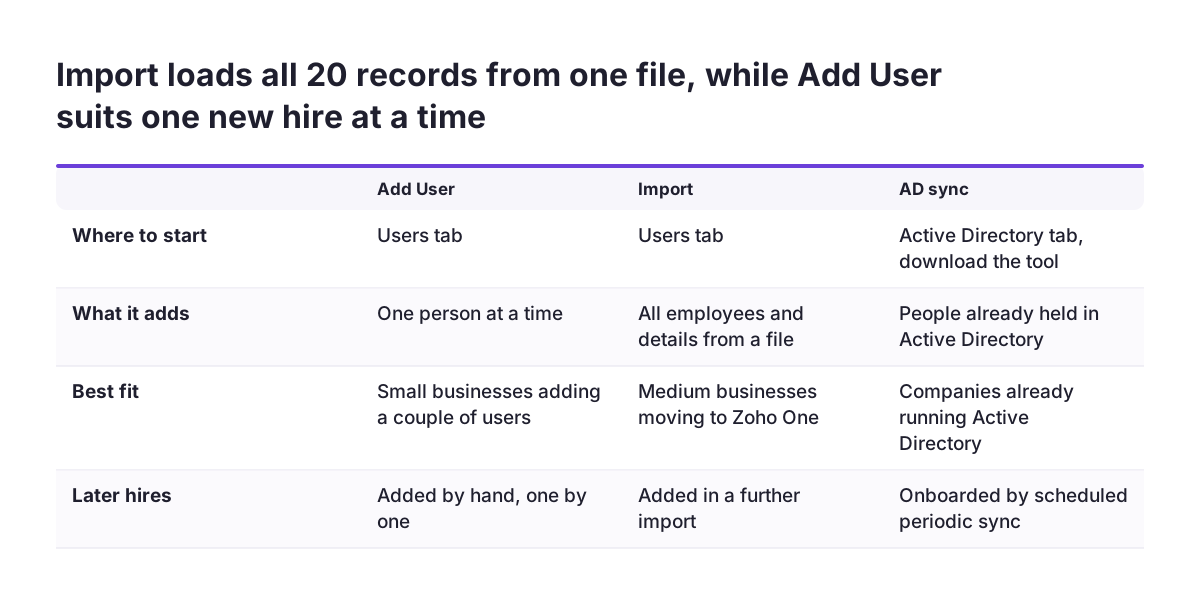
In Zoho One, employee records usually start in the admin panel. Zoho's guide to onboarding employees to Zoho One calls the admin panel a unified place to onboard, equip and manage employees. It describes three methods:
- Add User in the Users tab adds one person at a time. It suits small businesses that add a couple of users at a time.
- Import in the Users tab adds all employees and their details from a file. It suits medium-sized businesses moving their operations to Zoho One.
- AD sync connects Active Directory to Zoho One. You download the tool from the Active Directory tab. You can schedule periodic syncs, so people you add in Active Directory later are onboarded to Zoho One automatically.
If you already use Zoho Mail, users can also be added there. The Control Panel lets you add users, invite them with an existing email address, import them from Zoho CRM or bulk-import them from a .csv file.
For 20 people, an import is the practical route. Before you run it, set up the organisation structure and decide each person's reporting manager. Every record then lands in the right entity with the right approver.
Tell employees where to find their own space. In Zoho People 5.0, the landing page is Home > Dashboard. Home > My Space > Overview replaces the Self Service page from Zoho People 4.0.
Onboarding flows in Zoho People for candidates and new employees
The onboarding service in Zoho People sets up a process to welcome and add new employees. Zoho's onboarding overview describes two flows.
Candidate Onboarding Flow
The Candidate Onboarding Flow is a customisable pre-onboarding flow. It invites selected candidates to fill in their personal and professional details before they join. Through it you can send documents and get signed copies back, including:
- The offer letter.
- The terms and conditions of employment.
- A background check authorisation letter.
- A non-disclosure agreement (NDA).
- Other company-specific forms.
Employee Onboarding Flow
The Employee Onboarding Flow gives a new hire a full introduction to the company, and it can start on their date of joining. It covers the documents and policies they must read and accept. It also introduces their team members and gives a short overview of their goals and required training.
Administrators manage both flows in Operations, the administrator space for onboarding. From there they send invites, send files for e-signature and fill out checklists. They can also convert candidates to employees, set permissions and add custom forms. Automation lets you customise notification templates.
Keep the first version short for a growing company. Start with the offer letter, the employment terms and a first-day checklist, then add forms once hiring picks up.
Approval flows and leave: set reporting lines first, policies in part 2
Approval flows in Zoho People follow people, not the organisation structure. Zoho states that the request approver is independent of the employee's company, division or entity. Reporting managers are not restricted by the structure either. An employee in one legal entity can report to a manager in another.
This flexibility suits a growing company, but it depends on clean data. A leave request goes to whoever the record names. Before you switch on any approval, check that all 20 records carry the right reporting manager. Then test one request end to end with two colleagues.
Leave policies are covered in part 2 of this series, and some decisions can wait until then. The pricing page lists two leave features worth knowing about now:
- Compensatory off: leave applied to a regular working day as compensation for overtime work.
- Bradford score: a measure that helps manage short, frequent and unplanned absences.
Also remember the data centre point here. Blueprints and past approval records do not survive a data centre migration. Building approval flows in the wrong data centre therefore means rebuilding them, and losing their history.
Connecting Zoho People to the rest of Zoho One so HR data stays consistent
Connecting Zoho People to the other Zoho One apps keeps one version of each employee across the system. A Zoho community write-up on a small business setup named fragmentation as the core problem, rather than a lack of tools. It concluded that small businesses need clear integration and intentional structure rather than more apps.
Zoho People offers these connections:
- Timesheets integrate with Zoho Projects, Zoho Invoice, Zoho Expense, Zoho CRM, Zoho Books and QuickBooks.
- Advanced analytics needs an active Zoho Analytics subscription.
- Other Zoho apps: Zoho lists integrations with Zoho CRM, Zoho Projects, Zoho Connect and Zoho Recruit among those that survive a data centre migration.
Connect these apps after the core records are clean, not before. An integration copies whatever it finds, including wrong managers and duplicate people.
AI assistants can now work with Zoho People directly. Zoho MCP for Zoho People lets AI agents such as Claude find information, complete approvals and generate reports from prompts. Zoho says it supports hundreds of actions across leave, attendance, performance, timesheets, employee records and more. Access controls, encrypted data handling and audit trails govern what the agents can do.
If you are weighing AI in recruitment and HR, finish the setup in this guide first. An agent is only as reliable as the records it reads.
Payroll in the EU: Zoho Payroll is not available, so plan the handover
Zoho Payroll does not serve EU employers. Pay runs therefore stay with your payroll provider or accountant. The Zoho Payroll product page lists regional editions for the GCC, Canada, India and the USA.
Zoho's two pages do not agree on the regions. The Zoho People payroll integrations article lists the Zoho Payroll integration for India, Saudi Arabia and the United Arab Emirates only. Neither page lists an EU country.
The same article lists four payroll integrations in total. One is marked global, one covers the United Kingdom and the others cover India and the Gulf. Several integrations can run at the same time. Zoho recommends switching away from unsupported payroll applications. For many EU companies that advice does not fit, because pay rules are set nationally and your current provider already handles them.
The practical answer is a clear handover. Decide which data your payroll provider or accountant needs each month, such as new starters, leavers and approved absence. Then pull it from Reports, the consolidated space for all Zoho People reports. Agree the format and cut-off date with them before your first pay run on the new system.
A two-week setup plan for a 20-person company
A two-week plan fits a 20-person company inside the 30-day trial and leaves margin. Take an example company with one legal entity, renamed Company. It has two divisions based on location, an office and a warehouse. Twelve people work in the office and eight in the warehouse. Two warehouse staff report to the operations manager in the office.
| Days | Step | Where in Zoho | Done when |
|---|---|---|---|
| 1 to 2 | Start the trial and confirm the data centre | Sign-up, browser address | The address reads people.zoho.eu |
| 3 to 4 | Build the structure | Settings > Manage Accounts > Organization Setup > Organization Structure | Company, business unit and two divisions exist |
| 5 to 6 | Import all 20 employees with managers | Zoho One admin panel, Users tab, Import | Every record has an entity and a reporting manager |
| 7 to 8 | Set up departments and onboarding | Onboarding, Operations | Offer letter and first-day checklist are tested |
| 9 to 10 | Test approvals | A request from a warehouse employee | It reaches the office manager |
| 11 to 12 | Connect only the apps you use | Timesheet integrations, Zoho Analytics | Test data appears correctly on the other side |
| 13 to 14 | Agree the payroll handover, buy the edition and invite staff | Reports, subscription, Home > My Space > Overview | Paid plan active before day 30 |
The cross-division manager is a deliberate test. Zoho allows reporting lines across entities, so the day 9 to 10 test proves that the imported data is right, not just the settings.
What this means for a company in your EU country
An EU company should treat three points in this guide as fixed requirements. The first is the data centre. An account created from an EU location should land on people.zoho.eu. Confirming this before any employee data goes in keeps your HR records in the EU data centre from day one. It also fits the GDPR, the EU-wide data protection regulation that part 3 of this series covers for employee data.
The second is payroll. No Zoho Payroll edition covers EU countries, so plan Zoho People as the source of HR data and keep calculation and payment with your payroll provider or accountant in each country.
The third is local employment rules. Leave entitlements, working time and document requirements differ between member states. Do not copy one country's leave policy across the whole account. If you employ staff in more than one EU country through separate companies, set up each company as its own legal entity under Organization Structure.
Separate legal entities keep country-specific policies apart while managers still approve across borders. Part 2 of this series covers setting up those leave policies.
Next steps for setting up Zoho People
Start with the two decisions that are hardest to reverse. Work through these steps in order:
- Sign up from an EU location and confirm the people.zoho.eu address before you import anything.
- Draw your legal entities, business units and divisions on paper. Then decide between Organization Structure and Multi-organization.
- Prepare one import file with every employee, their entity and their reporting manager.
- Set a reminder for day 25 of the trial to choose and buy your edition.
- Agree with your payroll provider or accountant what data they need from Zoho People each month.
When those five steps are done, the rest of the two-week plan is routine configuration. If you want to see what Zoho People covers beyond the setup, or want help with it, our Zoho People implementation page explains how Svennis approaches HR projects. Part 2 of this series moves on to leave, attendance and time tracking.
Sources
- Zoho People pricing and editions
- Zoho People help: Data Center Migration
- Zoho People help: Organization Structure
- Zoho Community: 3 ways to onboard employees to Zoho One
- Zoho Community: Designing a practical Zoho setup for a small business
- Zoho People help: Onboarding Service Overview
- Zoho Blog: Introducing Zoho MCP for Zoho People
- Zoho Payroll product page
- Zoho People help: Payroll Integrations