
Ask Zia questions in Zoho Analytics: what works and what it needs
You can ask Zia questions in Zoho Analytics in plain English, and it replies with the report that best matches each question. The answers are reliable only when the workspace is prepared. That means clear table and column names, tables joined with Lookup columns, and synonyms for your own business terms. Before anyone relies on the answers, you check one against a report you already trust.
Ask Zia is a search-driven analytical assistant in Zoho Analytics that creates reports in response to questions asked in natural language. That is how Zoho's help page on using Ask Zia describes it. You type something like "What is the last year profit?" and Ask Zia builds a chart, a table or a single figure.
Ask Zia works from the names and data in your workspace, not from what your team means. A column with a cryptic code as its name, or a status recorded in several spellings, produces muddled answers. Zoho's own help also says Ask Zia may not interpret every domain-specific term. For those cases, you train it.
This guide covers the full route for managers who want plain-language access to their figures. It explains who can use Ask Zia, how to prepare and train the workspace and how to phrase questions. It then works through one example, shows how to check the result and sets out what applies to a company in the EU. Ask Zia is one form of AI for reporting, and the same preparation rules apply to the others.
Who can use Ask Zia, and where to open it in Zoho Analytics
To use Ask Zia in Zoho Analytics, a person needs permission to create reports in that Workspace. The Zoho help page lists three privileges that qualify:
- Account Administrator
- Workspace Administrator
- Shared User with access to a data table
A manager who can only view finished dashboards therefore cannot ask Zia anything yet. Decide who should have report-creation rights before you announce the feature. Otherwise the first reaction from your team will be a missing button.
Ask Zia opens from three places: the Ask Zia tab, the Workspace Search option and the Dashboard Designer page. Pick the entry point that matches where each team already works, so asking a question does not mean learning a new screen.
While you type, Ask Zia offers auto suggestions. Zoho says these are personalised based on the relationships among tables, previous history and your Ask Zia customisation. They also propose supporting phrases such as Top 10 or Bottom 10, sort options and chart types. A conversation mode gives a chat-like interface, so a manager can follow one question with the next. The suggestions only become useful once the tables are related and trained, which is the subject of the next two sections.
Preparing the workspace: table names, column names and Lookup joins
Preparing a Zoho Analytics workspace for Ask Zia starts with names a manager would actually say. Rename tables and columns so that "Deals", "Amount" and "Close Date" appear where a system export left internal codes. Make status values consistent, so "Won" is written one way and not three. Ask Zia matches words in the question against these names and values, so every vague name becomes a vague answer.
Agree on definitions before you rename anything. Decide what counts as "sales", an "active lead" or a "new customer" in your company. Then make one column carry that meaning. If two departments use "sales" for different figures, Ask Zia cannot settle the argument for you.
Lookup columns decide how cross-table questions are read
A Lookup column is a column in one table that points to a matching column in another table, which tells Zoho Analytics how the two are joined. The help page on constructing questions for Ask Zia states that metrics across tables are interpreted based on these joins. A question like "invoiced amount by account owner" only works if invoices are joined to accounts.
This matters most when a workspace blends sources. You might combine CRM deals with invoices from Zoho Books, or campaign results from Zoho Campaigns. Check each Lookup before you open Ask Zia to managers. Also limit the workspace to sources you trust, because Ask Zia will happily answer from a test import nobody cleaned.
Training Ask Zia with synonyms, column priority and default functions
Training Ask Zia in Zoho Analytics means telling it how your business talks about your data. The help page on training Ask Zia lists three customisation options: Synonyms, Column Priority and Default Function. You open the Ask Zia Settings dialog from Table Edit Design or from the settings of a single column.
The three options solve different problems, so use the table below to decide which one you need:
| Option | What it does | When you need it | Example |
|---|---|---|---|
| Synonyms | Maps a term people say to a column in the data set | Your team uses a word that is not the column name | "Revenue" treated as the column named Amount |
| Column Priority | Ranks a column from high to low when several columns have similar names | Ask Zia picks the wrong one of two similar columns | Amount ranked above a second amount-like column |
| Default Function | Replaces the summary function Ask Zia applies by default | A total makes no sense for that column | Average instead of summation for a price or score column |
You can add any number of synonyms to a column. Collect them from real conversations: the words sales managers use in pipeline meetings, the terms finance uses in month-end reports. Zoho Analytics offers summary functions such as Sum, Count, Average, Min and Max. A default function is only a starting point, because a function named in the question overrides it. Someone can still ask for the "maximum discount" when the default is Average.
Phrasing questions that Ask Zia understands
Ask Zia understands structured questions, short fragment phrases and "WH" questions that start with what, when, who or which. "What is the last year profit?" and "profit last year" both work. According to Zoho, Ask Zia supports five types of query:
- Ask for a metric
- Apply summary functions
- Group the metric column
- Apply filter criteria
- Sort data
A question that asks for one metric returns a Numeric KPI widget, which is a single headline figure. Time words such as monthly, yearly, daily and quarterly make Ask Zia find a date column and plot the data along it. You can also ask for an advanced summary function, such as a Running Total across quarters.
Filters, ranges and exclusions
One question can carry one filter or several. Supported filters include plain text, numeric ranges, exact dates, date ranges and relative dates. Slice by range means narrowing data with terms like Top 10, Bottom 5, highest, lowest, most or recent. Filter negation means excluding data with words like exclude, except, ignore or without.
Ask Zia tolerates imperfect typing, so the misspelling "salse" is matched to sales. It also reads unit keywords such as k, m and bn, plus Dollar and Rupee terms. The euro is not among the currency keywords on the help page. Teams that report in euros should therefore test those questions before relying on them.
Worked example: a revenue question on a sales table, from setup to answer
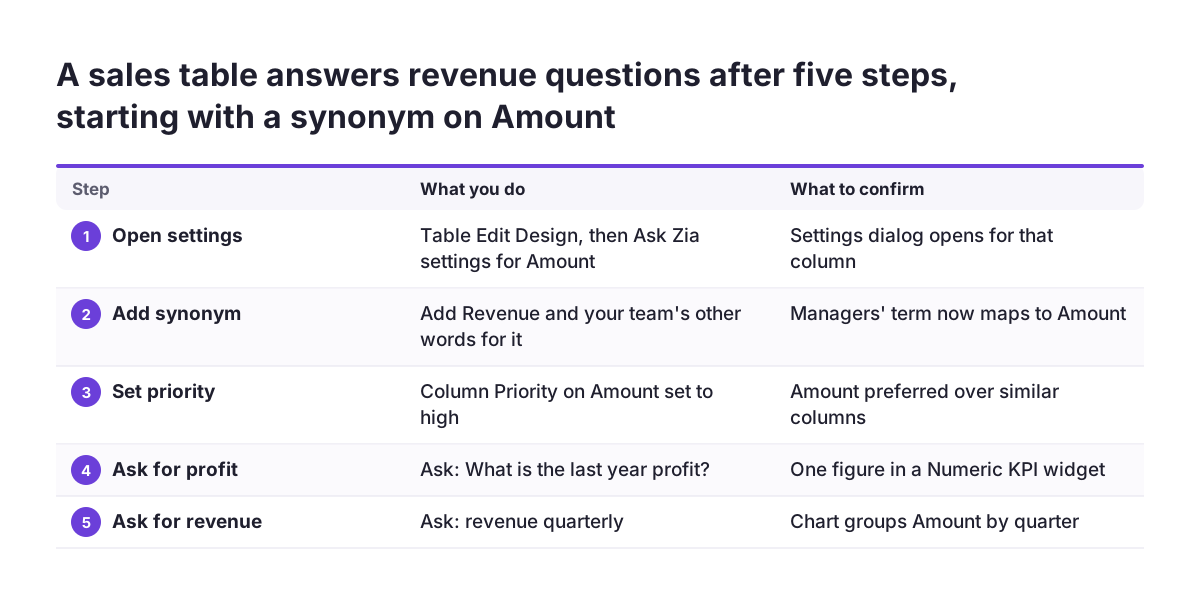
This worked example takes one sales table in Zoho Analytics from untrained to answering a manager's real question. Assume the table holds a Profit column, a date column and an Amount column for the invoiced value. Your managers never say "amount". They say "revenue".
- Open the table in Table Edit Design and open the Ask Zia settings for the Amount column.
- Add the synonym "Revenue", plus any other word your team uses for the same figure.
- If a second amount-like column exists, set Column Priority on Amount to high, so Ask Zia prefers it.
- Ask "What is the last year profit?" and confirm you get a Numeric KPI widget with one figure.
- Ask "revenue quarterly" and confirm the chart groups Amount by quarter along the date column.
- Ask "running total of revenue by quarter" to see the cumulative figure across the quarters.
- Add a filter, for example "revenue quarterly without" followed by a product line, and confirm it is excluded.
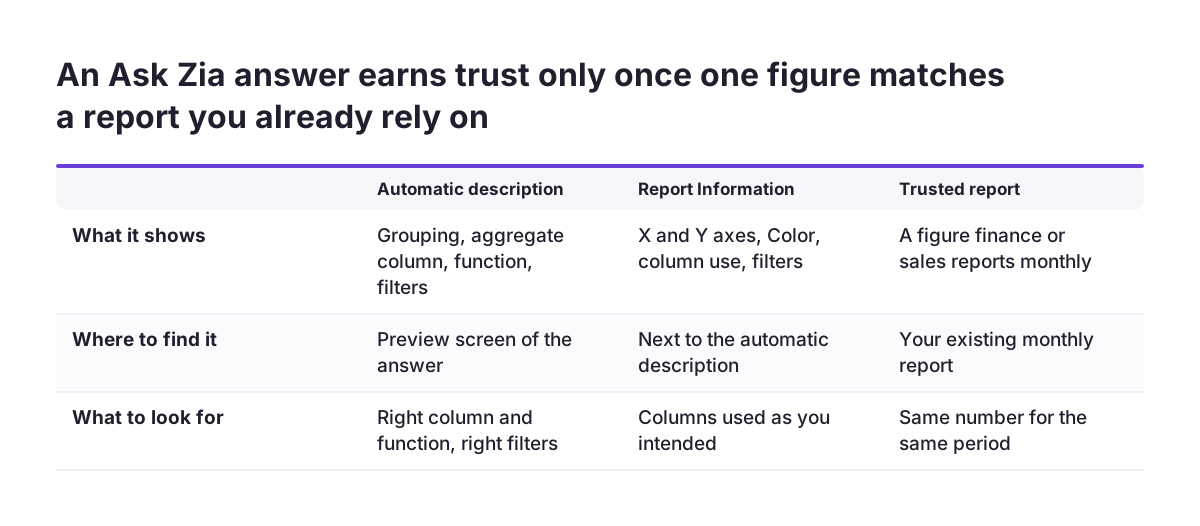
After each question, read the description Ask Zia shows with the preview. It should say the data is grouped by quarter, the aggregate column is Amount and the function is a sum. Any filter you asked for should also be listed there. If the description names a different column, the synonym or the priority is not set where you think it is.
The whole exercise touches only the three settings from the help page. No formulas or query tables are needed. Afterwards, the word your managers already use returns the column you meant.
Checking an Ask Zia answer against a known report before you rely on it
Checking an Ask Zia answer starts with the preview screen, which explains how the report was built. Zoho's help page says the automatic description shows how the data is grouped, the aggregate column used, the function applied and the filters used. Next to it, Report Information lists the facets of the report. For a chart, these are the X and Y axes and Color. It also shows how the columns are used and which filters apply.
Then match one figure against a source you know is right. Take a number your finance or sales lead already reports every month, ask Ask Zia for it and compare. When Svennis sets up Ask Zia, we take a handful of questions the managers already answer from an existing report and ask each one in Ask Zia. A mismatch almost always traces back to a missing synonym, a wrong default function or a broken Lookup, and we fix those before anyone uses the answers in a meeting.
Turn repeated questions into fixed reports
Ask Zia lets you change the chart type, edit the report in the report editor and save it. You can also add it to a dashboard, where it appears as the first view until you rearrange the layout. Save any question managers ask every week as a fixed report.
Ask Zia suits quick questions in meetings, early exploration and colleagues without technical skills. Reports that directors read every month still belong on tested fixed dashboards.
What Ask Zia means for a company operating in the EU
For a company in the EU, language is the first practical limit of Ask Zia. Zoho's help page says Zia supports English and Spanish. By default, it uses the language set in each person's Zoho Account, and conversation mode does not support Spanish yet. Teams in Germany, France, Italy or elsewhere should plan to ask questions in English.
Data protection is the second point. Ask Zia builds reports from the tables a person can reach, and its previews name the columns it used. Keep personal data out of table and column names. Share only the tables each role needs, and record Ask Zia in your GDPR documentation. Our page on AI data security covers the wider questions to settle first.
Embedding Ask Zia for colleagues or customers
Ask Zia can be embedded in another application or site through an embed snippet or a permalink. With Access with Login, users must log in to Zoho Analytics, and the required tables must be shared with them. Access without Login embeds Ask Zia publicly and works only in public workspaces. Never choose it for a workspace that holds customer or employee data.
Review sharing settings table by table before you embed. The tables shared with each user decide what Ask Zia can build reports from, and so what an answer can contain.
Next steps to set up Ask Zia in your Zoho Analytics workspace
The next step is a short, ordered piece of setup work, done before managers open Ask Zia. Work through it in this order:
- List the questions your managers ask most often, in their own words.
- Rename unclear tables and columns, and make status values consistent.
- Check that every table managers will query is joined with a Lookup column.
- Add synonyms, column priorities and default functions in the Ask Zia settings.
- Give report-creation rights to the people who should ask questions.
- Ask each listed question and compare one figure with a report you trust.
- Save the recurring questions as fixed reports or dashboard views.
Start with one table that matters, usually sales, and expand once its answers match. If your pipeline lives in Zoho Bigin rather than Zoho CRM, the same steps apply once its data is in Zoho Analytics.
When you want help with the data model, the joins or the training settings, read about our Zoho Analytics implementation and consulting work. It covers how we prepare workspaces so that plain-language questions return figures you can defend.