What lead scoring with Zia in Zoho CRM actually does
Lead scoring with Zia in Zoho CRM means letting Zoho's AI assistant give each lead a score that reflects how likely it is to convert, instead of writing every points rule yourself. Zoho describes Zia Scores as an AI-based method that takes into account all the information related to a record and then calculates a score for it. That sounds like a feature you switch on and forget. In practice, the score is only as good as the records and the sales process it learns from.
This guide explains how the score is built, what data it needs before it is worth reading, and how to put it to work in the views your team uses every day. It also shows how to test whether you can trust it, and where Zia scoring misleads a small team that would be better served by a manual rule for now.
Three terms first. A scoring rule is Zoho CRM's general mechanism for qualifying prospects by their behaviour, attributes or other details of their persona. Zoho's help page on scoring rules puts it simply: the higher the score, the more likely the prospect is to become a customer. A manual score is a rule you configure yourself, setting points for each channel and its factors. A Zia score is the version Zia calculates for you from your data.
Both kinds can run on the same module. Zoho states that you can still set up manual scoring rules for a module that has Zia Scores enabled, and that the two behave independently. You do not have to choose one and abandon the other, which matters later when you test Zia's output.
How Zia builds the score
Zia does not produce a single kind of score. The Zia Scores help article lists five score types:
- Conversion score: predicts the likelihood of a record being converted into a successful outcome. Zoho calls it most relevant for journey-based modules such as Leads or Deals, so this is the one most people mean by lead scoring.
- Field Attribute score: calculated from the attributes of specific fields in the module, assessing the relevance, completeness and accuracy of the data.
- Follow-up score: captures outbound signals to judge a salesperson's follow-up actions on timeliness, relevance and impact.
- Health score: the overall status of a customer relationship, based on data such as satisfaction, usage patterns, payment history and support interactions.
- Engagement score: the fifth type named in the article.
The split that matters for preparation is this. Health, engagement and follow-up scores do not require training data, because they follow an algorithm automatically. Conversion and Field Attribute scores do need training data, meaning historical records with known outcomes that Zia learns from.
What Zia reads
For each record, Zia may take into account the module data, data in related modules, related activities and information from SalesSignals. The original Zoho community announcement adds data obtained by integrating your CRM with other products. In other words, a lead's score depends on the lead record itself, the calls, meetings and emails logged against it, and whatever connected systems push into Zoho CRM. Gaps or inconsistencies in any of those feed straight into the number.
The minimum data before scores mean anything
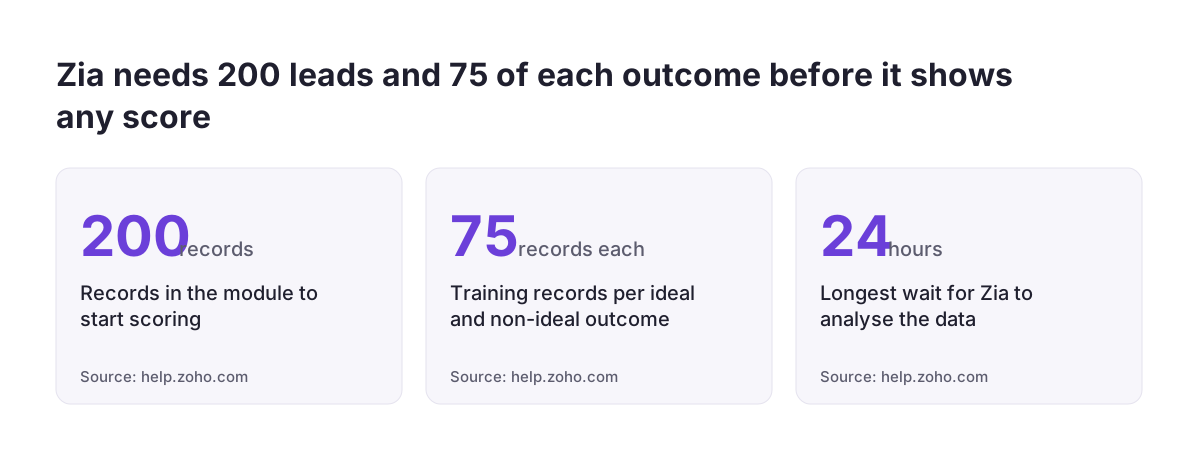
Zoho sets hard minimums. Zia needs at least 200 records in the module to start scoring. For the Conversion and Field Attribute scores, the training data must contain at least 75 records for the ideal condition and 75 for the non-ideal condition. If the minimum criteria are not met, Zoho shows a "Waiting for data" error instead of a score.
Those minimums are about volume, not quality. A module can pass both thresholds and still produce weak scores if the outcomes are recorded inconsistently. If some reps convert a lead the moment a meeting is booked and others only after a signed order, Zia learns a blurred picture of what "converted" means. The SaasKart discussion on Zia puts it bluntly: clean data matters more than the model.
Timing and coverage
- Analysis time: typically a few minutes to 24 hours before scores appear.
- Where the score lives: in a custom field labelled Zia Score on the record.
- Existing records: not scored unless they are edited after you enable Zia Scores.
- New records: by default a Zia score rule applies to fresh records added from the day after the rule is created.
The coverage rule catches people out. On the first morning, your open pipeline of older leads will mostly show no score, while new leads do. That is expected behaviour, not a fault, but it means you cannot judge the feature on day one.
Preparing Zoho CRM before you switch scoring on
Because Zia reads the record, its related activities and integrated data, preparation means making those three things consistent. The checklist below covers what to fix and why Zia cares. Work through it before enabling scoring, not after, because the model learns from the history you give it.
| Item | Why it matters to Zia | What to check |
|---|---|---|
| Outcome definitions | Conversion scoring needs clear ideal and non-ideal examples | One written rule for when a lead is converted and when it is closed as lost, used by every rep |
| Outcome volume | At least 75 records per condition and 200 in the module | Count converted and lost leads in a custom view before enabling |
| Picklist values | Field attributes feed the Field Attribute score | No duplicate or retired values in Lead Source, Lead Status or Industry |
| Activity logging | Related activities are part of the score | Calls, meetings and emails logged against the lead, not only in personal inboxes |
| Integrations | Data from connected products can be used | Web forms, shop and ERP data land in the right fields |
| Edition and access | Scoring depends on edition; configuration needs a permission | Your edition qualifies and the admin has Manage Configuration permission |
If you are bringing leads in from another system, the outcome history is usually where the damage is. Statuses from the old tool rarely map one to one. Our post on how to migrate to Zoho CRM without losing your sales history covers how to carry won and lost outcomes across so they can serve as training data later.
A worked example: enabling Zia scoring on the Leads module
Take a distributor selling to other businesses in several EU countries. Its Leads module has been in use for a while, reps have agreed that a lead counts as converted when a first quote is accepted, and leads that go nowhere are closed with a "Lost" status. That agreement gives Zia a clear ideal condition (converted) and a clear non-ideal condition (lost).
- Check access. The admin confirms they have Manage Configuration permission, since only users with it can open the Configuration page.
- Check volume. Two custom views, one for converted leads and one for lost leads, confirm at least 75 of each and at least 200 leads in total.
- Enable scoring. Following the Zoho announcement, the admin goes to Settings > Zia > Recommendation > System recommendation and enables Zia scoring for the Leads module.
- Wait. Zia analyses the data for anywhere from a few minutes to 24 hours. If the page shows "Waiting for data", the minimums are not met yet.
- Confirm the field. A custom field labelled Zia Score appears on lead records. The admin adds it to the lead layout and list views.
- Cover older leads. Because existing records are scored only once edited, the team updates open leads during their normal follow-up rather than forcing a bulk edit.
Zoho's own pages differ on scope. The original community announcement said scoring was available only in Leads and Deals, while the current help article describes score types across all modules. Check what your account shows under that settings path rather than relying on either page alone.
Reading the score and the score card
A Zia score runs from 0 to 100 and, according to Zoho, is expressed in percentile format. Zoho groups it into three bands:
| Band | Score range | Sensible default use |
|---|---|---|
| Needs improvement | 0-50 | Nurture, do not spend rep time first |
| Good | 51-75 | Regular follow-up sequence |
| Excellent | 76-100 | Contact first, same working day |
Zoho says the score represents the likelihood of conversion of a lead or deal. Treat it as a ranking signal for deciding who to call first, not as an exact probability you can multiply into a forecast. A lead at 80 is a better bet than one at 40 in your own data; it is not a promise that eight in ten such leads will close.
The score card
The more useful part for managers is the score card on the record detail page. It shows "What went wrong" with that record, "What went right" and the overall score. This is where you find out whether Zia's reasoning matches how your sales actually work. If the reasons given for a high score are factors your team knows to be irrelevant, such as a lead source you stopped using, that points to a data problem rather than a strong lead.
| Indicator | points |
|---|---|
| Needs improvement | 0-50 |
| Good | 51-75 |
| Excellent | 76-100 |
| Source: help.zoho.com | |
Using the score in your daily pipeline views
A score nobody looks at changes nothing. The Zia Score field can be used as a criterion in smart filters, custom views, layout rules, workflow rules, Blueprint and the approval process. That lets you build it into the places reps already work, instead of asking them to open a separate report.
- Custom view: "My leads, Excellent band, no activity this week" as the default view for each rep, so the first screen of the day is the call list.
- Workflow rule: Zoho defines workflow rules as actions (email notifications, tasks and field updates) run when set conditions are met. A rule can create a call task when a lead's score enters the Excellent band.
- Blueprint: require a minimum band before a lead can move to a stage that involves a quote or a demo.
Scoring also combines with assignment. Zoho CRM can assign leads automatically to users, roles or groups in a round-robin pattern, set limits on how many leads each user receives, or let Zia match leads with the most suitable team member, as described on Zoho's lead nurturing page. For leads in the Good band, Cadences automate branching sequences of follow-ups based on responses to emails, calls, meetings or quotes, so they stay warm without a rep chasing each one by hand.
If you want to see how scoring fits alongside other uses of AI for lead management, our sister site covers the wider picture.
Checking whether the scores can be trusted
The SaasKart discussion proposes a practical test for any CRM AI: does it surface which deals to work today, and why? Most major CRMs now ship AI, so judge Zia on whether it changes what your reps do, not on whether it produces numbers. You can run that test in a structured way.
- Keep a manual rule running. Since manual and Zia scoring behave independently, keep a simple manual rule on the same module as a baseline.
- Track outcomes by band. After enough new leads have been scored and closed, compare how many converted from each Zia band. If Excellent leads convert no better than Needs improvement leads, the score is not yet useful.
- Read ten score cards. Pick high and low scores and ask your best rep whether the "What went right" and "What went wrong" reasons make sense.
- Look for disagreement. Leads that Zia rates highly but your manual rule rates low, or the reverse, show where one of the two is wrong.
At Svennis we review the reasons on a sample of score cards with the sales lead before any workflow rule acts on the Zia Score field, because a model trained on inconsistent statuses produces confident but wrong reasons. Only when the reasons make sense to the people who sell do we let the score drive task creation or assignment.
When Zia scoring misleads a small team
Zia scoring is built for volume, and small teams hit its limits first. The 200-record minimum and the 75 examples each for ideal and non-ideal outcomes can take a long time to accumulate when you close a handful of leads a month. Until then you either see "Waiting for data" or a model trained on too few outcomes to be reliable.
Editions matter too. The current help article says Zia Scores is available for organisations on Professional and above editions. The original community announcement said it was released for Enterprise, Ultimate and above customers with more than 20 user licences. Check your own account before planning around it. The help article also lists a limit of 5 scoring rules per CRM account on Enterprise and 10 on Ultimate, which constrains how many experiments you can run at once.
A few patterns make scores misleading in small teams:
- One rep, one habit: if a single person logs most activities, Zia partly learns that person's style.
- Old records unscored: the open pipeline stays largely blank until edited, so the view looks emptier than it is.
- Changing offer: if what you sell changed recently, history describes a different business.
In those cases a transparent manual rule is the better starting point, with Zia added once the data exists. If you are still deciding whether you need the full CRM at all, our comparison of Zoho Bigin and Zoho CRM helps you judge that first.
| Indicator | scoring rules per CRM account |
|---|---|
| Enterprise edition | 5 |
| Ultimate edition | 10 |
| Source: help.zoho.com | |
What this means for companies selling across the EU
For a company operating in more than one EU country, the biggest risk to scoring is inconsistency between country teams. If one office records a lead as converted at first meeting and another at signed contract, or each country maintains its own Lead Source values in its own language, Zia treats them as different signals. Agree one set of statuses and picklist values for all markets before training data accumulates.
Completeness of company data matters because the Field Attribute score assesses relevance, completeness and accuracy of fields. Validating company details at entry helps. For businesses registered in Romania, for example, ANAF validation for Zoho CRM checks tax identifiers against the national register, a Romanian requirement rather than an EU-wide one. Online sellers should make sure shop data lands in the right fields; our page on Zoho CRM for e-commerce covers connecting PrestaShop and Shopify.
Since Zia can use everything related to a record, including data from integrated products, list which systems feed personal data into the CRM and include them in your GDPR records of processing. Our sister site's page on data security covers how to think about AI features that read customer data.
Practical next steps
Treat Zia scoring as the last step of a clean sales process, not the first. The order below keeps you from training a model on data you will later have to fix.
- Write down your outcome rules. Define when a lead is converted and when it is lost, and share it with every rep and country team.
- Count your outcomes. Build custom views for converted and lost leads and check them against the 75-per-condition and 200-record minimums.
- Clean picklists and activity logging. Merge duplicate values in Lead Source and Lead Status, and make sure calls and emails are logged on the lead.
- Start with a manual rule if you are below the minimums, and keep it as a baseline afterwards.
- Enable Zia scoring under Settings > Zia > Recommendation > System recommendation, wait up to 24 hours, and add the Zia Score field to layouts and views.
- Review score cards before automating. Only connect workflow rules, Blueprint or assignment to the score once the reasons make sense to your sales lead.
If your CRM setup itself needs work before any of this, from outcome definitions to integrations, see how we approach a Zoho CRM implementation in Europe.