
Why the order matters for Zia enrichment and duplicates
Zia data enrichment and duplicates in Zoho CRM are two halves of the same job. Enrichment fills empty fields on a record from public web sources, and duplicate control makes sure there is only one record to fill. If you switch enrichment on before you have settled your duplicate rules and merge logic, Zia enriches every copy of the same company, and each copy then looks complete and trustworthy.
This is part 2 of a three-part series on customising Zoho CRM with Zoho's own AI. Part 1, "Customising Zoho CRM with Zia: fields and layouts that still work after go-live", covers the fields and layouts a record is built on. Part 3 covers workflow automation. This post deals with the data in between, because a layout and a prediction are only as good as what sits underneath them.
Two topics are deliberately left out. Lead scoring with Zia already has its own post on this site, and automation belongs to part 3. This guide covers what enrichment adds and where it gets it, the duplicate rules and merge decisions to make before you turn it on, the data-quality signals Zia raises, what to fix by hand first, and how to measure the result after a month.
What Zia enrichment adds to a record and where it gets it
Zoho describes data enrichment as an in-product Zia feature that helps keep CRM data complete, accurate and up to date. You give it a starting point in the Company, Email or Website field. Zia then searches public web pages and retrieves details such as company size, phone number, address and revenue, according to the data enrichment FAQ.
What it fills
For an organisation, Zia collects the name, contact email address, contact number, social links, website, technology used, address and revenue. Zoho's V7 API announcement also lists employee count and social media handles. Zia can extract details from email signatures as well.
The retrieved values land in what Zoho calls Enrichment fields. These are mapped to standard CRM fields by default, and you can change the mapping so the values go into custom fields instead. For any enrichment field you do not want filled, choose Do not map this field in the mapping.
Where it looks, and when
Zia only crawls public websites, and it follows the rules each site publishes in robots.txt. It cannot pull data from websites that are not in English, which matters a great deal in Europe, as the EU section below explains.
You can enrich a record while you create it or after it has been saved. The Enriched data available link appears only when at least one of Email Address, Website or Company Name is filled in. Enrichment can be configured for any module as either organisational or personal information. Each module allows one configuration, and changing the type means deleting the configuration and creating it again. For existing customers, Leads, Contacts and Accounts come preset to enrich organisational information.
Editions, limits and who can use it
Zoho's own pages disagree on editions, so check your account before you plan anything. The Data Enrichment help article says the feature is available in all paid editions. The API documentation for Org Enrichment says it is available only in the Enterprise and Ultimate editions. Zoho's March 2026 community digest announced Zia capabilities for the Professional edition and named writing assistance, summaries, email intelligence and Ask Zia, without mentioning enrichment.
How many enrichments you get
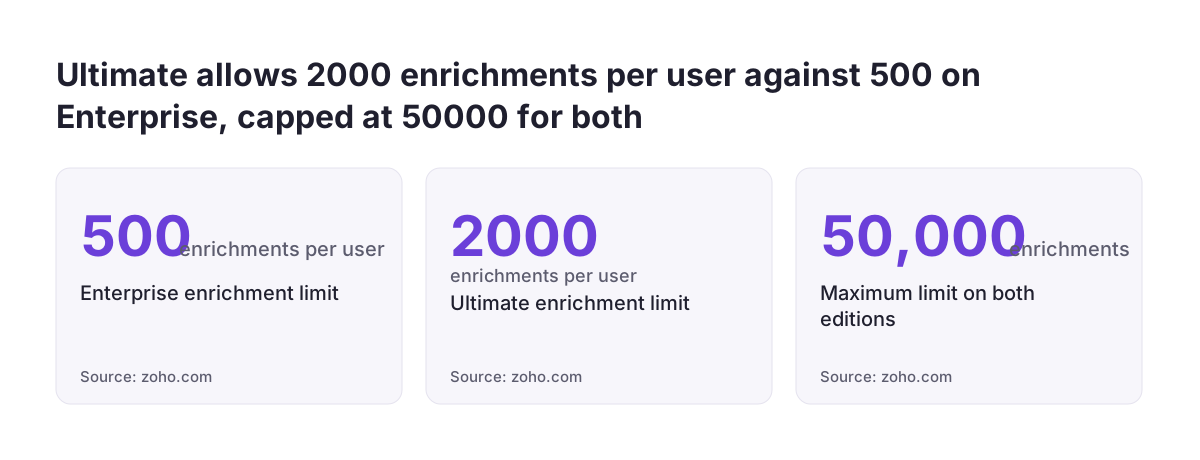
The API documentation states that the limit depends on the number of users: users times 500 on Enterprise, users times 2,000 on Ultimate, with a maximum of 50,000 for both editions. A 10-user Enterprise account therefore has 5,000 enrichments and a 10-user Ultimate account has 20,000. The ceiling is reached at 100 users on Enterprise and at 25 users on Ultimate. The enrichment usage tab shows the monthly limit and your average monthly consumption.
Permissions and region
Users whose profile has the View results permission can enrich data. Only CRM administrators and users with manage configuration can open the enrichment history and consumption usage tabs. Zoho states that enrichment is currently available only to users in Europe, Australia, the US and India.
If you are still choosing a product or an edition, the comparison of Zoho Bigin and Zoho CRM sets out where each one fits. Plan enrichment around the edition you will actually run.
Why duplicates have to be settled first
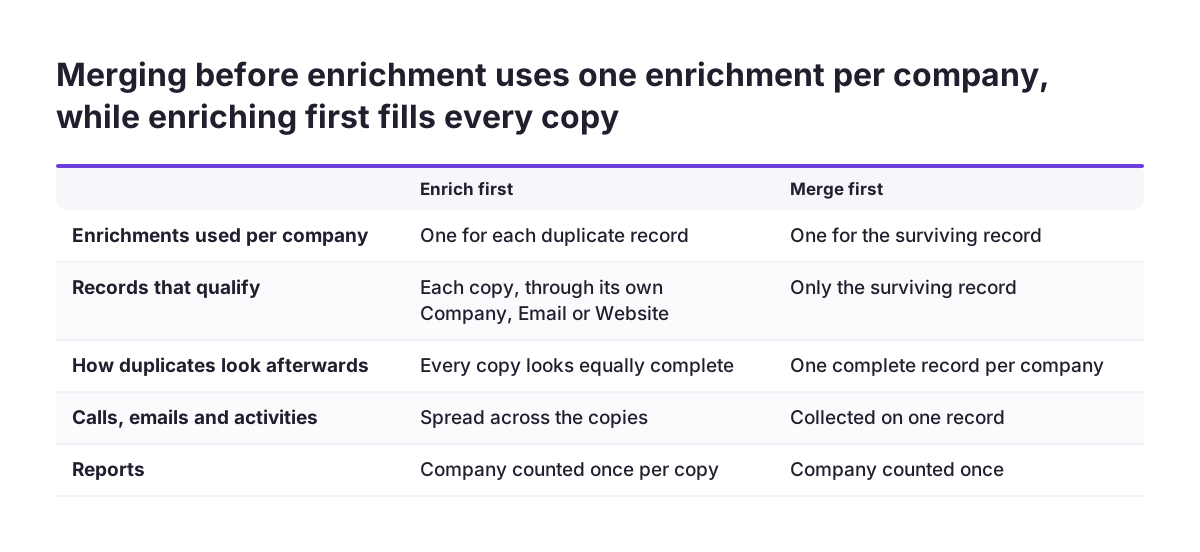
Enrichment runs record by record. Two records for the same company each have their own Company, Email or Website field, so each one qualifies for enrichment and each one uses up part of your limit. The limit is spent twice for the same information.
The bigger cost is that duplicates become harder to see. A half-empty record with no phone number and no address is a visible hint that something is off, and people tend to ignore it in favour of the fuller one. Once Zia has filled both copies with the same address, phone and revenue, they look equally complete. Sales reps pick whichever appears first in a search, activities and emails spread across both, and reports count the company twice.
The clean-up does not undo itself either. If you disable enrichment later, everything Zia has already added stays on the records, and only new records stop being enriched. The enrichment history records who enriched which record, when and which fields changed, but it cannot be exported, so reconstructing what happened across thousands of records is manual work.
At Svennis we run the duplicate check and agree the merge rules with the person who owns the sales data before enrichment is switched on, because once two copies of a company are both enriched, nobody questions either of them.
Duplicate rules and merge logic, defined
A duplicate rule is the set of fields that decides when two records describe the same person or company. A unique field is a field whose value should never appear on two records in the same module. Zoho's V7 APIs include a Duplicate Check Option API that manages and prevents duplicates in the Leads and Contacts modules by defining unique field preferences and checking for duplicates automatically. Zia also offers duplicate image detection, which finds duplicates from profile images with an emphasis on facial recognition.
Merge logic is your own policy for what happens once a duplicate is found. The software can find the pair, but a person has to decide which record survives and which values win. Write those decisions down before anyone merges anything.
| Decision | A workable default | Why it matters for enrichment |
|---|---|---|
| Unique field for Leads and Contacts | Email address | Email is also an enrichment trigger, so one clean value per person means one enrichment |
| Match key for Accounts | Website domain, or a tax or registration number you store | Company names vary too much to be a reliable key |
| Which record survives a merge | The one with the most activities and deals attached | Enrichment should land on the record people actually use |
| Which value wins per field | Values your team entered and verified | Zia's values can go into separate custom fields for comparison |
| Who may merge | A named data owner per module | Merges are hard to reverse once enrichment has run |
A worked example: one company, two leads
Take a fictional German supplier, Nordlicht Components GmbH. Your Leads module holds two records for it. Lead A has Company set to "Nordlicht Components GmbH" and Email set to einkauf@nordlicht-components.de, and it has three logged calls. Lead B, imported from a trade fair list, has Company set to "Nordlicht Components" and Website set to nordlicht-components.de, with no activities.
What happens if you enable enrichment now
Both records qualify, because each has at least one of Company, Email or Website filled in. Zia enriches each one separately, using two enrichments from your limit. If the company publishes an English-language site, both records receive the same address, phone number and revenue. If its site is only in German, Zia cannot pull data from it, and both records stay as empty as before.
What happens if you follow the order
First, a duplicate check with email domain and website domain as match keys flags the pair. Second, your merge rule keeps Lead A because it holds the activity history, and copies the Website value across from Lead B. Third, in the enrichment mapping you send revenue to a custom field such as "Revenue (Zia)" rather than to the field your sales team maintains, so you can compare the two values.
Only then do you enrich, once, on a single record that carries both an email and a website. You have spent one enrichment instead of two, the call history sits on the record that now holds the new address, and anyone reviewing it can see which values came from Zia.
The setup order, step by step
The table below is the checklist. Each step depends on the one before it, so resist the urge to skip ahead to switching enrichment on.
| Step | What to set | Why it comes here |
|---|---|---|
| 1. Scope | Which modules to enrich, and organisational or personal type for each. If you choose personal, or if organisational enrichment will add a named person's email, phone or signature details, agree the legal basis with whoever handles GDPR in your company before you go on. Also agree how you will tell the people concerned, including that the data came from public websites. That has to happen within a month, or at your first contact with them if that comes sooner. | One configuration per module, and changing type means rebuilding it |
| 2. Trigger fields | Clean Company, Email and Website by hand | These fields decide what Zia searches for |
| 3. Duplicate rules | Unique fields and match keys per module | Stops new duplicates arriving after the clean-up |
| 4. Merge | Merge existing duplicates using your written merge logic | Each company should have one record before enrichment |
| 5. Mapping | Review default mapping, add custom fields, mark Do not map this field where needed | Protects values your team has verified |
| 6. Permissions | Who has View results and who has manage configuration | Controls who spends the limit and who sees history |
| 7. Pilot | Enrich a small batch and read the enrichment history | Shows the real hit rate for your customer base |
| 8. Roll out | New records first, then existing records in batches | Lets you watch the usage tab against the limit |
Bulk runs through the API
For existing records, the Org Enrichment API schedules an enrichment job at org level. It needs the scope ZohoCRM.settings.intelligence.CREATE or ZohoCRM.settings.intelligence.ALL, a mandatory module parameter and an optional record_id. The enrich_based_on object must include at least one of name, email or website, and those values must be at least three characters long and in English. A response of SCHEDULED returns a job ID you can check with the Get Org Configuration API.
Data-quality signals Zia raises and what to fix by hand
Zia does not only add data, it also flags unusual patterns. Zoho defines anomaly detection as identifying events that deviate significantly from expected trends and notifying the relevant people. Zoho's AI features overview lists untouched records created in the last seven days among the conditions Zia looks at in its workflow anomaly checks.
Duplicate image detection compares faces in profile photos. Under the GDPR that is biometric data, so do not switch it on without the agreement of whoever handles GDPR in your company.
Treat these signals as prompts to look, not as a clean-up in themselves. A spike in untouched new records often points to an import or a web form creating records nobody owns, which is the same place duplicates tend to come from.
What to fix before enrichment
- Company names: agree one spelling, including the legal suffix, so "GmbH" and no suffix are not two companies.
- Generic emails: addresses at free mail providers say nothing about the employer, so do not rely on them as the only trigger.
- Websites: fill the Website field on Accounts wherever you can, since it is the most precise starting point you can give Zia.
- Special characters: the API requires English input values, so test how names with characters such as ä, ș or ł behave in your pilot.
If the duplicates came from a past system move, the guide on how to migrate to Zoho CRM without losing sales history explains how to deduplicate during the migration rather than after it.
What this means for a company in the EU
Zoho lists Europe among the regions where enrichment is available, so the feature itself is open to EU users. The practical limit is language. Zia cannot pull data from websites that are not in English, and many small and mid-sized companies across the EU publish their site only in their national language. If most of your customers are local firms in Germany, Romania or Italy, expect a lower hit rate than a business whose customers are international and publish in English. Your pilot batch gives you the real number before you plan around it.
Personal or organisational data
Each module's configuration is either organisational or personal. Organisational enrichment on Accounts is the simpler case, but a contact email, phone number or email signature can still identify a person, and then the GDPR applies to that data too. If you want to enrich personal information on Leads or Contacts, involve whoever handles GDPR in your company before switching it on, and record that decision alongside the configuration.
National identifiers as match keys
A tax or company registration number is often the most reliable duplicate key for accounts, because it does not change with spelling. For Romanian companies, ANAF validation of CUI/CIF codes in Zoho CRM gives you a checked identifier to match on. Other member states have their own registers, so choose the identifier that fits the countries you sell into rather than assuming one national format works everywhere.
Online shops face a particular risk, because orders can create contacts at volume. If that describes you, the page on Zoho CRM for e-commerce covers how shop data reaches the CRM.
How to tell whether it improved anything a month later
Measure against a baseline taken before you switch enrichment on, or you will only have impressions. Record three numbers first: how many duplicate pairs your duplicate rules find in each module, how many Leads and Accounts have an empty phone, address or website field, and your current enrichment consumption.
What to check after a month
- Fill rate: rerun the empty-field counts. The share of records with phone, address and website should have risen on the modules you enriched.
- Duplicates: rerun the duplicate check. The count should be close to zero for older records and stay low for new ones.
- Consumption: the enrichment usage tab shows the monthly limit and average monthly consumption. Compare the enrichments spent with the rise in fill rate.
- Accuracy: open a sample of enriched records and compare Zia's values with the company's own site and with what your sales team knows.
Because the enrichment history cannot be exported, keep your sample checks in a simple spreadsheet with the record name, date and what you found. That log becomes your evidence when someone asks whether the feature is worth keeping.
Two results mean something is wrong. High consumption with little change in fill rate usually means your customers' sites are not in English, or the trigger fields are poor. New duplicates appearing means a form or import is bypassing your rules, and that needs fixing before the next batch.
Practical next steps
You can do most of this in a few focused sessions, as long as the decisions are made by someone who owns the data. Work through it in this order.
- Confirm in your account whether your edition includes enrichment, given that Zoho's help article and API documentation disagree.
- Run a duplicate check on Leads, Contacts and Accounts and write down the counts as your baseline.
- Write your merge logic on one page: match keys, which record survives, which values win, and who may merge.
- Clean the Company, Email and Website fields, then merge the existing duplicates.
- Review the enrichment mapping, send values you want to compare into custom fields, and mark the rest Do not map this field.
- Enrich a pilot batch, read the enrichment history, and estimate your hit rate given the language of your customers' websites.
- Roll out to new records, then existing ones in batches, and repeat the measurements after a month.
If you want the duplicate rules, mapping and rollout designed as part of a wider setup, the Zoho CRM implementation page explains how that work is scoped.