
Claude extracting email data into Zoho CRM: the short answer
Claude extracting email data into Zoho CRM works best as a proposal step, not a writing step. Claude reads the incoming email and its attachments and returns the fields it found. A person approves those fields before Zoho CRM saves anything. This setup removes most manual typing without letting a model edit live records on its own.
Email data extraction is the step where software reads an unstructured message and turns it into named fields. Typical fields are a company name, a contact's email address or a requested product. Claude can do this because every current Claude model accepts text and image input, handles several languages and supports tool use, according to Anthropic. Tool use means the model can call a function you define, for example one that returns a structured result to your automation.
The rest of this guide covers five things:
- the four stages of the setup
- which Claude model to choose, and what it costs
- how files get from Zoho to Claude
- a worked example with a review step in Zoho CRM
- the places where these projects usually go wrong
Getting the review step right matters more than any prompt. A clean proposal that nobody checks can still write a wrong value into your customer data.
Four stages of email extraction: capture, extract, validate, review
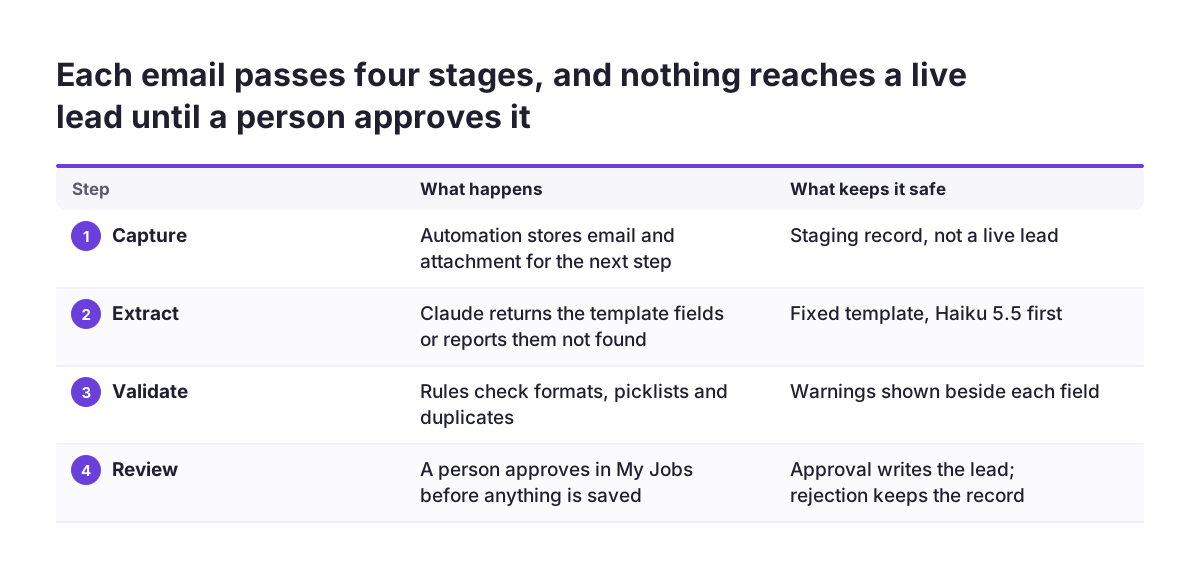
An email extraction setup for Zoho CRM has four stages, and each one needs its own owner. If you treat the whole flow as a single "AI feature", you will not know where a bad record came from.
- Capture. An automation picks up the email and any attachment and stores them where the next step can read them. On the Zoho Community, practitioners describe clients sharing documents through WorkDrive or through a file upload field in CRM.
- Extract. The automation sends the email text and the files to Claude with a fixed template. The template lists the fields you want back. Claude returns those fields, or says it could not find them.
- Validate. Rules check the proposed values before a person sees them. Examples are email format, required fields and a lookup for an existing contact.
- Review. A person approves, corrects or rejects the proposal. Only after approval does the automation write to the live lead, contact or deal.
One community member described a similar pattern for documents. A shared file is downloaded and sent to Gemini or Claude with predefined templates. The AI response is then written back to the CRM record, all triggered by one automation. That description covers capture and extraction well. The validation and review stages are what turn a working demo into a process you can trust with customer data.
Choosing a Claude model for email extraction, and what it costs
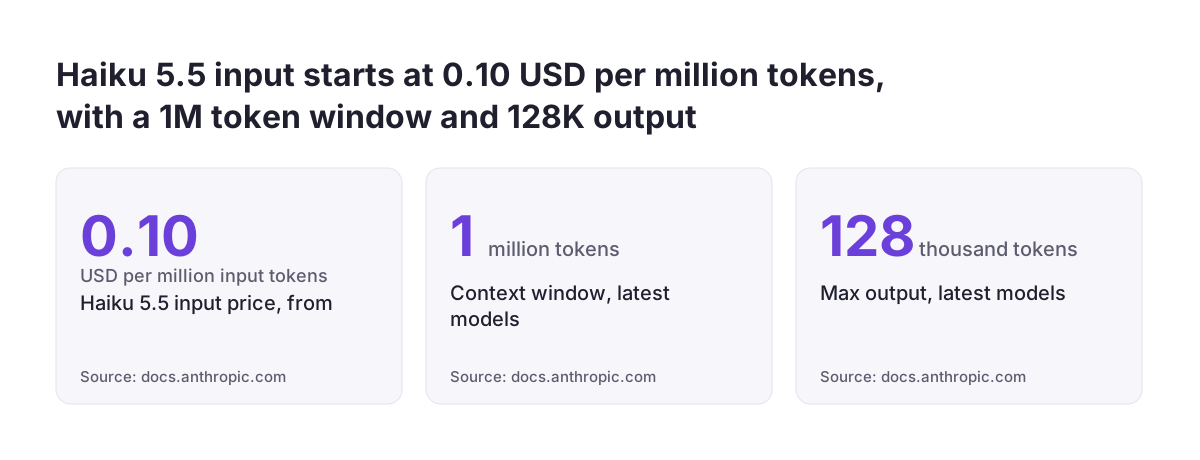
For most inbound email extraction, Claude Haiku 5.5 is the natural starting point. Anthropic positions it for high-volume, latency-sensitive tasks such as classification, extraction and routing. Move up a tier only when your tests show Haiku missing fields that matter.
Anthropic bills by the token. A token is a small chunk of text the model counts for input and output. The prices below come from Anthropic's models overview, in US dollars per million tokens.
| Model | Anthropic's positioning | Input / output price per million tokens |
|---|---|---|
| Claude Haiku 5.5 | High-volume tasks such as classification, extraction and routing | From $0.10 / from $0.50 |
| Claude Sonnet 5.5 | The best combination of speed and intelligence | $2 / $10 |
| Claude Opus 5.5 | The suggested start for most workloads if you are unsure | $4 / $20 |
| Claude Fable 5.2 | Demanding reasoning and long-horizon agentic work | $8 / $40 |
All four of these models have a 1M token context window and a maximum output of 128K tokens. A long email thread with attachments therefore fits in one request. Claude costs are separate from your Zoho licences, so budget both. See our overview of Zoho CRM pricing, editions and add-ons for the CRM side.
Pick the model per task, not per company. Simple lead emails can run on Haiku. A dense requirements document may justify Sonnet.
Getting emails and attachments from Zoho to Claude
The hardest practical question in email extraction is moving the file, not reading it. A Zoho Community user asked exactly this: how to pass a file received through WorkDrive or a CRM file upload field to Gemini or Claude, and then write the response back to the record. The community thread on passing Zoho CRM files to Claude shows how often teams get stuck here.
Two common routes
The first route is a custom automation that downloads the file and calls Claude directly. You control the template, the model and the error handling. The second route is an MCP server. An MCP server is a connector that exposes an application's actions to an AI client.
A Zoho Community post states that Zoho offers an MCP server that opens up the action libraries of more than 15 Zoho apps to any MCP client. The same forum also carries a developer's write-up of a custom MCP server connecting Zoho CRM with Claude.
Scanned documents and tables
Every current Claude model supports vision, so a photographed order form or a scanned PDF page can still be read. If your inbound documents are mostly tables, compare Zoho's own option too. A Zoho Community announcement states that Zia Vision's ICR capability can recognise, extract and store tabulated values in Zoho CRM subforms. For wider document processing beyond email, the same capture and review logic applies.
Worked example: a prospect email with a requirements document becomes a reviewed lead
This worked example follows one inbound email from arrival to an approved Zoho CRM lead. The company and person are fictional. The products, settings and model are real.
A message arrives in your shared sales inbox from a procurement manager at a fictional distributor. The body asks for a quote. A requirements document is attached as a PDF.
- Capture. Your automation creates a staging record. A staging record is a holding entry that keeps the raw email and the attachment, stored in a file upload field, separate from your live leads.
- Extract. The automation sends the email text and the PDF to Claude Haiku 5.5. A fixed template asks for company name, contact name, email address, phone, country, requested products and a one-line summary. The template tells Claude to answer "not found" rather than guess.
- Validate. Rules check that the email address is well formed and that the country is a value from your picklist. A search checks whether the company already exists in Zoho CRM.
- Review. A Zoho CRM approval process sends the staging record to a sales coordinator. The coordinator opens My Jobs, compares the proposal with the original email and approves it.
- Write. On approval, the automation creates the lead, or updates the existing account, and attaches the original PDF.
The salesperson then opens a complete lead with the source document attached. Nobody retyped the PDF, and nobody let the model write unchecked. If the coordinator rejects a proposal, the staging record keeps the reason. That reason becomes your test material for improving the template.
Validation rules that stop bad email data before it reaches a record
Validation rules catch the errors a reviewer would miss when tired or rushed. Run them between Claude's output and the human review, so the reviewer sees warnings next to each field.
These checks are worth building first:
- Required fields. Flag proposals with no company name or no contact route.
- Format checks. Test email addresses, phone numbers and postcodes against simple patterns.
- Picklist matching. Map free text such as a country name to the exact values your Zoho CRM fields accept.
- Duplicate search. Look up the email address and company before proposing a new lead.
- "Not found" handling. Leave a field empty when Claude reports it missing, and never fill it with a placeholder.
Some checks depend on the country you sell into. If you sell to Romanian companies, for example, ANAF validation for Zoho CRM checks the CUI/CIF tax identifier against the official register. Other member states have their own registers, so pick the check that matches your customers.
Validation also depends on a clean starting point. If your CRM still carries duplicates from an old import, extraction will happily match new emails to the wrong account. Our guide on how to migrate to Zoho CRM and keep your sales history covers cleaning data before it moves.
Human review with a Zoho CRM approval process and My Jobs
A Zoho CRM approval process is the simplest way to put a person between Claude and your live data. Zoho describes the approval process as a process automation tool for automating approvals in your organisation. Reviewers approve requests from one place, called My Jobs.
Configure the review around the staging record, not the live lead. The approval rule fires when Claude's proposal lands. It routes the record to the right reviewer, for example by region or by product line. The reviewer sees the original email, the attachment and the proposed fields together.
Approval triggers the write to the lead or account. Rejection keeps everything for later analysis.
At Svennis we keep Claude's proposals in a staging record and let the approval process decide what reaches live data, because the failures we see at clients almost always start with an automation writing straight into leads and contacts.
Keep the review fast, or people will stop doing it. Show only the fields that changed, highlight validation warnings, and give one-click approval for clean proposals. Track how often reviewers correct each field. A field that is corrected often needs a better template or a stricter rule.
A field that is never corrected is a candidate for lighter review later, once you have the history to justify it. This is the same discipline that good lead management needs anyway.
Where Claude email extraction setups usually break
Most broken email extraction setups fail at the edges, not in the model's reading. These are the failure points worth testing before go-live.
Model settings that a model does not accept
Models differ in which settings they accept. Anthropic's documentation shows that for Claude Sonnet 5.5, the Models API reports disabled thinking as not supported. An automation that turns thinking off and then switches to that model will therefore fail. You can query each model's capabilities and token limits through the Models API, so check before changing models.
Organisation settings
Anthropic notes that your organisation's settings can make a request fail even when the model supports a tool. For example, an administrator can disable web search. Agree with your administrator which tools the extraction flow uses.
Model retirement
Models are retired over time. Anthropic states that Claude Opus 5.5 will not be retired sooner than September 22, 2027. Record which model your flow uses and set a review date ahead of any retirement.
Silent failures
Attachments in unexpected formats, empty emails and forwarded threads with several senders all produce odd proposals. Log every failed or rejected extraction on the staging record so someone sees it the same week.
What Claude email extraction means for a company in the EU
For an EU company, Claude email extraction is a data protection question as much as a technical one. Sales emails carry names, addresses and phone numbers of real people. Treat the extraction flow as part of your GDPR documentation, alongside the CRM itself.
Three decisions deserve a written answer before go-live:
- Where Claude runs. Anthropic lists the latest models on the Claude API, Amazon Bedrock, Google Cloud, Microsoft Foundry and Claude Platform on AWS. Choose the platform whose hosting and processing terms your data protection officer has approved.
- What Claude sees. Send only the email and attachments needed for extraction, not whole mailboxes or unrelated history.
- Who decides. The approval step records which person accepted each value. If you are assessing your AI use under the EU AI Act, that documented human decision is straightforward to explain.
Language matters too. All current Claude models are multilingual, so one flow can read emails in German, Romanian or French. Your picklists and validation rules, however, must match each country you serve. Tax identifiers, postcode formats and company registers differ between member states. Do not assume one country's check works everywhere.
For a wider view of how AI workloads handle personal data, see the notes on data security on our sister site.
Next steps: a checklist before you switch email extraction on
Start with one inbox and one record type, such as new leads from your sales address. Prove the full flow there before you add accounts, deals or support emails. The checklist below covers the decisions in this guide.
| Check | What to decide | Done when |
|---|---|---|
| Scope | Which inbox and which Zoho CRM module | One inbox, one module, written down |
| Template | The exact fields Claude returns, with "not found" allowed | Tested on a sample of real past emails |
| Model | Claude Haiku 5.5 first, a higher tier only if tests require it | Model name and settings recorded |
| Staging | Where raw emails and proposals wait | No proposal can write to a live record directly |
| Validation | Formats, picklists, duplicates, country checks | Warnings visible to the reviewer |
| Review | Approval process routing and reviewers in My Jobs | Every approval and rejection logged |
| Data protection | Platform, data minimisation, GDPR records | Signed off by your data protection officer |
Run the flow for a few weeks with full review, then look at which fields reviewers corrected. That evidence tells you whether to change the template, the model or the rules.
If your Zoho CRM structure needs work before extraction makes sense, start with the CRM itself. Our Zoho CRM implementation service for European businesses covers modules, fields and approval processes that this kind of automation depends on.