
Zoho CRM pricing in short: four paid editions billed per user
Zoho CRM pricing runs from a free edition for three users to four paid editions: Standard, Professional, Enterprise and Ultimate. Each paid edition is billed per user per month. Reported US list prices run from $14 to $52 per user on annual billing. Your real cost depends on the edition, the user mix, the add-ons and the implementation.
Zoho CRM pricing is the sum of four things. These are a per-user subscription for one edition, any extra user types, add-ons such as storage or backup, and the cost of setting the system up. The licence line is the easiest of the four to read. The other three are where budgets drift.
Zoho sells Zoho CRM as a pay-as-you-go service, billed monthly or yearly, with no binding contract. Local taxes such as VAT are charged on top of the listed prices. For a business in the European Union, the figure on the pricing page therefore excludes VAT.
Zoho accepts Visa, MasterCard, American Express and PayPal. For yearly subscriptions it also accepts bank transfer. That matters if your finance team prefers to pay a yearly invoice by transfer rather than put a recurring charge on a card.
Zoho CRM edition prices per user, on annual and monthly billing
Annual billing is the cheaper way to pay for every paid Zoho CRM edition. Method and Capsule, two CRM vendors that publish Zoho price breakdowns, report the same US-dollar list prices per user per month.
| Edition | Annual billing | Monthly billing | What it adds |
|---|---|---|---|
| Standard | $14 | $20 | Mass email, multiple pipelines, forecasting, workflows, custom modules |
| Professional | $23 | $35 | Blueprint, CPQ, inventory management, validation rules, client scripts |
| Enterprise | $40 | $50 | Zia, territory management, custom functions, sandbox, multi-user portals |
| Ultimate | $52 | $65 | Everything in Enterprise plus Zoho Analytics and higher limits |
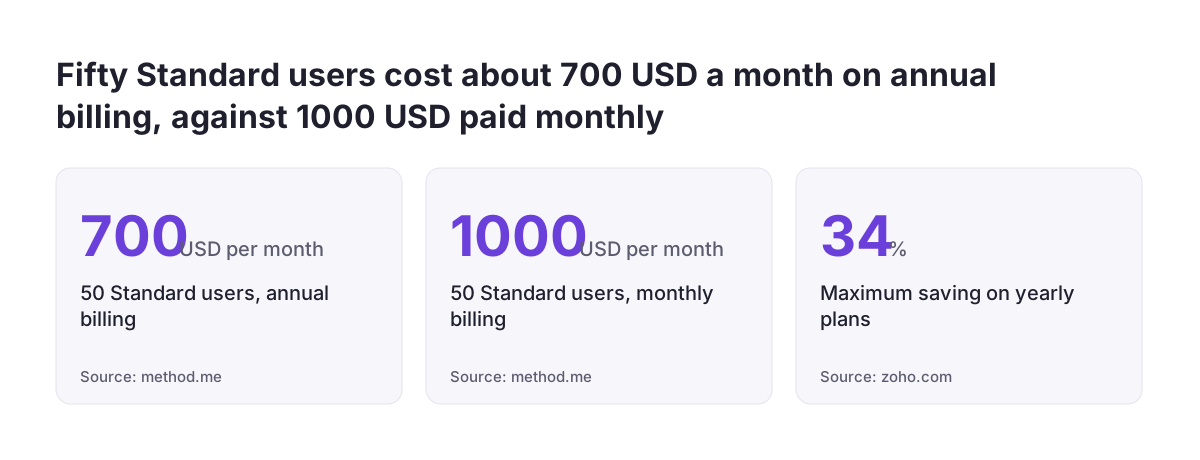
Zoho's own pricing page says yearly plans save up to 34%. Method puts the typical annual discount at 20 to 30 percent. The gap grows with headcount. In Method's Zoho CRM cost breakdown, 50 Standard users cost about $700 a month on annual billing and $1,000 a month on monthly billing.
Treat these as US list prices, not your invoice. Check the rate in your own currency on Zoho's CRM pricing calculator, then add VAT. Monthly billing still has a use in the first months, while you confirm that the edition you picked is the right one.
The Zoho CRM free edition: three users, one pipeline and tight limits
The free edition of Zoho CRM is free for up to three users, with no time limit. Capsule lists what it covers: leads, contacts, accounts, deals, tasks, events, call logs, notes, standard reports, web forms and mobile apps. Method adds that it has 1 GB of storage and one pipeline, with no mass email.
Zoho's pricing page sets two more limits on the free edition. You get 5,000 API calls a day to connect other apps. You can export data from Zoho CRM up to 10 times.
The free edition suits a trial run or a very small team. It stops fitting the moment you need a fourth user, a second pipeline or mass email. At that point the whole team moves to a paid edition.
A better way to test is the paid trial. According to Capsule, all paid Zoho CRM plans include a 30-day free trial. Use it on the edition you actually plan to buy, with a sample of your own data, rather than judging Zoho CRM by the free edition.
If all you need is a simple pipeline for a small team, the free edition may not be the only alternative. Compare Zoho Bigin against Zoho CRM before you commit to a paid CRM edition.
Choose the Zoho CRM edition by the feature you cannot work without
The right Zoho CRM edition is the lowest one that contains every feature your process depends on. The per-user step between editions is small next to the cost of working around a missing feature for years. These features mark the edition boundaries, based on Method's and Capsule's breakdowns and Zoho's pricing page:
- Standard: multiple pipelines, sales forecasting, workflows, custom modules and mass email up to 250 a day.
- Professional: Blueprint for guided sales processes, inventory management, validation rules, client scripts and 500 mass emails a day.
- Professional also adds CPQ: configure, price, quote, which matches products to customer requirements and manages quotes with price rules.
- Enterprise: Zia, territory management, custom functions, approval processes, sandbox testing, multi-user portals and survey campaigns.
- Ultimate: everything in Enterprise plus Zoho Analytics, 2,000 daily emails and expanded limits.
Zoho's pricing page also lists AI agents in Professional, which build and run tasks on your behalf. Zoho positions Ultimate for large, bespoke deployments, with expert consultation and migration assistance included.
At Svennis we list every user's role and the features that role cannot do without, then check each one against Zoho's edition comparison before we recommend an edition. That list settles the edition faster than a price comparison, because one missing feature rules a cheaper edition out.
Zoho CRM user mix: full users, Team users, Lite users and portal users
Not every person who touches Zoho CRM needs a full user licence. A full user, which Zoho calls an org user, has complete CRM access. Zoho offers narrower user types for people outside the sales core, and Zoho's calculator lists them as separate licences.
Team users
Team users are users who work in team modules, with full access to their own team's modules and limited access to organisation-wide modules. Zoho intends the licence for non-sales staff such as marketing, support, legal and finance. In org modules, Team users can view and add notes, tags and attachments in up to 10 modules.
Team users cannot use reports and dashboards in org modules, start calls or meetings, create automation or use Zia features there. Team users, team modules and team spaces exist only in the new CRM For Everyone interface. Check that your account runs on that interface before you plan around them.
Lite users
Lite users can be added only to Enterprise and Ultimate licences. You also need at least 25 regular user licences first. A smaller team on Professional cannot use them at all.
Portal users
Portal users are external stakeholders, such as customers or vendors, given restricted CRM access through portals. Portal users are an add-on available in all paid plans, and multi-user portals arrive at Enterprise. Price each user type for your region in the calculator before you assign roles.
Zoho CRM add-ons and usage limits that raise the monthly bill
Several Zoho CRM costs only appear once the system is in daily use. Method notes that costs can rise with extra storage, custom modules, additional portals or higher API usage. These are the add-ons and limits Zoho's own pages name:
- File storage for attachments, images and documents, sold in 5 GB blocks.
- Data storage for more records across all modules.
- Data backup, weekly or one-time, in a downloadable format.
- Mail merge, with a default of 1,000 merges per month per organisation and more available to buy.
- WhatsApp messages through the WhatsApp Business integration, which require credits.
The mass email limit in each edition covers only the organisation's sales activities. It does not include workflow email notifications. For marketing campaigns, Zoho points you to Zoho Campaigns, which is a separate product with its own licence.
Integrations carry a cost on both sides. Zoho's feature list states that integrations with third-party vendors and other Zoho products often need paid licences for Zoho CRM and for the integrated software. That includes the Zoho Finance Suite integration, which covers Zoho Books, Zoho Invoice, Zoho Expense, Zoho Inventory and Zoho Billing.
The same applies outside Zoho. If you connect an online shop, for example through a PrestaShop and Zoho CRM integration, budget for the licences of both systems and for the connector.
Zoho CRM support plans: Classic is included, Premium and Enterprise cost extra
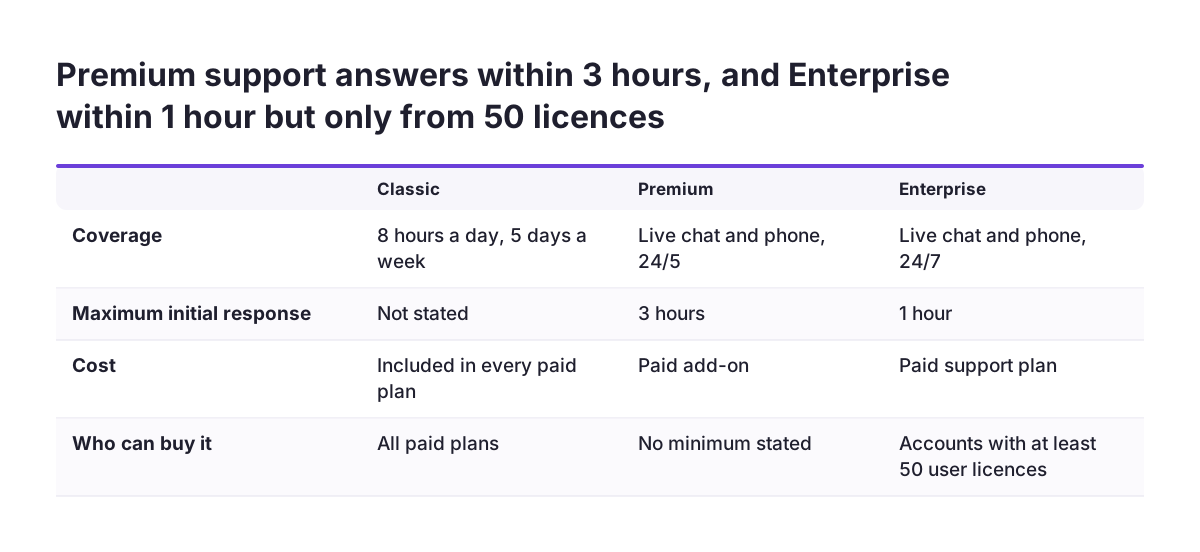
Classic support, eight hours a day on five days a week, is included in every paid Zoho CRM plan. Two paid support plans sit above it. The calculator describes all three:
| Support plan | Coverage | Maximum initial response | Condition |
|---|---|---|---|
| Classic | 8x5 | Not stated | Included in all paid plans |
| Premium | 24/5 live chat and phone | 3 hours | Paid add-on |
| Enterprise | 24/7 live chat and phone | 1 hour | Minimum 50 user licences |
The deciding question is whether your sales process stops when Zoho CRM has a problem outside office hours. If it does, price Premium support first. Enterprise support is open only to accounts with 50 or more user licences, so smaller teams cannot buy it.
Zoho support answers questions about the product. It does not redesign your pipeline or fix a configuration your team built. Keep that difference in mind when you weigh a paid support plan against help with the setup itself.
Zoho CRM implementation cost: configuration, data migration and integrations
Implementation is the Zoho CRM cost that appears on no pricing page. Method notes that Zoho CRM has no forced onboarding fees, and you can use the product at the listed prices. That holds for the licence. Someone still has to configure modules, fields, pipelines, automation and permissions, import the data and connect other systems.
The time is real even for experienced people. In an older Zoho community thread, a consultant whose firm had customised at least 15 Zoho CRM packages reported spending more than 25 hours importing one client's data. That was on a two-user Standard account.
You have three ways to cover the work:
- Do it in-house, with a named person who owns the configuration.
- Use Zoho's own end-to-end services, which run from requirement gathering to setup and onboarding, with programmes for SMEs and enterprises.
- Bring in a Zoho partner for design, migration and integrations.
Ultimate includes expert consultation and migration assistance, which offsets part of its higher price for large deployments. For a move from another CRM, plan the import before you pick a go-live date. Our guide to migrating to Zoho CRM without losing your sales history covers that step. For a full rollout across several countries, see how we approach Zoho CRM implementation in Europe.
Where companies overpay and where they underbuy on Zoho CRM
Companies overpay on Zoho CRM when they buy flexibility or seats they do not use. They underbuy when they choose an edition on price alone and hit a limit after go-live.
Common ways to overpay
Staying on monthly billing after the edition is settled costs real money, since Zoho says yearly plans save up to 34%. Giving full licences to marketing, finance or legal staff who only need team modules is the second leak. The third is buying Zoho CRM, Zoho Desk and Zoho Campaigns separately without pricing Zoho CRM Plus. Zoho CRM Plus is a bundle of sales, marketing and service apps that starts at $20 per user per month.
Common ways to underbuy
Edition limits catch teams out. In an older Zoho community thread, a consultant bought Standard for a client. The account then showed the message "Sorry, you cannot create more custom fields in your edition." A Zoho sales manager confirmed that the per-edition limits appeared only in the detailed technical comparison, not on the main pricing page. Read Zoho's feature-wise comparison of editions for limits, not only the pricing page.
Portal-heavy designs carry a licensing risk. In a separate Zoho community complaint about portal user licences, a customer objected to a licensing change. The customer said it would cost their company 150,000 USD a year for something previously free. Read every Zoho licensing announcement to the end.
Next steps to price your Zoho CRM rollout
A reliable Zoho CRM budget comes from working through the costs in a fixed order. Use these steps before you sign up for any paid edition:
- List every person who will use the CRM, with their role and the features they cannot work without.
- Assign each person a user type: full user, Team user, Lite user or portal user.
- Pick the lowest edition that covers every must-have feature, and check its limits in the feature comparison.
- Price that edition in the calculator in your own currency, compare annual and monthly billing, and add VAT.
- Add the add-ons you will use: storage, backup, mail merge, WhatsApp credits and integration licences.
- Estimate implementation: configuration, data migration and integrations, and decide who does each.
- Run the 30-day trial on the chosen edition with a sample of your own data.
If you are still choosing between vendors, set the same budget against the alternatives. Our comparisons of Zoho CRM versus HubSpot and Zoho CRM versus Salesforce walk through pricing and hidden costs for EU businesses.
Sources
- Zoho CRM Pricing and Editions
- Zoho CRM Pricing Calculator
- Zoho CRM Preise und Versionen
- Feature-wise comparison of Zoho CRM Editions
- Method: How much does Zoho CRM cost?
- Capsule CRM: Zoho CRM pricing, is it worth the cost?
- Zoho Community: Massive price increase for user licenses of Zoho Portal
- Zoho Community: Before you subscribe to Zoho CRM, custom field limits by edition