Zoho Bigin vs Zoho CRM: two products built for different jobs
The Zoho Bigin vs Zoho CRM decision comes up for almost every small or growing business that settles on Zoho. Both products come from the same vendor and both manage customers and deals, but they are built for different stages of a company and different levels of process complexity.
Zoho describes Bigin as an offshoot of Zoho CRM: a pipeline-centric CRM built and priced for small businesses. Zoho CRM is the older and larger product. It started in 2005 as one of the first cloud applications Zoho launched, and Zoho positions it for mid-market and enterprise sales teams that need multi-step workflows and deep customisation.
Zoho also explains why Bigin exists as a separate product. It noticed that other CRM vendors were offering the lowest tier of their enterprise system as their "small business CRM". Bigin was designed the other way round, starting from what a small team needs rather than cutting down a larger platform.
That difference matters for your choice. You are not picking a cheap version and an expensive version of the same thing. You are picking between a tool that keeps things simple on purpose and a platform that can model almost any sales process, at the cost of more setup. The rest of this post compares them on features, price, integrations and migration, then sets out the signs that tell you which one fits.
What Bigin does well
Bigin is built around the pipeline. Deals move across stages on a visual board, and contacts, activities and follow-ups hang off those deals. Zoho states that Bigin is built for businesses with 1 to 20 employees, naming agencies, consultancies, real estate firms, schools, clinics, retailers and ecommerce brands as typical users, and that it gets you running in about 30 minutes.
It comes in three paid editions: Express, Premier and Bigin 360. According to appvizer's comparison, Express covers up to 50,000 records, light automation, calls and web forms. Premier adds multiple pipelines, more automation, custom views and API access. Bigin 360 adds integration with other Zoho apps such as Zoho Desk and Zoho Books, richer reports and priority support.
Features small teams often do not expect
- A built-in intelligence layer powered by Zia, Zoho's AI, with no separate subscription according to Zoho.
- Phone, email and live chat support on every plan.
- Direct connections to tools like Microsoft 365, Microsoft Teams, Google Workspace, QuickBooks, Shopify and PayPal.
If your sales process is "enquiry comes in, we quote, we follow up, we win or lose", Bigin covers it without asking you to design a system first. For a guided setup of exactly this kind, see our Zoho Bigin setup service.
What Zoho CRM adds on top
Zoho CRM models the whole revenue operation rather than only the pipeline. The practical differences show up in four areas: how enquiries are qualified, how strictly the process is enforced, how far the data model can be extended and how many other systems you can connect.
- Lead qualification. Zoho CRM separates unqualified enquiries from deals and adds lead scoring from the Standard edition, according to appvizer.
- Process control. Blueprint, available from Professional, lets you define a sales scenario step by step, with validation, assignment and multiple triggers. Enterprise adds CommandCenter and process validation.
- Custom modules. Enterprise lets you build entirely new modules, so you can track objects such as projects, contracts or installations alongside deals. Bigin works with a fixed set of modules.
- Integrations. appvizer counts native connectors to more than 500 applications for Zoho CRM, against around 25 direct integrations for Bigin.
Support also scales with the edition. Zoho CRM offers priority support from Enterprise and dedicated support on Ultimate, and appvizer notes that Bigin has no plan equivalent to Ultimate. The table below sums up the differences that most often decide the choice.
| Zoho Bigin | Zoho CRM | |
|---|---|---|
| Built for | Small businesses with 1 to 20 employees | Mid-market and enterprise sales teams |
| Lead scoring | Not a listed feature | Included from Standard edition |
| Process control | Pipelines and light automation | Blueprint from Professional edition |
| Custom modules | Fixed set of modules | New modules from Enterprise edition |
| Direct integrations | Around 25 | More than 500 native connectors |
| Time to start | About 30 minutes | Needs configuration for your process |
| Free plan | 1 user | 3 users |
What each option costs
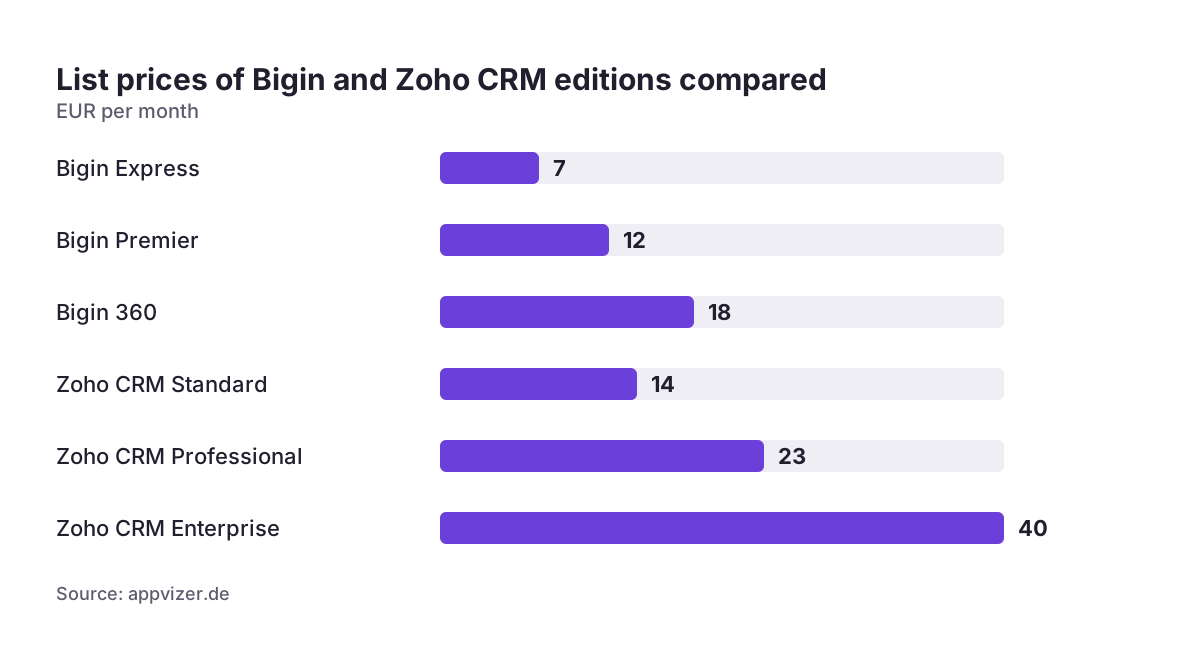
Price is where Bigin looks most attractive, and the gap is real at the entry level. appvizer lists Bigin at 7 EUR a month for Express, 12 EUR for Premier and 18 EUR for Bigin 360. Zoho CRM starts at 14 EUR for Standard, then 23 EUR for Professional, 40 EUR for Enterprise and 52 EUR for Ultimate. The chart below puts the most relevant editions side by side.
Two details are easy to miss. First, Bigin 360 costs more than Zoho CRM Standard. If you are paying for the top Bigin edition mainly to connect other Zoho apps, compare it honestly with CRM Standard or Professional before renewing. Second, Zoho states that local taxes such as VAT come on top of listed prices, so check with your finance team how VAT applies to you, since most VAT-registered businesses reclaim it or account for it themselves under the reverse charge.
Free plans
Bigin Free is free for 1 user and Zoho CRM Free for 3 users. appvizer adds that the free Bigin plan includes 1 pipeline and 500 records. Free plans are useful for testing, but they are rarely where a team of several salespeople ends up.
List prices change, so treat these numbers as a guide and check current pricing in your region before you commit to an annual contract.
| Indicator | EUR per month |
|---|---|
| Bigin Express | 7 |
| Bigin Premier | 12 |
| Bigin 360 | 18 |
| Zoho CRM Standard | 14 |
| Zoho CRM Professional | 23 |
| Zoho CRM Enterprise | 40 |
| Source: appvizer.de | |
When Bigin is enough
Bigin is the right answer more often than people expect. A tool that your team actually uses every day beats a powerful platform that nobody updates. Bigin tends to be enough when most of the following are true:
- You have a small team, within Zoho's stated range of 1 to 20 employees, and one or two people own sales.
- Your process is linear: an enquiry becomes a deal, and the deal moves through a handful of stages.
- You do not need to enforce steps, such as approvals before a discount or mandatory fields at a given stage.
- Your quotes and invoices live in an accounting tool, and you only need the CRM to track that the deal happened.
- Your integration needs are covered by the common tools Bigin connects to directly, such as email, calendar and accounting.
- You want to be working in the system this week, not after a configuration project.
If you run separate product or service lines, Bigin Premier's multiple pipelines usually handle that without moving up. A consultancy with one pipeline for projects and another for training, for example, can stay on Bigin comfortably. The case for Zoho CRM starts when the process itself, not the number of deals, becomes the problem.
Signs you need Zoho CRM before you outgrow Bigin
The expensive mistake is not choosing Bigin. It is staying on Bigin for a year after the business has outgrown it, while people build workarounds in spreadsheets. We have delivered over 200 implementations, and the migrations that hurt most were the ones where those workarounds had quietly become the real system. Watch for these signs.
- Enquiries clog the pipeline. If unqualified contacts sit as deals and distort your forecast, you need a lead stage and scoring.
- You need rules, not reminders. When a manager must approve discounts, or a deal must not advance without certain data, you need Blueprint.
- You track things that are not deals. Contracts, assets, service visits or projects call for custom modules.
- Sales and other teams share customers. Once marketing, service and finance work from the same records, you need the permissions and connectors of the full CRM.
- Reporting questions go beyond the pipeline. appvizer describes Bigin's reporting as limited and notes it has no native marketing functions.
- You need systems Bigin cannot reach. An ERP, a web shop or a national tax registry usually needs a proper integration.
Two or more of these signs usually justify planning the move now. For what a full rollout involves, see our Zoho CRM implementation page.
Integrations, AI and data protection
Integration depth is often the deciding factor for European businesses with an existing ERP or web shop. Bigin covers the everyday tools, including Zoho Books, Zoho Analytics, QuickBooks and Shopify. Zoho CRM goes much further, which is why ERP and e-commerce projects, such as a SAP Business One and Zoho CRM sync, are built on the full CRM rather than on Bigin.
AI in both products
Zoho says Bigin includes an intelligence layer powered by Zia, and that you can connect AI tools like Claude to Bigin through Zoho MCP for Bigin to get insights and take action with a prompt. In Zoho CRM, appvizer lists Zia AI as part of the Enterprise edition, where it is meant to predict conversions, suggest the best time to contact someone and analyse customer sentiment. If lead management with AI support is part of your plan, the richer data model of Zoho CRM gives the AI more to work with.
GDPR
Zoho states that Bigin runs on its own infrastructure and names certifications such as ISO 27001 and SOC 2 for it. Certifications describe Zoho's platform, not your use of it. You are still the controller: you choose the lawful basis for each contact, set retention, restrict access and sign Zoho's data processing agreement, and finer-grained roles and permissions are one more reason larger teams choose Zoho CRM.
Moving from Bigin to Zoho CRM later
Starting on Bigin is low risk because the path upward exists. Zoho states that businesses that outgrow Bigin can switch to Zoho CRM and migrate their data and preferences, and appvizer describes the upgrade as a smooth one with simplified data migration. If you are coming from another tool, imports from Pipedrive, HubSpot and Insightly are supported, and Bigin also supports CSV imports.
What does not migrate automatically is the thinking. Automation you built in Bigin was designed around its limits, and in Zoho CRM you will usually want to redesign it using Blueprint and a proper lead stage rather than copy it one to one. Plan the move as a short project, not a button click. Our guide on how to migrate to Zoho CRM without losing your sales history covers the steps.
Running both, or neither separately
You do not have to choose one for the whole company. Zoho allows Bigin and Zoho CRM to be used together, with data sync handled through Zoho Flow. And if you are considering the full suite, Bigin is included in Zoho One, so a small unit can run Bigin while the main sales team uses Zoho CRM under the same licence.
Practical next steps
You can make this decision in a week with a structured check rather than a long evaluation.
- Write down your sales process from first contact to invoice, including every approval and handover. If it fits on one line of stages, Bigin is a strong candidate.
- Score yourself against the six signs above. Two or more point to Zoho CRM now, not in a year.
- List every system the CRM must talk to, such as accounting, ERP, web shop, telephony and email marketing, and check which product connects to each.
- Price three scenarios for your real headcount: Bigin Premier, Bigin 360 and Zoho CRM Professional, adding VAT. Remember that Bigin 360 costs more than CRM Standard.
- Use the 15-day free trial. Zoho offers it without a credit card, so load a sample of real deals and ask your salespeople to work in it for a few days.
- Decide your exit point. If you start on Bigin, agree in advance which trigger, such as headcount or a new approval rule, will start the move to Zoho CRM.
If you are still weighing Zoho against other vendors, our guide on how to choose the right CRM for your European business covers the wider selection criteria.