Multiple departments and brands in Zoho Desk: the short answer
Multiple departments and brands in Zoho Desk work on two separate levels. A department separates how tickets are handled. A branded Help Center separates what customers see. Give a team its own department when its tickets need different handling. Give a brand its own Help Center when customers must recognise it as a separate company or product.
A department in Zoho Desk is a self-contained support unit inside one Zoho Desk account. According to Zoho's own documentation, each department can have its own service channels, SLAs, notifications, community and Knowledge Base articles. An SLA, or service level agreement, is the set of response and resolution targets your team commits to.
A Help Center is the customer portal where users read knowledge base articles to learn about a product and its processes. Zoho Desk's multi-brand support gives each brand its own Help Center, so customers of one brand see that brand's identity rather than a shared portal.
This guide explains how to choose between these options. It walks through one worked example. It also flags the settings that an administrator cannot reverse alone.
What a department controls in Zoho Desk
A Zoho Desk department controls five things that can differ from one department to the next. Zoho lists them as follows:
- Service channels: the routes by which tickets reach the department.
- SLAs: the response and resolution targets that apply to its tickets.
- Notifications: the alerts sent to customers and agents.
- Community: the department's customer forum.
- Knowledge Base articles: the self-help content published for its customers.
Read that list as a test. If two teams would use the same channels, the same SLAs, the same notifications and the same articles, they probably belong in one department. If any of those five must differ, a separate department is the cleaner answer.
The test also shows what a department is not. A department is not a reporting label or an org chart box. Creating a department for every manager leaves you maintaining five settings per department with nothing gained. Departments should mirror differences in how customers are served, not differences in who signs the timesheets.
When a team or product line needs its own department
A team or product line needs its own Zoho Desk department when its support differs in at least one of the five department settings. The most common triggers are different SLAs and different knowledge base content. A product sold to businesses with contractual response times rarely shares SLAs with a consumer product.
Use these questions to decide for each team or product line:
- Do its customers expect different response or resolution times?
- Does it receive tickets through its own channels, such as a dedicated support address?
- Do its customers need articles that would confuse other customers?
- Should its notifications carry a different tone or sender?
- Does it run its own customer community?
Two or more "yes" answers make a strong case for a separate department. One "yes" may still justify it if the difference is contractual, such as an SLA you have signed with a client.
Keep internal specialisms out of this decision. A billing team or a second-line technical team often handles tickets from several product lines. Those teams usually work better as groups of agents who receive escalated tickets than as departments with their own customer-facing setup.
When a brand needs its own Help Center
A brand needs its own Help Center when its customers should not see the parent company or the other brands. Zoho Desk's multi-brand customer support exists for exactly this case. It lets you distinguish the identity of each brand by giving each one its own Help Center.
Brand separation is a customer-facing decision, not an internal one. Ask whether a customer of brand A would be confused or put off by landing on a portal that also shows brand B. If the brands are sold to different audiences, under different names, the answer is usually yes.
Multi-branding builds on departments. Zoho sets one structural rule here: a department used for multi-branding must not be associated with more than one Knowledge Base category. In practice, each branded department needs one clean article category. Tidy the knowledge base before you switch multi-branding on, not after.
Branding details matter too. If you do not upload a logo, visitors to your branded Help Centers see the default Zoho Desk logo in the masthead. Zoho specifies a logo of no more than 20 KB, best viewed at 200:40 pixels. Prepare one logo file per brand to that size before setup.
Common or unique user base for branded Help Centers
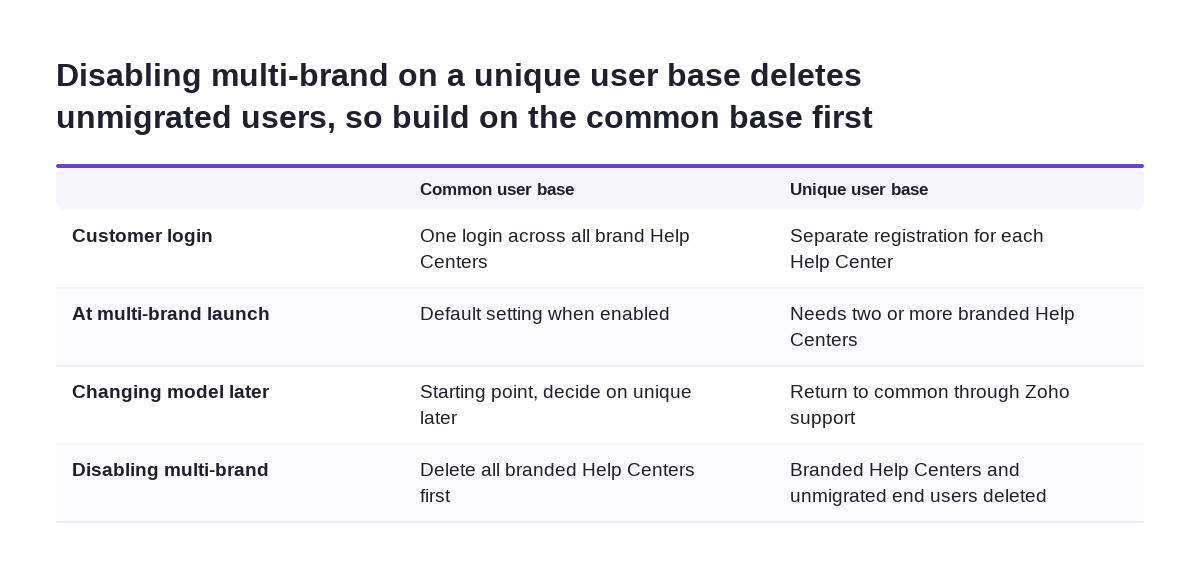
Zoho Desk offers two models for multi-brand Help Centers: the Common User Base and the Unique User Base. The choice decides whether a customer has one login across all your brands or a separate login for each.
The Common User Base is the model in which end users access multiple Help Centers with one set of login credentials, such as an email address and password. This is the default. When you enable multi-brand support, Zoho Desk switches it on with a common user base.
The Unique User Base is the model in which end users can only access the Help Center they registered for or were invited to. When a user visits a new brand, they must register again to access that Help Center. You need at least two branded Help Centers configured before you can enable this model.
Which model fits
Choose the common user base when the same customers buy from several of your brands and would resent logging in twice. Choose the unique user base when the brands must stay fully apart in the customer's eyes, for example when brand B should not reveal that it shares an owner with brand A.
Decision table: department, branded Help Center and user base
The table below compares the four structural options in Zoho Desk across what they separate, what customers see and how easily you can change course. Each option builds on the one above it.
| Option | What it separates | What customers see | Changing course later |
|---|---|---|---|
| One shared department | Nothing; one set of channels, SLAs and articles | One portal for everyone | Easy to split later |
| Separate departments | Channels, SLAs, notifications, community, articles | Content per department | Settings to maintain per department |
| Branded Help Centers, common user base | Department settings plus a Help Center per brand | A branded portal, one login across brands | All branded Help Centers must be deleted before disabling |
| Branded Help Centers, unique user base | As above, plus separate customer accounts per brand | A branded portal, separate login per brand | No self-service switch back; disabling deletes Help Centers |
Start at the top and move down only when a real customer need pushes you there. Each step down adds separation. It also adds settings to maintain and choices that are harder to reverse.
Worked example: two brands on one Zoho Desk
Take a fictional company that sells tools under two brands. "Alba Pro" serves professional installers. "HomeFix" serves consumers. Installers have a contract with a fast response time, while consumers mostly need how-to articles. The company runs one Zoho Desk account.
- Create two departments. Name them Alba Pro Support and HomeFix Support. Each gets its own service channels, its own SLA and its own notifications.
- Give each department one Knowledge Base category. Zoho requires that a multi-branding department is not associated with more than one category. Move installer articles into the Alba Pro category and consumer articles into the HomeFix category.
- Enable multi-brand support. Zoho Desk turns it on with the common user base by default.
- Set up the two branded Help Centers. Upload each brand's logo, at no more than 20 KB and ideally 200:40 pixels. Without a logo, customers see the Zoho Desk logo.
- Decide on the user base. Installers rarely buy consumer products, and the brands are marketed separately. The company could move to the unique user base, now that two branded Help Centers exist.
The company should pause before step five. The unique user base cannot be switched back by an administrator. A test with real installers and consumers is cheap compared with a contact request to Zoho support after go-live.
Routing, SLAs, email channels and agent access as the company grows
A Zoho Desk structure stays workable as the company grows when each new team or brand is added by the same rules as the first. Write those rules down once: what earns a department, what earns a Help Center and which user base applies. Then apply them every time.
Email channels and routing
Give each department its own inbound channels, so a ticket lands in the right place on arrival. A shared address that someone sorts by hand turns into a bottleneck as volume grows. Keep a simple register of which address or channel feeds which department.
SLAs
Set SLAs per department to match what each customer group was actually promised. Copying one SLA across every department hides the difference between a contractual target and a goodwill target.
Agent access
Decide which agents work in which department before you invite them, and review that list when people change roles. When Svennis sets up a multi-brand Zoho Desk, we build every branded Help Center on the default common user base first. We move to the unique user base only after the brand owners have tested it, because administrators cannot reverse that switch.
Changes that are hard to undo in Zoho Desk multi-branding
Three multi-brand settings in Zoho Desk are difficult or destructive to reverse. Know them before you click.
- Switching from unique to common user base. Administrators cannot switch back independently. Zoho's documentation says you must contact support@zohodesk.com to return to the common user base.
- Disabling multi-brand with a unique user base. The branded Help Centers are deleted. Their end users can no longer visit or submit tickets to those brands. End users who are not migrated to the default Help Center are deleted.
- Disabling multi-brand with a common user base. You must first delete all of your multi-brand Help Centers.
The practical lesson is to treat the user base model as a design decision, not a toggle. Agree it with whoever owns each brand. Record who approved it. Test it with a small group of real customers before you announce the new Help Centers.
If you later merge two brands, plan the customer migration first. The deletion rule means a careless disable can remove customer accounts that you still need.
What a multi-brand Zoho Desk means for companies across the EU
For a company operating across the European Union, a multi-brand Zoho Desk is often a market decision as much as a brand decision. Groups that trade under different names in different member states frequently want each name to keep its own customer portal. Branded Help Centers serve that need inside one account.
The deletion behaviour deserves attention under GDPR. Disabling multi-brand with a unique user base deletes end users who were not migrated. Your data protection lead should know about that consequence before anyone changes the setting. Record it in your processing documentation, alongside who may change the structure.
The user base model also shapes what customers are told. With a common user base, one set of credentials opens several brands' Help Centers. Make sure your privacy information reflects that customers are shared across those brands. With a unique user base, each brand registers its own users, which fits companies that keep brands strictly apart.
Rules that apply in a single member state, such as a legal deadline for answering complaints in a regulated sector, belong in that department's SLA. Keep them there rather than imposing them on every department.
Next steps for structuring departments and brands in Zoho Desk
Start your Zoho Desk structure on paper, not in the settings. These steps keep the work in a sensible order:
- List every team, product line and brand that handles customer tickets today.
- Run each one through the five department settings: channels, SLAs, notifications, community and articles.
- Mark which brands need their own Help Center, and agree the user base model with each brand owner.
- Clean the knowledge base so each branded department has a single category.
- Prepare one logo per brand at no more than 20 KB.
- Build and test on the common user base before any irreversible change.
If you want help designing or building the structure, our Zoho Desk implementation service covers departments, channels, SLAs and Help Centers. If you are still choosing a helpdesk, our comparison of Zoho Desk and Freshdesk sets the two side by side. Managers who want one set of numbers across all brands can read about our Zoho Analytics implementation work before deciding on reporting.