What Zoho Books for a company in two EU countries has to achieve
Setting up Zoho Books for a company in two EU countries means managing one tension. Each country has its own tax and invoicing rules, and the books must follow them exactly. Management, meanwhile, wants one view of revenue, costs and cash across both countries.
How you resolve that tension depends on three things. The first is how the business is structured legally. The second is which edition of Zoho Books each country needs. The third is how VAT applies to what you sell across the border. Once those are settled, currency handling and a combined report follow fairly directly.
This guide first defines the terms. It then covers the EU VAT rules that drive the setup and gives you a decision table. After that comes a worked example with a German parent company and a French subsidiary, followed by consolidated reporting, what changes by country, and next steps. If you want to know what the software itself covers before you read on, the Zoho Books setup overview is the place to start.
A point of scope: this post explains how the setup follows from the rules. It does not replace advice from a tax adviser in each of your two countries. That adviser should confirm your registrations and filing duties before you configure anything.
The terms you need first
A handful of terms decide almost every choice in this setup. Here is what each one means in this guide.
- Organisation: a separate set of books in Zoho Books, with its own settings, contacts and transactions. Zoho prices every plan per organisation per month, so a second organisation means a second subscription.
- Edition: the country version of Zoho Books. Zoho publishes, for example, a Germany edition, a France edition and a Global edition. Each edition carries the tax settings and document rules of its country.
- Base currency: the currency an organisation keeps its books in. Transactions in other currencies are converted into it.
- VAT registration: in the Germany edition, you enter a VAT Registration Number and a VAT Registration Date. Zoho Books does not let you apply VAT to transactions dated before that registration date.
- Reverse charge: an arrangement where the customer, not the supplier, accounts for the VAT on a supply.
- One Stop Shop (OSS): the EU scheme through which a business declares VAT that is due in other member states on certain sales to consumers.
- Consolidated reporting: combining the figures of both organisations into one set of reports for management, without changing the books of either country.
Keep the difference between an organisation and an edition in mind throughout. You choose an edition for each organisation, and that choice largely determines what the organisation can and cannot do.
The EU VAT rules that shape the setup
The legal basis for VAT across the Union is Council Directive 2006/112/EC of 28 November 2006, which establishes the common system of value added tax. The directive has been amended many times, most recently in 2025, so always read the latest consolidated text on EUR-Lex.
The directive requires a standard rate of at least 15%, and each member state sets its own standard and reduced rates within the directive's limits. It also calls for a harmonised list of the particulars an invoice must show and for common arrangements on electronic invoicing. Member states may require certain statements and returns to be filed electronically, so filing formats can differ between your two countries.
Sales to consumers in the other country
Article 59c of the directive sets an EU-wide threshold of EUR 10,000 for two kinds of sale to consumers in other member states: distance sales of goods, and telecommunications, broadcasting and electronically supplied services. The threshold counts those sales to all other member states together, and it only applies to a business established in a single member state. Most other services to consumers stay taxed where the supplier is, whatever the amount.
This is an EU rule, not a rule of one member state. Above the threshold, VAT on those sales is due in the country where the customer is. You can declare it through the One Stop Shop instead of registering in each country.
Services to businesses in the other country
Article 44 covers services supplied to business customers. As a general rule the supply is taxed where the customer is established, and under Article 196 the customer accounts for the VAT through the reverse charge. This matters in particular for invoices between your own two companies, as the worked example shows.
One organisation or two: the decision
The first decision is whether you need one Zoho Books organisation or two. The deciding question is whether the second country is home to a separate legal entity with its own VAT registration, or whether you are selling into it from your home country.
| Your situation | Organisations | Why |
|---|---|---|
| Two legal entities, each registered for VAT in its own country | Two, one per entity, each in its country's edition | Each entity needs its own base currency, VAT registration and invoice rules. The France edition does not allow multiple tax registrations in one organisation. |
| One entity selling services to businesses in the other country | One | Under Article 44 the customer accounts for the VAT through the reverse charge. |
| One entity, established only in its home country, whose distance sales of goods and electronic services to consumers in all other member states together stay below EUR 10,000 | One | Below the Article 59c threshold, those sales stay taxed in the home country. |
| One entity whose distance sales of goods and electronic services to consumers in all other member states together exceed EUR 10,000 | One, with OSS tracking switched on | VAT on those sales is due where the customer is and can be declared through the One Stop Shop. OSS tracking is optional in Zoho Books, so you must switch it on yourself. |
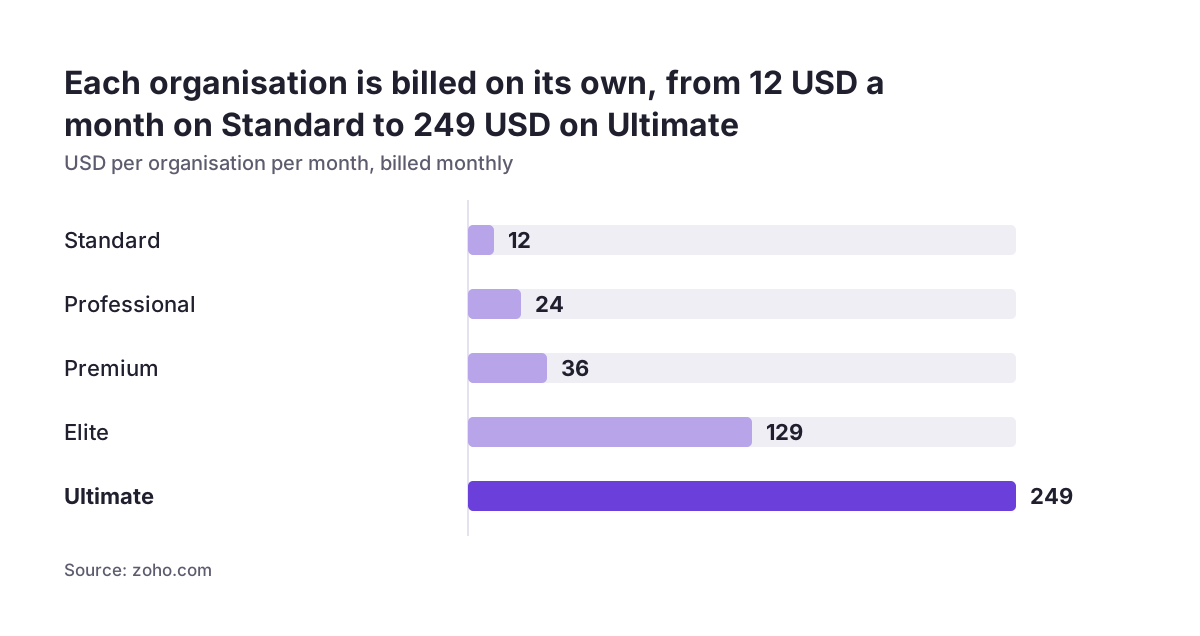
The cost follows the structure. The Standard plan costs USD 12 per organisation per month billed monthly, or USD 10 billed yearly. A second organisation doubles that line, and the prices exclude local taxes. That extra cost is small next to the cost of issuing invoices that do not meet one country's rules.
Choosing the right edition for each country
Once you know how many organisations you need, pick the edition for each one. The edition carries local rules that a general setup cannot reproduce by configuration alone.
Germany edition
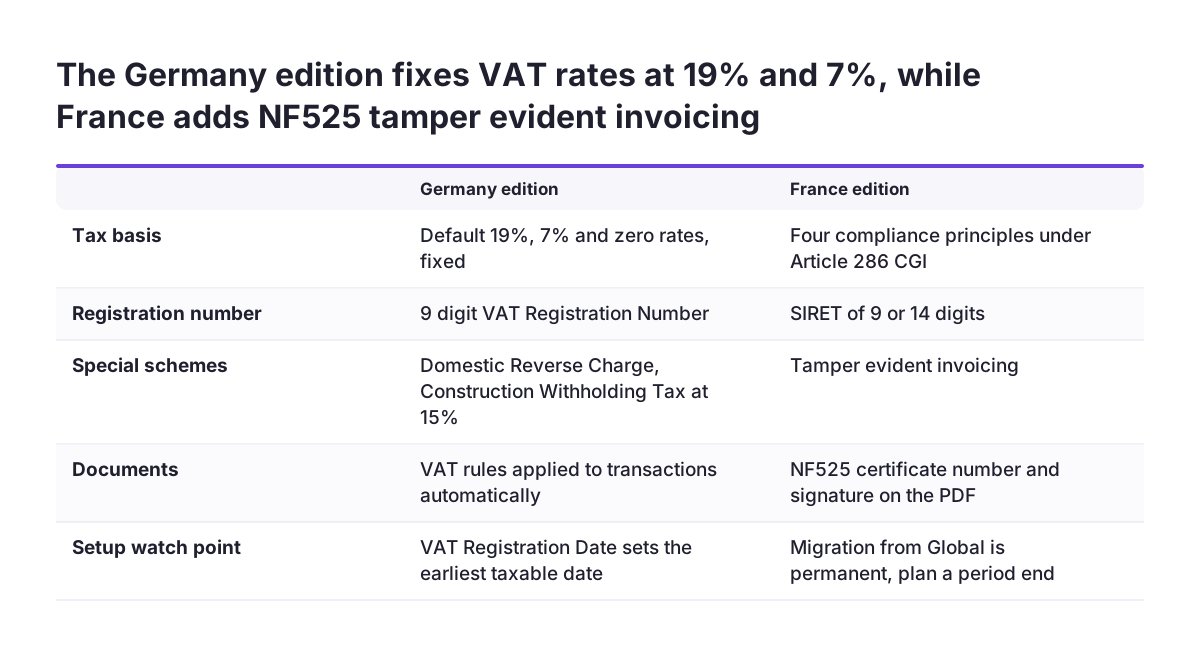
According to the Germany edition tax help page, the organisation comes with default VAT rates of 19% standard, 7% reduced and a zero rate. These default rates cannot be edited or deleted. The edition asks for a 9-digit VAT Registration Number and supports VAT rules, which are sets of rates applied to transactions automatically. When both a contact and the items on a transaction carry a VAT rule, the contact's rule overrides the item rules.
France edition
The France edition is built around the four compliance principles of Article 286 of the French General Tax Code and offers ISCA-compliant features. Every issued document is digitally signed so that tampering can be detected. Draft invoices receive a number only once they are marked as Open, and Zoho keeps transaction data for 7 years.
Your French adviser should confirm the retention periods that apply to you. Tax Rules, Group Tax creation and Multiple Tax Registrations are not available in this edition.
Moving from the Global edition
If a French organisation already runs on the Global edition, Zoho's Global to France migration guide sets two conditions. The base currency must be Euro, and Reverse Charge must be disabled for both sales and purchases. The migration is permanent and cannot be reverted. Retainer invoices, customer debit notes, sales receipts and self-billed invoices become read-only, so plan the switch for a period end.
Worked example: a German parent with a French subsidiary
Take an illustrative company, Nordlicht GmbH, based in Germany, with a subsidiary, Nordlicht France SAS. Both are separate legal entities, and each is registered for VAT in its own country. The first row of the decision table applies, so the company needs two organisations.
- Create the German organisation in the Germany edition. Set Euro as the base currency, then enter the 9-digit VAT Registration Number and the correct VAT Registration Date. Take care with the date, because VAT cannot be applied to transactions dated earlier.
- Check consumer sales from Germany. If Nordlicht GmbH sells to consumers in other member states above EUR 10,000, switch on OSS tracking so this VAT can be declared through the One Stop Shop.
- Create the French organisation in the France edition. Every business contact needs a SIRET of 9 or 14 digits, because invoices cannot be opened for a business contact without one.
- Set up the intercompany invoice. When the German parent invoices the French subsidiary for management services, Article 44 applies, and the subsidiary accounts for the VAT through the reverse charge. Check the VAT rules on the subsidiary's contact record, since a contact rule overrides item rules.
- Adjust any automation. In the France edition, drafts cannot be emailed. Any CRM workflow that sends invoices from draft status must create the draft, mark it as Open and only then send it.
The result is two sets of books that each follow their own country's rules. The two can then be combined for management reporting.
Currency and the CRM connection
In the example above, both organisations use the euro, so currency conversion only affects sales to customers outside the euro area. If one of your two countries does not use the euro, that organisation's base currency will differ. You will then need to decide which currency management reports in. The Zoho Books multi-currency feature applies exchange rates either automatically or manually. Choose one method and document it, because the combined report depends on consistent rates.
Connecting a CRM needs more planning with two organisations than with one. In a Zoho community thread, a company with Canadian and US entities described its attempt to link two Zoho Books organisations to one Zoho CRM account. It reported an error it attributed to the CRM's base currency. The same user also found no way to send records to one organisation or the other based on the CRM territory. The case is outside the EU, but the same structural problem applies to any two-country setup.
Before you connect anything, decide which organisation each type of CRM record belongs to, and test the link on sample records. The guide to setting up Zoho CRM and Zoho Books together walks through the integration itself. Re-check that design against your two-organisation structure, and against the France edition's rule that drafts cannot be emailed.
Where consolidated reporting fits
Because each country keeps its own organisation, the combined view sits on top of the two sets of books rather than inside either of them. This protects compliance. Nothing you do for management reporting touches a signed French invoice or a German VAT return.
The usual place for the combined view is Zoho Analytics, which can pull figures from both organisations into one set of dashboards. Three choices make those reports reliable. Keep a matching chart of accounts in both organisations, fix one reporting currency and one exchange rate method, and tag intercompany transactions so they can be eliminated. Without that last step, the management fee from the worked example would count twice, once as German revenue and once as a French cost.
At Svennis, we align account names and codes across both organisations before the first transaction is posted, because renaming accounts once reports are built breaks the mapping behind them. That early alignment is what makes the combined view trustworthy from the first month.
Zoho also offers business intelligence inside Books. The Ultimate plan, which Zoho describes as adding advanced business intelligence, costs USD 249 per organisation per month billed monthly, or USD 200 billed yearly. Books also includes AI features for asking questions in plain English and spotting anomalies. If you want to go further, AI for reporting can build on the combined data once it is clean.
What this means for a company in your country
The directive sets the common framework, but each member state applies it in its own law, and those national rules are what your organisation has to meet. Do not assume that a setting that is correct in one of your countries is also correct in the other.
The two editions in the worked example show how far apart national rules can be. The France edition is built for the anti-fraud rules of Article 286 of the French General Tax Code, and documents show an NF525 certificate number on the PDF.
The Germany edition, by contrast, includes Domestic Reverse Charge. It also supports Construction Withholding Tax, under which the business receiving construction work withholds 15% of the subcontractor's invoice and pays it to the German tax authorities, unless the subcontractor presents an exemption certificate. That withholding is a German rule. It applies to construction work in Germany, including where a company from another member state is involved, so check it with a German adviser if you build or commission work there.
Some rules hold across all 27 member states. Article 59c sets the same EUR 10,000 threshold everywhere for distance sales of goods and electronic services to consumers, and Article 44 is the general rule for services to businesses everywhere, with exceptions such as services connected with property. The standard rate cannot fall below 15% in any member state, although the actual rates differ.
Some users on the Zoho community forum have asked whether another country's edition would do the job because its VAT looks similar. Where Zoho offers an edition for your country, use that edition. If none exists, confirm with your adviser that the Global edition meets your country's invoice and filing requirements.
Practical next steps
Work through these steps in order. Each one settles a question the next step depends on.
- List your entities and registrations. Write down every legal entity, the country it is registered in and what it sells across the border. Then use the decision table to set the number of organisations.
- Measure your consumer sales. Add up your distance sales of goods and electronic services to consumers in all other member states, and compare the total with the EUR 10,000 threshold of Article 59c. If you are above it, plan for OSS tracking.
- Pick an edition per organisation. If you are moving from the Global edition to the France edition, remember that the migration is permanent. Schedule it for a period end.
- Test in a safe environment. Zoho offers a demo organisation and a 14-day free trial. For Germany, Zoho's Germany edition getting-started video runs through sign-up in about 18 minutes.
- Align the structure before posting. Match the charts of accounts, fix the reporting currency and define how intercompany transactions are tagged.
- Connect the CRM last. Only once both organisations work on their own should you connect the CRM, testing where each record goes.
When your entity list and threshold check are done, the Zoho Books setup page explains what a structured implementation covers. It is a good place to decide which parts you configure yourself and which you hand over.
Sources
- EUR-Lex: Council Directive 2006/112/EC on the common system of VAT
- Zoho Community: 2 Books in different countries, 1 CRM
- Zoho Community: UK or Global edition best for use in France / other EU countries
- Zoho Books Help: Migrate from Global to France Edition
- Zoho Books: product and pricing page
- Zoho Books Help: Taxes (Germany edition)
- Zoho Books Overview, Germany Edition (YouTube)