Help desk software for small business: what you need in year one
Help desk software for small business needs to do three things in its first year. Every request becomes a ticket with one owner. Tickets reach that owner without anyone sorting them by hand. You can see which tickets are late. Everything else can wait until your ticket volume proves you need it.
Help desk software is a shared system that turns customer emails, form submissions and calls into tickets. Each ticket has a status, an owner and a history that any colleague can read. That shared history separates a help desk from a shared inbox, where the context lives in one person's head.
This guide uses Zoho Desk as the example. Routing is where small teams either save admin work or create it, so most of the advice concerns routing. The order is simple:
- write the routing rules first
- keep ticket fields to the ones those rules use
- set one response target
- automate status changes
- settle your GDPR obligations before customer data piles up
Routing rules: decide who owns which ticket before you configure anything
Good routing starts on paper, not in the settings screen. Write down which kinds of request exist and who should own each kind. Then decide which single piece of information on the ticket tells the system which kind it is. That table becomes your configuration.
Zoho shows the pattern in its own issue management system built in Zoho Projects. Testers tag each issue with a feature name. Business rules then use those tags as criteria to assign each issue automatically to the relevant developers, designers, managers and project managers. Nobody sorts issues by hand, because the tag carries the routing decision.
At Svennis, we write this routing table with the person who answers most requests today, before anyone opens the admin settings. When that step is skipped, the rules reflect how the builder imagines support works, and agents end up reassigning tickets by hand.
A small team can draft the table in an hour with these steps:
- List the request types you received last month, in the customer's own words.
- Merge them into a handful of categories that need different people.
- Name one owner, or one group, per category.
- Decide what happens to a ticket that fits no category, and who catches it.
Ticket fields: collect only what routing and reporting use
Every ticket field should be used by a routing rule or by a report you actually read. A field that feeds neither one costs agents time on every ticket and adds nothing. Small teams usually create too many fields in the first week and stop filling them in by the third.
Zoho's issue management example makes the point by contrast. Its Issue Layout has custom fields for severity, module, browser type and font family. Those fields suit a product testing team, because each one helps a developer reproduce a fault. A support team selling a service would need entirely different fields, chosen for its own routing and reporting.
For a first-year help desk, three fields usually carry the load:
- Category, which drives routing to the right owner
- Priority, which drives the response target and escalation
- Product or service, which drives reporting on where problems come from
Make the category field a picklist rather than free text. A picklist keeps values consistent, so a routing rule can match them reliably. Free text produces spelling variants that no rule catches, and those tickets land with nobody. Add fields later only when a report you need cannot be built without them.
Response targets and escalation: start with one SLA and clear levels
A small team should start with one service level agreement (SLA), a target time for responding to or resolving a ticket. Add a second only when a real customer group needs a different promise. Each extra SLA adds rules to maintain and exceptions to explain.
Zoho's own Zoho Projects setup shows how an SLA ties to ticket content. Issues categorised as Support, Security, Privacy or Performance trigger an SLA that targets resolution within 24 hours. If an issue stays unresolved, it escalates through Levels 1 to 4. The category field decides the target, and the escalation levels decide who hears about a miss.
A small business rarely needs four levels in its first year. Two levels usually cover it. The first alerts the ticket owner before the target passes. The second alerts a manager when it has passed. Agree in advance what the manager does with that alert, or the escalation becomes noise that everyone learns to ignore.
Set your SLA hours to match the hours your team actually works. A target that runs overnight will show breaches nobody could have prevented. Our guide to Zoho Desk SLAs, escalations and business hours covers the configuration in detail.
Duplicates, status changes and notifications: automation that removes admin work
Automation earns its place in a small help desk when it removes a manual update that agents would otherwise forget. The best candidates are status changes that follow from another action, duplicate handling and notifications to people who need to know. Each one replaces a step that agents do inconsistently.
Zoho's issue management example uses four such automations:
- Duplicate issues are linked to the original with the "is duplicate of" link type, and a custom function closes duplicates only when the original closes.
- When a tester sets the linked task to Started Testing, a custom function moves the issue to In QA Process.
- Business rules add product managers as followers when an issue reaches a status such as Discuss with the PM.
- Custom email templates notify developers and relevant team members when an issue is reopened.
The duplicate rule translates directly to support. When one outage produces many tickets, link them to one master ticket and close them together. Every affected customer then hears the outcome without an agent closing each ticket by hand.
The status rule carries a general lesson. If an agent must update two records to say one thing, automate the second update. Keep the first automations few and visible, so the team knows why a ticket changed state.
Connecting the help desk to your CRM so agents see the whole customer
A help desk connected to your CRM shows agents who the customer is before they reply. Without that link, agents ask questions the business already answered in sales, and customers notice. With it, sales can also see open problems before calling a customer about a renewal.
For a small business the order matters. Settle the help desk routing first, then connect it. A link carries data both ways, so messy categories or duplicate contacts in either system spread to the other. Our step-by-step guide to linking Zoho Desk tickets with CRM walks through the connection itself.
If you have not chosen a CRM yet, pick one with the help desk in mind. The questions in choosing a CRM for a small business that you will not outgrow apply to support data too. Ask who owns the customer record, and which system is the source of truth for contact details.
AI drafting comes after routing and the CRM link, not before. AI can only draft a useful reply when tickets are categorised and the customer history is visible. Once both are in place, AI replies in Zoho Desk with Zia become worth testing. The wider options are covered under AI for customer support.
GDPR in a help desk: the processor contract and customer requests
A help desk holds personal data from the first ticket, so GDPR applies from day one. Under the GDPR, personal data is any information relating to an identified or identifiable individual. A customer's name, email address and description of a problem all qualify. Your business is the data controller, because it decides why and how that data is processed.
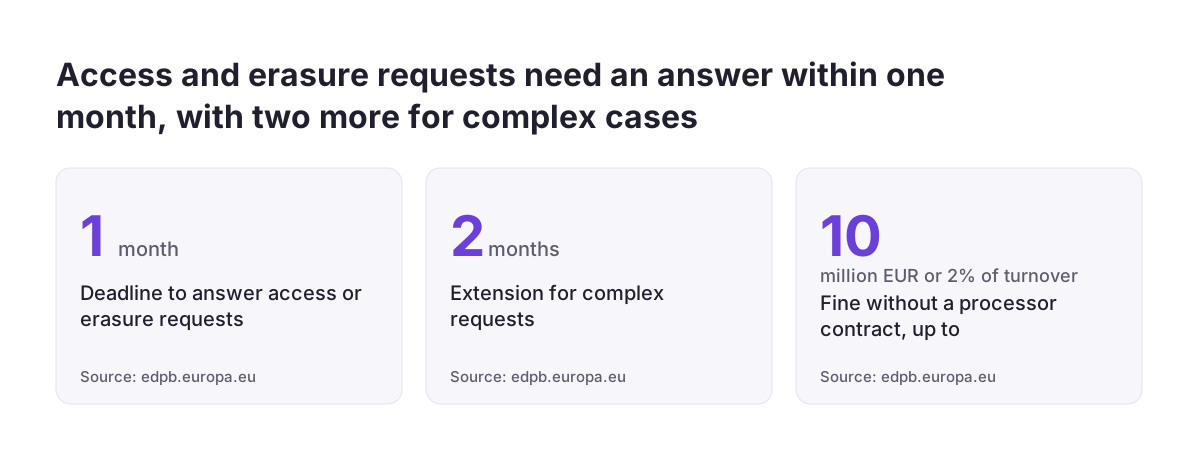
A help desk vendor that processes this data on your behalf is a processor. The European Data Protection Board's data protection FAQ for small businesses states that a valid contract between controller and processor is obligatory. Lacking one can lead to a fine of up to EUR 10 million or 2% of total annual turnover, whichever is higher. The Danish and Slovenian data protection authorities and the European Commission have published template agreements.
Your help desk will also receive requests from individuals about their own data. The FAQ sets the rules:
- respond without undue delay and at the latest within one month of receipt
- extend by two further months only for complex requests, and tell the person within the first month
- answer access requests free of charge
- answer electronic requests in a commonly used electronic format, unless the person asks otherwise
The right to erasure is not absolute, so check before deleting. A dedicated category for data protection requests, routed to one named person, keeps those deadlines visible.
Security settings and data location for a small support team
The GDPR requires controllers and processors to apply technical and organisational measures that match the risk to personal data. The EDPB's guide on securing personal data gives small businesses practical examples. Most of them apply directly to a help desk.
- Strong authentication. Authentication counts as strong when it combines at least two categories, such as a password and a phone.
- Password rules. The guide's example is at least 8 characters, with upper case and special characters.
- Access reviews. Review who has access regularly, for example every six months.
- Personal devices. The GDPR requires the same level of security whatever equipment is used, so agents working from their own phones count too.
The guide also warns that some consumer software can transmit user data to third parties. It calls such software particularly unsuitable for corporate use. A free chat app is a poor channel for support conversations.
Data location matters as well. Personal data may only leave the EEA under the conditions in Chapter V of the GDPR, as the EDPB's page on international data transfers explains. Transfer tools include adequacy decisions and standard contractual clauses, adopted by the Commission on 4 June 2021. Ask your vendor where ticket data is stored and which transfer tool applies.
Avoiding lock-in: keep your ticket rules and data portable
Lock-in happens when leaving a system costs so much that you stay even after it stops serving you. An EU guide on standards in public ICT procurement found that at least 40 per cent of responding authorities perceived some degree of lock-in. The guide was written for public authorities. Its warning still applies to a small business: overdependence on a single vendor can mean value for money is not achieved in the long term.
A small business can reduce that risk without avoiding commitment to a tool. Three habits help most:
- keep your routing table and SLA targets in a plain document outside the help desk
- confirm before signing that you can export tickets and contacts in a common format
- prefer configuration over custom code wherever configuration does the job
The first habit pays off even if you never switch tools. A written routing table lets a new colleague understand why tickets go where they go. It also makes the next change to the rules a decision rather than an archaeology project. Custom code is sometimes the right answer, as Zoho's own duplicate-closing function shows. Document why each piece exists and who maintains it.
Next steps for setting up your first help desk
A small team can set up a help desk that lasts by following a fixed order. Each step depends on the one before it. These steps take you from a shared inbox to working routing:
- Write your routing table: request categories, one owner per category and a catch-all owner.
- Create only the fields that routing and your first report need, with the category as a picklist.
- Set one SLA in your real business hours, with two escalation levels and an agreed manager response.
- Automate duplicate closing and any status update agents would otherwise make twice.
- Sign the processor contract, and create a routed category for data protection requests.
- Switch on two-factor sign-in and put an access review in the calendar.
- Connect the help desk to your CRM once routing has run cleanly for a few weeks.
Review the routing table after the first month. Look at which tickets were reassigned by hand, because each one points to a missing or wrong rule. If you want help with the setup, see how a Zoho Desk implementation is structured, and decide which steps you keep in-house.
Sources
- Zoho: Create Your Own Issue Management System (Zoho Projects)
- European Data Protection Board: FAQ, data protection guide for small business
- European Data Protection Board: Secure personal data
- European Data Protection Board: International data transfers
- European Commission: Guide on standards in ICT procurement (SWD(2013) 224)