Checking Zia before you trust it in Zoho CRM: why the order matters
This guide explains how to check Zia before you trust it in Zoho CRM. It covers how to tell whether a score, prediction or suggestion from Zoho's built-in AI is solid enough to act on. Zia can rank prospects, estimate whether a deal will be won and flag customers likely to churn, and all of it looks authoritative on a record page. Whether it deserves that authority depends on the records underneath it.
This is the third and last part of a series on customising Zoho CRM with Zoho's own AI. The first part covered using Zia to build fields, modules and layouts that still work after go-live. The second covered the process side: the workflows and automations Zia can suggest.
This part covers the record and the data model. It explains what history and data quality a prediction depends on and how to measure it against what actually happened. It also covers when to stop relying on an output and which decisions stay with a person.
The method has three steps. First, check the inputs. Then test the outputs against outcomes you already know. Only after that should a score drive a view, a report or a workflow that people act on.
Scores, predictions and suggestions: what Zia gives you
Zia is the AI built into Zoho CRM. It produces four kinds of output, and each needs a different check. That is why it helps to name them before testing anything.
Scores
Zia scores rank prospects so you can see which are most likely to convert and deal with them first. Churn prediction does the same for existing customers. It shows a churn probability score on each customer record and, for subscription-based records, names the product or service the customer might leave. Zoho states that scores are recalculated automatically when record fields, related records or sales signals change. The sister site's page on AI for lead management covers ranking prospects from the AI side.
Predictions
Field prediction lets you build your own prediction based on a selected record field. Examples include the likelihood of winning or losing a deal, or the revenue you can expect from it.
Suggestions
Next best experience proposes the next step on open deals and leads, such as sending an email or scheduling a call. The similarity recommender shows the five most similar previously closed records, so you can see how comparable deals moved through the stages. Zia can also suggest workflows, macros and owner assignment rules for repetitive work.
Classifications
On emails and calls, Zia labels sentiment as positive, negative or neutral. It identifies the intent of an email as a query, request, complaint or other. It can also sort emotions such as frustration, confusion or trust.
The history a prediction depends on
Every one of these outputs is built from records you already have. The similarity recommender looks at previously closed records, and field prediction works from the field you select. Scores move whenever fields and related records change. If that history is thin or inconsistent, the output still appears on the record page and looks just as confident.
The Zoho pages this guide draws on do not publish a minimum number of records or months of history. So the judgement is yours. Open your closed deals, lost as well as won, and ask whether a colleague reading them could tell why each one ended the way it did. If they could not, Zia has no better basis.
At Svennis, the first thing we check before a client relies on any Zia prediction is whether lost deals are actually closed as lost. Where they sit open in the pipeline for months, any prediction built on that history is looking at a sales process that never records a defeat.
History that was dropped or flattened during a move from another system causes the same problem. If you are still planning that move, our post on how to migrate to Zoho CRM without losing your sales history explains what to bring across. If the move is already done, check a sample of imported deals for close dates, stages and owners before any score depends on them.
Field usage: the quiet cause of bad scores
A prediction based on a selected field is only as meaningful as the way your team fills that field. Zia treats all of the following as data:
- picklists with overlapping values
- free-text fields that one rep fills in full and another leaves blank
- stages that two teams use differently
Before you choose a field for a prediction, run a report grouped by its values. Look for blanks, near-duplicates and values nobody should be using.
Data enrichment deserves the same attention. Zia gathers extra details about leads and customers from the internet and from email signatures. It uses them to fill enrichment fields such as location, phone number and social profiles. Open a sample of enriched records and compare the values with the source before other decisions rely on them.
Owner assignment suggestions depend on user thresholds, which set the number of records a user can handle per day, week or month. People change roles or hours, and thresholds fall out of date. When that happens, the suggestions distribute work across a team you no longer have.
Custom email intent is another setting to check. Without sample data, you can define a custom intent with up to five keywords. The result therefore depends directly on how well those keywords separate one type of email from another.
A worked example: a deal prediction and email emotion
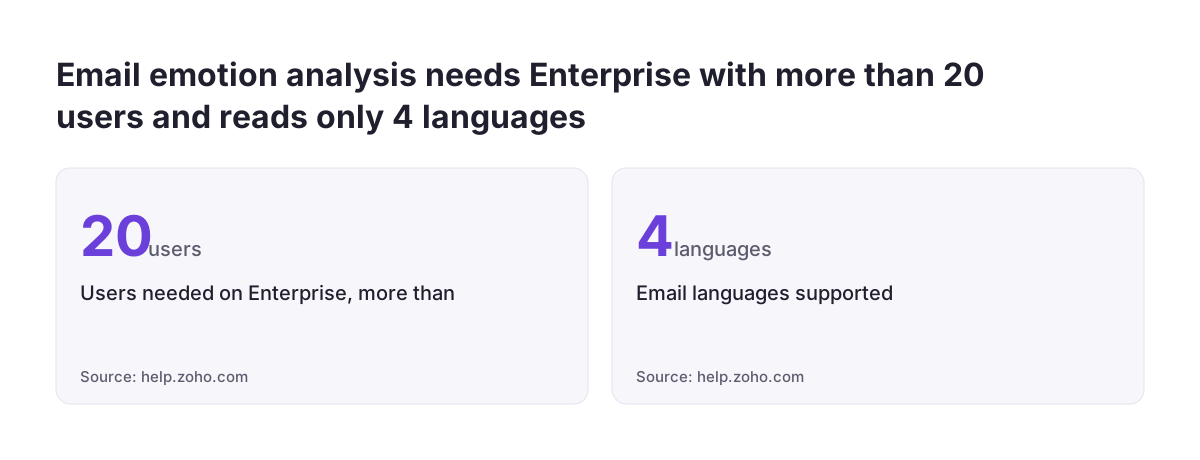
Take a sales manager, Elena, at a distributor that runs Zoho CRM on the Enterprise edition with more than 20 users. She wants two things. The first is a field prediction on Deals that estimates the likelihood of winning. The second is email emotion analysis, so her team spots frustrated customers early. She works in this order.
- Check the history. She runs a report of deals closed over the past year, grouped by stage and owner. She asks each rep to close any deal that is lost but still open.
- Check the field. She chooses the field the prediction will use and cleans its picklist values, so every team means the same thing by each one.
- Check eligibility for emotion. The Zia Email Emotion Analysis help page lists the requirements. Enabling the feature needs the Enterprise edition or above with more than 20 users, a user with the Administrator profile and the new email integration. Viewing emotions needs the Professional edition or above.
- Switch it on. In Setup > Zia > Communication, she opens the Email Intelligence tab and toggles on Email Intelligence. She then toggles on the Email Emotion option.
- Watch before acting. Emotions appear in the record's related list, inside the email and in SalesInbox. A new email to a record shows the latest emotion calibrated for that address. For the first weeks, she uses both outputs for reading only, with no workflows attached.
Neither output goes into a view, a report or a rule until she has run the measurement in the next section.
How to measure Zia against what actually happened
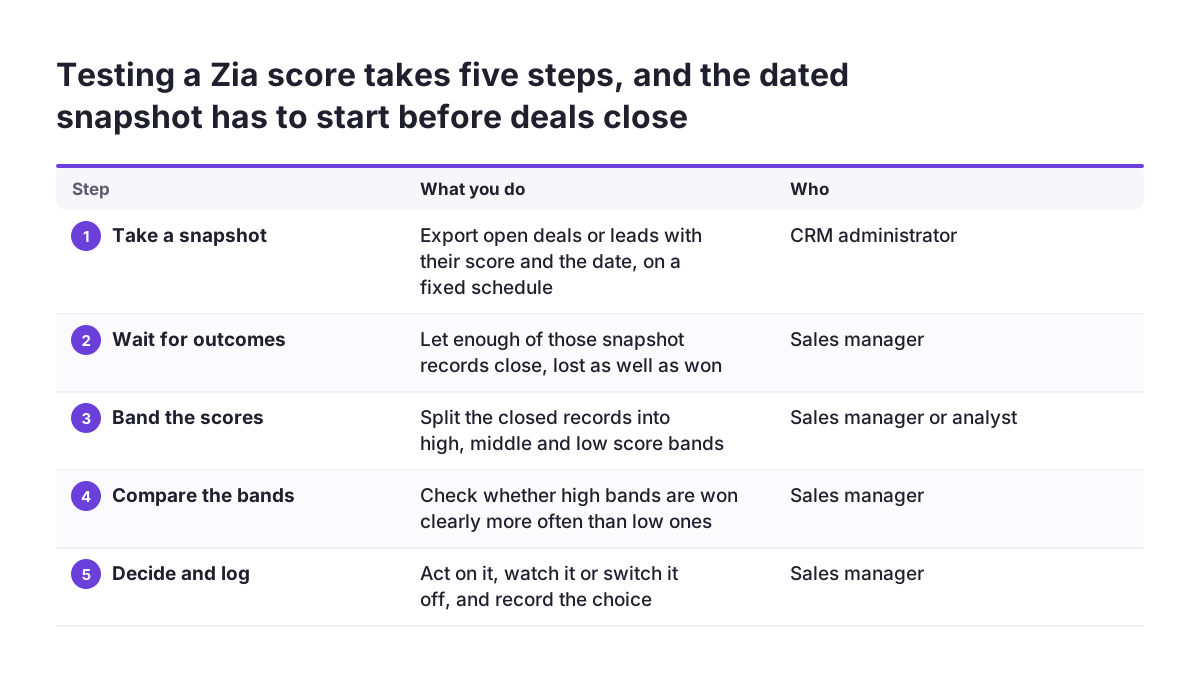
A score is a claim about the future, so the only fair test is to compare it with what happened later. Zia recalculates scores whenever records change. The value you see today is therefore not the value that was there when a rep made a decision. Keep a dated snapshot, such as a regular export of open deals or leads with their score or prediction, so you can match it against the outcome later.
Once enough of those records have closed, split them into bands such as high, middle and low scores, and look at how each band ended. If high-scored deals are won clearly more often than low-scored ones on your own data, the score is separating something real. If the bands end up looking alike, the score is not worth routing work by, however precise its number looks.
Classifications need a different test. Take a sample of emails or calls that Zia labelled negative or frustrated, read them yourself and note where you disagree. Do the same with a sample labelled neutral, because missed complaints matter as much as false alarms.
Keep the results in a simple log for each output: date, sample size, what you found and what you decided. That log tells you later whether an output got better or worse after a change to your data or process.
The checklist: what to verify before an output drives a decision
Use this table as your working checklist. Go through it row by row, but only for the outputs you actually use.
| Zia output | Depends on | Check first | Who acts |
|---|---|---|---|
| Zia score (prospects) | Consistent statuses, conversions recorded on time | Do high scores convert more often than low ones on your data? | Rep decides the order of work |
| Field prediction (deals) | Closed won and lost deals, selected field filled consistently | Blanks and overlapping values in the chosen field | Manager, for forecasts, after measurement |
| Churn probability | Customer and subscription records kept current | Did high-risk customers actually leave? | Account owner decides any retention offer |
| Similarity recommender | Previously closed records with real stage history | Are the five records shown genuinely comparable? | Rep, as reference only |
| Next best experience | Activities logged on open deals and leads | Is the suggested step one your team would take? | Rep |
| Data enrichment | Correct initial details, sensible enrichment fields | Sample of enriched values against the source | Data owner, before reuse |
| Owner assignment suggestions | Current user thresholds | Thresholds match current roles and hours | Sales manager |
| Email and call sentiment or emotion | Supported language, eligible edition | Read a sample of labelled items yourself | Person handling the customer |
Anything you cannot tick off can stay visible on the record, but keep it out of workflows until you can.
When to recheck, retrain or switch an output off
The Zia pages this guide draws on describe automatic recalculation of scores. They do not document a separate retrain control for the native predictions. As a result, the outputs follow your data, so recheck whenever your data or process changes in bulk. That includes new pipeline stages, new picklist values, a merged team, an import or a large clean-up. After each of these, repeat the measurement before you trust the output again.
If the native features cannot fit your process, Zoho offers QuickML for creating your own machine learning models beyond Zia's built-in ones. That gives you control over what the model is built from. It also makes testing the model your responsibility.
Switching an output off needs care, and call intelligence shows why. When an admin disables it, processing stops, but fields keep the data already processed and new records get empty call intelligence fields. Reports that mix the two periods will mislead unless you filter by date. Deleting a call intelligence custom field also erases the data stored in it, so export that data first if you might need it.
Review your automation before you switch anything off. Users can create workflow rules from call intelligence data. A rule that reads a field that is no longer filled will quietly stop doing its job.
Which decisions stay with a person
Zia is moving from suggesting to acting. Zoho describes Zia Agents that can escalate tickets, update deal stages, send emails, assign tasks and run multi-step workflows across apps, within your permissions and guardrails. The more an output can change a record or contact a customer, the higher the bar for the checks above.
Some decisions should stay with a person:
- closing a deal as lost
- pricing and discounts
- any retention offer prompted by a churn score
- anything that affects a person's access to a service, a job or care
A score can put a record at the top of someone's list, but it should not make the final call. If your records describe patients or clients, our page on Zoho CRM for healthcare covers GDPR in that setting. Whoever handles GDPR for you should review any automated decision about people. For the wider legal picture, see the sister site's guide to AI law for business.
If you test an agent, Zoho's testing tools support a careful approach. Click Test Agent in the top right of the agent details page, and use Clear Chat so each scenario starts without earlier context. Make sure connections to services such as CRM are in place before you begin.
What this means for a company in the EU
For companies in the European Union, the first checks are language and data centre, and both vary by feature. Email emotion analysis is available in all data centres except CN and JP. It supports English, German, Spanish and French. If your customers write in Italian, Polish, Dutch or Romanian, do not rely on emotion labels in those markets. Measure each market separately.
Call intelligence is available on the Professional edition and above in all data centres except JP. Its politeness score takes correct English grammar into account. For calls held in other languages, or with non-native English speakers, treat that score with caution or leave it out of reviews.
Zia Chat is a separate Zoho product that works across Zoho's apps. It currently works only in English and is available in the India and US data centres, with more regions planned. Accounts on the EU data centre should not plan around it yet. Zoho states that business data processed by Zia Chat is not used to train AI models. Ask the same question about every AI feature you switch on.
Subscription businesses that sell across borders should also check churn prediction country by country, because one market's history may say little about another. Our page on Zoho CRM for e-commerce covers that kind of setup.
Next steps
This post closes the series. The first two parts covered shaping the system and the process with Zia. This one covers how to tell when Zia's output deserves to shape decisions. Work in this order.
- List the Zia outputs your team actually looks at, and the views, reports or workflows that use them.
- Run the history and field checks from this guide on the records behind each output.
- Start a dated snapshot of scores and predictions, and wait until enough records have closed to make a comparison.
- For each output, choose one of three states: act on it, watch it or switch it off. Record the decision in your log.
- Write down which decisions stay with a person, and remove any workflow that takes them away.
For a structured view of whether your data is ready, the sister site offers an AI readiness check. If you would like help cleaning your history and reviewing your Zia setup, see how we approach Zoho CRM implementation in Europe.