Zoho Desk Blueprints for support processes: what they are and what they enforce
Blueprints for support processes in Zoho Desk turn a fixed procedure, such as a refund or a customer onboarding, into a path every ticket must follow. You define the states, the transitions between them and the fields an agent must complete at each step. A ticket then cannot skip a step, and it cannot sit still without a visible owner.
A Blueprint is a structured, visual framework of stages and transitions. In the words of the Zoho Desk Blueprint FAQ, it defines the exact sequence a ticket must follow from creation to resolution within a department. Zoho's product page puts it more bluntly: a Blueprint "mandates an entire sequence of actions" until the ticket is resolved.
Two more terms carry the rest of this guide:
- State: a stage in the ticket lifecycle, such as Open, On Hold or Closed. States are the boxes in the Blueprint diagram.
- Transition: the action that moves a ticket from one state to another. A transition can carry before, during and after conditions.
The enforcement is real. When a Blueprint is active on a ticket, manual status changes outside its transitions are blocked. Each person sees only the actions that apply to them, and nobody can move the ticket forward until their mandatory actions are done. That is what makes a Blueprint useful for Zoho Desk processes that must happen the same way every time, and too rigid for everything else.
Which Zoho Desk plans include Blueprints, and who can build them
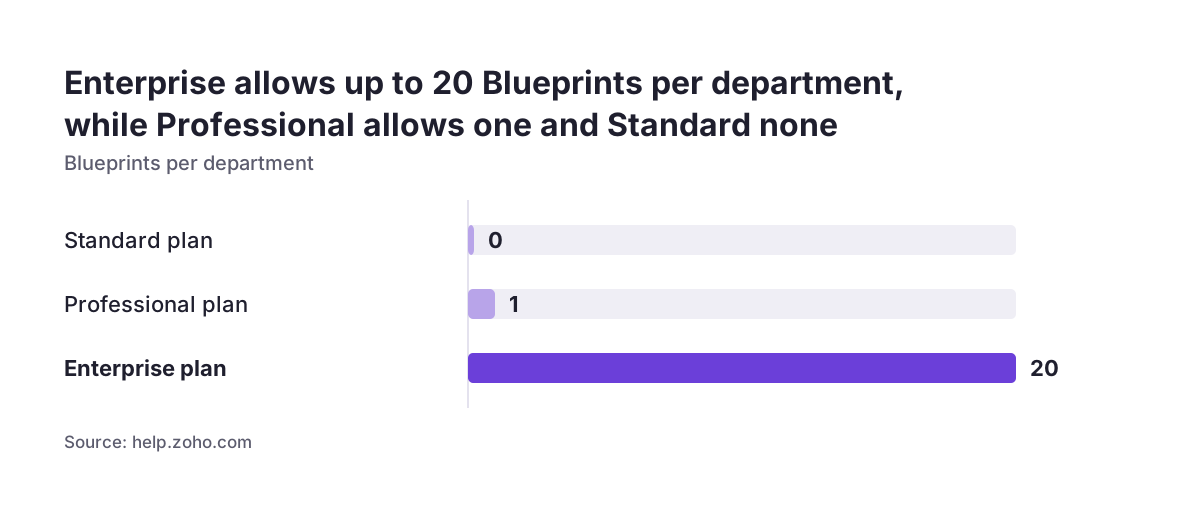
Blueprints are only available on the Professional and Enterprise plans of Zoho Desk, and the limit applies per department. The Blueprint FAQ sets out the allowance for each plan, which decides how many processes you can enforce:
| Plan | Blueprints per department | What it means in practice |
|---|---|---|
| Standard | None | Use workflow rules only |
| Professional | 1 | Pick the single process in each department that stalls most often |
| Enterprise | Up to 20 | Separate Blueprints for refunds, onboarding, escalations and similar flows |
The Professional limit shapes the design more than people expect. With one Blueprint per department, you either merge related processes into one diagram or choose which one deserves enforcement. For reference, a Zoho Desk blog post on customer service at scale lists the Enterprise edition at US$40 per agent per month.
Building is restricted too. Only users with the Support Administrator permission can create, edit, deactivate and delete Blueprints. Configuration happens in the web application only. In the iOS mobile app, agents can view Blueprint information and perform transitions, but they cannot change the Blueprint itself. Plan for one or two administrators who own the design, rather than letting each team lead edit it.
Blueprint or workflow rule: how to decide for each support process
Use a workflow rule when one event should cause one reaction, and a Blueprint when a ticket must pass through several steps in a fixed order. Zoho describes workflows as automating email alerts, task assignments and field updates when a rule is triggered. A Blueprint, by contrast, governs the whole journey from state to state.
The table below is the checklist we use to decide, need by need:
| What the process needs | Workflow rule | Blueprint |
|---|---|---|
| Send an alert when a ticket matches a condition | Built for this | More than you need |
| Assign a task or update a field on one event | Built for this | More than you need |
| Force steps to happen in a fixed order | Not designed for it | Built for this |
| Require specific fields before the ticket moves on | Not designed for it | Mandatory actions per transition |
| Hand the ticket between people or teams | Assignment only | Defines who acts at each step |
| See which stage tickets are stuck in | No stage view | Blueprint dashboard |
One constraint narrows the choice further. An agent cannot associate a Blueprint manually with a ticket, so the process must be recognisable from data already on the ticket. Zia, the built-in assistant in Zoho Desk, can be trained to predict ticket field values, which helps that data be present early. If you are weighing AI in customer support more broadly, treat field prediction as an input to the Blueprint, not a replacement for it. The same split between rules and enforced processes exists in CRM, covered in our post on Zoho CRM workflows and Blueprint.
Map the real resolution path before opening the Blueprint Builder
A Zoho Desk Blueprint should copy how your agents actually resolve a ticket, not how the procedure manual says they should. The drag-and-drop Blueprint Builder makes it easy to draw a tidy flow in an afternoon. Drawing it before you have watched the real process is the most common way to build one that agents resent.
At Svennis we sit with the agents who close these tickets and write down every state, handover and waiting point on paper before anyone opens the builder. Where we see Blueprints break at clients, the diagram usually followed the documented procedure, so agents spent their energy finding ways round it.
When you map the process, capture four things for each step:
- The state the ticket is in, named the way agents already talk about it.
- Who is responsible for moving it on, as a person, role or team.
- The information that must exist before it can move, which becomes your mandatory fields.
- Every way the ticket can go backwards, such as a customer reopening the issue.
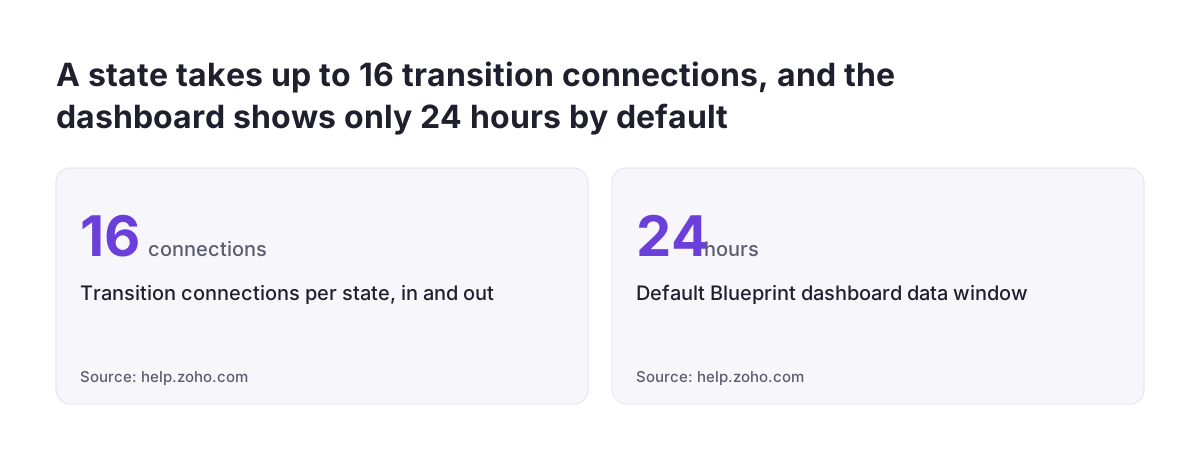
Keep the diagram small. Zoho allows up to 16 transition connections per state, counting inputs and outputs together. If a single state needs anywhere near that many, the process is probably two processes. Note also that Blueprints do not track how many times a ticket has entered a particular state, so a loop that repeats is invisible unless you design for it.
Worked example: a refund process as a Zoho Desk Blueprint
A refund is a good first Blueprint for Zoho Desk because the steps are fixed and Zoho itself lists refunds as an example process. The state and field names below are an illustration; rename them to match your own team's language.
The process uses five states and four forward transitions:
- Open to Awaiting return, transition "Request return". The agent must fill in the order number and the return reason before the transition completes.
- Awaiting return to Item received, transition "Confirm receipt". The warehouse contact records the item's condition as a mandatory field.
- Item received to Refund approved, transition "Approve refund". A named person in finance owns this step and enters the refund amount.
- Refund approved to Closed, transition "Close refund". The agent adds the resolution and a custom notification informs the customer.
Put the condition that must hold into the before part of each transition, the fields into the during part, and notifications into the after part. Each stakeholder then sees only the step that is theirs. Finance never sees "Confirm receipt", and the warehouse never sees "Approve refund".
Add one backward path: Awaiting return back to Open, for a customer who changes their mind. Skipping that path is how refund tickets end up stranded. If you want each step to start as soon as the previous one completes, the Continuous Blueprint setting triggers the next transition in the sequence without an agent clicking it.
Mandatory fields and transition owners that stop tickets stalling
Mandatory fields stop a Zoho Desk ticket from moving on half-finished, and transition owners stop it from sitting without a name attached. Zoho's product page states that a Blueprint defines the who, what and when of every action. Each transition should answer all three.
Mandatory fields: ask only for what the next person needs
Every mandatory field is a small delay for the agent completing the transition. Ask for a field only if the person handling the next state cannot work without it. A refund approver needs the order number and amount, not a free-text summary that repeats the customer's email.
Transition owners across departments
You can choose a transition owner from another department. When you do, Zoho Desk automatically shares the ticket record with that agent's department. That is convenient for a finance approval step, but it widens who can see the customer's ticket. Decide that deliberately rather than discovering it later.
Strict Mode for processes that must not be bypassed
Strict Mode prevents agents from acting outside a transition. With it on, they cannot edit fields, send replies, add comments or resolutions, or upload attachments except through a transition. Reserve it for processes where a reply sent at the wrong moment causes real damage, such as confirming a refund before approval. For most support flows, the ordinary Blueprint enforcement is enough.
On Hold and waiting states: where Zoho Desk Blueprints most often get stuck
Waiting states, where the team is waiting on the customer or a third party, are where Zoho Desk Blueprints stall most often. The ticket is technically owned, but nobody is expected to act, so it can wait indefinitely.
The Zoho community shows the typical trap. In one thread about moving a ticket from On Hold back to Open, a user had an automatic transition back to Open when the customer responds. They also wanted a manual transition in the same direction, for when an agent decides to resume work without a customer reply. The Blueprint would not let them add a second transition in the same direction as the automatic one.
Plan waiting states with that behaviour in mind:
- Decide whether a customer reply or an agent decision reopens the ticket, before you build either transition.
- If both must be possible, test the design in a trial department before going live.
- Give every waiting state an exit that a person can trigger, not only an automatic one.
Reminders need separate thought. In a community suggestion on Blueprint reminders, a user asked for alerts to the assignee of a forgotten Blueprint task. The same user described having to click the next transition manually after completing a task. Where tasks drive the process, check whether Continuous Blueprint or a workflow alert covers the gap.
SLAs and reporting: what the Blueprint dashboard shows and what it does not
The Blueprint dashboard in Zoho Desk shows how many tickets sit in each stage and how many have gone past their SLA. It also shows which states violate SLA most. That last view is the most useful one after go-live. A state that keeps breaching its SLA usually has a missing owner, an unclear mandatory field or no human exit.
Two defaults catch people out. The dashboard shows data from the last 24 hours unless you change the period. Reviewing it weekly with the default setting gives a misleadingly calm picture, so widen the window before you draw conclusions.
Deeper reporting has limits that users have raised publicly. One thread on custom reports for Blueprint transitions and SLAs shows the gap. A member could not find how to build a custom report on Blueprint SLA violations. A separate request for transition-based time reports explains why. The user noted that the Status field holds a single or multiple choice, not a flow of changes. That makes time reports per transition hard to build in Zoho Analytics.
If time per step matters to you, design for it at build time. Capture timestamps in fields during transitions, then report on those fields in Zoho Analytics. Zoho Desk support plans are a separate mechanism. They define the scope of guaranteed service per customer, including the credit cycle, and do not track Blueprint stages.
Changing a live Zoho Desk Blueprint: the rules that block edits and deletions
A live Zoho Desk Blueprint is hard to change while tickets are moving through it, so get the design close to right before activation. The Blueprint FAQ lists several restrictions that apply once tickets are in progress.
The restrictions you will meet most often are these:
- You cannot delete or modify a transition or state while tickets are currently associated with it.
- You cannot delete a Blueprint while active tickets are in progress within it.
- Deleting a Blueprint is permanent, so there is no undo.
In practice, a redesign means building the new version alongside the old one and letting existing tickets finish on the old path. On the Professional plan, with one Blueprint per department, that parallel approach is not available inside the same department. You either wait for the old tickets to clear or move them out of the affected states first.
This is the strongest argument for piloting. Run the first version on a single department, watch the dashboard for a few weeks, and collect the agents' complaints. Fix the states and transitions before the Blueprint carries real volume. Small changes later, such as an extra notification, are easier than restructuring states that tickets already occupy.
What Zoho Desk Blueprints mean for support teams across several EU countries
For a company running support in several EU countries, the key fact is that Zoho Desk Blueprints are set per department. If each country or language team is its own department, each needs its own Blueprint, and the plan limit applies to each department separately.
That has three practical consequences:
- Plan choice: on Professional, each country department gets one Blueprint, which may be enough if every team runs the same refund process.
- Consistency: separate Blueprints drift apart over time, so keep one master design and copy changes deliberately.
- Language: name states and transitions in words each team uses, because agents see those labels on every ticket.
Cross-border handovers need particular care. When a transition owner sits in another department, Zoho Desk shares the ticket record with that department automatically. A central finance team approving refunds for several country desks will therefore see those customers' tickets. If you document who has access to customer data for GDPR purposes, include this sharing in that record. Also check that each step only asks for the personal data the next person genuinely needs, since every mandatory field is data you choose to collect.
Next steps: set up your first Zoho Desk Blueprint
Start your first Zoho Desk Blueprint with one process that stalls today, in one department, and keep the first version small. A short, accurate Blueprint that agents trust is worth more than a complete one they work around.
Work through these steps in order:
- Confirm your plan allows Blueprints and who holds the Support Administrator permission.
- Choose the process, such as refunds or onboarding, and check it can be recognised from ticket data.
- Map the real path with the agents, including waiting states and backward paths.
- List mandatory fields per transition, keeping only what the next person needs.
- Decide owners for each transition and note any cross-department sharing.
- Pilot in one department and review the dashboard with a period wider than the 24-hour default.
If your refund or onboarding steps depend on customer data held in CRM, connect the two systems first, as described in our guide to linking Zoho Desk tickets with CRM. To see what else the helpdesk covers and how we set it up, our Zoho Desk implementation page is the place to continue.
Sources
- FAQ: Blueprint, Zoho Desk
- Zoho Desk Blueprint product page
- Blueprint reminders and automatic transitions (Zoho community)
- Can't transition Blueprint from On Hold back to Open (Zoho community)
- Custom report for Zoho Desk Blueprint transition and SLAs (Zoho community)
- Zoho Desk support plans
- How to manage customer service at scale with Zoho Desk (Zoho Desk blog)
- Process/Blueprint flow (transition) based time reports (Zoho community)