No code automation in Zoho covers most processes, until the logic outgrows clicks
No code automation in Zoho handles most everyday business processes. Workflow rules react when records change. Blueprint walks a deal or a ticket through fixed stages. Zoho Creator builds forms and small apps.
Clicks stop being enough when you need loops over many records, calculations across modules, calls to outside systems, or decisions based on free text. At that point, custom Deluge or an integration has to take over.
No code automation is the automation of tasks and processes without writing code. You follow prompts and click buttons to build the workflow, as Whalesync's overview of no-code automation tools describes it. The same source draws a line to low-code tools, which often require a working knowledge of APIs or webhooks.
That line matters for planning. A process you can describe as "when this happens, do that" usually stays on the no-code side. A process that needs memory, arithmetic across many records, or a conversation with another system usually crosses over. The sections below show where each Zoho tool fits, and which signs tell you it has run out.
Workflow rules handle single events on single records
Workflow rules in Zoho are the first layer of no code automation. They work best when one event on one record should cause a predictable set of actions. A new lead arrives, so an owner is notified. A deal reaches a stage, so a follow-up task is created. A field changes, so another field is updated.
Workflow rules are strong when the trigger and the actions are both easy to say in one sentence. Your sales manager can read them back and understand them. That makes them the cheapest automation to maintain, because nobody needs a developer to check what they do.
Workflow rules get weaker as conditions multiply. A rule with a long chain of criteria is hard to read. Several rules that fire on the same record edit can also interfere with each other, and the result depends on the order they run in. When you find yourself writing a third rule to correct what the first two did, the logic has probably outgrown rules.
A useful test is to write the rule in plain language before you build it. If the sentence needs "for each", "unless any of", or "add up all", a single workflow rule is unlikely to express it cleanly. Marketing journeys are a separate case: nurture sequences usually belong in Zoho Marketing Automation for lead nurturing, not in a growing pile of CRM rules.
Blueprint enforces a process with stages and required steps
Blueprint in Zoho is the no code tool for processes with a fixed order. You draw the stages a record moves through and the transitions between them. At each transition you can ask for the fields, notes or approvals that must be in place before the record moves on.
Blueprint suits work where skipping a step causes real damage later. Typical examples are a quote that needs approval before it goes out, a service case that needs a diagnosis before it closes, or onboarding that needs documents before activation. The process becomes visible on the record itself, so users see what is expected of them.
Blueprint runs out in two places. The first is branching that depends on data outside the record, such as stock levels, credit status in another system, or the history of related records. The second is volume: Blueprint guides one record at a time through a human process. It is not meant for batch work that touches hundreds of records at once.
Blueprint and workflow rules also combine. A transition can trigger the follow-up actions, while the rules handle notifications. Keep each piece small. A Blueprint with many stages and many exceptions often describes how the process should work on paper. It rarely matches how your team actually works, and users start looking for ways around it.
Zoho Creator builds forms and apps where CRM modules do not fit
Zoho Creator is the no code option when the process does not belong in a CRM module at all. Examples include an internal request form, a site inspection checklist, or a small tool for a team that never touches sales data. You build forms, reports and simple workflows visually, then share the app with the people who need it.
Zoho Creator fits well when your data model is simple and owned by one team. It removes the spreadsheet that gets emailed around. It also gives that team a structured place to work without stretching CRM into something it was not designed for.
Zoho Creator stops being purely no code faster than many people expect. As soon as an app must look up data in CRM, write back to it, or calculate across related records, you are writing Deluge. The visual builder still gives you the forms and layouts. The logic behind them, however, becomes code that someone has to maintain.
Plan Zoho Creator apps around that moment. Decide early which data lives in Creator and which stays in CRM. Then decide who maintains the scripts once the app goes live. A Creator app that started as a weekend project and became business critical without an owner is one of the harder things to rescue.
Signs that no code automation has run out in your Zoho setup
No code automation in Zoho has usually run out when the workaround costs more than the process it automates. The signs are fairly consistent across companies and departments. Watch for any of the following:
- A rule must look at many related records, such as all open deals of an account, before it decides.
- A value must be calculated from other modules, such as a margin built from line items and costs.
- Data must go to, or come from, a system outside Zoho, such as a warehouse or an ERP.
- The same action must run on a batch of records on a schedule rather than on a single edit.
- Failures must be caught and retried, because a silent failure costs money.
- The decision depends on free text, such as the content of an email or a support request.
- Staff keep a spreadsheet next to Zoho to finish what the automation leaves undone.
One sign on its own is not a verdict. A single calculated field can sometimes be solved with a formula field or a report. Several signs on the same process mean the no-code version will keep breaking. Moving that process to code is then cheaper than patching it.
For reporting needs in particular, check first whether the calculation belongs in Zoho Analytics rather than in an automation. Analysis across many records is often a reporting question, not a workflow question.
Custom Deluge takes over for logic across records and modules
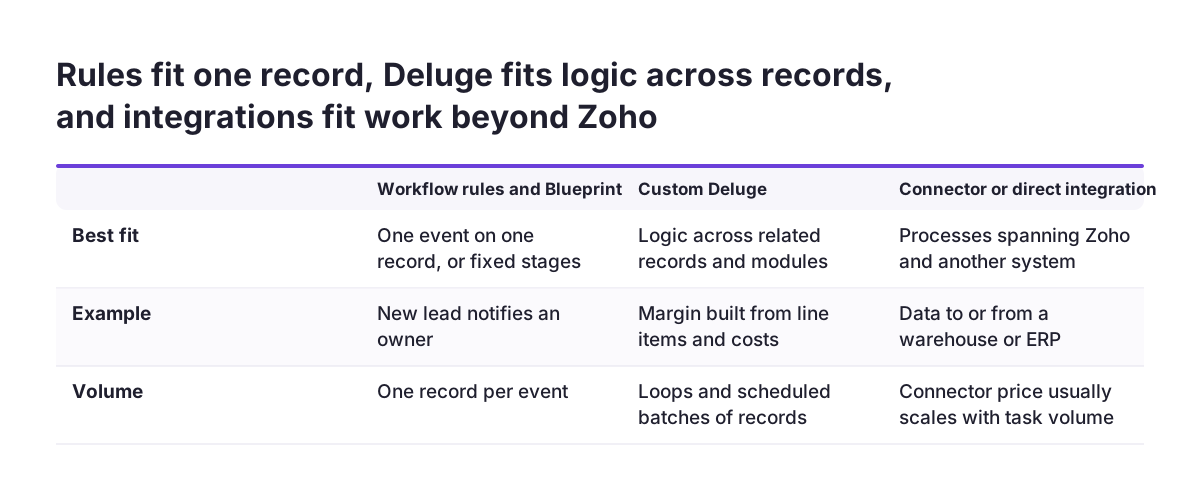
Custom Deluge is the step after no code automation inside Zoho. Deluge is Zoho's own scripting language. You attach a function to a workflow rule, a Blueprint transition, a schedule or a button, and the function does what the click-built actions cannot. It can loop over related records, calculate across modules, and decide based on data the rule cannot see.
Custom Deluge keeps the trigger in no code. The workflow rule or Blueprint still decides when something happens. The function only decides what happens. That split keeps the process readable for administrators, while the hard part lives in one place that a developer can test.
Before Deluge gets written, the existing automation has to be understood. At Svennis we list every workflow rule, Blueprint transition and function for the module before we write a line of code. We often find rules that fire on the same edit and overwrite each other, and merging those removes part of the request for code.
Custom Deluge brings a maintenance cost that no code does not. Someone must own each function, document what it does, and test it when the process changes. Keep functions short and give each one a single job. Write down which rule or transition calls it. A function nobody can trace back to its trigger becomes a risk the day its author leaves.
Integrations and connector platforms, and how their pricing scales
An integration takes over when the process spans Zoho and another system. You have two routes: a direct integration written against the other system's API, or a connector platform such as Zapier or Make. Connector platforms are themselves sold as no code, but they behave differently at volume.
Connector pricing usually scales with use. Knack notes that workflow automation platforms may charge per user, per workflow, or by task volume. Its 2025 comparison lists paid plans from $19.99 a month for Zapier and $9 a month for Make.
Free tiers show how quickly volume becomes the limit. Whalesync reports that Zapier's free plan allows one-step automation and 100 executions a month. Make's free plan offers 1,000 operations a month. Check current prices with each vendor before you commit.
Connector platforms fit well for low-volume links between Zoho and an app that has no native integration. They fit poorly when a Zoho process runs thousands of times a month. Every step then counts against a quota that keeps growing. In that case, a native integration or a Deluge function calling the other system's API is usually cheaper and easier to monitor.
Check the Zoho suite before you buy a connector. Invoicing often belongs in Zoho Books, and recurring charges in Zoho Billing. Both connect to CRM inside Zoho. Every external connector also moves your Zoho data, often personal data, through another company's service. Include that flow in your GDPR review before you switch it on.
AI takes over where rules cannot read free text
AI is the right tool when an automation must decide based on unstructured text. Workflow rules and Blueprint read fields. They cannot read an email and work out what the sender wants. Routing a support request by its content, or extracting values from a document, needs a model that understands language.
Language models now cover this kind of task at low cost. Anthropic's models overview positions Claude Haiku 5.5 for high-volume, latency-sensitive tasks such as classification, extraction and routing. It lists Haiku 5.5 from $0.10 per million input tokens and from $0.50 per million output tokens. The same page says all current models support text and image input, multilingual capabilities, vision and tool use.
AI works best as one step inside an existing automation, not as a replacement for it. The model classifies the request or extracts the fields. A workflow rule or a Deluge function then acts on that structured result. The rest of the process stays readable and testable, and the AI step can be checked against real cases.
If your gaps are mostly about free text, look at AI automation as its own design question. Common starting points are customer support triage and document processing for incoming files.
Ownership and documentation keep mixed automation maintainable
Mixed automation stays maintainable only when every piece has a named owner. A typical Zoho setup ends up with workflow rules, a Blueprint or two, some Deluge functions, a connector and maybe an AI step. Each piece works on its own. Together, nobody can say what happens when a deal is saved unless someone has written it down.
A short automation register solves most of this. For each automation, record the module, the trigger, what it does, whether it is no code or code, and who owns it. Reviewing the register before every change prevents the most common failure: two automations quietly working against each other.
Ownership also decides where new requests go. If the owner of a process is an administrator, prefer no code where it can do the job, because that owner can maintain it. If the request truly needs code, assign a developer as co-owner before you build it, not after the first failure.
Platform choice belongs in the same conversation. If you are still comparing Zoho with tools built around boards and visual automations, the comparison of Zoho CRM and Monday.com covers how each one handles process work.
Next steps: audit your automations, then decide what moves to code
Start with an audit of what already runs, before you build anything new. Most Zoho setups that feel like they need code already contain automations that overlap. Cleaning those up is cheaper than adding more on top.
- List every workflow rule, Blueprint, function and connector, with its trigger and owner.
- Mark each process against the signs above: related records, calculations, outside systems, batches, error handling, free text.
- Keep processes with no signs on no code, and simplify any rules that overlap.
- Move processes with several signs to Deluge, keeping the trigger in a workflow rule or Blueprint.
- For processes that span other systems, compare a native Zoho app, a direct integration and a connector on expected monthly volume.
- For processes that depend on free text, test an AI classification step on real examples before connecting it to live records.
Repeat the audit whenever a process changes, not only when something breaks. No code automation is easy to add, so it accumulates fast. A register that stays current is what lets you see where clicks are still enough and where they have stopped being enough.