
Zoho licences and plans: the short answer
Here are Zoho licences and plans explained in brief. You pay per user, per product and per edition, so the right purchase depends on who needs which features. Choose Zoho One when most of your staff need several apps. Choose individual app licences when a few teams need one or two. Then pick the lowest edition that covers your mapped processes.
Zoho sells software along two paths. The first is Zoho One, a bundle of business apps under a single subscription. The second is each product on its own, such as Zoho CRM, Zoho Creator or Zoho Workplace. Each of those products has its own editions and its own per-user price.
Three further choices change the bill:
- the edition inside each product or bundle
- the add-ons and support plans you buy on top
- whether you pay monthly or yearly
Zoho's own pricing pages state that prices exclude VAT and local taxes. You should therefore always budget the tax your country applies on top of the listed figure.
This guide covers each of these choices in turn. It then works through one example company and gives a decision table you can reuse.
Licence, user and edition: the three terms that set your Zoho bill
A Zoho licence is a paid seat that lets one named user work in a product at a chosen edition. Zoho's Creator documentation puts the model plainly: "Zoho Creator offers per-user pricing, so you can add however many users you want by purchasing licenses." The same logic applies across most Zoho products. Your cost therefore grows with the number of people who log in.
A user is the person who holds a licence. Someone who never logs in still costs a seat if you bought one for them. For that reason, the list of real users matters more than your headcount, except under one Zoho One model described later.
An edition is a tier of the same product with different features and limits. Zoho CRM, for example, runs from a free edition through Standard, Professional and Enterprise to Ultimate. A higher edition unlocks features, and it raises the price for every user on it.
Two more terms complete the picture:
- Bundle: several products sold as one subscription, such as Zoho One or Zoho CRM Plus.
- Add-on: extra capacity or service bought beside a licence, such as additional recording storage or a paid support plan.
Once you hold these four terms apart, every Zoho pricing page reads the same way. You look at who the user is, which product they need, at which edition, and with which add-ons.
Zoho One editions: Essentials against Standard
Zoho One comes in two editions, Essentials and Standard, and the difference is the number of apps. According to the Zoho One pricing page, Essentials includes 15+ unified business apps. The Standard edition includes more than 50 applications.
Zoho describes Essentials as designed for companies starting their digitalisation. It covers a CRM, collaboration, finance management, marketing, customer service and HR tools. Standard adds the wider catalogue that Zoho says gives a company of any size all the services it needs to run connected.
Edition changes apply to the whole organisation
You cannot mix Zoho One editions inside one organisation. Zoho's pricing FAQ states that upgrading from Essentials to Standard means upgrading all users associated with your organisation. Downgrading from Standard to Essentials likewise means downgrading all users. Treat the edition choice as a company-wide decision, not a per-person one.
The trial shows more than Essentials includes
The Zoho One trial can give you a misleading picture of Essentials. Zoho says that during the free trial you have access to Zoho One's full potential. A team can therefore grow used to an app during the trial that Essentials does not contain. Note which apps you actually used before the trial ends.
If you want to see how Svennis approaches a full rollout of the bundle, the Zoho One implementation page describes the scope.
Zoho One pricing models: All Employee against flexible user
Zoho One offers two ways to count licences, and the choice matters more than the edition. All Employee Pricing is a model under which your business must buy Zoho One licences for all employees on payroll. Flexible user pricing lets you buy licences for any number of users.
The Zoho One pricing page lists flexible user pricing at US$90 per user, excluding VAT. It states the All Employee commitment in capitals: "Your business will have to commit to purchase Zoho One licenses for ALL employees on payroll." The per-person price under All Employee is lower, but you pay it for everyone, including staff who never open an app.
How to decide between the two models
The deciding figure is the share of your payroll that genuinely needs Zoho. Under All Employee, the licence count follows your payroll. Under flexible user pricing, it follows your list of actual users. Count both numbers from your process map, then price each model for your region on the vendor page.
All Employee suits companies where nearly everyone uses email, documents, HR self-service or tickets inside Zoho. Flexible user pricing suits companies where office staff use Zoho and a large field, warehouse or production workforce does not.
Growth also changes the sums. Under All Employee, your commitment grows with every person added to payroll. Under flexible user pricing, it grows only when a new person needs access. Our Zoho One review for 2026 looks at where the bundle earns its price.
Individual app licences: per-user editions in Zoho CRM, Creator and Workplace
Individual app licences mean you buy each Zoho product separately, each with its own editions. This route suits a company whose needs sit in one or two products. The three products below show how editions differ.
Zoho CRM editions
The Zoho CRM pricing page lists a free edition for up to 3 users. It includes 5000 API calls per day and data export up to 10 times. The paid editions are Standard, Professional and Enterprise. Ultimate is described as "tailored for large-scale, bespoke deployments with highest possible feature limits, consultation with experts, and migration assistance".
Professional adds building and deploying AI agents. That matters if you plan AI automation inside the CRM.
Zoho CRM Plus bundles sales, marketing and service, starting at US$20 per user per month. Our comparison of Zoho CRM Plus and Zoho One explains where one bundle stops paying off.
Zoho Creator plans
According to the Zoho Creator pricing FAQ, Creator has had three predefined plans since April 2024. Standard is for your first application, Professional for team and department apps, and Enterprise for organisation-wide software. A tailored Flex plan sits beside them. File upload storage ranges from 250 MB to 5 GB per user, depending on the plan.
Zoho Workplace plans
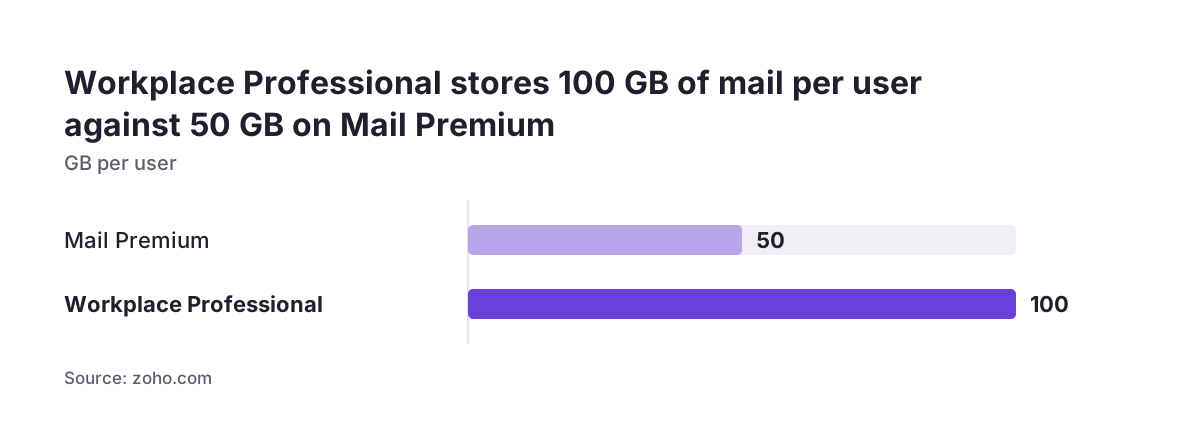
The Zoho Workplace plan comparison covers Mail Lite, Mail Premium, Workplace Standard and Workplace Professional. WorkDrive, Writer, Sheet, Show and Meeting appear only in the two Workplace plans. Meeting allows up to 100 participants on Standard and up to 250 on Professional.
Add-ons and support plans that sit on top of a Zoho licence
Add-ons and support plans are the costs that do not appear in the headline per-user price. Budget for them before you compare Zoho One with individual apps, because they change the gap between the two.
Capacity add-ons
Some limits can be raised for a fee. The Workplace comparison page states that each Zoho Meeting host can store recordings up to 5 GB. It adds that "additional storage space can be purchased as an add-on". WorkDrive team storage follows a fixed rule instead.
For 1 to 3 users, each user adds 10 GB. For more than 3 users, the team gets 100 GB for the first 10 users, and each additional user adds 10 GB.
Support plans
Support levels differ by product, so check each one you buy. Customers of paid Zoho CRM editions automatically get Classic support and can opt into a paid support plan. Zoho Creator lists four support plans: Basic, Classic, Premium and Enterprise. Creator also states that all its current pricing plans include a dedicated account manager. All four Workplace plans list 24x7 support by email, chat and call, plus a 99.9% uptime guarantee.
Setup services
Zoho also sells setup help. Zoho Jumpstart is a Zoho service that provides initial configuration so a company can start working with its new software quickly. The CRM pricing page mentions end-to-end services from requirement gathering to onboarding, with dedicated programmes for SMEs and enterprises.
Annual against monthly billing for Zoho, and what each lets you change
Zoho lets you pay monthly or yearly. The trade-off is flexibility against commitment. The Zoho CRM pricing page says: "You are not bound by any contracts or commitments. Zoho CRM is a pay-as-you-go service (monthly or yearly)."
Monthly billing suits a company that is still testing its setup or expects headcount to move. You can adjust seats and editions without waiting for a renewal date. That is useful during the first months of an implementation, when you are still discovering which users really need access.
Yearly billing suits a stable setup. It also opens more payment methods. Both the Zoho CRM and Zoho Creator pages list Visa, Mastercard, American Express and PayPal. Each adds that "bank transfer or check transfer" is accepted for yearly subscriptions only. If your finance team prefers paying by bank transfer against an invoice, that points to yearly billing.
A practical sequence is to start monthly, confirm the user list and edition after go-live, then move to yearly billing. Before you switch, check the vendor page for your region. The difference between monthly and yearly rates varies by product and is shown there in your currency.
Worked example: mapping a 40-person company before buying Zoho
A worked example shows how the process map drives the licence choice. Take a company with 40 employees on payroll. Its process map shows 12 people who need business apps: 6 in sales, 3 in customer service, 2 in finance and 1 operations manager. All 40 need company email.
Option A: Zoho One, All Employee
All 40 people on payroll need a licence. Everyone gets the full bundle, including the 28 staff who only need email. This option wins only if most of those 28 would also use documents, HR tools or other apps in the bundle.
Option B: Zoho One, flexible user
Only the 12 mapped users get Zoho One. At the listed rate of US$90 per user, that is 12 x US$90 = US$1,080 before VAT. The other 28 still need email, so you add a Zoho Workplace plan for them.
Option C: individual app licences
The 6 salespeople get Zoho CRM. The edition depends on the map. If the sales process needs AI agents, that means Professional. If it does not, Standard may be enough.
Everyone gets Mail Lite, or Workplace Standard for those who need WorkDrive, Writer and Sheet. Service and finance get their own products.
The map settles the choice. If service, finance and operations each need a separate product, the cost and admin of Option C grow quickly, and Option B usually wins. If only sales needs a business app, Option C stays simpler. Price each option on the vendor pages in your currency before you sign.
Decision table: Zoho One or individual Zoho app licences
The table below compares the three Zoho buying routes across the questions that decide most purchases. Read across the row that matches your process map. The route with the most matching cells is usually your starting point.
| Question | Zoho One, All Employee | Zoho One, flexible user | Individual app licences |
|---|---|---|---|
| Who needs a licence | Every employee on payroll | Only the people you choose | Only the users of each product |
| Share of staff using Zoho | Nearly everyone | A minority, across several apps | A few teams, in one or two apps |
| Number of products needed | Many | Many | One or two |
| Edition changes | Apply to all users | Apply to all users | Set per product |
| Effect of hiring | Every new payroll hire adds a licence | Only new users add a licence | Only new users of that product add a licence |
| Main risk | Paying for staff who never log in | Buying the bundle before the apps are mapped | Too many separate products to manage |
When two routes tie, choose the one that is easier to change later. Monthly billing on individual apps is the easiest to reverse. An All Employee commitment is the hardest.
Buying Zoho in an EU country: VAT, currency and language
For a company in an EU member state, three practical points apply to any Zoho purchase. The first is tax. The Zoho One page states that its prices do not include VAT. The Zoho CRM page states that local taxes such as VAT are charged in addition to listed prices. Budget the VAT treatment that applies to your company in your own country, and ask your accountant how it is handled.
The second point is currency. Some Zoho pricing pages show a different currency depending on where you view them. The Zoho CRM page we read showed Indian rupees, for example, so compare prices only on the page for your region. Zoho Creator lists 18 billing currencies, including the euro. Paying in euros removes exchange-rate movement from your budget.
The third point is language. The Zoho CRM pricing page states that it supports 28 languages. A company with teams in several member states can therefore give each team the interface in its own language under the same licence.
One caution on reading pricing pages from outside Europe. The Zoho CRM Standard edition lists HIPAA compliance, which is a United States health-data rule. It says nothing about your obligations under GDPR. Assess data protection separately, based on how you configure and use the system.
Zoho licensing mistakes companies make when they buy before mapping processes
Most Zoho licensing mistakes come from buying seats before anyone has written down who does what. The pattern is consistent, and each mistake has a simple check.
- Licensing headcount instead of users: seats go to people who never log in. Check each name against a process step.
- Choosing the edition from the trial: the Zoho One trial shows the full catalogue, not just Essentials. Note which apps you actually used.
- Buying the top edition "to be safe": a higher CRM edition costs more for every user on it. Buy it only for a feature your map requires.
- Ignoring whole-organisation rules: Zoho One edition changes apply to all users, so you cannot upgrade one department alone.
- Forgetting add-ons and tax: storage, support plans and VAT come on top of the per-user price.
At Svennis we start every licence decision with a short process map that lists each person, the apps they touch and the edition feature they need. The mistake we most often correct is a bundle bought for everyone, where the map later shows many seats that never log in.
Downgrading is possible but costs features. The Creator FAQ confirms that moving down from Enterprise keeps your data, but higher-edition features become unavailable. Mapping first avoids that rework.
Next steps: map your processes, then trial the Zoho edition you need
The practical next step is a one-page process map, done before you open any pricing page. Work through these steps in order:
- List every process your teams run, and the people who perform each step.
- Mark the Zoho product each step needs, and the edition feature it depends on.
- Count two numbers: employees on payroll and actual users.
- Price Zoho One, All Employee and flexible user, against individual app licences on the vendor pages for your region, and add VAT.
- Start a trial of the route you chose. Zoho Creator's trial, for example, lasts fifteen days and needs no credit card.
- Begin on monthly billing, and move to yearly once the user list is stable.
If your map points to a single need, a single product is often enough. Pipeline-only sales teams can look at Zoho Bigin, and accounting-led companies at our Zoho Books setup page. If the map shows several teams across several apps, read the Zoho One implementation page before you commit.