
Zoho CRM Plus vs Zoho One: the real decision
The choice between Zoho CRM Plus vs Zoho One looks like a feature comparison. In practice it is a licensing decision. Zoho describes CRM Plus as a customer experience platform that unifies your sales, support and marketing teams on one interface. It describes Zoho One as an all-in-one suite that lets you run your entire business.
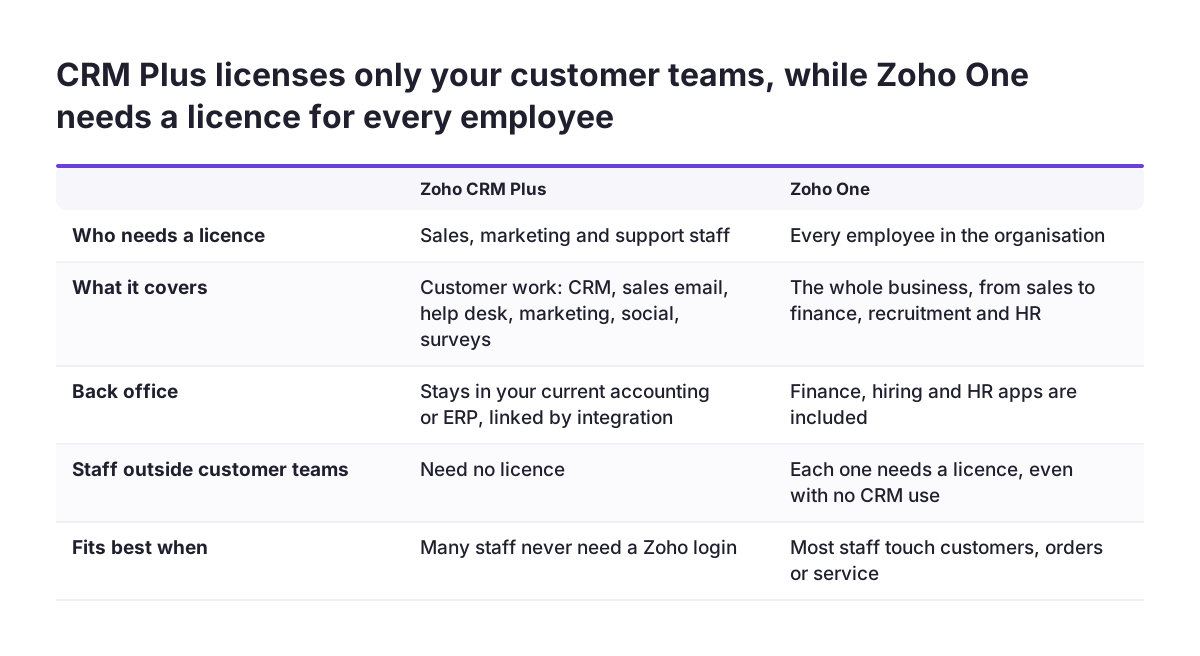
What separates them is who you have to pay for. With CRM Plus you buy licences for your customer-facing teams. With Zoho One, Zoho's own help centre states that you need licences for all the employees in your organisation. That single rule drives most of the maths, and it is where many buyers get the comparison wrong.
Below you will find what each bundle covers and a break-even test you can run with your own headcount. You will also see what user ratings and support tiers suggest, and which signals tell you it is time to move from one bundle to the other.
If you are still deciding whether Zoho is the right platform at all, start with our guide on how to choose a CRM for your European business. Come back to this comparison once Zoho is on your shortlist.
What Zoho CRM Plus covers
Zoho CRM on its own is focused on sales teams. It helps them track leads, nurture them into prospects, close deals and build lasting customer relationships. CRM Plus wraps that core with the tools your other customer-facing teams use. According to Zoho's product page, it combines CRM, an email client for salespeople, visitor tracking, a help desk, project collaboration, marketing automation, social media management, customer surveys, activity management, and metrics and KPIs in one platform.
- SalesInbox, which sorts email into columns by deal stage: Prospecting, Qualification, Proposal and Closing.
- Social, for scheduling posts and engaging with customers across Facebook, Twitter, Instagram and LinkedIn.
- Analytics, with over 100 pre-installed reports and dashboards.
- Zia, Zoho's AI assistant, which predicts business trends, suggests the best times to contact customers and identifies sentiment in emails and tickets.
The point of the bundle is the shared view. Zoho says CRM Plus gives your customer-facing teams a 360-degree view of customers across all touch points. It also integrates with over 1,000 third-party business apps and comes with APIs plus mobile and web SDK support. So it does not have to replace your accounting or ERP.
Our Zoho CRM Plus page describes the suite in more detail. If ticket sentiment is the feature that interests you most, read up on AI for customer support before you commit to a bundle.
What Zoho One adds on top
According to Zoho's help centre, Zoho One includes 40+ web applications covering sales, marketing, customer support, finance, recruitment, HR and more. GetApp's German comparison describes it as an operating suite with more than 35 integrated apps in a single account. The count depends on who is counting and when, so plan around "several dozen apps" rather than an exact number.
The practical difference is the back office. CRM Plus stops at your customer-facing teams. Zoho One reaches into finance, hiring and HR. One commenter on a public Zoho forum described using Zoho One with Books for invoicing, stock and ordering, Inventory for parcel and delivery tracking, Forms for web embeds and Analytics for reporting.
An EU-specific detail
Zoho's help centre notes that using finance applications inside Zoho CRM Plus is currently available for organisations in the EU data centre. Zoho plans to roll it out to other data centres in phases. If your account sits in the EU data centre, check whether this narrows the gap for you before you pay for the full suite.
For an overview of the wider suite, see our Zoho One implementation page.
The licensing rule that decides the maths
Zoho states the rule plainly in its help article on the two bundles. For CRM Plus, you purchase user licences for your customer-facing teams. For Zoho One, you purchase licences for all the employees in your organisation. Headcount, not app count, is therefore the number that matters.
Think about what "all employees" means in your company. Under Zoho One, warehouse staff, part-time administrators and a technician who never opens the CRM all need a licence. So does a finance clerk who only files expenses. Under CRM Plus, none of them need one, as long as they stay outside sales, marketing and support.
This cuts both ways. If most of your people work with customers anyway, the all-employee rule costs you little. It also gives everyone else access to finance, HR and collaboration tools. If your customer-facing team is a small slice of a larger workforce, the rule multiplies your bill by people who may never log in.
Buying and contract terms
Zoho says CRM Plus comes with a monthly or yearly subscription that you can cancel at any time. You can sign up online, or offline, where someone else signs you up rather than you paying on the website. Comparison sites show list prices in US dollars. Confirm the currency, billing cycle and VAT treatment on your own quote before you compare.
A break-even test you can run in ten minutes
GetApp lists Zoho One from 45.00 US dollars a month and Zoho CRM Plus from 45.65 US dollars a month. Entry prices that close tell you very little on their own. Your real bill is the rate multiplied by the number of licences each bundle forces you to buy, and editions differ.
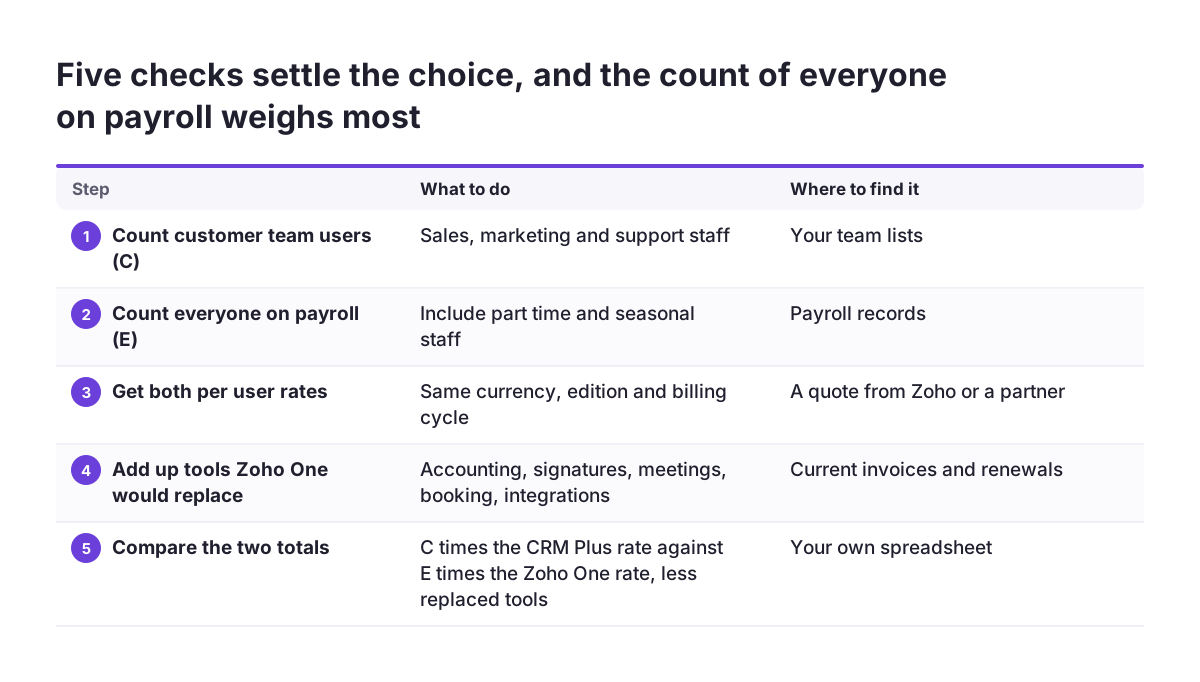
- Count your customer-facing users in sales, marketing and support. Call this C.
- Count everyone on payroll. Call this E.
- Get the current per-user rate for each bundle, in your currency and edition, from a quote.
- Add up what you pay today for separate tools that Zoho One would replace, such as accounting, e-signature, video meetings, appointment booking or integration middleware.
- Compare two totals. The first is C times the CRM Plus rate, plus the tools you would keep. The second is E times the Zoho One rate.
The share C divided by E is your quick signal. The figures below are hypothetical and only show the method.
| Company profile | C | E | C as share of E | Likely lean |
|---|---|---|---|---|
| Sales-led agency | 18 | 22 | 82% | Zoho One |
| Services firm | 12 | 30 | 40% | Run the full calculation |
| Distributor with a warehouse | 10 | 60 | 17% | CRM Plus, unless replaced tools close the gap |
At similar per-user rates, Zoho One pays for itself in two cases. Either C is close to E, or the tools it replaces cost more than the extra licences for staff who would otherwise stay outside Zoho.
What user ratings and support tiers suggest
On GetApp Germany, CRM Plus scores 4.4 out of 5 from 71 reviews. Zoho One scores 4.1 out of 5 from 134 reviews. The gap repeats in the sub-scores.
| GetApp score | Zoho CRM Plus | Zoho One |
|---|---|---|
| Overall | 4.4 | 4.1 |
| Ease of use | 4.2 | 3.8 |
| Customer service | 4.1 | 3.6 |
| Value for money | 4.4 | 4.1 |
A broader suite is harder to learn and harder to support, so lower ease-of-use scores for Zoho One are not surprising. GetApp discloses that software vendors pay it for sponsored profiles, and the review counts are modest. Read these scores as a direction, not a verdict.
Support hours
For CRM Plus, Zoho states that standard support runs eight hours per workday by email, phone and chat. The Premium tier covers 24 hours per workday and the Enterprise tier covers 24/7. The paid Enterprise Support plan adds the community channel and a maximum response time of one hour. If your sales or support team works outside office hours, include that tier in your cost comparison from the start.
Signals that CRM Plus is enough, and signals it is not
CRM Plus is usually enough when
- A defined group of sales, marketing and support staff handles your customers.
- You already run accounting, payroll or ERP elsewhere, you are happy with it, and an integration can connect it to the CRM.
- Many of your staff never need a Zoho login at all.
Keeping your existing back office is a normal choice. Our SAP Business One integration is one example of an ERP handling finance while the CRM handles customers.
Zoho One starts to pay when
- Most of your staff touch customers, orders or service anyway.
- You pay for several standalone tools that overlap with Zoho One apps.
- Handoffs between sales, finance and operations still run through email or spreadsheet exports.
- You want one login and one set of records across departments.
Multi-site businesses often show the second pattern. At World Class, the fitness chain, we built one Zoho system that runs 47 clubs. When every site works from the same records, the case for licensing broadly rather than narrowly gets stronger.
A small-team example from a public forum
A thread on the r/Zoho forum shows how the choice plays out for a very small company. The poster described a 4-person team that handled quotes and orders manually in Excel and created quotes in a separate accounting package. The gap between a quote and an order could be instant or 3 to 4 months.
The owner's position was clear: they wanted only a CRM and planned to keep their accounting software for everything else. One commenter still recommended Zoho One. Their list of swaps covered Zoho Sign for e-signatures, Zoho Flow for integrations, Zoho Meeting for video calls, Zoho Bookings for appointments and Zoho Books for accounting. They said they had moved their own accounting to Books the previous year and had no regrets.
Another commenter who had moved to Books added a warning. Books downloads bank transactions through a third-party bank feed service, and they had struggled to get that connection working. These are individual experiences, but they show where the effort goes.
The lessons are practical. In a team where all four people face customers, C equals E, so the licensing difference nearly disappears. Replacing accounting is a bigger project than adding a CRM, though, and the owner's preference counts. If you are moving off spreadsheets, our guide to migrating to Zoho CRM without losing your sales history covers the data side.
Rollout risks to plan for
Zoho states that implementation time for its software is 50 percent lower than the industry average. Treat that as the vendor's own figure. Your timeline depends on your scope, your data and how many teams change their way of working at once.
With Zoho One, scope is the main risk. Access to dozens of apps tempts teams to switch on everything in the first month, which spreads training thin and leaves half-configured apps behind. A phased plan works better. Start with customer-facing apps, add finance once the customer records are clean, then add HR and the rest.
Use the trial properly. Zoho offers a 30-day free trial of CRM Plus with no credit card required, and GetApp lists both bundles with a free version and a free trial. Load a real sample of your pipeline and tickets rather than demo data, and let the people who will use the system daily test it.
Whichever bundle you choose, get the CRM setup right first. A clean Zoho CRM structure with sensible fields, stages and ownership rules makes every later app easier to add.
Practical next steps
- Count C and E from payroll. Use actual people, including part-time and seasonal staff, because the Zoho One rule covers all employees.
- List every paid tool and its renewal date. Mark which ones a Zoho One app could replace and which ones you would keep regardless.
- Request quotes for both bundles on the same terms. Use the same currency, edition and billing cycle. Confirm your data centre, and if it is the EU data centre, ask whether finance apps inside CRM Plus are available to you.
- Run the break-even test. If C is close to E, or replaced tools cover the extra licences, lean towards Zoho One. Otherwise start with CRM Plus.
- Trial with real data for 30 days. Measure whether your sales, marketing and support teams actually work from the shared customer view.
- Choose your support tier based on your working hours, not on the lowest price.
- Plan a phased rollout. Launch the customer-facing apps first and set a date to review the back office.
If your C to E share lands in the middle, features will not settle the decision. It comes down to the tools you would retire and how much change your team can absorb in one year.