What AI replies in Zoho Desk with Zia actually are
AI replies in Zoho Desk with Zia means letting Zoho's built-in AI draft an answer to a ticket, which an agent then reviews, edits and sends. Zia is Zoho Desk's built-in AI, and Zoho lists reply assistance among its generative features, alongside ticket summarisation, tone analysis, content generation and writing assistance.
The key word is draft. Zoho describes the feature as Zia analysing ticket content and generating the most relevant responses from your knowledge base directly in the agents' workspace. A knowledge base is your organised collection of product articles, troubleshooting tips and FAQs. When that collection is thin or out of date, Zia has little to draft from, and the output reads like a guess.
This guide covers four things:
- the reply assistant and the Answer Bot, which share the same knowledge,
- the preparation that turns vague drafts into usable ones,
- sentiment analysis and auto-tagging, which shape how tickets reach agents,
- what an agent still checks before pressing send.
If you are still deciding whether Zia or a separate assistant suits your company, read our comparison of Zia, Claude or both inside Zoho first. This post assumes you have chosen Zia and want AI for customer support that your agents trust rather than work around.
What Zia answers from, and what it cannot see
Zia's drafts come from three places. The first and most important is your knowledge base. Zoho's help centre says the Answer Bot is a self-learning bot that trains itself on the articles in the knowledge base. When generative AI is switched on, the bot sends the customer's query and the relevant article to the preconfigured generative model, and Zoho states it will not use generative AI to fetch answers from the open domain in that mode.
Be aware that Zoho's product page also describes a broader option: the Answer Bot can be configured to use your articles, open domain data (when integrated with ChatGPT or Zia's generative AI), or both. For customer support, knowledge-base-only is the safer default, because every draft can then be traced back to an article you control.
Past tickets and other Zoho data
The second source is ticket history. According to an analysis published by eesel AI, Zia predicts fields such as category, priority and issue type from past ticket data, and it pulls context from Zoho CRM and other Zoho apps. Zoho also says Zia converts ticket conversations into knowledge base articles, which is the practical route for turning good past answers into material the reply assistant can use. A user in Zoho's own community asked for exactly this: AI that uses historical ticket conversations beyond manually written help centre articles.
What stays invisible
The same eesel AI analysis states that Zia cannot reach knowledge stored outside Zoho applications, such as Google Docs, Confluence, Slack or Notion. If your real answers live in those tools, they have to move into Zoho Desk articles before Zia can use them.
| Articles only | Articles plus open domain | |
|---|---|---|
| Where answers come from | Your published knowledge base articles | Your articles plus open domain data |
| What it needs | Generative AI switched on in Zoho Desk | Integration with ChatGPT or Zia's generative AI |
| Your GDPR assessment | Covers your Zoho setup | Adds data flows to document, a further provider with ChatGPT |
| Where to start | Recommended starting point for customer support | After you have reviewed what open domain answers add |
Check what your Zoho Desk plan unlocks
Before you plan a rollout, confirm which AI features your subscription includes. Zoho's Zia page states that the generative capabilities, including reply assistance, are built into Zoho Desk at no extra cost. A third-party review paints a more restrictive picture, and the difference matters for your budget.
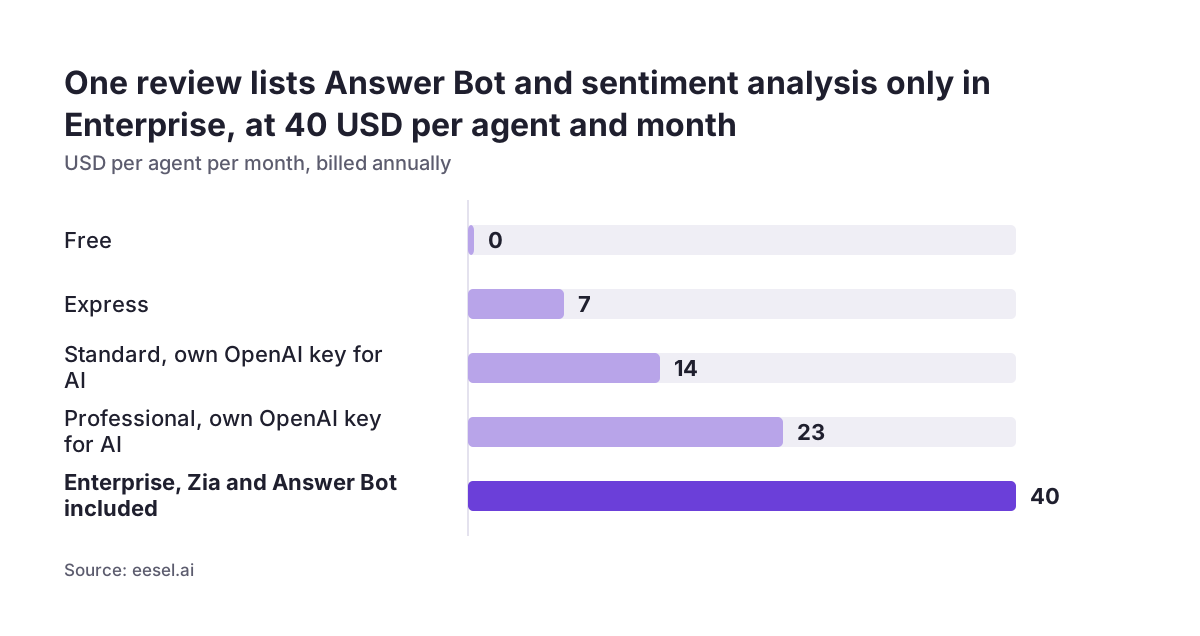
eesel AI's March 2026 analysis lists these prices per agent per month, billed annually, and the AI each tier includes:
- Free (0 USD) and Express (7 USD): no AI features listed.
- Standard (14 USD) and Professional (23 USD): generative AI only if you bring your own OpenAI API key.
- Enterprise (40 USD): Zia AI Assistant, Answer Bot, sentiment analysis, field predictions, anomaly detection and AI Agents.
On that reading, access to Zia's main features costs 480 USD per agent per year. The same analysis notes that Zoho Desk offers no way to test AI accuracy on your past tickets before you commit to Enterprise. Treat these figures as a third party's snapshot and confirm current plan contents with Zoho before you sign.
The practical consequence: if you are on Standard or Professional, decide whether bringing your own OpenAI key is acceptable, both technically and for data protection (covered below). If you are still choosing a helpdesk, our Zoho Desk vs Freshdesk comparison puts plan differences side by side.
Prepare the knowledge base before you switch anything on
Most weak drafts trace back to the articles, not the model. Zoho's help centre sets concrete rules for what the Answer Bot can learn from, and the reply assistant draws on the same knowledge. Treat good knowledge management as the real setup work.
| Requirement | Zoho's rule | What to do |
|---|---|---|
| Article count | 30 articles per department recommended for best results (eesel AI calls 30 the minimum to enable the Answer Bot) | Count published articles per department and fill gaps before launch |
| Article length | At least 100 characters, at most 200,000 | Merge stub articles; split very long manuals |
| Paragraph length | Ideal limit of 1,000 words per paragraph | Break long blocks into short, single-topic paragraphs |
| Format | Attachments, images and infographics are skipped in training | Write key steps as text; do not rely on PDFs or screenshots |
| Visibility | By default only articles published to "All Users" are used | Check which articles are restricted and whether they should be |
| Language | Generative AI supports 33 languages; the Answer Bot 29 | Confirm each language you serve is supported |
One exception on visibility: when the Answer Bot is linked to a Business Messaging channel, signed-in customers can receive answers drawn from both "All Users" and "Registered Users" articles. Decide deliberately which content belongs in each group.
Configure the Answer Bot and reply assistance
With the articles in shape, the configuration itself is short. Zoho describes the Answer Bot as an AI chatbot that can be enabled within Zoho Desk for agents and deployed on websites and messaging apps for customers. Admins can create one Answer Bot per department, and Zoho's product page adds that you can create brand-specific bots while controlling the information Zia trains on.
Set the threshold
The threshold decides how closely a response must match a query before it is sent to a customer. Zoho offers three levels, Exact, Confident and Possible, which trade accuracy against coverage. Start stricter for customer-facing answers and loosen only when you have reviewed what the bot gets right.
Choose the generative mode
Pick knowledge-base-only generation for support, as explained earlier. If you connect ChatGPT, record that choice and its reason, because it changes where queries are processed.
Keep training current
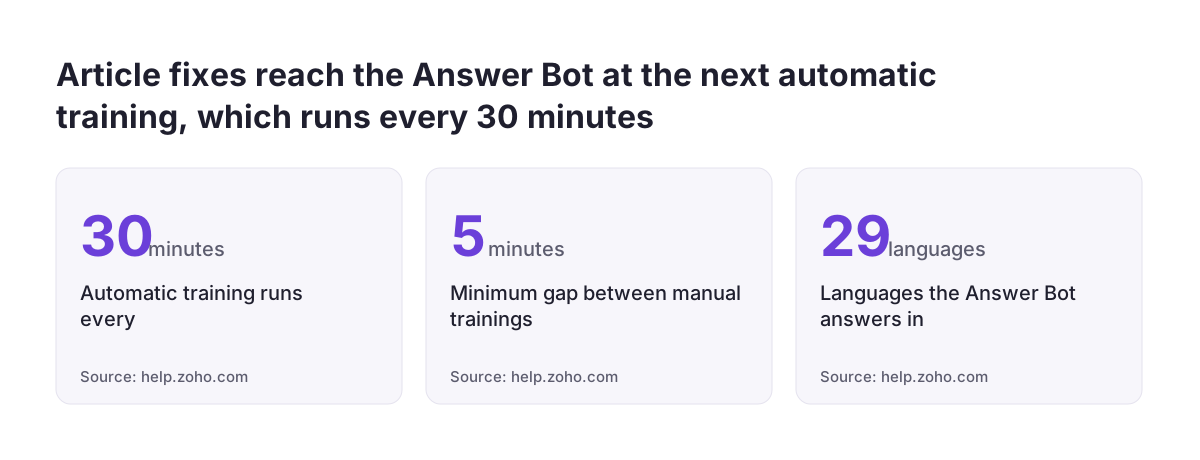
Zoho's scheduler runs automatic training every 30 minutes, and manual retraining sessions need at least five minutes between them. When an article is deleted or unpublished, the next scheduled training removes it. Updating an article is therefore the fastest fix for a wrong draft.
Plan the channels and the fallback
For customers, the Answer Bot runs on websites, the help centre, landing pages and in iOS and Android apps through mobile SDKs. The "Chat with Agent" fallback appears only if live chat is enabled in ASAP, so switch that on if you want customers to reach a person.
Sentiment analysis and auto-tagging: useful signals, not verdicts
Two Zia features shape which tickets agents see first and how drafts get framed. Neither writes replies, but both affect the quality of the work around them.
Sentiment analysis
According to eesel AI, Zia classifies the mood of incoming tickets as positive, negative or neutral. Twig's comparison notes that Zoho Desk prioritises requests based on this sentiment, and Zoho lists a Sentiment Analyst among its Zia Agents. The same eesel analysis reports that multiple reviews describe the sentiment results as "hit-or-miss".
Use sentiment to sort a queue or to flag tickets for a second look. Do not use it alone to trigger escalations or refunds, and spot-check a sample of labels every week in the first month.
Auto-tagging and field predictions
Zoho states that Zia auto-tags incoming requests so agents can open tickets that share a tag. eesel AI adds that Zia predicts category, priority and issue type from past ticket data. The consequence is simple: predictions mirror how your team filled in these fields before. If past categories were chosen inconsistently, clean up the category list first, or Zia will learn the inconsistency.
Zoho also says Zia predicts and notifies you of unusual ticket activity. If you want to follow tag and sentiment trends beyond the Zia dashboards in Desk, our Zoho Analytics page explains the reporting options.
A worked example: two departments, one set of rules
Take a software company that sells a subscription product and runs two Zoho Desk departments, one answering in English and one in German. Both languages sit within the languages Zoho lists for generative AI and the Answer Bot. Here is how the setup runs, in order.
- Audit the articles. The English department has plenty of published material; the German one has fewer articles than Zoho's recommended 30. The team translates the most-read English articles and asks Zia to convert strong past ticket conversations into new German articles.
- Fix the format. Installation steps that lived in screenshots are rewritten as numbered text, because the Answer Bot skips images during training.
- Check visibility. Billing articles were restricted to "Registered Users". The team keeps them restricted and connects the bot to a Business Messaging channel so signed-in customers still get those answers.
- Create one Answer Bot per department and set the threshold to Exact for the first weeks.
- Select knowledge-base-only generation so drafts cite only the company's own articles.
- Enable live chat in ASAP so "Chat with Agent" appears as a fallback.
- Review drafts daily. When an agent finds a wrong draft, the article is corrected and the scheduler picks up the change within 30 minutes.
After a few weeks the team compares German and English drafts. Where German drafts are weaker, the cause is usually a missing article, and the fix is writing it.
What an agent still checks before sending
A draft saves typing; it does not transfer responsibility. Every suggested reply goes through a short human review before it reaches the customer. Build that review into your team's routine and keep it brief enough that agents actually do it.
- Does it answer this ticket? Drafts match on content, so check that the article Zia used fits the customer's actual situation, product version and plan.
- Is the article current? If the facts are outdated, fix the article, not only the reply, so the next draft is right too.
- Commitments. Refunds, deadlines, warranty terms and prices must match your current policy. Never let a draft promise what your policy does not.
- Tone. Use Zia's tone analysis as a hint, then read the reply as the customer would, especially when sentiment is flagged negative.
- Personal data. Remove anything about another customer and anything the recipient should not see.
- Language. Check terms and form of address in the customer's language, not only grammar.
At Svennis we start every Zia rollout with a knowledge base audit before touching any AI setting, and where we see drafts go wrong at clients, the cause is almost always a thin or outdated article rather than the model. That is why the review above ends with a loop: every corrected draft should produce a corrected article.
What this means for companies in the EU
For a European business, the first question is where the data sits. Zoho states that Zia is available in its EU data centre, among others, and that it never uses customer data to train its AI model and is compliant with GDPR. Those are Zoho's own statements. You still need to check them, sign Zoho's data processing agreement and record Zoho as a processor. Your own GDPR assessment, including what personal data flows into tickets and drafts, remains yours to document, and our sister site sets out a wider view of data security for AI in business.
The OpenAI key route on Standard and Professional plans deserves particular care, because it adds another provider to that assessment. The same applies if you connect ChatGPT for open domain answers.
National guidance varies
Data protection authorities in each member state publish their own guidance, so check yours. As one example, Germany's Datenschutzkonferenz (DSK), the conference of the independent federal and state data protection authorities, published guidance on using AI in line with data protection in May 2024 and guidance on AI systems using Retrieval Augmented Generation in October 2025. Retrieval Augmented Generation means an AI looks up relevant documents first and then writes an answer from them, which is close to how Zoho describes the Answer Bot's generative mode. The DSK has also taken a position on national responsibilities for the EU AI Act. This guidance reflects how German authorities read the law; companies elsewhere should check what their own authority has published.
Practical next steps
You can prepare most of this in a week without changing a single Zia setting. Work through the steps in order, because each depends on the one before.
- Confirm your plan. Check which Zia features your Zoho Desk subscription includes and whether generative AI requires your own OpenAI key.
- Count and clean articles. Aim for Zoho's recommended 30 per department, within the length limits, with key steps written as text.
- Review visibility. Decide which articles are "All Users" and which are "Registered Users".
- Tidy categories and tags so field predictions learn from consistent history.
- Configure one Answer Bot per department, knowledge-base-only, with a strict threshold to start.
- Write the agent review checklist from the previous section into your support procedures.
- Document the data flows for your GDPR records and check your national authority's AI guidance.
If you want to see how Zoho Desk fits your wider support setup before you start, the Zoho Desk helpdesk page on this site describes what an implementation covers and where Zia fits in it.
Sources
- Zoho Desk help: AI-based Self-Service with Answer Bots
- Zoho: Zia, Zoho Desk's AI for customer service
- Zoho: Zia Answer Bot
- Zoho Community: Automating Ticket Responses Using Zoho Desk's AI Features
- eesel AI: Zoho Desk AI accuracy, how reliable is Zia in 2026
- Twig: Zoho Desk vs Levity AI
- Datenschutzkonferenz (DSK): Pressemitteilungen