Freshdesk helpdesk or Zoho Desk: the short answer for Zoho CRM teams
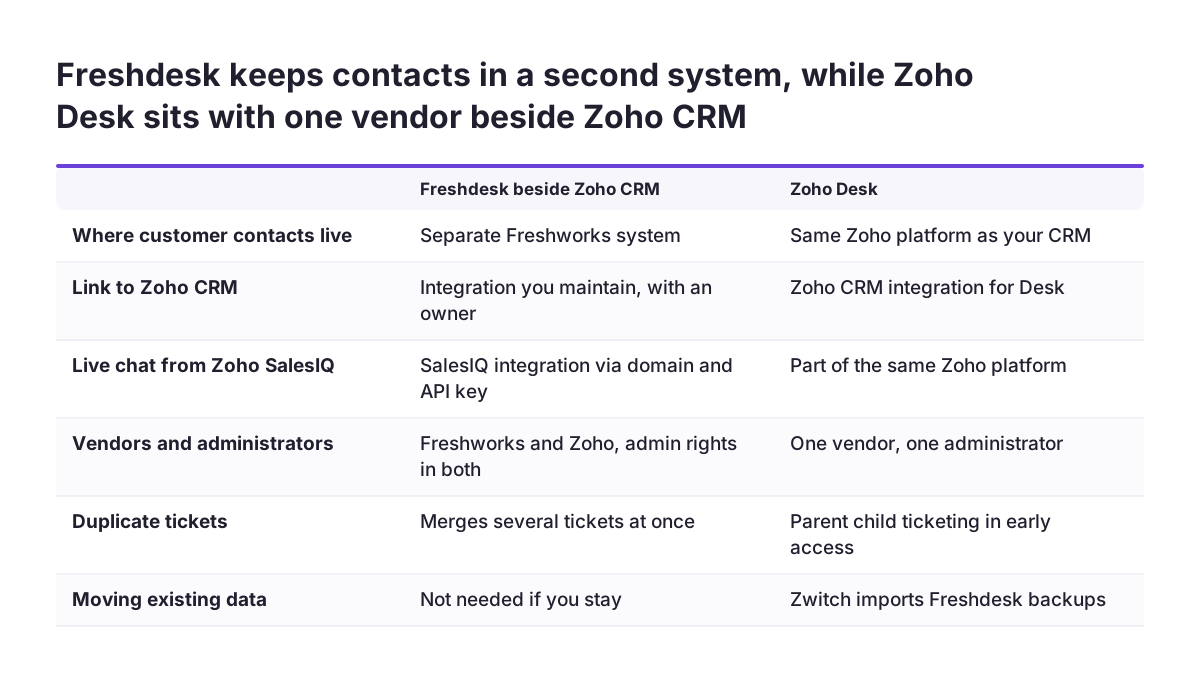
For a company already on Zoho CRM or Zoho One, a Freshdesk helpdesk is a capable product. It usually costs you more ongoing effort than Zoho Desk, though. Freshdesk keeps your customer contacts in a second system, so every link back to Zoho CRM is an integration you maintain. Zoho Desk also has a built-in tool for importing Freshdesk data.
A Freshdesk helpdesk is the hosted help desk from Freshworks. Customer contacts become tickets, agents work those tickets from a shared queue, and the system measures how that went. Zoho Desk does the same job inside the Zoho platform you already pay for and administer.
So the choice is less about ticket features and more about where your customer data lives. Freshdesk can still be the right call in three situations:
- Your support team has its own budget and its own owner.
- The team rarely needs CRM context.
- The team already runs well on Freshdesk.
If none of those apply, moving to Zoho Desk removes a second contact database and a set of integrations. For a side-by-side view of features, see our Zoho Desk vs Freshdesk feature comparison. This post covers the rest: what Freshdesk costs, what connecting it to Zoho involves, and what moving tickets, contacts and workflows across actually takes.
Freshdesk strengths and the team size it suits
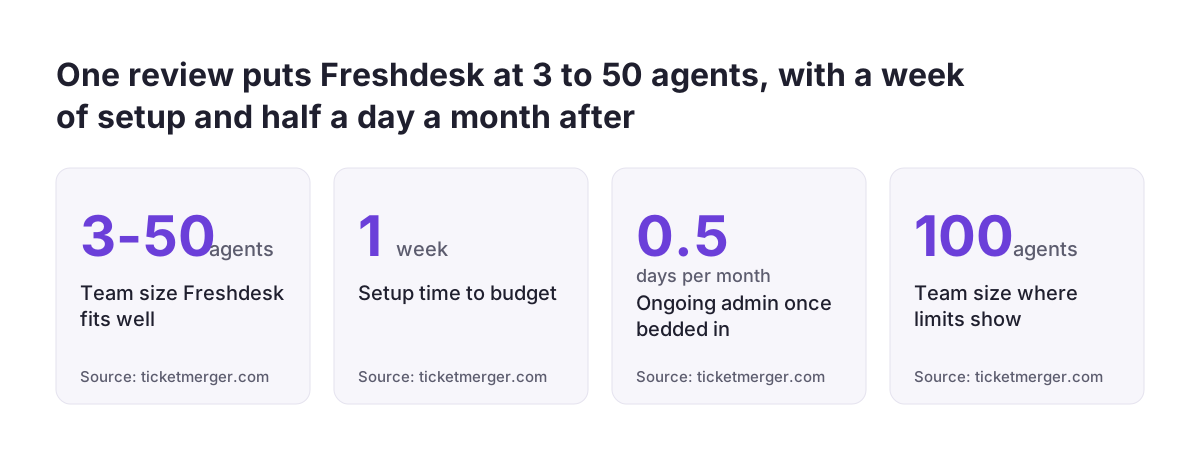
Freshdesk suits small and mid-sized support teams that mostly answer email and portal requests. Ticket Merger is a software vendor whose tools work with help desks. Its review of Freshdesk puts the comfortable range at roughly three to fifty agents. It adds that teams above a hundred agents start to feel the ceilings, particularly in reporting.
The same review compares Freshdesk with Zendesk. Zendesk goes deeper on configurability, reporting and enterprise controls, and it costs more. Freshdesk is faster to stand up and cheaper.
Email is a native channel in Freshdesk. Chat, voice and social are separate modules attached to the same workspace. The feature list on Freshworks' own site includes these items:
- Ticket handling.
- A customer portal and knowledge base.
- Ticket templates.
- Skill-based ticket assignment.
- The option to bring your own channel (BYOC) or your own telephony (BYOT).
Setting Freshdesk up takes more than an afternoon. Ticket Merger advises budgeting a week of a real person's time. After that, expect roughly half a day a month of administration once the system is bedded in, and more if you keep adding rules.
None of this is a reason to avoid Freshdesk. For a team on Zoho, the real question is whether these strengths outweigh running customer data in two places.
Freshdesk pricing: plans, add-ons and features that raise every seat
Freshdesk is sold per agent per month. The plan you pay for is set by the most advanced feature any one agent needs. Freshworks lists three paid plans, Growth, Pro and Enterprise, on its Freshdesk features and plans page. Prices are quoted in US dollars, and annual billing is cheaper than monthly. Take the current per-seat prices from Freshworks itself on the day you compare costs.
Ticket assignment is one feature that often decides the plan. According to eesel AI's guide to the Freshdesk ticket system, Advanced Automatic Routing is available only on Pro and Enterprise. On the Free and Growth tiers, ticket assignment is manual.
Freshdesk also has a free plan. It covers ticketing, a knowledge base and basic reporting for a limited number of agents. eesel AI describes it as one to two agents for six months, with no credit card. SLAs, business hours and deeper automation sit on the paid tiers.
Scenario automations are also missing from the free tier. These are agent-triggered macros that bundle several actions into one click.
Add-ons sit on top of the seat price:
- Voice and chat are priced separately from ticketing seats. Voice also adds per-minute and per-number charges.
- Freddy AI agent includes the first 500 sessions, then costs 49 USD per 100 sessions. A session is a 72-hour window starting from the customer's first message.
- Freddy AI Copilot is a separate add-on billed per agent. Like the rest of Freddy AI, it is not included in any base Freshdesk plan, so confirm its current price with Freshworks before you budget for it.
Round robin, custom roles, sandbox and multiple products each sit at a particular tier. Needing any one of them raises the price of every seat. If AI is what draws you to Freddy, compare it with the options in our overview of AI for customer support.
Connecting Freshdesk to Zoho SalesIQ and Zoho CRM: what you maintain
Keeping Freshdesk next to Zoho means running at least one integration, and each integration has an owner and failure points. Zoho SalesIQ, Zoho's live chat tool, has a documented Freshdesk integration. It turns chat conversations into Freshdesk tickets.
You configure it in SalesIQ under Settings > Integrations > Help Desk > Freshdesk, using your Freshdesk domain name and API key. You need admin rights in both accounts.
The SalesIQ integration lets you choose four things:
- Which chats become tickets: operator-attended, bot-attended or missed.
- When the ticket is created: as soon as an operator picks up the chat, or when the chat ends.
- The default ticket status: open or closed.
- Which Freshdesk group receives the chats from each SalesIQ department.
The transcript and any attachments go to Freshdesk with the ticket. SalesIQ also adds an automatic private note with the visitor's question, location, browser and system details.
Two dependencies matter in daily use. First, operators must belong to the integrated Freshdesk portal to open the ticket page directly. Second, the integration may fail if the Freshdesk user who set it up is deactivated or loses access. Tie it to an account that will outlast staff changes.
Zoho CRM is a different matter. There, the connection runs through Freshdesk's REST API, which is rate limited by plan, and through outgoing webhooks from automation rules. That approach works, but you design it, host it and monitor it yourself.
Zoho Desk beside Zoho CRM: what one platform changes
Zoho Desk is Zoho's own help desk. For a Zoho CRM customer, its main advantage is that support and sales data sit with one vendor and one administrator. Zoho's migration help page confirms that a Zoho CRM integration exists for Desk. It tells you to disable that integration during a migration to avoid duplicate contacts and accounts.
Duplicates need attention in any help desk. Ticket Merger estimates that duplicate tickets make up 8% to 20% of a typical queue, and says no help desk finds them for you. Freshdesk can merge several tickets at once, but it has no one-click unmerge. Zoho Desk has introduced parent-child ticketing in early access, which combines repetitive and interconnected tickets under one parent ticket.
Zoho Desk has rough edges too, and the Zoho Desk community forum records some of them. One user was rolling Desk out to replace Freshdesk. That user reported that selecting a ticket template loses the in-context contact. Test the templates your agents rely on before go-live.
Reporting is the other reason to keep support inside Zoho. Your managers then read sales and support figures from one platform rather than reconciling two exports. We describe how we approach this on our Zoho Analytics implementation page. Our Zoho Desk setup page covers the help desk itself.
Moving tickets from Freshdesk to Zoho Desk with Zwitch
Zwitch is Zoho Desk's built-in migration tool. It validates your Freshdesk backup files, reshapes the data to fit Zoho Desk, loads it in the correct order and produces a detailed migration report. Only a user with the Primary Contact or Support Administrator role can start a migration.
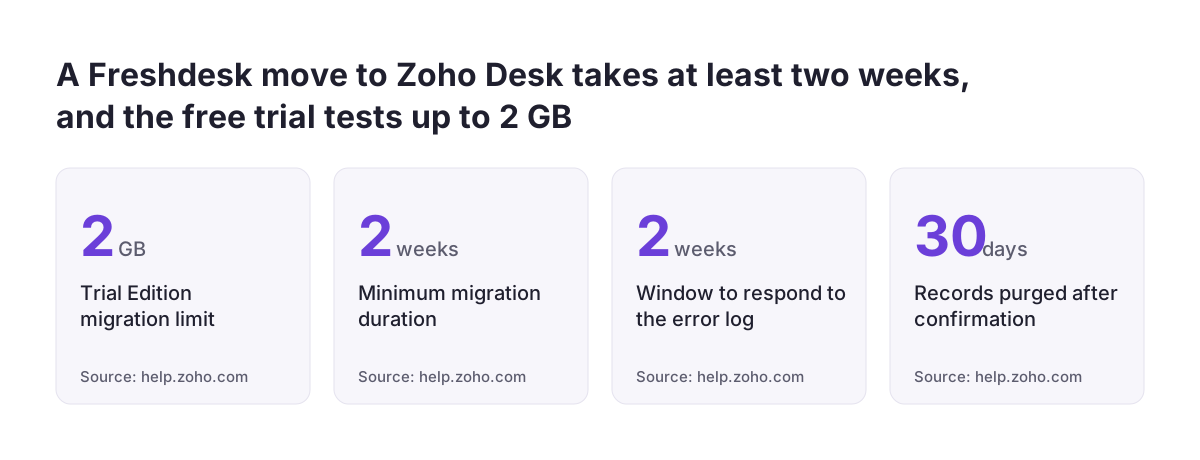
All paid Zoho Desk editions support migration. The Trial Edition handles up to 2 GB of data, which is enough for a test run on a small account.
The input is your Freshdesk backup. Each backup must be a zip file under 5 GB, and you can upload up to five files. Throughout the run, Zwitch also stays connected to Freshdesk over the API to fetch inline images, attachments and field values. Keep the Freshdesk account and its API access active until the migration ends.
Plan your calendar around the sequence described in the Zoho Desk guide to migrating from Freshdesk:
- The first phase moves the bulk of your data.
- Roughly two weeks later, the residual migration picks up two kinds of record: new Freshdesk records, and records that need another try or a correction.
- You respond to the error log within two weeks.
- Records are purged within 30 days of your confirming the migration.
Expect the whole migration to take at least two weeks. You can cancel a migration only while its status is "Submitted in Queue". Once processing starts, it cannot be cancelled. Check your backup and settings before you submit.
Contacts, agents and departments in a Freshdesk migration
Zwitch splits Freshdesk users into three Zoho Desk user types: Agents, Contacts and EndUsers. Tickets follow agents by email address. If an agent is inactive, or the email does not match, that agent's tickets go to the Primary Support Administrator. Align agent email addresses in both systems before the first phase.
Three further rules from Zoho's help page shape the migrated data:
- Tickets linked to deleted Freshdesk contacts are not migrated, because deleted contacts are not in the backup files.
- Everything lands in a single department, either the default or one you choose. Splitting data across several departments in one pass is not supported.
- Private Freshdesk notes become ticket comments, and public notes become threads.
The department rule matters if you support several brands or countries from one Freshdesk account. Decide before the run which department receives the data. Then plan how you will separate it inside Zoho Desk afterwards. The deleted-contacts rule matters if you need older ticket history. Check what history you need before anyone cleans up Freshdesk.
The Zoho CRM integration needs the most care. At Svennis, we keep the Zoho CRM integration switched off through both Zwitch phases. We reconnect it only after we have compared the migrated contacts against the CRM contacts for duplicates.
Rebuilding Freshdesk automation rules as Zoho Desk workflows
Plan to rebuild your Freshdesk automation by hand. Zoho's migration help page covers tickets, contacts, agents and notes. It does not list automation rules among the data that moves.
Start by documenting what you have. Freshdesk's automation engine has three rule types, each on its own tab: Ticket Creation, Ticket Updates and Hourly Triggers. Longer-serving admins may know them by their old names: Dispatch'r, Supervisor and Observer.
The order of Freshdesk rules matters, according to eesel AI's guide:
- Ticket Creation rules run on "first matching rule" by default. They can be switched to "all matching rules".
- Ticket Updates and Hourly Triggers run all matching rules from top to bottom.
- Hourly Triggers only see tickets updated in the last 30 days. They only use ticket properties, not contact or company fields, and every time threshold must be at least one hour.
In Zoho Desk, a workflow rule runs a predefined set of actions when conditions on a record are met. Those actions can be alerts, tasks, field updates or custom functions. Write down which Freshdesk rules depend on order or on first-match behaviour. Then run the same sample tickets through the rebuilt rules and compare the outcomes.
Test Blueprint processes with particular care. One community user reported that conditional layout rules and required fields do not work well with Blueprints when those fields are called during a Blueprint transition.
API usage alerts in Zoho Desk after go-live
Once your integrations call Zoho Desk, watch your API credits. API credits are the usage meter that counts every API call. Zoho Desk's API Usage Alerts email you when usage reaches a threshold you set. You find them under Setup, then Developer Space, API and API Usage Alerts.
The first time you open the page, Zoho Desk creates three alerts, at 80%, 90% and 100% of the limit. They notify the primary contact and all agents in the support administrator profile, and you can edit or delete them. The Zoho Desk help page on API usage alerts sets these limits:
- Each threshold must be between 50 and 100 percent.
- An admin can have at most five active alerts.
- Each alert can have up to 50 recipients.
- Recipients can include addresses outside Zoho Desk, but those addresses are not validated automatically.
- The email template cannot be edited.
Add whoever owns your integrations as a recipient, and check that the address is typed correctly. There is one trap. If you disable the API Usage Alerts feature, the individual alerts still appear enabled in the interface, but they stay inactive. After any change, confirm the feature itself is switched on.
Next steps: deciding and planning a move from Freshdesk
Work through these steps in order. The first two support the decision. The rest prepare a migration if you choose to move.
- Price Freshdesk honestly. Find the single feature that sets your plan, then add voice, chat and Freddy AI if you need them.
- List every integration you would keep running between Freshdesk and Zoho, and name an owner for each.
- Run a test migration on the Zoho Desk Trial Edition, within its 2 GB limit, and read the migration report.
- Decide whether you need tickets from deleted Freshdesk contacts, because they will not move.
- Align agent email addresses and choose the receiving department.
- Export your Freshdesk rules from all three tabs and note their order.
- Disable the Zoho CRM integration, then schedule both phases about two weeks apart. Keep time free for the error log.
- Set API usage alerts and test templates and Blueprints before agents start.
If your agents also connect to customers' screens, decide early whether Zoho Assist for remote support belongs in the same rollout. That way you train the team once.
Sources
- Freshworks: Freshdesk helpdesk features and plans
- Ticket Merger: Freshdesk Help Desk Software, What You Actually Get
- eesel AI: How the Freshdesk ticket system works
- Zoho: Integrate Freshdesk with Zoho SalesIQ
- Zoho Desk: Migrate from Freshdesk
- Zoho Community: Zoho Desk forum
- Zoho Desk: Working with API Usage Alerts