When to bring in a Zoho partner: the short answer
Bring in a Zoho partner when your setup stops being a configuration job and becomes a design job. Four signs mark that point: broken integrations, a second app without a shared data model, reports nobody trusts, and automation only one person understands. The fifth sign is product changes that land untested. Before those signs appear, in-house work is usually enough.
A Zoho partner is a company admitted to Zoho's Partner Program that delivers services on Zoho products for its clients. Zoho describes its consulting partners as helping businesses by "addressing process gaps, delivering strategic consulting, implementation, integration, training, support, and more", on its Zoho Partner Program page.
Keeping Zoho in-house is a sound choice in three conditions:
- You run one Zoho app with a standard process.
- A small team uses it.
- Someone on staff has the time to own its settings.
Most companies start this way, and many should stay that way for a while. The rest of this guide explains each sign, what a partner changes at that stage, how engagements are priced and how to check a partner before you sign.
What a Zoho partner does that a setup guide does not
A setup guide tells you how one setting works. A Zoho partner decides which settings you need, in what order and how your apps relate to each other. You can follow a guide alone. A partner earns its fee through the design decisions that come before the guide.
Zoho lists the services its consulting partners provide on its Find a Zoho Partner page:
- implementation and customization
- data migration
- integration with third-party tools
- user training for your entire team
- continued post-sales support
- workflow automation
Not every company with a Zoho badge does this work. Zoho's program includes Affiliates, who "earn commissions for promoting Zoho and driving sales". Value Added Resellers resell Zoho products with localized support.
Consulting partners and Global System Integrators are the two types that implement. The Partner Directory describes them as "business-focused implementation, support, and related services" and "large-scale global deployments". The partner type and tier therefore matter when you choose.
Sign one: Zoho integrations that break or only do half the job
Broken integrations are usually the first sign that a do-it-yourself Zoho setup has hit its limit. The symptoms are familiar. Records appear twice. Fields stay empty on one side. Staff retype data because the sync does not carry what they need.
The cause is often a gap between what the integration moves and what the business assumes it moves. One example from the Zoho Community: a user reported that the Zoho CRM and Zoho Projects integration can carry only Accounts, not Vendors. They called this "a huge limitation for our perspective and needs". A team that planned its supplier work around Vendors finds out only after go-live.
A partner changes three things at this stage:
- It maps, field by field, what each integration carries and what it leaves out.
- It decides where the gap is closed: a custom field, a different module or custom code.
- It tests the sync with real records before users depend on it.
You can do the mapping yourself if one integration is involved. Once three or four integrations touch the same records, one decision affects the others. At that point the job is design, not configuration.
Sign two: a second Zoho app added without a shared data model
A data model is the agreed list of what records you keep, where each one lives and which app owns it. A single Zoho CRM account can run for years without one written down. Adding a second app, such as Zoho Books or Zoho Projects, is where a missing data model starts to cost money.
The typical failure is simple. A customer exists in CRM as an Account and in the second app as a separate contact or client. Nobody decided which copy is the master. Edits in one app never reach the other, and within months the two lists disagree.
When Svennis takes over a do-it-yourself setup, we draw the data model on one page before we touch any workflow. Most broken automations we see trace back to a record that lives in two apps with no agreed owner.
A partner at this stage fixes the design before the build. It names the master record for each object and decides which direction each sync runs. It also plans the clean-up of duplicates that already exist. If you are about to add a second app, this is the cheapest moment to bring someone in. Fixing the model afterwards means migrating your own data twice.
Sign three: Zoho reports that nobody in management trusts
Reports nobody trusts show that the data underneath has drifted. You notice it when two managers bring different revenue figures to the same meeting. You notice it when staff export to spreadsheets to "correct" a dashboard. You notice it when a Zoho report is opened once and then ignored.
The report tool is rarely the problem. The cause sits upstream:
- A field means different things to different teams.
- Picklist values have multiplied.
- Duplicate records inflate the counts.
- A stage or status is skipped because nothing enforces it.
Building a new dashboard on the same data only produces a new number nobody trusts.
A partner starts by defining each metric once, in writing. A won deal, an active customer and a booked invoice each get one agreed meaning. The partner then traces each metric back to the fields that feed it. Finally, it makes those fields hard to fill in wrongly, through required fields, validation or a guided process.
The dashboard comes last. In-house teams can do this well if one person has the authority to settle definitions across sales, finance and operations. Without that authority, an outside party is often what breaks the deadlock.
Signs four and five: Zoho automation only one person understands, and changes nobody tracks
Automation that only one person understands is a business risk. Nobody can see it until that person leaves or goes on holiday. Workflow rules and custom functions pile up over the years. When something misfires, nobody knows which rule fired or why it exists.
The fifth sign is related: Zoho keeps changing the product under you. Recent examples from the Zoho Community announcements show how often this happens:
- File storage for new Zoho CRM signups is now powered by WorkDrive, with existing users moving across in a phased manner.
- Zoho Books record pages now render natively inside Zoho CRM, as part of an upgraded Books integration.
- Zoho CRM has a new email integration field, "Sync emails from", to reduce mailbox clutter.
Each change is useful. Each one can also interact with automation someone built on the old behaviour.
A partner addresses both signs together. It documents every active rule and function, including its purpose and owner. It removes the rules that no longer serve a purpose. It also reviews Zoho announcements against your setup before each change reaches your users. This is where ongoing support, rather than a one-off project, usually pays for itself.
Worked example: Zoho CRM and Zoho Projects for a company that uses subcontractors
Here is how the signs look in one company. It sells installation projects and tracks customers as Accounts in Zoho CRM. When a deal is won, the team adds Zoho Projects to run the delivery. The company also relies on subcontractors, which it keeps in the Vendors module in CRM.
The do-it-yourself path goes like this. The team connects CRM and Projects and sees customer Accounts flow across. Then it finds the gap one community user reported: Vendors do not come across. Project managers start typing subcontractor names into task descriptions.
Within a few months nobody can report on which subcontractor worked on which project. Two signs have now appeared together: a half-working integration and a second app without a data model.
A partner would take four steps:
- Decide that Vendors in CRM stay the master list of subcontractors.
- Choose how a project references a vendor: a custom field, a lookup or a small custom function.
- Define the report the business needs, such as projects per subcontractor per quarter, before building anything.
- Test the flow end to end with a handful of real projects, then train project managers on the one place to enter a subcontractor.
None of these steps is exotic. The value lies in making the decisions before users build habits around the gap.
Decision table: keep Zoho in-house or bring in a partner
The table below turns the five signs into a decision. Read across each row. If your situation matches the third column in two or more rows, bring in a partner.
| Sign | Keep in-house if | Bring in a partner if | What a partner changes |
|---|---|---|---|
| Integrations | One integration, standard fields | Several integrations touch the same records, or one leaves out a module you need | Field-level map, a chosen workaround, tested sync |
| Second app | The new app shares no records with the first | Customers, products or suppliers exist in both apps | A written data model with a master record for each object |
| Reports | One owner can settle definitions across teams | Managers dispute the numbers and nobody can settle it | Metrics defined once, fields enforced, dashboard last |
| Automation | A few rules, documented by their author | Rules nobody can explain, or one person holds all the knowledge | Documented rules with owners, dead rules removed |
| Product changes | You read Zoho announcements and test changes yourself | Changes reach users before anyone has checked them | Regular review of Zoho changes against your setup |
One row alone rarely justifies a full project. A short, scoped review is often enough to fix a single sign. It also tells you whether the others are close behind.
How Zoho partner engagements are priced, and what to prepare
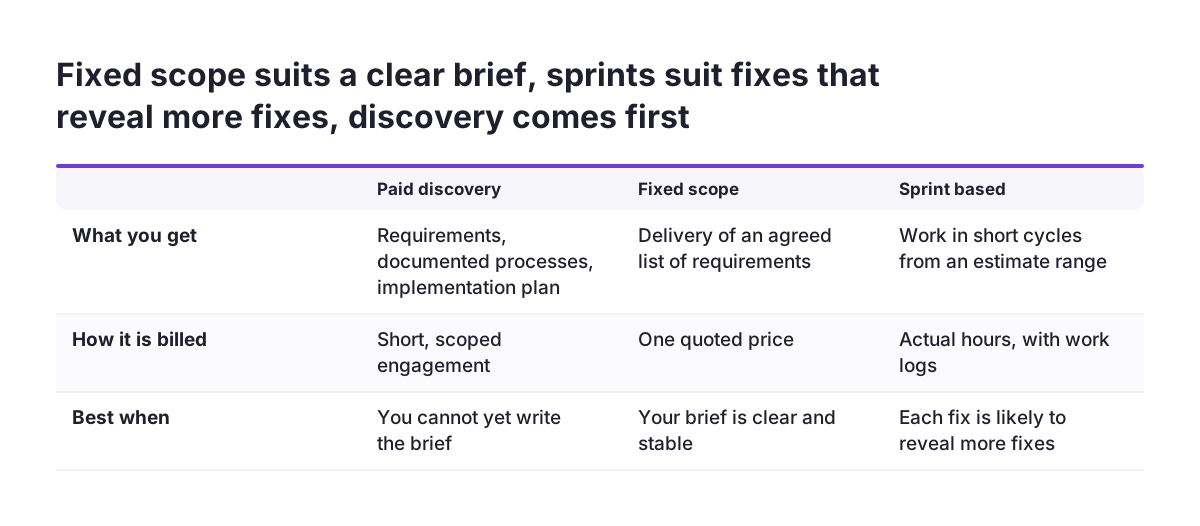
Zoho partner engagements are usually priced in one of three ways. Knowing them helps you compare quotes that look different on paper.
- Paid discovery is a short, scoped engagement. The partner gathers requirements, documents your processes and produces an implementation plan.
- Fixed scope means you agree a defined list of requirements and the partner quotes one price to deliver it.
- Sprint-based work starts from an estimate range and runs in short cycles. It is billed against actual hours, with work logs.
Fixed scope suits a clear, stable brief. Sprint-based work suits a setup where the fixes will reveal more fixes. Paid discovery is a sensible first step when you cannot yet write the brief.
Zoho's partner page advises you to be ready to discuss specific points before you contact a partner:
- your current business processes
- your pain points
- the number of users
- the Zoho applications you are interested in
- your timeline expectations
- your budget range
Prepare these points before the first call. A quote is only as precise as that list.
Licence billing is a separate question. Zoho states that once you officially begin working with a partner, the partner has permissions to manage your payments and subscriptions in its partner tool. Agree in writing who handles renewals.
Checking a Zoho partner's tier and status before you sign
You can check a Zoho partner's tier in Zoho's own directory, and you should. The Zoho partner tiers page names three tiers: Authorized, Advanced and Premium. A partner's tier depends on its score in an annual value scoring process. The maximum score is 1,000 points. The Advanced tier requires more than 400 points and the Premium tier more than 600.
The score covers four categories: Revenue, Customer Success, Market Readiness and Zoho Engagement. Customer ratings count. Each 4- or 5-star rating adds 5 points, up to 100. Each validated partner-customer escalation removes 10 points, up to a maximum of 100. Tier status is updated by January each year.
Zoho recommends four checks before you choose a partner:
- Check its certification status in the Partner Directory.
- Read its client testimonials and case studies.
- Verify its years of experience.
- Schedule a consultation to assess its expertise.
A partner may be missing from the directory because it has not met the listing criteria. Zoho suggests writing to partner-operations@zohocorp.com to verify its status.
Access is also yours to control. Zoho states that a partner cannot automatically access your confidential business information unless you explicitly grant access.
What bringing in a Zoho partner means for a company in the EU
For a company in the EU, a Zoho partner does not need to sit in your city. Zoho notes that many partners work with clients remotely across regions and time zones. Two practical points still matter more in Europe than elsewhere: data location and language.
Data location comes first. Zoho's partner sign-up form ties the regions a partner can apply for to the data centre where its own Zoho account is registered. Ask early which data centre your account runs on. Then confirm that the partner is set up to work in that region.
Personal data comes second. A partner who can see customer or employee records processes that data for you, so the GDPR requires a written data processing agreement with them before access starts. Keep a note of who received access, to which apps and until when, and remove it when the engagement ends.
Language and local practice come third. Invoicing, tax fields and business customs differ between member states. A partner who has worked in your country saves time. See how this works for a Zoho partner in the Netherlands, a Zoho partner in Sweden, a Zoho partner in Poland or a Zoho partner in Spain.
Next steps: audit your Zoho setup against the five signs
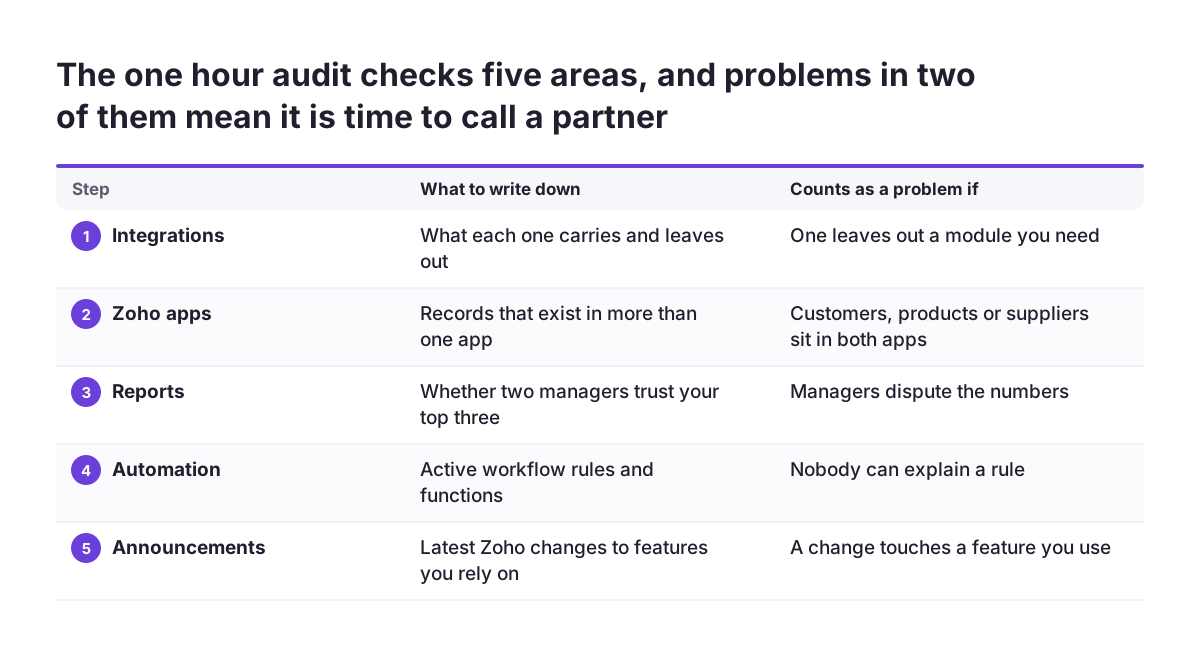
Before you call anyone, run a one-hour audit of your own Zoho setup. It will tell you whether you need a partner, and it will make any first call far more useful.
- List every integration and write down what each one carries and what it leaves out.
- List every Zoho app you use and mark the records that exist in more than one.
- Pick your three most important reports and ask two managers whether they trust them.
- Export or list your active workflow rules and functions, and mark any that nobody can explain.
- Check the latest Zoho announcements for changes that touch features you rely on.
If two or more of these steps turn up problems, prepare the points from Zoho's checklist. Those are your processes, pain points, users, apps, timeline and budget range. Then ask for a scoped review. If the audit comes back clean, keep the setup in-house and repeat the audit when you add your next app. When you are ready to talk it through, start with the page on working with a Zoho partner across Europe.