
Moving from spreadsheets to a CRM: decide and clean before you import
Moving from spreadsheets to a CRM works when you decide what the new system is for and clean the data before the import. Inventory every sheet first. Move only the records that support active selling. Fix duplicates and formats, map each column to a field, and leave analysis and one-off lists in the spreadsheet.
A CRM is a system built around the customer journey that keeps contact records, conversations, tasks, appointments, deals and follow-up activity connected. That is the definition TwiLead uses in its comparison of CRMs and spreadsheets. The same article sums up the difference in two sentences: "Spreadsheets organize information. A CRM organizes action around information."
That difference explains why a straight copy of your spreadsheets rarely works. A sheet can hold anything in any column. A CRM expects each record to mean one thing and each field to hold one kind of value. Import the sheet unchanged and the new system inherits every old inconsistency. Your team then stops trusting it in the first week.
This guide takes the implementer's side, with Zoho CRM as the destination. It covers the inventory, the cleaning rules, the column mapping, a worked example and the first week after go-live. If your main concern is years of closed deals, the companion post on how to migrate to Zoho CRM without losing your sales history covers that side in depth.
Signs a spreadsheet has outgrown its job as your CRM
A spreadsheet has outgrown its job when it no longer tells your team what should happen next. TwiLead makes this point directly: "the spreadsheet does not naturally tell your team what should happen next." A sheet stores rows. It does not remind anyone to call.
TwiLead lists four signs that a business has outgrown its spreadsheet:
- Leads wait too long for a response because inquiries arrive through several channels.
- You cannot see every open opportunity and its next step in one view.
- Follow-up depends on someone's memory.
- Customer information is scattered across files and inboxes.
The same article names further warning signs. Several people update the file. Prospects come in from forms, calls, social media and referrals. You have to search through email to learn what happened with a lead. TwiLead also notes that every handoff between tools "creates another chance for a delay, duplicate record, or missed opportunity."
A spreadsheet is not always wrong. TwiLead states that for a solo consultant with 20 active contacts, a spreadsheet "can be perfectly reasonable." In its view the right choice depends on lead volume, the complexity of your sales process and what missed follow-up already costs you. If your process is one simple pipeline, compare Zoho Bigin and Zoho CRM before you choose where the data goes.
Inventory every spreadsheet, column and owner before any import
The inventory is a written list of every spreadsheet that holds customer or sales data, with its owner and purpose. It comes before any cleaning, because you cannot clean what you have not found. Most companies find more files than they expected: a sales sheet, an events list, a quotes tracker, and a personal copy on someone's laptop.
Composity describes the typical end state well. Companies build spreadsheet structures so complex that "it impossible to search and manage through their contacts database." The inventory is how you untangle that structure before it reaches the CRM.
For each file, record these points in one inventory sheet:
- File name, location and the person who maintains it.
- Date of the last real update, not the last time someone opened it.
- Number of rows and what one row represents: a person, a company or a deal.
- Every column, with a plain-language note on what it means.
- Hidden meaning: colours, comments, bold text and blank cells that people read as signals.
- Whether the same contacts also appear in another file.
The hidden meaning matters most. A red row might mean "lost", "do not call" or "waiting for payment", depending on who coloured it. A CRM cannot import a colour. Every such signal needs a named field or a picklist value, or it disappears on import day.
Decide what moves to the CRM, what stays and what gets archived
Move the data that supports active selling first and treat everything else as a separate decision. TwiLead recommends moving "current leads, customers, open deals, upcoming appointments, and essential notes" first. That set is small enough to clean properly. It is also what your team needs on day one.
A CRM handles appointments and follow-ups differently from a sheet. Composity notes that a CRM lets you create time-bound events, such as meetings, and status-bound tasks, such as sending an email or making a call. A "next call" column in a spreadsheet should therefore become a task in the CRM, not a text field.
Use this table to decide each data type before you touch the cleaning:
| Data in the spreadsheet | Decision | Reason |
|---|---|---|
| Current leads | Move before go-live | Your team works them in week one |
| Customers | Move before go-live | Needed for repeat sales and service |
| Open deals | Move with stage and next step | A deal without a next step is a stalled deal |
| Upcoming appointments and call dates | Move as events and tasks | The CRM can remind people; a cell cannot |
| Essential notes | Move, trimmed to what still matters | Long note dumps bury the useful line |
| Closed deals from past years | Plan as a separate history migration | Different cleaning effort and value |
| Old event and prospect lists | Review before any import | Often duplicates, stale or without a clear reason to keep |
| Pivot tables, forecasts, report tabs | Keep in the spreadsheet | Analysis, not records |
Cleaning rules for duplicates, formats and blank cells
Cleaning means making every row mean one thing and every column hold one kind of value, before the import. Clean in a copy of the export and keep the original untouched. That way you can always check what a record looked like before you changed it.
Manual entry is where most of the mess comes from. noCRM points out that daily manual data entry can "open doors to human errors." Years of such entry by several people leave the same company spelled three ways and phone numbers in five formats.
Work through the rules in this order:
- Merge duplicates. Match on email first, then phone, then company name. Decide which row wins before you merge.
- Split combined columns. One name column becomes first name and last name. One address cell becomes street, city, postcode and country.
- Standardise formats. One date format, phone numbers with the country code, and country names written one way.
- Fix picklist values. "Won", "won!" and "closed-won" become one value.
- Decide what a blank means. "Unknown" and "none" are different answers. Record the difference or accept that you lose it.
- Replace colours with values. Every coloured row from the inventory gets its meaning written into a column.
At Svennis we ask the person who maintained each spreadsheet to review a sample of cleaned records before the full import. The builder of a sheet is usually the only one who knows what a blank cell or a colour really meant, and that review catches problems no rule would.
Mapping spreadsheet columns to CRM fields, owners and stages
Mapping is the decision, column by column, of where each piece of spreadsheet data lands in the CRM. Every column gets one of four destinations: a field, a picklist value, a note or nothing at all. Write the map down before the import. It becomes the reference when someone asks later where a value went.
Status columns become pipeline stages
The status column is usually the most important one to map. Each status value should land on one pipeline stage. Values that do not fit any stage point to a gap in your process. Fix the process first rather than inventing a stage for every oddity.
Owner columns become record owners and access rights
A "salesperson" column becomes the record owner. That matters because a CRM, as Composity notes, gives you "control over what each employee can see/do at any time." In a shared sheet, everyone sees everything. In the CRM, the owner mapping decides who works each record.
Filtered views become saved filters
Many sheets have tabs like "hot leads" or "Germany only" that someone copies by hand. Composity describes how CRM filters can be saved, with contacts added or removed automatically as they meet the criteria. Map each such tab to a saved view, not to a field.
Resist a field for every column
TwiLead warns that a complicated CRM creates the same problem in a different form: the team avoids it because it takes too long to update. If nobody has filled a column in a year, leave it out.
Worked example: a service company's lead sheet mapped to five stages
The worked example uses the hypothetical home services company in TwiLead's article. It receives 50 inquiries a month. On a busy afternoon, five inquiries wait until the next morning, and two of those have already booked elsewhere. With an average job of 800 USD, that is lost revenue from one afternoon.
Assume the company tracks inquiries in one shared sheet. For illustration, give it seven columns: Name, Phone, Source, Status, Quote sent, Notes and a row colour meaning "urgent". TwiLead suggests these stages for a service business: New Lead, Contacted, Estimate Sent, Booked and Completed.
The map for this sheet looks like this:
| Spreadsheet column | Goes to | Cleaning rule |
|---|---|---|
| Name | First name and last name fields | Split on the first space; check double surnames by hand |
| Phone | Phone field | Add the country code; remove spaces and brackets |
| Source | Lead source picklist | Collapse variants such as "web", "website" and "site" |
| Status | Pipeline stage | Map each value to one of the five stages |
| Quote sent | No field; implied by Estimate Sent | Use it to check the stage mapping, then drop it |
| Notes | Note on the record | Move any dated "call back on" text into a task |
| Red colour | Priority value or task due today | Write the meaning into a column before export |
After import, the five delayed inquiries from the example sit at New Lead with a task each. Nobody depends on a colour or on memory to spot them. That is the change TwiLead describes: the system now organises action, not only information.
What to keep in a spreadsheet after the CRM goes live
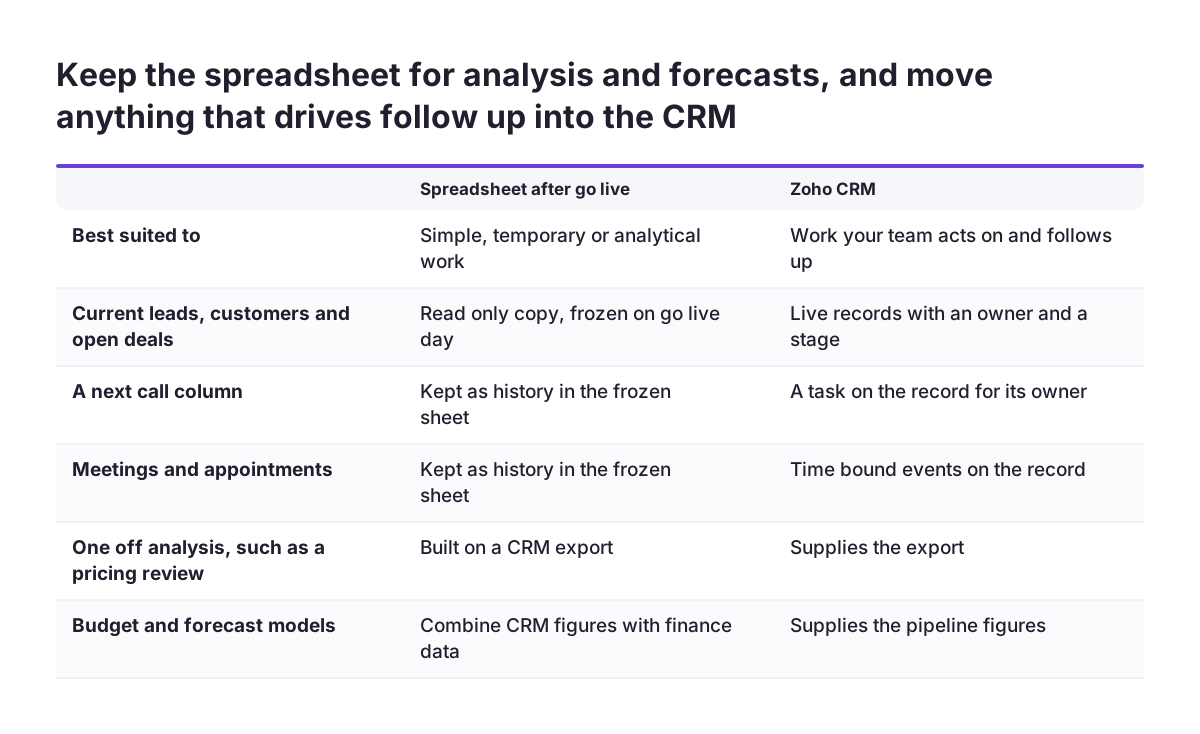
Keep a spreadsheet for work that is simple, temporary or analytical, and move everything that drives follow-up into the CRM. That split follows TwiLead, which says spreadsheets "are useful when the work is simple, temporary, or primarily analytical."
Spreadsheets remain good at calculation. noCRM notes that Excel offers basic functions for tracking data, creating charts and graphs, and using formulas for quick calculations. Those strengths stay useful after go-live, just not for records your team acts on.
Reasonable uses for a spreadsheet after the move include:
- One-off analysis of a CRM export, such as a pricing review.
- Budget and forecast models that combine CRM figures with finance data.
- A raw list collected at an event, before anyone has qualified it.
- A read-only archive of the original export, kept for reference.
One rule keeps the split honest. A spreadsheet should never be the place where anyone decides who to contact next. Once that decision lives in a sheet again, you are back to two sources of truth. Composity also notes that spreadsheets have no direct integration with other software, so every sheet you keep means manual transfers. If your orders come from a web shop, Zoho CRM for e-commerce shows how that feed can reach the CRM without a sheet in between.
The first week after the import: freeze the old sheets and measure use
The first week after the import decides whether your team trusts the CRM. Make the old spreadsheets read-only on go-live day. If people can still edit them, some will. You then have two diverging copies within days.
Check the data daily in that first week. Ask each salesperson to open five of their own records and confirm the stage, the owner and the next task. Collect every error in one list and fix the pattern, not only the record. A wrong stage on one deal often means a wrong mapping rule for a whole status value.
Measure use, not only data quality. TwiLead recommends measuring "response time, booked appointments, close rate, and lead source performance after the change." Response time shows quickly whether new leads are reaching the right person. Lead source performance shows whether the source picklist you cleaned is being filled in.
Watch for avoidance too. noCRM observes that salespeople dislike CRM software that asks them to enter extensive data about leads or customers. If people skip fields, ask which fields they skip and why. Removing a field that nobody needs usually helps adoption more than a reminder email does.
What moving to a CRM means for a company in the EU
For a company in the EU, moving to a CRM is also a question of where your data lives and who can reach it. EU statistics already treat CRM as core business software. Commission Implementing Regulation (EU) 2023/1507 sets the data requirements for Eurostat's survey on ICT usage and e-commerce. One mandatory variable covers remote access by employees to business applications, naming CRM as an example.
The same regulation includes a mandatory variable on whether external suppliers performed ICT functions in the previous calendar year. Examples include support for business management software and security and data protection. A CRM move with an outside implementer is exactly that kind of arrangement. Agree in writing who handles the exported files and when copies are deleted.
Customer spreadsheets usually hold personal data, so treat the cleaning step as a GDPR review as well. Decide with whoever advises you on data protection which old lists you still have a reason to keep. The review column in the decision table above is where those lists belong.
National details differ between member states, so map them per country. Phone numbers need their country code and address formats vary. Company identifiers follow national rules too. If you sell to Romanian companies, for example, a CUI/CIF field can be checked with an ANAF validation integration for Zoho CRM. That is a Romanian requirement, not an EU-wide one.
Next steps for moving your spreadsheets into Zoho CRM
The next step is the inventory, because every later decision depends on it. You can start it this week without any new software. Work through these steps in order:
- List every spreadsheet with customer or sales data, its owner and what one row represents.
- Mark each data type as move, review, archive or keep, using the decision table in this post.
- Write down the meaning of every colour, comment and blank cell.
- Clean a copy of the export with the six cleaning rules, and have each sheet owner review a sample.
- Draft the column map, including how status values land on pipeline stages.
- Plan go-live day: import, freeze the old sheets and set the first-week checks.
If your closed deals from past years matter for reporting, plan them as a separate history migration rather than squeezing them into the first import. If you want help with the mapping and the import itself, the page on Zoho CRM implementation in Europe explains how Svennis approaches a new setup.