
WhatsApp Business templates and consent in Zoho: the short answer
Setting up WhatsApp Business templates and consent in Zoho properly takes three things before the first message goes out. You need an approved template for every conversation you start. You need recorded opt-in on the Zoho record. And every reply needs a named owner. WhatsApp's own policy makes the first two platform rules, not optional good practice.
The WhatsApp Business Messaging Policy states that you may only contact people who have given you their mobile number or username and have given you opt-in permission. It also states that you may only initiate conversations using an approved Message Template. Zoho CRM and Zoho Desk are where you prove both conditions were met, message by message.
This guide covers connecting a number, getting templates approved, recording opt-in, and routing replies to the right person. It closes with a decision table, the points where consent most often breaks, and what the rules mean for a company in the EU. A WhatsApp Business Solution Provider writing on the Zoho community notes that none of the template rules are Zoho-specific. They apply whichever tool you send from.
Message templates, opt-in and the 24-hour window, defined
A WhatsApp message template is a pre-written message that Meta has reviewed and approved, and that a business must use to start a conversation. Templates can contain variables, written as {{1}}, {{2}} and so on, which Zoho fills from the record when the message is sent.
Four more terms carry the rest of this guide:
- Opt-in is the permission a person gives you to receive WhatsApp messages or calls from your business. The policy requires it in addition to having their number.
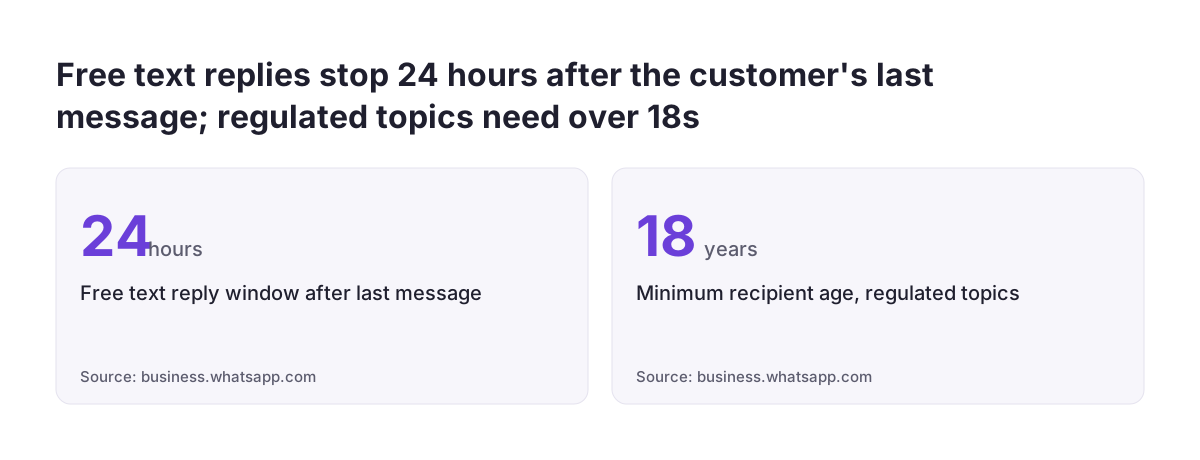
- The 24-hour customer service window opens and resets with each message the customer sends. Inside it you may reply with free-form text; outside it you must use an approved template.
- Template category is the label you submit a template under, such as Utility or Marketing. Since July 2025 Meta charges per template message by category, so the category also sets the cost.
- Quality rating is the green, yellow or red rating Meta gives your number. It comes with a daily limit on how many customers the number can start conversations with.
The quality rating matters for consent because WhatsApp ties it to user feedback. The policy says its systems may limit how many messages a business can send based on blocks and reports. Messaging people who never agreed to hear from you is the fastest way to collect both.
Connecting a WhatsApp Business number to Zoho CRM and Zoho Desk
Connecting a WhatsApp Business number to Zoho starts with choosing the route. Zoho CRM has its own WhatsApp integration, which now supports multiple numbers and accounts. Third-party extensions on the Zoho Marketplace offer a second route.
One such WhatsApp extension for Zoho CRM, built on the official WhatsApp Business API, adds a "Send WhatsApp Template" button on Leads, Contacts and Deals. It logs every message on the CRM record and provides a shared team inbox, so several agents can reply from one business number. Whichever route you choose, check that it uses the official API and writes the conversation back to the record.
Check how templates behave in your edition
Template handling in Zoho CRM has differed from Zoho Desk. In one community thread on WhatsApp templates in Zoho CRM, a user reported that templates could be used only in workflow rules. The same user reported a templates option in Zoho Desk. In CRM, predefined texts they added were visible only to themselves, not to other users.
Test these points in your own account before you design the process, because they decide whether agents can send templates by hand. Our overview of Zoho CRM editions, users and add-ons helps you confirm which edition you are testing on. If your team compares help desks for this, our comparison of Zoho Desk and Freshdesk covers the support side. Two organisation types have special rules: government entities must access the platform through a Solution Provider, and political parties, politicians and campaigns may not use it at all.
Writing WhatsApp templates that Meta approves
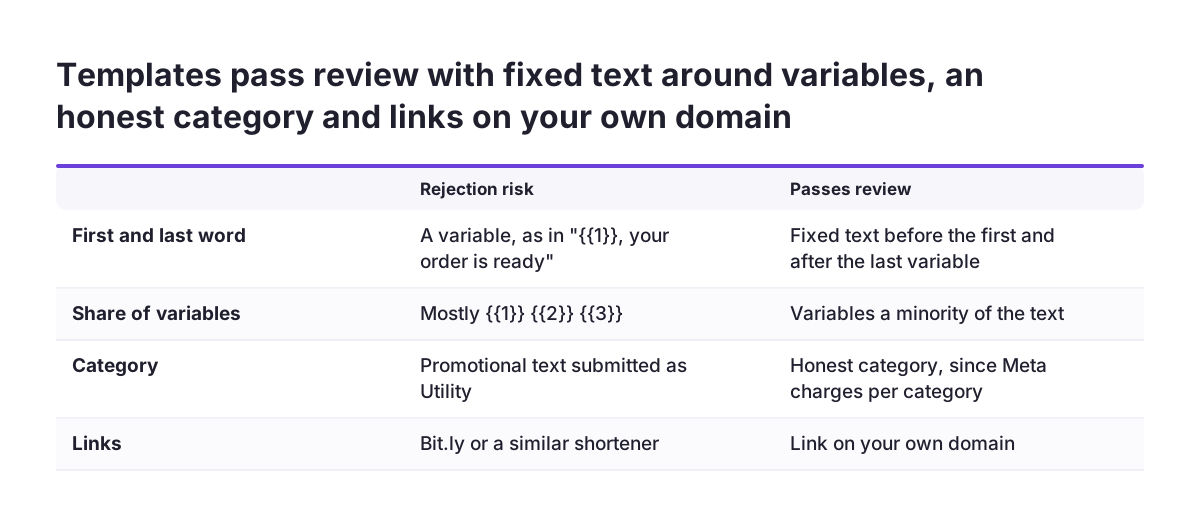
WhatsApp templates that pass review follow a short set of rules. The notes on seven template mistakes from a WhatsApp Solution Provider list the ones that cause most rejections:
- Never start or end with a variable. "
{{1}}, your order is ready" gets rejected. Put fixed text before the first variable and after the last one. - Keep variables a minority. A template made mostly of
{{1}} {{2}} {{3}}looks like spam to Meta's reviewer. - Pick the honest category. Promotional text submitted as Utility is either rejected or re-categorised as Marketing, and the category changes what you pay.
- Use your own domain for links. Bit.ly and similar shorteners are a common rejection reason.
Plan templates as text only for now. A Zoho moderator update in a community thread on WhatsApp limitations in Zoho CRM reported an unexpected delay in supporting media in CRM templates, with no updated date. Confirm the current status in your account before you design an image-based template.
Content rules sit on top of the format rules. The policy forbids asking people to share full payment card numbers, financial account numbers, personal ID card numbers or other sensitive identifiers. Messaging about Regulated Verticals, such as alcohol or over-the-counter drugs, has its own limits and may not reach people under 18.
Recording WhatsApp opt-in on the Zoho record before any template goes out
WhatsApp opt-in should live on the same Zoho record that the template is sent from. If the consent sits in a web form tool, a spreadsheet or someone's inbox, nobody can check it at the moment of sending. Store it on the Lead and Contact records, where your workflows and filters can read it.
A workable opt-in record has four fields:
- WhatsApp opt-in status: opted in, opted out, or unknown.
- Opt-in date: when the person agreed.
- Opt-in source: the form, call or checkout where they agreed.
- Opt-in wording: the exact sentence they agreed to, or a reference to its version.
Every template send, manual or automated, should then filter on the status field. Opted out must win over everything else. The policy requires you to respect requests to block, discontinue or opt out, whether made on or off WhatsApp, and that includes removing the person from your contacts list. An opt-out by email or phone therefore has to reach the same field.
Limit what you do with the data too. The policy says you must not use data obtained from WhatsApp about a person, other than message content, beyond what is reasonably necessary to support messaging with them. Keep WhatsApp-sourced details out of unrelated profiling or enrichment. If opt-ins arrive from several tools, a first workflow in Zoho Flow can write them onto the CRM record in one consistent format.
Worked example: an appointment confirmation template sent from a Zoho CRM Deal
The worked example follows a service company that confirms appointments on WhatsApp. The customer ticked an opt-in box on the booking form. That form writes "Opted in", the date, the source "Booking form" and the wording version onto the Contact in Zoho CRM.
The company submits this template under the Utility category, because it confirms a transaction and promotes nothing:
Hello {{1}}, your service appointment is confirmed for {{2}}. Reply to this message if you need to change it.
The template passes the format rules. It starts with fixed text, ends with fixed text, and only two of its words are variables. It contains no link, so no shortener is involved. Variable 1 maps to the Contact's first name and variable 2 to the appointment date on the Deal.
The send rule is a workflow on the Deal. It fires when the appointment is booked, but only if the related Contact shows "Opted in". If the status is "Opted out" or "Unknown", the workflow creates a task for the Deal owner instead of sending.
When the customer replies "Can we move it to Friday?", the 24-hour window opens. The Deal owner can answer in free text, and the conversation is logged on the record. If the owner answers two days later, the window has closed and they need an approved template again. Before any larger send, the company checks quality rating and limits in WhatsApp Manager under Phone numbers.
Which WhatsApp message is allowed when: a decision table
The decision of which WhatsApp message you may send comes down to two questions: has the person opted in, and has the 24-hour window opened? The table below combines the policy rules with what Zoho needs to record in each situation.
| Situation | What you may send | What Zoho must hold |
|---|---|---|
| Number known, no recorded opt-in | Nothing on WhatsApp | Status "Unknown", which blocks every send |
| Opted in, you start the conversation | An approved template only | Opt-in status, date, source and wording on the record |
| Customer messaged within the last 24 hours | Free-form reply, or automation with a route to a human | The logged conversation and a named owner |
| More than 24 hours since the customer's last message | An approved template only | Unchanged opt-in, plus the template used |
| Promotional offer to opted-in contacts | A template in the Marketing category | Opt-in that covers the offer, and the category charged |
| Customer asked to stop, on or off WhatsApp | Nothing further | Status "Opted out", removed from WhatsApp send lists |
For broadcasts, the same logic applies at list level. The extension mentioned earlier can broadcast approved templates to a filtered list of leads. That filter must include the opt-in status, not just region or lead stage.
Routing WhatsApp replies to the right owner in Zoho
Routing WhatsApp replies starts with the record owner, because that is where Zoho CRM sends incoming message notifications by default. In the limitations thread, a user asked for several users, not only the record owner, to receive these notifications. If ownership on your Leads and Contacts is stale, replies reach people who have left the account or the company.
The same thread shows what users wanted and did not yet have. They asked for redirecting messages to different users based on customer replies, triggering workflows from incoming WhatsApp messages, and handling chats in the CRM mobile app over weekends. Treat these as questions to test in your current edition, not as features to assume.
Three practical patterns cover most teams:
- Sales conversations stay with the Lead or Deal owner in Zoho CRM, so ownership rules must be kept current.
- Shared numbers use a team inbox, where several agents reply from one business number.
- Support conversations go to Zoho Desk, where tickets carry their own assignment.
Automation fits inside the window, with one condition. The policy allows automated replies during the 24-hour window but requires prompt, clear and direct escalation paths, such as transfer to a human agent. If you are considering AI for customer support on WhatsApp, design the handover to a named person first.
Where WhatsApp consent breaks at clients, and how to prevent it
WhatsApp consent most often breaks when an old list meets a new channel. The Solution Provider's notes are blunt: importing an old lead list and sending a template to all of it drives blocks and reports, and the quality rating drops. A burst to a cold list can drop the number a tier, which cuts how many customers it can contact each day. If you are bringing contacts across in a migration to Zoho CRM, carry each person's opt-in status with them rather than treating the whole list as reachable.
At Svennis we add the opt-in fields and the send filter before the first template is approved, because the failure we see most is a team that connects WhatsApp first and asks about consent after the first campaign. Once a number has lost quality, you are repairing the channel instead of using it.
Three other break points are worth checking:
- Opt-outs that never reach the record. One user on the Zoho community asked, in capitals, how to stop WhatsApp Business messages to customers from Zoho. Plan the off switch as carefully as the send.
- Wrong categories. A promotion submitted as Utility gets rejected or re-categorised, and the cost changes with it.
- Private snippets. Predefined texts that only one user can see push others into writing their own wording, outside any review.
Marketing sends deserve the same discipline. The latest Zoho Campaigns release describes campaigns as spanning email, SMS and WhatsApp. If you plan WhatsApp campaigns in Zoho Campaigns, make the CRM opt-in field the source every list reads from.
What WhatsApp consent rules mean for a company in the EU
For a company in the EU, WhatsApp's opt-in requirement is a platform rule that applies on top of your own data protection duties. The policy decides whether WhatsApp lets you send. GDPR, and any national rules in the member states where your customers live, decide how you must handle and document their personal data. Ask your data protection lead how your WhatsApp opt-in record fits your existing GDPR records.
Three EU-relevant points follow from the pack sources:
- Keep evidence, not just a tick. Date, source and wording on the Zoho record let you show what each person agreed to.
- Treat the policy as a moving target. WhatsApp may update its Business Messaging Policy without notice, unless the law requires notice. Review it before each new use case.
- Do not assume one country's practice applies everywhere. A company selling into several member states should check local marketing rules per market rather than copying one country's approach.
Measure coverage, too. A simple report on opt-in status by country and by source shows how much of your contact base you may actually message. Our Zoho Analytics implementation page explains how that kind of reporting is set up on CRM data.
Next steps to set up WhatsApp templates and consent in Zoho
The next steps for WhatsApp templates and consent in Zoho fit into a short sequence. Work through it in order, because each step depends on the one before:
- Add the four opt-in fields to Leads and Contacts, and decide which forms and channels write to them.
- Choose your connection route and test how templates behave in Zoho CRM and Zoho Desk in your own account.
- Write your first two or three templates using the format rules, each under its honest category, and submit them.
- Build every send rule and broadcast filter on the opt-in status, with "Opted out" blocking all sends.
- Clean up record ownership, then decide which replies stay in CRM and which go to Zoho Desk.
- Check quality rating and limits in WhatsApp Manager under Phone numbers before any larger send.
If WhatsApp is mainly a marketing channel for you, start with the list side. Our page on setting up Zoho Campaigns covers how campaign lists connect to CRM data, which is where the opt-in check has to happen.
Sources
- WhatsApp Business Messaging Policy
- WhatsApp in Zoho CRM: 7 template mistakes that get rejected or quietly damage your number
- WhatsApp inside Zoho CRM: send templates from Leads/Deals and log every chat on the record
- WhatsApp inside Zoho CRM: broadcast of approved templates to filtered leads
- Whatsapp Limitation Questions (Zoho community)
- Feature should be added: WhatsApp templates in Zoho CRM
- Whatsapp Business (Zoho community)