
Testing Claude outputs inside Zoho workflows means proving them on real records before write-back
To test Claude outputs inside Zoho workflows, run the Claude step against real Zoho CRM or Zoho Desk records and check every answer against your field rules and edge cases. Only then let Claude write back. Until the answers pass, Claude proposes and a person decides. After launch, keep sampling and monitoring, because models, connectors and your data all change.
A Claude step is any point in a Zoho workflow where Claude reads a record and returns text or a value. The workflow then stores, sends or acts on that output. Examples include a ticket category, a lead summary, a draft reply or a cleaned-up address.
A Claude step differs from a normal automation in one way that matters for testing. A workflow rule gives the same result for the same input every time. Claude can phrase or classify the same input slightly differently on different runs. You therefore do not test it once. You test it on a set of cases, judge the results against rules you wrote down in advance, and repeat that set whenever something changes.
This guide covers the four parts of that work in order:
- field rules that every output must meet
- sample tests on real records, including edge cases
- review checks while the step earns trust
- monitoring once the step runs on its own
What goes wrong when a Claude step writes into Zoho without testing
An untested Claude step usually fails quietly, not loudly. The record saves and the workflow finishes. The problem only shows up later, when a report looks wrong or a customer gets the wrong answer.
Three failure patterns are worth knowing before you design any tests:
- Skipped automations. A developer guide on Zoho integrations warns that "omitting the trigger parameter skips CRM workflow rules and approvals, which can break downstream automations". If the Claude step creates records through the API without that parameter, your existing rules never fire.
- Silent script errors. Deluge is Zoho's scripting language for serverless scripting and custom automation. The same guide notes that "Deluge errors in production workflows can silently break automations". A Deluge function that passes Claude's output to a field can fail without anyone noticing.
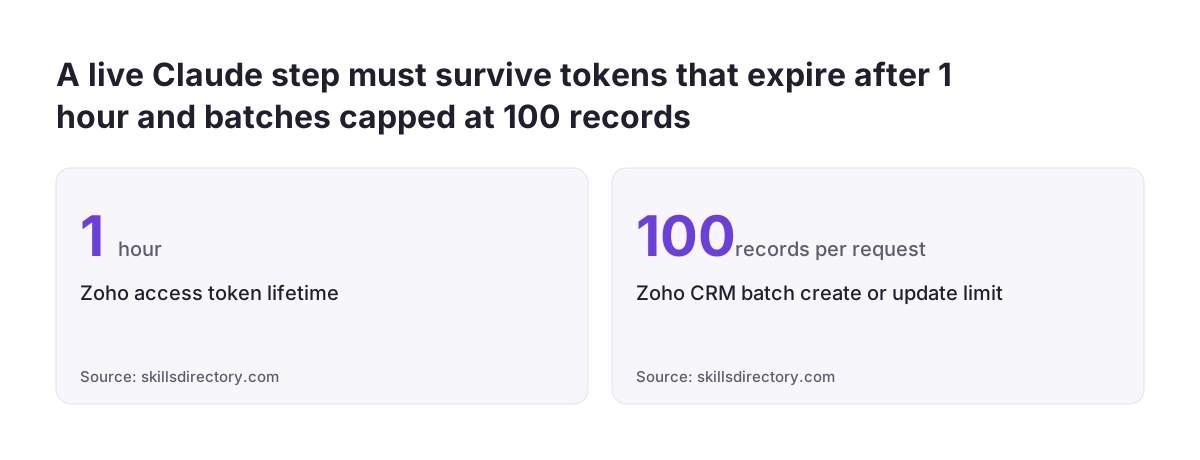
- Batch limits. The Zoho CRM API caps batch creates and updates at 100 records per request. A step that works on one record can behave differently in bulk.
Manual testing alone does not scale. In a Zoho community thread on automated testing of workflow rules and custom functions, one administrator describes manual testing as "tedious, error prone and takes a lot of time". That administrator was testing ordinary rules and functions. Adding a Claude step makes a repeatable test set more necessary, not less.
Field rules come first: picklists, lengths and required values
Field rules are the checks every Claude output must pass before it touches a record, whatever the content. Write them down before you run a single test. They turn "does this look right" into a yes or no answer.
Start from the target field in Zoho CRM or Zoho Desk and list what it accepts:
- Allowed values. A picklist accepts only its listed options. Claude's answer must match one exactly, including spelling and capitals.
- Length. A single-line text field holds less than a multi-line field. A summary that runs over gets cut or rejected.
- Format. Dates, numbers, emails and phone numbers need the format the field expects.
- Required values. If the workflow needs a value, define what Claude returns when it cannot decide, such as an explicit "unsure" option.
- Forbidden content. Decide what must never appear, for example internal notes in a customer-facing reply.
Put the same rules into the instruction you give Claude and into a check in your workflow. The instruction tells Claude what you want. The check catches the cases where it does not comply. Neither replaces the other.
The fallback deserves the most thought. A Claude step that always has to choose will sometimes choose wrongly with no warning. A step that may answer "unsure" sends hard cases to a person. That keeps your data clean and shows you where the instruction needs work.
Sample tests on real records, including the edge cases
A sample test runs the Claude step on a set of real records whose correct answer you already know. You then compare Claude's output with that answer. Real records matter because invented examples are cleaner than what your customers and colleagues actually type.
Build the test set from recent records and have someone who knows the work mark the expected result for each one. In Zoho CRM you can pull a targeted sample with COQL, Zoho's SQL-like query syntax for Zoho CRM. COQL supports aggregation, sorting and multi-field filtering that the basic search API cannot handle. Zoho has also introduced a zoho-crm skill (SKILL.md) for working with its developer tools through AI harnesses such as Claude Code. Its Kaizen #261 article shows it generating complex COQL queries.
Then add the edge cases on purpose. These are the records that break steps in production:
- empty or near-empty fields
- records in a second or third language
- one message that raises two different issues
- forwarded email chains with old content quoted below
- a screenshot or scanned document instead of text
- names, codes or product terms specific to your business
Score each result as correct, wrong, or correctly unsure. Keep the whole set, with expected answers, in one place. That set is your regression test. You rerun it every time you change the instruction, the model or the connector.
Worked example: testing Claude ticket triage in Zoho Desk
Ticket triage in Zoho Desk is a common first Claude step, and it shows the full testing method in one place. In this example a new ticket triggers a workflow. The workflow sends the subject and description to Claude. Claude returns one category from a fixed list, or "unsure", and the workflow writes that value to a category field on the ticket.
The model choice follows Anthropic's own guidance. Its models overview positions Claude Haiku 5.5 "for high-volume, latency-sensitive tasks such as classification, extraction, and routing", which describes triage well.
The test runs in five steps:
- Export recent tickets and have an experienced agent mark the correct category for each.
- Add edge cases: a ticket in German, a ticket that is only a screenshot, a ticket with two problems, and a long forwarded chain. All current Claude models accept image input, so the screenshot case is a fair test.
- Run the step against a test environment rather than live tickets, with the field check switched on.
- Compare outputs with the agent's answers. Every output must be a valid picklist value. Read every mismatch, not just the totals.
- Adjust the instruction or the category list, then rerun the full set.
The mismatches usually teach you more than the matches. Two categories that Claude keeps confusing often confuse your agents too. In that case the category list needs fixing, not the model.
Zoho is also widening its own AI features in this product. Zoho says AI-powered features in Desk, previously for Enterprise users, are expanding to the other paid subscriptions from 7 July 2026. The same testing method applies whichever AI produces the answer. For a broader view of where triage fits, see our page on AI for customer support.
Choosing which Claude model to test, and retesting when it changes
Test the model you will run in production, because results on one Claude model do not carry over to another. Anthropic's models overview gives a starting point. If you are unsure, it recommends Claude Opus 5.5 for most workloads. It suggests Claude Fable 5.1 for demanding reasoning and long-horizon agentic work, or when your evals on Claude Opus 5.5 at higher effort still fall short.
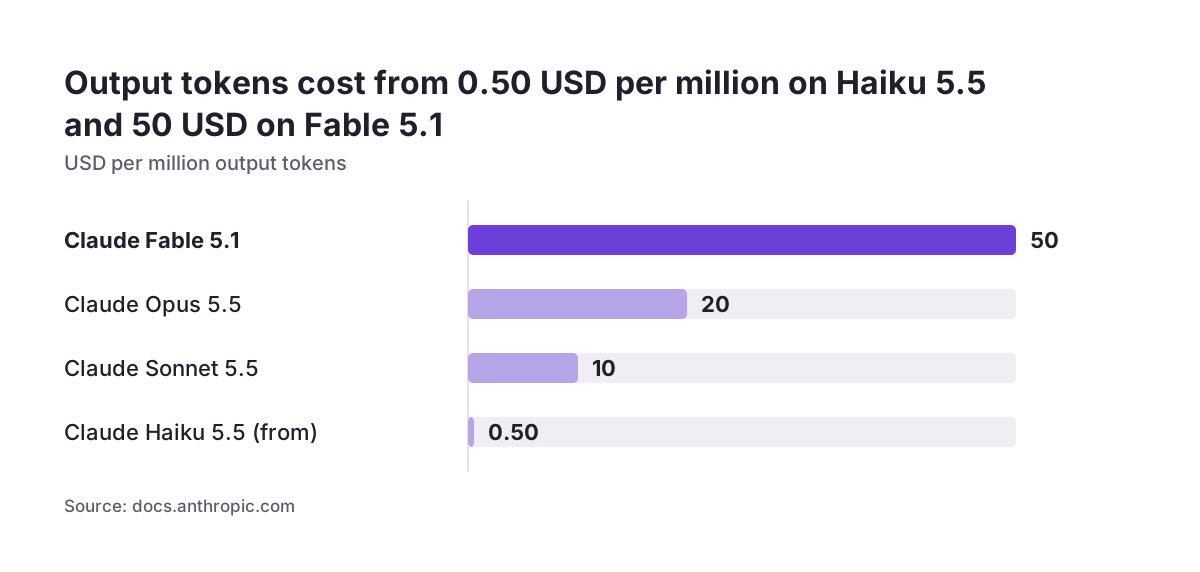
Cost shapes how often you can rerun your test set. The overview lists these prices per million tokens:
| Model | Input (USD per million tokens) | Output (USD per million tokens) | Not retired sooner than |
|---|---|---|---|
| Claude Haiku 5.5 | from 0.10 | from 0.50 | 7 October 2027 |
| Claude Sonnet 5.5 | 2 | 10 | 28 September 2027 |
| Claude Opus 5.5 | 4 | 20 | 22 September 2027 |
| Claude Fable 5.1 | 10 | 50 | 1 September 2027 |
The retirement dates matter for testing. When you move to a newer model, rerun your full regression set before switching the live workflow.
Check capabilities as well as answers. The Models API returns max_input_tokens, max_tokens and a capabilities object for every available model. Organisation settings can still make a request fail. Anthropic gives the example of an administrator disabling web search. A test run under a developer's account may pass while the production account fails, so test with the settings production uses.
Testing checklist for a Claude step: what to run before and after go-live
A Claude step needs different checks at different moments, and the table below sets out which check catches which problem. Use it as the plan for your first launch and as the routine afterwards.
| Check | What it catches | When to run it |
|---|---|---|
| Field rule check | Invalid picklist values, overlong text, wrong formats, missing required values | On every output, in the workflow itself |
| Sample test on real records | Wrong answers on typical cases | Before launch, and after any instruction change |
| Edge-case set | Failures on empty, multilingual, mixed or image-only records | Before launch, with the sample test |
| Write-back test | Skipped workflow rules and approvals, silent Deluge errors, batch limits | Before launch, in a test environment |
| Region and access check | Wrong data centre base URL, expired tokens | Before launch, and after credential changes |
| Regression rerun | Changed behaviour after a model, connector or schema change | Every time one of those changes |
| Live sampling | Drift as your data and processes change | On a fixed schedule after launch |
The write-back test is the check teams most often skip. It is also the one that protects your existing automations. If the Claude step feeds records into rules you already rely on, confirm those rules still fire. Our guide to Zoho CRM workflows and Blueprint explains how those rules and processes fit together.
Review checks: keep a human approval step until results hold
A review check puts a person between Claude's output and the live record. The person approves, corrects or rejects each proposal. That review step is the bridge between passing tests and running unattended. Tests show how the step behaves on records you picked. Review shows how it behaves on records you did not pick.
Svennis runs it in two stages. First, we have the Claude step write its proposal to a separate review field, never to the live field. Then a person compares it with what they would have done, and we switch on direct write-back only once those comparisons stop turning up surprises.
Design the review so it is quick to do and records the outcome. A reviewer who has to open three screens will start approving without reading. Useful review designs share three features:
- the proposal and the source record are visible together
- approve and correct are single actions
- every correction is stored, so it can join the regression test set
Keep review permanently for outputs with real consequences, such as replies that go to customers or changes to amounts. If you build the review step in a custom app, our guide to approval workflows inside Zoho Creator apps covers the design choices.
Monitoring a Claude step after launch: sampling, drift and failed writes
Monitoring is the ongoing check that a live Claude step still meets the standard it met at launch. A step that passed every test can still degrade. Your products change, customers write about new problems, and the tools around the step get updated.
Watch three signals:
- Answer quality. Take a regular sample of live outputs and score them the same way as your test set. Track the share of "unsure" answers. A rising share often means a new topic the instruction does not cover.
- Failed writes. Log every output that fails the field check or that Zoho rejects. Because Deluge errors can fail silently, count successes as well as errors.
- Access problems. Zoho access tokens last 1 hour, and all Zoho APIs use OAuth2. A broken refresh shows up as a sudden stop in activity, not as wrong answers.
Connectors need their own watch. One widely shared Claude skill for Zoho tells users to "always search first" because "tool schemas change". It also advises checking responses for pagination tokens and fetching until complete. If your Claude step reaches Zoho through such a connector, rerun the regression set when its schema changes.
A dashboard keeps these signals visible to the people who own the process. Zoho Analytics can chart sampled scores and failure counts next to your other operational data. If you would rather hand the routine over, that is what managed AI operations covers.
Testing a Claude step in a European company: EU data centre, languages and personal data
For a company in the EU, a Claude step in Zoho brings three testing points that are easy to overlook. They apply across member states, whatever your national rules add on top.
The EU data centre. Zoho routes API requests by region, with .eu for the EU data centre. Using the wrong base URL returns 404 errors even with valid tokens. A Claude step built from a generic example often points at the wrong region. Include a region check in your write-back test, and confirm the step reads from and writes to the data centre your account uses.
Languages. All current Claude models support multilingual input and output. Support does not equal identical quality on your records, though. If your customers write in several languages, your test set needs real records in each of them. Check that categories and summaries come out the same whatever the source language.
Personal data. Testing on real records means testing on real customer data, so GDPR applies to your test set as much as to production. Keep test exports inside systems you control, limit them to the fields the step needs, and delete them when they are no longer useful. Our page on data security explains how we handle data in Claude projects.
Next steps for testing Claude in your Zoho setup
The practical path is short: write the rules down, build the test set, then launch behind review. Each step produces something you keep using after go-live.
- Pick one Claude step and one target field in Zoho CRM or Zoho Desk.
- Write the field rules, including what Claude returns when it cannot decide.
- Collect real records with known answers and add the edge cases from this guide.
- Run the set in a test environment and check that existing workflow rules still fire.
- Launch with outputs going to a review field, and store every correction.
- Set a sampling schedule and a rerun trigger for model, instruction or connector changes.
If you are still deciding whether a task belongs to Claude or to Zoho's own Zia, settle that first. Our guide to AI inside your Zoho: Zia, Claude or both walks through that decision. Then return to this checklist for the step you choose.