E-invoicing in Zoho Books for Romania and Germany: the short answer
E-invoicing in Zoho Books for Romania and Germany starts with two decisions. First, which Zoho Books organisation and edition issues each country's invoices. Second, whether that edition connects directly to the network the country requires. Where it does, you configure tax details and customer identifiers. Where it does not, you add an integration.
This guide does not restate the Romanian or German rules themselves. Each national tax authority sets those rules, and the rules change. Your tax adviser should confirm them in writing, per country, before you configure anything. This post covers the Zoho Books side of the work.
That side has four parts, each covered in its own section below:
- what Zoho has published about how its e-invoicing features behave
- what to set up before the first invoice goes out
- where integrations come in and what limits they hit
- how to check that each invoice actually arrived
If you run Zoho Books for one country only, most of this still applies. The cross-border parts matter most when one company invoices customers with different tax registrations from more than one organisation.
What e-invoicing means, and why a PDF by email is not enough
E-invoicing is the exchange of invoice data in a structured, machine-readable format between the seller's system and the buyer's system. A PDF attached to an email is electronic, but it is not an e-invoice in this sense.
In Europe, the network Zoho Books uses for this is Peppol. Peppol (Pan-European Public Procurement Online) is a framework that lets businesses exchange invoices and credit notes through certified Access Points. An Access Point is a certified service that passes documents between the sender's software and the receiver's software.
Every Peppol transaction follows the EN 16931 structure. It is formatted according to Peppol BIS 3.0 (UBL), which Zoho describes as a standardised XML layout. In practice, this means the invoice must carry exact data in exact fields. A missing or wrong customer tax ID is not a cosmetic error. It can stop the document or change its tax treatment.
That is why most of the setup work in Zoho Books is about data, not buttons. Clean tax registration details and correct customer records do more for e-invoicing than any single setting.
Each country runs in its own Zoho Books organisation and edition
A Zoho Books organisation's country decides which tax logic and e-invoicing functions it gets. Zoho's Belgian rollout shows this directly: all new paid organisations created with Business Location set to Belgium automatically received the new e-invoicing functions. The country setting, not a later switch, opened the feature.
Germany works the same way. Zoho Books has a Germany Edition, and moving into it changes behaviour. One user reported that a monthly invoice import worked smoothly until the company migrated to the Books Germany Edition in December 2024, and then failed for one customer. The worked example later in this post covers that case.
For a company invoicing in Romania and Germany, this means two organisations with two sets of settings. Do not copy the German organisation's configuration into the Romanian one and assume it fits. Open each organisation's settings separately and record which e-invoicing options it actually shows.
If you do not see an e-invoicing option, check your tax details first. In the Indian edition, Zoho Books only shows the E-Invoice option under Settings, then Preferences, after the tax details are entered. Whether your edition follows the same order is worth checking before you conclude a feature is missing. Our Zoho Books setup page describes how we structure organisations for companies in more than one country.
How Zoho Books handles built-in e-invoicing: the Peppol model
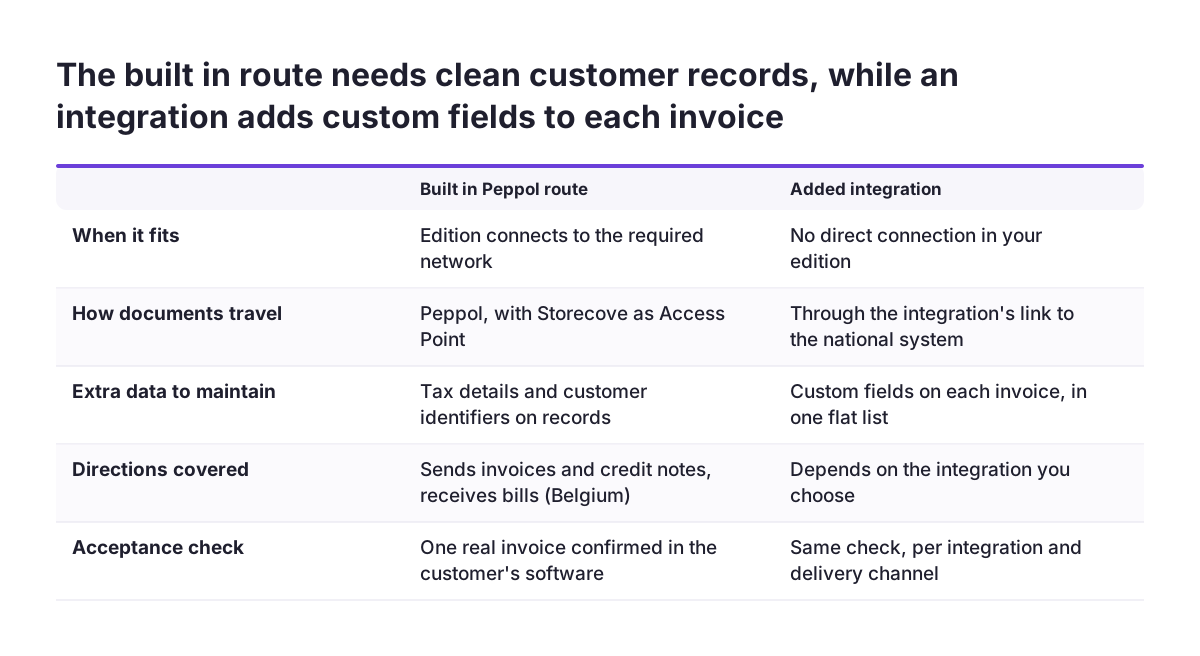
Where Zoho Books has e-invoicing built in for an EU country, it works through Peppol with Storecove as the Access Point. Zoho documented this in detail for Belgium. Storecove acts as the certified Peppol Access Point between Zoho Books and your customer's accounting software. The same Belgian announcement lists Zoho Books, Zoho Billing and Zoho Inventory as covered.
The Belgian setup covers both directions. You send invoices and credit notes. You receive bills and vendor credits. Delivery depends on the customer type, as this table shows:
| Customer type | Delivery channel in Zoho Books | What you must hold on the record |
|---|---|---|
| VAT-registered and on Peppol | Peppol, through Storecove | Correct VAT and Peppol identifiers |
| VAT-registered, not on Peppol | Email only | A working billing email address |
| Unregistered or B2C | Email only | A working billing email address |
Zoho also lists what the feature did not yet support: additional attachments, and businesses registered in Peppol under a different legal identifier. If your invoices rely on attached timesheets or delivery notes, plan for that gap.
Volume is capped. Paid plans include up to 1,000 Peppol send and receive transactions. An add-on gives 500 more for €15. Count incoming bills as well as outgoing invoices when you estimate your volume.
Configuration checklist before the first e-invoice
The checklist below covers what to set up in each organisation before you send a live e-invoice. Work through it once for the Romanian organisation and once for the German one.
| Step | Where | Why it matters |
|---|---|---|
| Get the national rules confirmed in writing | Your tax adviser, per country | Zoho features follow the country edition, not your group policy |
| Check the organisation's country and edition | Organisation profile | The Business Location decides which e-invoicing functions appear |
| Enter tax registration details first | Settings, tax section | In some editions the e-invoice option only appears afterwards |
| Correct each customer's country and tax ID | Customer records | The Germany Edition derives tax treatment from the customer's tax ID |
| Sort customers by delivery channel | Customer records | Peppol customers and email-only customers behave differently |
| Re-map VAT and tax registration fields | Zoho CRM and Zoho Books integration | Zoho requires the new custom fields after e-invoicing is enabled |
| Estimate yearly transactions | Plan and add-ons | 1,000 are included; extra blocks of 500 cost €15 |
| Test one invoice per channel | A real customer of each type | Acceptance happens in the receiver's system, not in Books |
The re-mapping step is easy to miss. If you run the Zoho CRM and Zoho Books integration, the fields that carried VAT and tax registration numbers stop being the ones e-invoicing reads. Zoho's Belgian guidance tells you to point the sync at the newly added custom fields instead.
Worked example: a French customer in the Germany Edition
A customer's tax ID can override the tax rate you intend to charge, and the Germany Edition shows how. A Zoho Books user imported invoices from a CSV file every month. The import worked smoothly until the move to the Books Germany Edition in December 2024.
After the migration, the same file loaded 13 of 14 invoices. The fourteenth failed with the message "You should apply Zero Rate Tax for this transaction". The only difference the user found was the customer's tax ID. That customer had a French tax ID, while every other customer had a German one.
The user needed the 19% standard rate on that customer's invoices. Every other 19% tax option also failed. Importing with the zero rate went through, but Books then refused a manual change from zero to 19%.
What to take from the example
The edition reads the customer's country and tax ID and decides the tax treatment from them. Once an invoice is saved with that treatment, correcting it may not be possible in place. Three habits prevent this:
- Review every customer with a foreign tax ID with your adviser before go-live.
- Run a test import containing one customer of each tax profile.
- Stop the monthly run when one invoice fails, rather than forcing a different rate.
For e-invoicing this matters twice. The tax treatment Books chooses also goes into the structured document your customer receives.
Where a national system needs an integration, and the limits you will hit
When a country's e-invoicing system has no direct connection in your Zoho Books edition, you add an integration. Companies already do this. One Zoho Books user runs two e-invoicing integrations, myData for the Greek tax authority and Peppol, side by side.
That user's experience shows the limits an integration runs into. Integrations usually need extra data on each invoice, held in custom fields. On the Zoho Books invoice form, custom fields cannot be grouped into sections. They cannot be shown conditionally.
Nor can those custom fields be made mandatory only when a condition applies. The user described facing more than 40 flat custom fields.
Zoho Books added Layout Rules for custom modules in its June 2026 update. Layout Rules let a condition show fields, enable fields, set a value or make a field mandatory. According to the same user, they do not apply to Invoices, Credit Notes, Bills, Quotes or Sales Orders.
Validation happens late
Validation Rules in Zoho Books check one field at a time, so they cannot express rules that span several fields. Workflow rules and custom functions run after the invoice is saved. In practice, an integration has to check the invoice after save and flag errors before sending. Design that check before you build.
If you invoice subscriptions from Zoho Billing, review it separately, because its e-invoicing settings live in a different product.
Checking that each e-invoice was accepted
An e-invoice counts as delivered only when it arrives in the receiver's system, so acceptance is checked at the customer's end. With Peppol, Storecove hands the document to your customer's accounting software. A clean send from Zoho Books does not prove that the customer could process it.
At Svennis we do not sign off an e-invoicing setup until the person receiving it has confirmed one real invoice per delivery channel. A document can leave Zoho Books correctly and still fail on the customer's side.
A practical acceptance routine for each organisation has four checks:
- Send one invoice to a Peppol-registered customer and ask their finance team to confirm it arrived in their software.
- Send one to a VAT-registered customer not on Peppol and confirm the email reached the right inbox.
- Send one credit note, because credit notes travel through the same route as invoices.
- Ask a supplier to send you a bill and check that it appears in Zoho Books as a bill.
After go-live, keep a simple register of failed or queried e-invoices per country. A register shows patterns, such as one customer group with a wrong identifier. If you already report on Books data, a small dashboard in Zoho Analytics can show the queries per month alongside your invoice volume.
What this means for a company invoicing in Romania, Germany or both
For a company invoicing in Romania and Germany, the main point is that EU e-invoicing is set country by country. Belgium shows the pattern. From 1 January 2026, Belgium made e-invoicing mandatory for B2B transactions between VAT-registered businesses, with invoices and credit notes exchanged in a prescribed digital format. That is a Belgian rule. It says nothing about Romania or Germany.
Each of your organisations therefore needs its own answer to three questions. What does the country require, and from when? Does the Zoho Books edition for that country connect to the required network directly? If not, which integration fills the gap?
The answers may differ between your two organisations. One organisation may run built-in e-invoicing while the other runs through an integration. That is normal. The mistake is assuming that the organisation you set up first defines the setup for the second.
Customers that buy from both of your entities need extra care. The same customer may hold different identifiers on each side, and each organisation may treat that customer's tax ID differently, as the Germany Edition example showed. Check those shared customers record by record.
Next steps: confirm the rules, inspect each organisation, then test
The next step is to turn this guide into a short plan per country. Work through these steps in order:
- Ask your tax adviser for a written summary of the e-invoicing obligations in Romania and in Germany, with start dates.
- Open each Zoho Books organisation and record its country, edition and the e-invoicing options its settings show.
- Enter or correct the tax registration details, then check whether new options appear.
- Clean customer countries and tax IDs, starting with customers that have foreign tax IDs.
- Decide, per country, between the built-in route and an integration, and list the custom fields an integration would need.
- Run the acceptance routine with one real customer per delivery channel before you switch everyone over.
Steps one to four take little time and show you how big the remaining work is. If the gap between what a country requires and what its edition offers turns out to be large, plan the integration before the deadline rather than after. If you want help structuring the organisations or building the integration, see our Zoho Books implementation services.