
Field service visits with Zoho FSM and CRM: the short answer
To run field service visits with Zoho FSM and CRM, you follow five steps. Install the Zoho FSM extension in Zoho CRM and create the service job from the won deal. Then schedule and dispatch it in Zoho FSM, and let the technician complete the report in the mobile app. Finally, turn the finished work order into an invoice. Each step hands its data to the next, and most problems appear at those handovers.
Field service management software (FSM) is software that gives you a single system to plan, execute and close on-site work without manual coordination between teams. In Zoho's guide to FSM in daily operations, it connects scheduling, dispatch, on-site work and billing into one workflow. Zoho FSM is Zoho's product in this category.
The division of labour matters. Zoho describes CRM systems as good at tracking leads and managing deals, while FSM platforms handle job scheduling and technician dispatch. Without a connection between them, Zoho notes that teams fall back on emails, calls, chats and spreadsheets to find out what is happening. This guide follows one visit through both systems, so you can see what each one owns.
The four Zoho FSM records a visit passes through
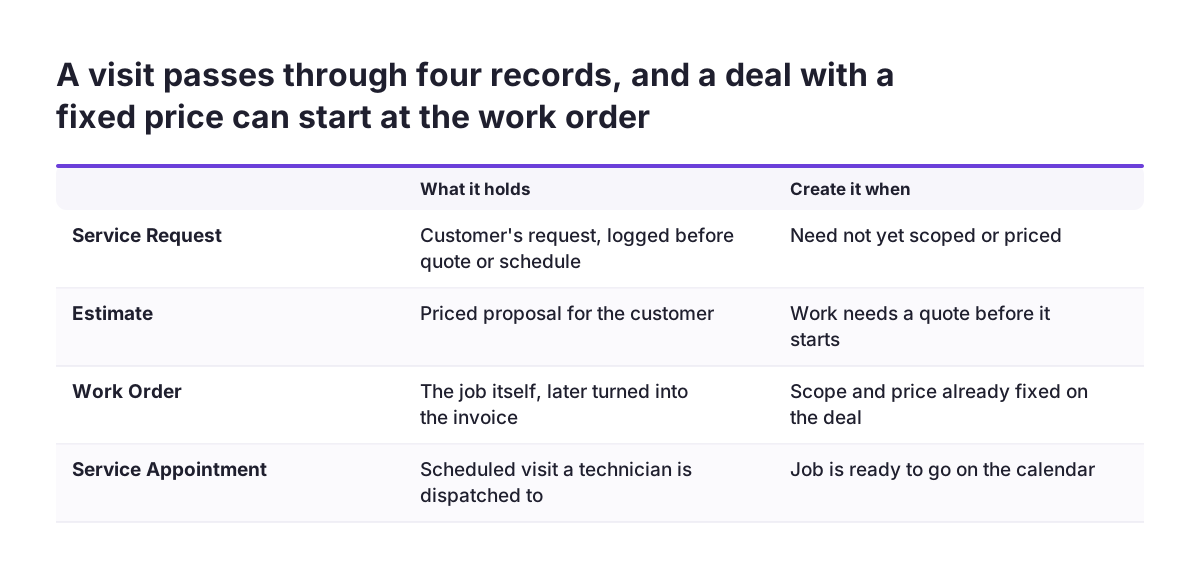
A field service visit in Zoho FSM moves through four record types, and the Zoho CRM integration can create any of them directly from CRM. Knowing what each record is for tells you which one to create first.
The four records, in the order a visit usually needs them:
- Service Request: the customer's request, logged before anything is quoted or scheduled.
- Estimate: the priced proposal, used when the work needs a quote first.
- Work Order: the job itself, which later becomes the invoice.
- Service Appointment: the scheduled visit that a technician is dispatched to.
You do not need all four every time. Suppose the CRM deal already fixed the scope and the price. In that case you can skip the request and the estimate and create the work order straight away. A loose enquiry is different: it fits better as a service request that someone qualifies first.
Repeat work has its own route. Zoho FSM's scheduled maintenance feature sets up recurring work orders and service appointments, so you can build periodic maintenance plans. A maintenance contract sold in CRM can then generate its visits without anyone recreating them by hand.
Connecting Zoho CRM to Zoho FSM with the extension
The connection between Zoho CRM and Zoho FSM is an extension you add to Zoho CRM. According to Zoho's announcement of the CRM and FSM integration from September 2025, you can create a Service Request, Estimate, Work Order or Service Appointment from CRM as soon as the deal closes.
The extension moves the details a dispatcher needs. Customer details, service location, products sold and instructions arrive in Zoho FSM pre-filled. Zoho also describes a two-way sync between modules such as Accounts, Contacts, Products and Assets. Completed, rescheduled and cancelled appointments appear automatically in the CRM timeline. That gives your sales team the service history without asking the office.
Smaller teams on Bigin have a similar option. Zoho says the FSM extension is also available for Bigin by Zoho CRM. When a deal is won in Bigin, you can create a job in Zoho FSM and assign technicians. If you are unsure which of the two CRMs fits your volume, our comparison of Zoho Bigin and Zoho CRM sets out where each one stops.
Not every visit starts with a sale. Repairs often begin as a support case, and Zoho lists Zoho Desk among the FSM integrations. For other CRM systems, Zoho FSM supports connections through APIs or middleware, alongside its native Zoho CRM integration.
Scheduling and dispatching technicians in the Dispatch Console
Scheduling in Zoho FSM happens in the Dispatch Console, the screen where dispatchers place appointments on technicians' calendars. Zoho lists Gantt, Grid and Calendar views for managing schedules, with maps for live location tracking. Its academy guide also mentions a list layout and a map layout for viewing jobs.
Good dispatch depends on knowing who can do the job and who is available. Zoho FSM uses Profiles to separate call centre agents, dispatchers and field agents, and Skills to record what each multi-skilled field agent can handle. The Time-Off module tracks absences so capacity stays accurate. The Shifts module defines working hours across schedules.
Set these up before the first live job, not after. A dispatcher who cannot see skills or absences will assign by memory. That is the manual coordination the system was meant to remove. Zoho's automation guide warns that manual scheduling and dispatch lead to unnecessary travel, poor scheduling, repeat visits and administrative delays.
Scale is not the obstacle it may seem. Zoho's academy page describes the cleaning business Team Clean, which applied structured workforce rules in Zoho FSM to manage over 400 appointments each month.
Capturing the technician report on site with the mobile app
The technician's report is captured in the Zoho FSM mobile app, available for Android and iOS. The app is where the visit is documented, so its setup decides how complete your records will be.
Two features carry most of the on-site work. Job Sheets are Zoho FSM forms that let technicians update checklists and record readings from the field. Service Reports are sent on job completion and collect customer feedback, job ratings and signatures. Customers can also receive updates by email and SMS during the visit.
The app also drives automation. When technicians create or update service records in the app, those changes can trigger workflow rules. Zoho lists common triggers in its guide to field service automation: appointment creation, technician assignment, job completion and a change in service status. A rule can then do three things:
- Send an email or WhatsApp notification when defined conditions are met.
- Update fields on service records automatically.
- Pass data to another application through a webhook.
A useful first rule notifies the office when a job is marked complete. Invoicing can then start the same day rather than when paperwork comes back.
Turning the completed work order into an invoice
Invoicing in Zoho FSM starts from the work order. Zoho states that you can turn work orders into branded invoices with built-in invoicing powered by the Zoho Financial Suite. The invoice therefore reflects what the technician recorded, not what someone retypes later.
For companies billing across borders, Zoho FSM supports multiple currencies with country-specific taxes. If your accounting already runs in Zoho Books, check during setup how FSM invoices arrive there. Settle which system owns the customer record before the first invoice is issued.
Zoho's examples show why closing this step matters. OnGuard Security Solutions consolidated jobs and invoicing in Zoho FSM, which removed delays after job completion. Roochii Cleaning, which adopted Zoho FSM to unify scheduling, communication and billing, improved task completion from 65% to 90%. Its principal is quoted on Zoho's blog saying that customer information, jobs and communication are all visible in one place.
Cost follows the same unit as the work. Zoho uses volume-based pricing, so you pay for the appointments you create rather than per user. Check Zoho's pricing page for current figures before you budget. If you are pricing the CRM side as well, our guide to Zoho CRM editions and pricing covers that half.
A worked example: one boiler service from won deal to invoice
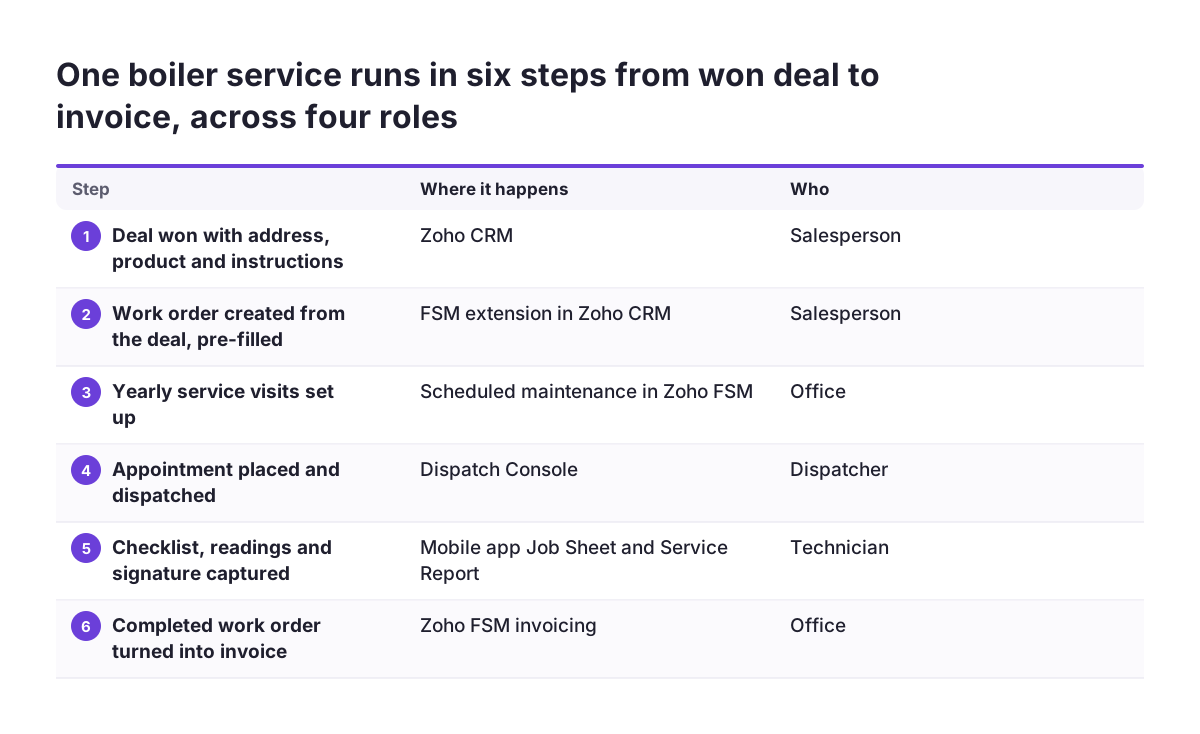
A worked example makes the chain concrete. Take a company that sells and services heating systems, with sales in Zoho CRM and field work in Zoho FSM. A customer signs for a boiler installation plus a yearly service.
- Deal won in Zoho CRM. The salesperson closes the deal. The account, contact, service address, the boiler product and access instructions are already on the record.
- Work order created from CRM. Using the FSM extension, the salesperson creates a Work Order from the deal. Customer details, location, products and instructions arrive pre-filled.
- Maintenance plan set up. In Zoho FSM, the office uses scheduled maintenance to create the recurring yearly service visits.
- Appointment dispatched. In the Dispatch Console, the dispatcher filters by the installation skill, checks Time-Off and Shifts, and places the Service Appointment.
- Work documented on site. The technician fills in the Job Sheet checklist and readings in the mobile app, then marks the job complete.
- Report and signature collected. The Service Report goes to the customer, who signs and rates the job.
- Invoice issued. A workflow rule tells the office the job is complete, and the work order becomes the invoice.
- Sales sees the result. The completed appointment appears in the CRM timeline on the account.
The salesperson never leaves Zoho CRM, and the technician never opens it. Each person works in one tool while the record travels between them.
Where the handover from CRM deal to invoice usually breaks
The handover between Zoho CRM and Zoho FSM usually breaks at the points where one team assumes the other filled something in. Zoho's academy page names the root cause plainly: the biggest mistake is trying to digitise broken processes. Its advice is to standardise intake, execution and closure first, then automate.
The cost of a broken handover shows up as repeat visits. Zoho cites industry data that a failed first visit adds an average of 2 extra trips. It also pushes resolution out by nearly 14 days.
| Handover | What usually goes wrong | What to check |
|---|---|---|
| CRM deal to work order | Service address or instructions missing on the deal | Location and instructions are mandatory before the job is created |
| Products and assets sync | Products named differently in CRM and FSM | One shared product list, synced both ways |
| Work order to dispatch | Skills, Shifts or Time-Off never configured | Every technician has skills and working hours set |
| Site visit to report | Job Sheets too long, so technicians skip fields | Only fields the invoice or the customer needs |
| Work order to invoice | Nobody is told the job is complete | A workflow rule on job completion |
The first row is the one we see most often. At Svennis, we make the service address and access instructions required on the CRM deal before anyone can create the FSM job. We then run one real job through the whole chain to invoice before go-live.
What Zoho FSM and CRM mean for a company operating in the EU
For a company operating in the European Union, two parts of the Zoho FSM setup need early decisions: invoicing across countries and technician location data.
Invoicing across countries is supported in the product. Zoho FSM handles multiple currencies with country-specific taxes. A company with technicians in more than one member state can therefore invoice each customer in the right currency and with the right tax. Configure the tax setup per country before the first invoice, not after a customer queries one. Rules differ between member states, so have your accountant confirm the settings for each country you serve.
Location data needs a policy. The Dispatch Console uses maps for live location tracking of field staff. Decide, with whoever is responsible for GDPR in your company, when tracking runs, who can see it and how long records are kept. Write that decision down before rollout so technicians know what to expect.
If you are moving customer data from an older system into Zoho CRM first, plan the migration before connecting FSM. Our guide on migrating to Zoho CRM without losing sales history covers that step. The cleaner the accounts and addresses in CRM, the cleaner every FSM job created from them.
Next steps for setting up Zoho FSM with Zoho CRM
The practical next step is to map one visit type from request to invoice before you configure anything. Zoho's automation guide recommends introducing automation gradually, starting where manual coordination creates the most effort. For most field teams, that is the handover from the won deal to the first appointment.
A sensible order of work:
- Write down who owns each step today, from deal to invoice.
- Decide which fields the CRM deal must carry before a job can be created.
- Start the 15-day free trial of Zoho FSM and install the extension in Zoho CRM.
- Set up Profiles, Skills, Shifts and Time-Off for your technicians.
- Build one short Job Sheet and one workflow rule on job completion.
- Run real jobs end to end and fix what confuses the technicians.
Measure the result with the metrics Zoho says field service organisations typically track. These include first-time fix rate, on-time arrival rate, service resolution time and customer feedback ratings. Compare them before and after the change.
If your Zoho CRM itself still needs structure before FSM can rely on it, our page on Zoho CRM implementation in Europe explains how we approach that work.