Candidate consent and retention in Zoho Recruit, in short
You handle candidate consent and retention in Zoho Recruit in five moves. You choose a lawful basis for each purpose, then confirm the GDPR settings are on. Next you send consent requests and set a waiting period. Finally you decide what happens when consent never arrives. Recruit can then lock or delete unanswered records, and it gives you tools for access, erasure and portability requests.
Consent management in Zoho Recruit is the set of compliance settings that asks each candidate for consent and tracks the status of that request. It also acts on the answer by continuing, locking or deleting the record. Retention is the other half of the subject. It means how long you keep a candidate's data before you delete it.
Recruit does not treat retention as a separate field in the Zoho pages this guide draws on. You control it through three levers:
- the waiting period for consent replies
- the Data Deletion Consent option
- manual deletion and block-listing when a candidate asks to be erased
The sections below explain each setting and walk through a worked example. They also cover the requests candidates can make and end with a checklist you can use before go-live. Legal points stay general. Your data protection adviser still decides your lawful basis and your retention periods.
Lawful basis first: consent is one of six options, not the default
Before you configure anything in Recruit, decide why you hold each piece of candidate data. A lawful basis is the legal ground that allows you to process personal data. According to Zoho's consent management guide for Recruit, the GDPR defines six lawful bases. No one basis is better than the others. The right choice depends on the purpose of processing and your business requirements.
Zoho's guide describes three of the bases in terms you will meet in practice:
- Consent requires a deliberate action by the data subject, the person the data is about, to opt in.
- Legitimate interests applies when you have a genuine reason to process data, the processing is necessary for it, and the candidate's interests and rights do not outweigh it.
- Contract applies when you process data to fulfil a contract with the individual, or to take steps they ask for before a contract, such as assessing their application.
A hiring team often has more than one purpose. Assessing a candidate for the job they applied for is one purpose. Keeping them in a talent pool for future roles is another. Each purpose needs its own basis, and consent is only the right tool where you can ask for it and accept a refusal.
Purpose also limits what you do later. Zoho's guide states that if you deviate from the original purpose for which you received consent, you need consent again. Suppose you want to send candidates a newsletter through Zoho Campaigns for email marketing. That is a new purpose, and your recruitment consent does not cover it.
Where Zoho Recruit's GDPR settings live, and why they now say Opt-In
Zoho Recruit's GDPR feature is enabled by default for customers who signed up on the EU server. That is stated on Zoho's Recruit GDPR readiness page. Customers on the US server who want the feature can contact Zoho Recruit support. If your account was created outside the EU data centre, check this first, because none of the settings in this guide appear until the feature is on.
The labels in your account may not match older guides. Zoho reworded "consent" to "Opt-In" based on user feedback, and the functionality stayed the same. The view once called "Consent Declined Candidates" is now "Opted-Out Candidates". When this guide says consent, look for Opt-In in the interface.
The GDPR settings in Recruit also support the right to be informed. That right means telling people how and why you process their personal data. According to Zoho's readiness page, Recruit lets you tell applicants four things:
- what information you want from them
- why you need it
- how long you are going to hold it
- what you intend to do with it
The third point is where retention first becomes visible to the candidate. The notice must state the period, or the criteria you use to set it where a fixed period is not possible. State one the system actually enforces. Then configure Recruit to enforce it.
Zoho's consent management guide adds one drafting rule. Keep consent requests separate from any other terms and conditions. A candidate should see the consent question on its own, not buried in a privacy notice.
Consent statuses in Zoho Recruit, from Pending to Not Responded
Every candidate record in Zoho Recruit carries a consent status, and the status tells you what you may do next. The consent management guide lists these statuses:
- Pending: the consent request has not been sent.
- Waiting: the consent form has been sent and you are waiting for a reply.
- Obtained: the candidate has given consent.
- Not Responded: no consent arrived within the waiting period defined in the Consent Settings.
Once you send a consent form from a record, the status changes from Pending to Waiting. After the waiting period ends, Recruit updates the status to Not Responded or Record Deleted. Which of the two depends on whether you enabled automatic deletion.
The primary email field drives consent across records. Recruit uses it to update the consent status on every record that shares the same primary email address. If someone changes a candidate's primary email address, you need to get consent again. Tell recruiters this, because a routine correction can reset a candidate's status.
The consent form can also limit contact. If you hide the Email or Phone option on the form, Recruit disables sending emails or making calls for the corresponding records.
Plan how you will evidence consent. A user on Zoho's community thread on consent auditing reported a gap. The record showed a confirmation under "Compliance Information" with a date and time, but no further evidence of the consent itself. Check what your account records, and keep a copy of the consent wording you used for each period.
Waiting period, Data Deletion Consent and the three actions without consent
The waiting period is the time Zoho Recruit gives a candidate to answer a consent request. You set it in the Consent Settings. When it ends without an answer, Recruit marks the record Not Responded or deletes it. That setting is your main retention control for candidates who never reply.
You also choose how Recruit treats records where consent is unavailable. The consent management guide describes three options. The table compares them with the automatic deletion option.
| Setting | What Recruit does | When it fits |
|---|---|---|
| Process data as usual | You keep working with the records as normal. | You rely on a basis other than consent for this purpose and did not ask these candidates for consent to it. |
| Stop processing data | Records are locked. Workflow emails stop, and editing, sharing, macros and merging are blocked. | Consent is your basis and you must pause until it arrives. |
| Restrain certain actions | Selected actions are limited rather than the whole record being locked. | You need the record visible but want to block some activity. |
| Data Deletion Consent | Data is deleted automatically once your waiting period is completed. | You have no other reason to keep candidates who did not reply. |
The lock behaviour comes from Zoho's data subject rights guide for Recruit. It lists what a locked record blocks: workflow emails, editing, sharing, macros and merging with a duplicate. Locking is a pause, not a deletion. If you choose Stop processing without Data Deletion Consent, locked records still need a deletion routine.
Worked example: an EU hiring team configures consent and deletion
Picture a manufacturer that hires engineers in several EU countries through one Zoho Recruit career site. The team keeps applicants for an open role, and it wants a talent pool for future roles. Here is how it configures consent management in Recruit.
- Confirm the data centre. The account was created on the EU server, so the GDPR feature is already on.
- Split the purposes. The adviser documents one lawful basis for assessing applicants for the advertised role. Consent is chosen for the talent pool.
- Write the notice. The career site states what is collected, why, how long it is held and what is done with it. The consent request sits apart from the terms and conditions.
- Set the waiting period and the action. The team picks a waiting period matching its notice. It chooses Stop processing data for records without consent.
- Enable Data Deletion Consent. Unanswered talent pool records are deleted automatically when the waiting period ends.
- Test one record. A recruiter sends the consent form from a test candidate and watches the status move from Pending to Waiting.
- Check the outcome. After the period, the test record shows Not Responded or Record Deleted, as configured.
Zoho Recruit includes a Sandbox, an environment for testing settings before they reach production. This is listed on Zoho Recruit's What's New page. Run steps 6 and 7 there first. A wrong deletion setting in production removes real candidates.
Access, rectification and portability requests from candidates
Candidates can ask what you hold about them, ask you to correct it, or ask for a copy they can take elsewhere. Zoho's data subject rights guide defines the three rights:
- Right of access: confirmation that their data is processed, and access to it.
- Right to rectification: correction of personal data that is wrong.
- Right to data portability: where you rely on consent or a contract and process the data by automated means, their data in a structured, machine-readable format, or sent to another organisation where technically feasible.
Candidate Login handles much of the first two in Zoho Recruit. With it, candidates can see their information at any time and the jobs they applied for. They can also correct their personal data themselves. You enable it under Setup > Career Website > Enable Candidate Login.
Recruit captures formal requests in two ways. A recruiter can log a request received by email, by phone or in person. Alternatively, you send the candidate a Data Request link by email. Requests raised through that link appear in the Data Privacy section of the record. That gives you one place to see what was asked and when.
Portability has its own path. Zoho states that Recruit exports the candidate's data as a CSV file and attaches it to an email. The file never downloads to your device. That matters for teams that want to avoid CSV copies of personal data on laptops.
Erasure and restriction: block-list, recycle bin and locked records
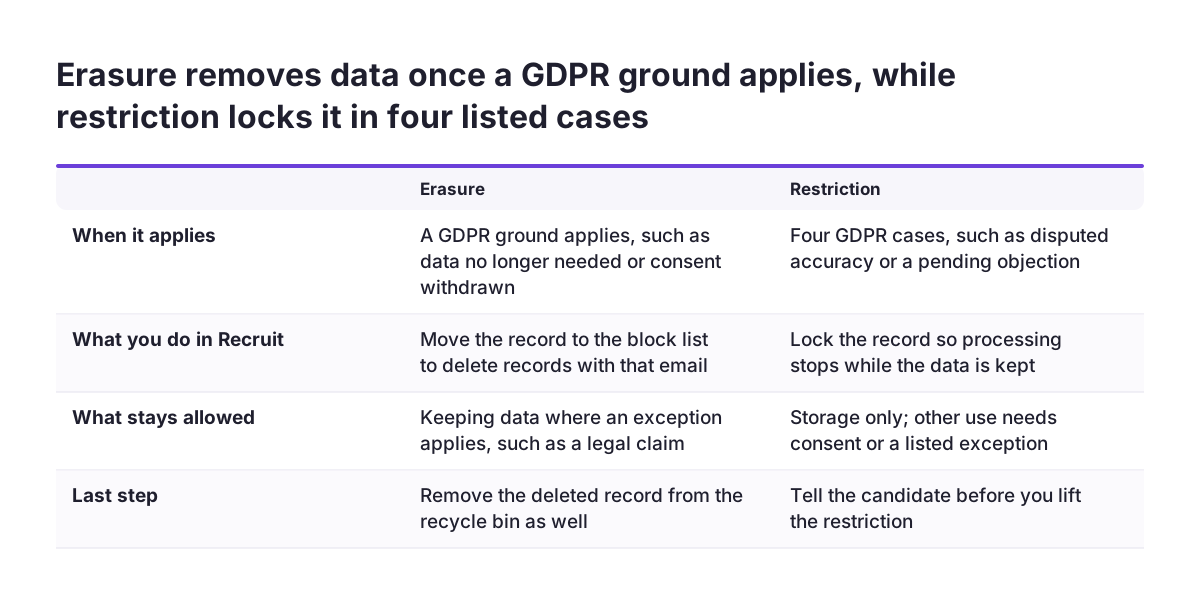
Erasure and restriction are the two candidate requests that change what you are allowed to keep. You must erase a candidate's data on request where a ground in the GDPR applies. Examples are data no longer needed for the role, or a candidate who withdraws consent when you have no other basis. Exceptions apply, such as keeping data to defend a legal claim.
Restriction applies on request in four cases:
- the candidate disputes the accuracy of the data
- the processing is unlawful and they prefer restriction to erasure
- you no longer need the data, but they need it for a legal claim
- they have objected and you are checking whether your grounds override theirs
Erasure through the block-list
Deleting a candidate in Zoho Recruit is not the end of the job. Deleted records must also be removed from the recycle bin before they are gone permanently. For a full erasure, Recruit offers the block-list. Moving a record there deletes every record with the same email address across all GDPR-enabled modules. Block-listed records can neither be retrieved nor viewed.
The block-list also stops the person coming back by accident. Their email address is blocked from re-entry through imports and synchronisation. A user can still add a record with that address manually, so recruiters need to know why a name is blocked. Only users with the Manage Data Subject Requests permission can move a record to the block-list.
Restriction through Restrict Processing
To restrict a candidate, open the record and choose More Actions > Restrict Processing. Recruit moves the candidate to a custom view named "Processing Restricted Candidates". The record is locked, so workflow emails stop and nobody can edit, share, run macros on or merge it. Review that view on a schedule. Restriction pauses processing but does not decide how long you keep the data.
AI features, Zoho People and Zoho One: where candidate data spreads
Your consent and retention settings only cover data inside Zoho Recruit. A rollout as part of Zoho One connects Recruit to other apps. Recent releases also add AI output to candidate records. Map both before you set retention.
Recruit now produces more candidate data through AI in recruitment. According to Zoho Recruit's What's New page, three features add AI output:
- AI-powered assessments, introduced in September 2025, run on Zia LLM by default. Zia LLM is Zoho's native AI model.
- Assessment Summary, introduced in October 2026, gives AI-generated insights on performance, strengths, concerns and recommendations.
- Interview Insights provides AI-generated transcripts and summaries for live and one-way video interviews.
Treat transcripts and summaries as candidate data. Your notice and your deletion routine should cover them.
Data also moves between apps. Offer details can sync from Recruit to Zoho People when you convert a candidate to an employee. At that point the person's data sits in a second system with a different purpose. Decide which app owns which records after conversion.
Agencies can generate invoices from successful hires through Zoho Books for cloud accounting. Check that invoices do not carry more candidate detail than the invoice needs. Recruit also syncs candidate activity with LinkedIn Recruiter. The block-list helps here, because it prevents a deleted candidate from returning through synchronisation.
What candidate data rules mean for a company in your EU country
The GDPR applies in every EU member state, so Zoho Recruit's consent and erasure tools serve the same rights wherever you hire. Retention periods are a different matter. How long you keep unsuccessful applicants is a decision you make and document. National employment rules and the guidance of your data protection authority may bear on it. Check them in each country where you recruit rather than copying one country's period across the group.
Three practical consequences follow for a company in an EU country:
- Data centre: an account on the EU server has the GDPR feature on by default. An account elsewhere needs a support request before the settings appear.
- Language: your notice and consent request must be understood by candidates in each market. Write them in the languages your career site uses.
- Per-country periods: if periods differ by country, one global waiting period will not fit. Plan separate handling, or apply the strictest period everywhere.
AI-assisted screening raises separate questions under the EU AI Act, which this guide does not cover. If you use Recruit's AI assessments or matching, read up on AI law for business before go-live, and involve your adviser.
Keep a short record of your decisions. It should state the lawful basis for each purpose, the period per country and the Recruit setting that enforces it. That record is what you show when someone asks why a candidate's data still exists.
Next steps: a go-live checklist for Zoho Recruit consent and retention
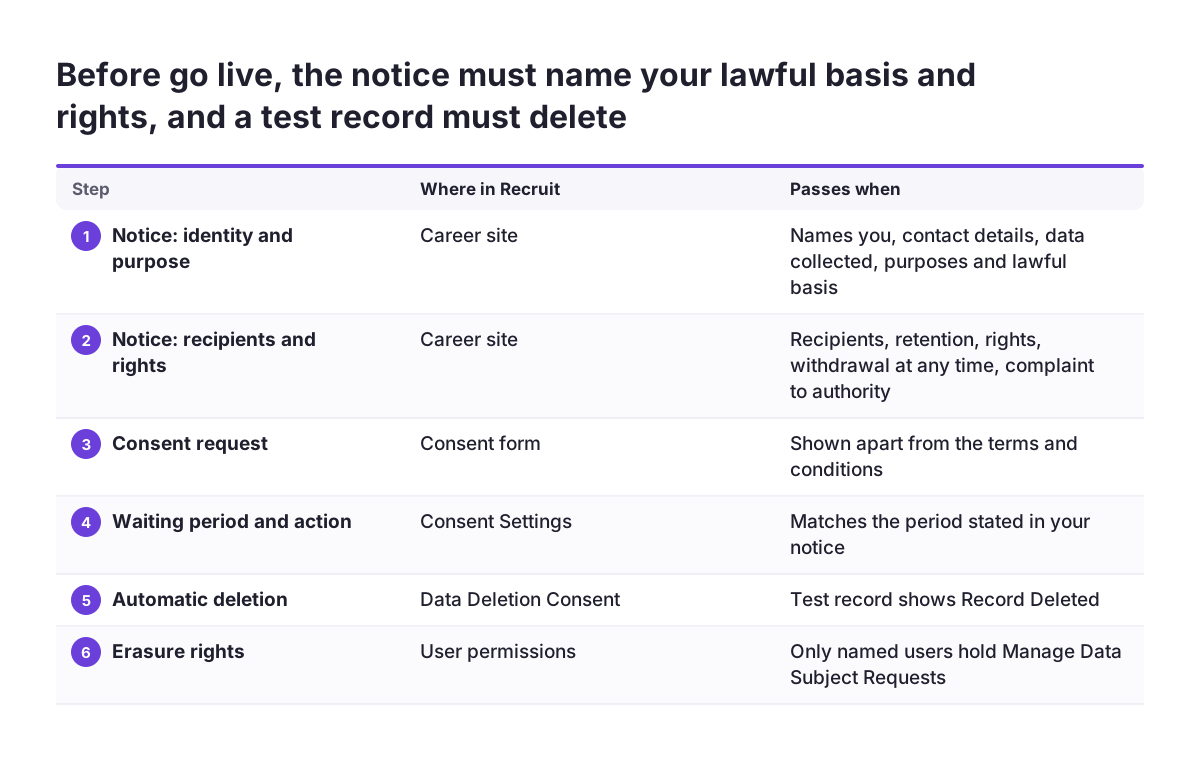
Run these checks before you open a Zoho Recruit career site to candidates. The table lists where each check lives and what a passing result looks like.
| Check | Where in Recruit | Passes when |
|---|---|---|
| GDPR feature on | Account data centre | EU server, or enabled by support |
| Notice and consent wording | Career site and consent form | Names you and your contact details, your DPO if you have one, the purposes and lawful basis, recipients and any transfers outside the EEA, the retention period or criteria, candidate rights including withdrawal and complaint, whether candidates must provide the data, and any automated decision-making. The consent request is kept apart from the terms. |
| Waiting period and action | Consent Settings | Matches the period in your notice |
| Automatic deletion | Data Deletion Consent | Test record shows Record Deleted |
| Self-service access | Setup > Career Website | Candidate Login enabled and tested |
| Erasure rights | User permissions | Only named users hold Manage Data Subject Requests |
| Permanent deletion | Recycle bin | Erased records gone from the bin |
At Svennis, when we roll Recruit out as part of Zoho One, we run one test candidate through every status in the Sandbox first, including a block-list deletion. Only after that do we copy the settings to production. That test catches a wrong action on unanswered consent before it locks or deletes real applicants.
If you are still choosing how Recruit fits your hiring process, start with our overview of Zoho Recruit as an applicant tracking system. Then take the checklist above to your data protection adviser and agree the periods before you configure them.