
Renewal reminders and obligations in Zoho Contracts, in short
Contract renewals and obligations in Zoho Contracts are managed in two places. Renewal settings and renewal reminders sit on each contract. Every duty in the contract gets an owner and a reminder in the Obligations tab. Connect Zoho Contracts to Zoho CRM and make the account owner the contract owner. The renewal then lands with the person who knows the customer, before the end date passes.
Zoho Contracts is Zoho's contract lifecycle management (CLM) software. It covers a contract from creation and internal approval to negotiation, signature and renewal. A contract renewal is, in Zoho's own definition, renewing the contract for the same or a similar duration in the current contract term, without altering its scope. An obligation is a duty one party must fulfil under the contract.
Renewal reminders go out before the contract expires, by email and in-app notification, on dates you choose. Obligation owners can see their own duties and update their status. The rest of this guide shows where each setting lives, how to choose notice periods, and how to route alerts into the CRM. Signing is left out on purpose: a Zoho Contracts subscription already includes Zoho Sign for eSignature.
Manual, evergreen and terminated contracts need different notice periods
The renewal type of a contract decides which notice period Zoho Contracts watches. Zoho's contract API documentation describes renewable contracts as either manual or evergreen. It also defines a separate notice period for termination. Pick the type and period from the signed text, because the system only reminds you about the dates you enter.
The table compares the three cases you will meet most often.
| Case | What happens at the end date | Notice period field | Who must act |
|---|---|---|---|
| Manually renewable contract | The contract ends unless someone renews it | notice-period-before-expiration: the minimum days before the end date to initiate the renewal | The contract owner starts the renewal in time |
| Evergreen contract | The contract runs into a new renewal term of a set number of months or years | non-renewal-notice-period, plus renewal-term-period for the length of each term | The party that wants out sends a non-renewal notice in time |
| Termination of a contract | The contract stops on notice | termination-notice-period: the minimum days before the end date to send or receive a termination notice | The party ending the contract |
The end date itself can be set in several ways. The API lists five options: Specific Date, On Condition, On Event, N Months/Years and On Fulfillment Of Order/Service. Only a known end date gives the reminders something firm to count back from. Contracts that end on a condition or event need an obligation or a manual check instead.
Renewal and Extension settings: where they are and what to switch on
The Renewal and Extension settings in Zoho Contracts decide how strict renewals are once a deadline has passed. An administrator sets them once for the whole organisation. Zoho documents the path in its Renewal and Extension settings article.
- Select the Admin tab at the top of the page. The Organization Info page opens by default.
- Select Contract Settings under General in the left panel.
- Select Renewal and Extension under Contract Settings.
The Renewals section holds three checkboxes, and each one is a policy decision:
- Allow to renew expired contracts lets users renew a contract after it has expired.
- Allow to renew manually renewable contracts even if the renewable notice period has elapsed keeps renewal open after the notice deadline.
- Show a warning for elapsed days before renewing notifies contract owners when a renewal happens after the notice period.
Click Save after each change. The termination settings on the same page include Allow Termination of Evergreen Contracts Past Non-Renewal Notice Period. Agree these choices with your legal or finance lead first. A permissive setting hides late renewals, while a strict one forces a fresh contract when a deadline slips. If you allow late renewals, switch on the warning too, so contract owners still see that a deadline was missed.
Renewal letters, amendments and approvals: keep scope changes out of renewals
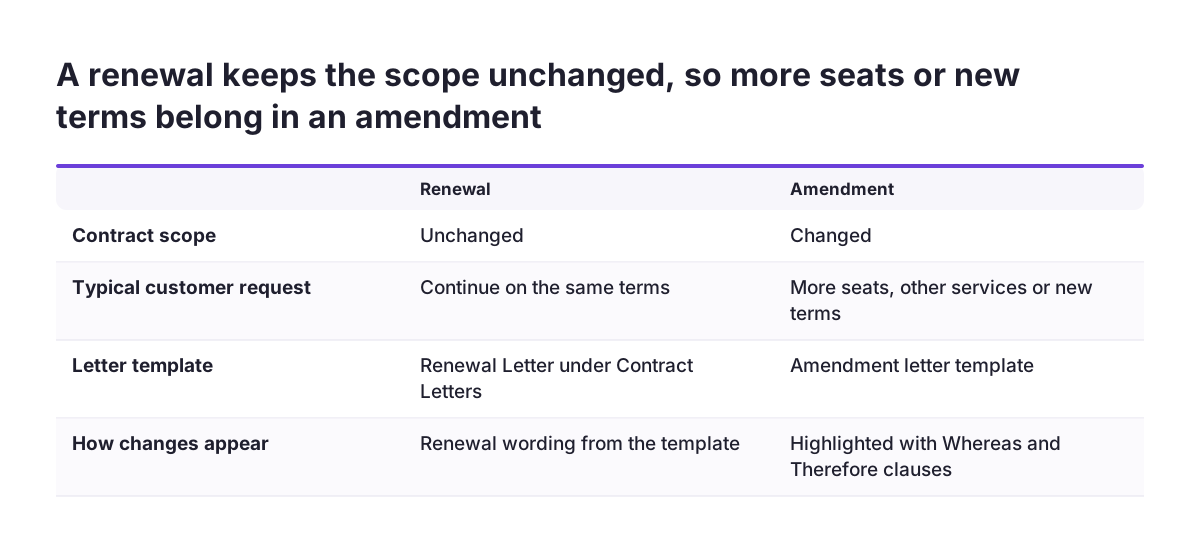
A renewal in Zoho Contracts keeps the scope of the contract unchanged. Zoho's settings article states that the renewal does not include altering the scope. When the customer wants more seats, other services or new terms, record the change as an amendment, not as a renewal.
Zoho Contracts supports amendments, renewals, extensions and terminations through built-in letter templates. These letters capture the changes to the existing contract and highlight them with Whereas and Therefore clauses. To see the renewal wording, open the Admin tab, select Contract Letters from the left panel and click Renewal Letter. Review that template before the first renewal goes out, so the language matches how your company writes.
Approvals follow the contract type. Administrators can set an approval workflow for original contracts and for amendments on each contract type, from Contract Types in the Admin tab's left panel. A sensible pattern is a light approval for like-for-like renewals and a full approval for amendments. A price or scope change then gets the review it needs, and routine renewals do not queue behind it.
Keeping the two apart also keeps the record readable. Anyone opening the contract later sees which documents renewed the term and which changed the deal.
Obligations in Zoho Contracts: record what each side committed to and assign an owner
Obligations turn the promises inside a contract into tracked tasks with a named owner. Each contract has a dedicated Obligations tab. There, contract owners create obligations, assign them and set reminders, and obligation owners update the status. Zoho explains the screens in its guide to managing contractual obligations.
Record duties for both sides, not only your own. A counterparty is the legal entity you contract with, such as a customer, vendor or partner. Its duties, such as paying on time or supplying data, matter as much as yours when a renewal comes up. If the counterparty drafted the contract, the steps are the same: Zoho says adding and managing obligations in a counterparty-initiated contract works like an organisation-initiated one.
Give every obligation one owner who can actually do the work. Usually that is the account manager, a delivery lead or someone in finance, not the person who drafted the contract.
Obligation owners find their work without opening each contract. Under the Activities tab, the All My Obligations view in the Contract Obligations section lists every obligation assigned to them. When one needs attention, the contract owner can send a reminder, and the obligation owner receives a notification.
Recurring obligations: edit, copy, pause and check the due history
Recurring obligations repeat on a schedule, such as a regular report or a periodic service review. Zoho Contracts keeps a due history for each one, which gives you a record to bring to a renewal talk. To manage an obligation, open the contract, choose More in the contract details panel and select Obligations. Then click More next to the obligation title.
The More menu next to an obligation title offers these actions:
- Edit opens the Edit Obligation form. Change the values, then click Update.
- Create a Copy opens a form pre-filled with the original obligation's values. Use it for similar duties on the same contract.
- Delete removes the obligation.
- Pause recurring stops the recurrence until you choose Resume Recurring by the same steps.
- View Due History shows every past due date. You can filter by due status and sort with the latest due date first or last.
Paused obligations need care. A pause stays in place until someone resumes it, so note the reason in the obligation's description. Before each renewal, filter the due history by status. The contract owner then knows whether both sides met their duties during the current term.
Connecting Zoho Contracts to Zoho CRM so renewals reach the account owner
The Zoho CRM integration puts contract status next to the customer record. With it, salespeople start new contract requests directly in Zoho CRM. They then track the contract's status from the Zoho Contracts section in the record's related list. Zoho has since reworked the integration: a Zoho Contracts update announced CRM 2.0 together with regional settings and six new reports.
Ownership is the setting that decides whether renewals reach the right person. At Svennis we make the contract owner the person who owns the account in Zoho CRM, not whoever drafted the contract. The elapsed-day warning goes to the contract owner, and a renewal gets chased sooner when it lands with the person who holds the relationship.
Two limits reported in the Zoho Contracts community are worth checking before go-live:
- In counterparty field mapping, the Billing Country field from Zoho CRM cannot be mapped because of a field type mismatch.
- One user reports that Zoho Contracts does not allow new user roles. Sales staff then need the administrator role to see contracts other users created.
Plan around both. Check which counterparty fields arrive from the CRM and fill the rest by hand. Decide who really needs administrator access, rather than granting it to the whole sales team.
Zoho Flow triggers for signed contracts, expired contracts and overdue obligations
Zoho Flow moves events from Zoho Contracts into other apps without code. A trigger is the event that starts a flow, and actions are the automated tasks that follow. The Zoho Flow page for Zoho Contracts lists the triggers and actions that matter here.
The useful Zoho Contracts triggers and actions in Zoho Flow are these:
- Contract signed triggers when a contract is signed.
- Contract expired triggers when a contract expires.
- Overdue obligation triggers when an obligation is overdue.
- Transfer contract ownership transfers ownership of an existing contract.
- Fetch counterparty fetches a counterparty's details by name or organisation API name.
Zoho Flow connects with over 1000 apps through a drag-and-drop builder. A customer story on the same page describes flows that integrate Zoho Books, Zoho Desk, Zoho CRM and Zoho Cliq. Use Overdue obligation to alert the account owner where they already work. Use Contract expired as a safety net for anything that slipped past the reminders. Custom functions in Zoho Flow can format data, call web APIs and send emails when the standard actions are not enough.
If you already track expiry dates in Expiration Reminder, Zoho Flow can pass data between that tool and Zoho Contracts. It can also renew an expiration item there with a new date.
Worked example: a manually renewable service agreement from deal to renewal
A manually renewable service agreement shows how the pieces fit together. Picture a company selling a support service to a business customer. The customer can renew at the end of the term, and the contract states a notice period for starting the renewal.
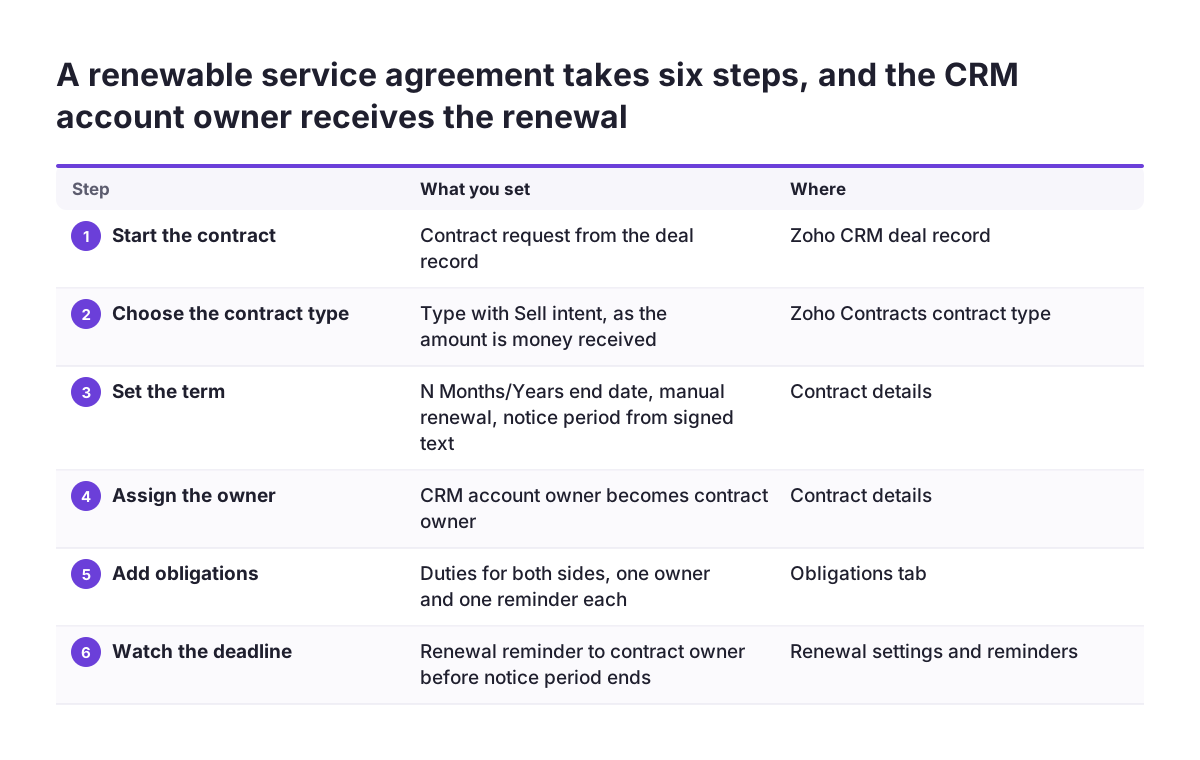
- Start in the CRM. The salesperson opens the deal in Zoho CRM and starts a contract request from the record. The status then shows in the Zoho Contracts section of the related list.
- Choose the contract type. Use a type with the Sell intent, because the contract amount is money received. The API ties the amount to the contract type's intent, Buy or Sell.
- Set the term. Use the N Months/Years end date option and the manual renewal type. Enter the notice-period-before-expiration exactly as the signed text states it.
- Assign ownership. Make the CRM account owner the contract owner, so renewal alerts and elapsed-day warnings reach them.
- Add obligations. Record the customer's payment duty and your recurring service review as separate obligations. Give each a named owner and a reminder.
- Add the safety net. Build a flow in Zoho Flow on the Overdue obligation trigger that alerts the account owner.
When the renewal reminder arrives, the account owner opens the due history and checks that both sides met their duties. They then renew with the Renewal Letter template. If the customer asks for a larger scope, the account owner raises an amendment instead, which goes through the amendment approval workflow for that contract type.
What contract renewal tracking means for a company in the EU
For a company in the EU, renewal tracking in Zoho Contracts touches personal data and, often, several legal entities. Counterparty contacts are people, so their names and email addresses fall under the GDPR. Zoho states that Zoho Contracts complies with the EU General Data Protection Regulation. You can also enable personal data protection for counterparty contacts. Switch that on before you import or create contracts.
Groups with companies in more than one member state should look at the multi-org feature. Users can belong to several organisations, each with its own Zoho Contracts account. Each entity then keeps its own contracts, templates and renewal settings. The regional settings that arrived with the CRM 2.0 update also deserve a check during setup.
Notice periods are a legal matter, not a software default. The periods you enter should come from the signed contract and the law that governs it. Have whoever advises you on contract law confirm them for standard templates. Zoho Contracts reminds people on the dates you set, but it cannot tell you whether those dates are right.
Cross-border deals often involve counterparties without Zoho accounts. That is not a problem: negotiators need no Zoho Contracts account or user licence, and counterparty signers need no Zoho account to sign.
Next steps: a setup order for your first renewals and obligations
Set up renewals and obligations in a fixed order, so every later contract inherits the right defaults. A practical sequence for your first week looks like this:
- Decide your renewal policy, then set the three Renewals checkboxes and the termination setting under Admin.
- Review the Renewal Letter template and the approval workflows for originals and amendments on each contract type.
- List your live contracts by renewal type and enter the notice periods from each signed text.
- Make the CRM account owner the contract owner on every renewable contract.
- Add obligations for both sides, each with one owner and a reminder.
- Build one Zoho Flow flow on Overdue obligation and one on Contract expired.
Once contracts flow through, check the standard reports. Zoho Contracts includes over 30 of them. If managers want renewals next to pipeline and revenue figures, a Zoho Analytics setup on top of your Zoho data brings them into one dashboard. Where a renewed contract also drives recurring invoices, plan that side with Zoho Billing for subscriptions.
For help with the whole setup, from contract types to the CRM integration, see the Zoho Contracts implementation page.