Zoho's own learning material for Zoho CRM: what it covers
Zoho's own learning material for Zoho CRM falls into four groups: self-service resources such as documentation and ebooks, videos and webinars, instructor-led training programmes, and the community and support channels that catch what the rest misses. This guide explains what each group contains according to Zoho's own pages, which question each one answers, how long it takes and the order that works for an administrator and for a salesperson.
It is written for the person who has to decide how a team gets from a new account to daily use. If you have not yet settled on the product itself, read our comparison of Zoho Bigin and Zoho CRM first, because the learning path depends on which one you run.
Two terms recur throughout. An administrator is the person who configures the account: modules, fields, users, permissions and automation. A user, in this guide mostly a salesperson or a sales manager, works inside that configuration every day. Zoho splits its instructor-led training along these role lines, and this guide follows the same split.
The short version is this. Zoho's material is good at teaching how the product works. It is not designed to decide how your particular business should be modelled inside it, and that gap is where most adoption problems begin.
The self-service resources and the question each one answers
Zoho collects its self-service material on the Zoho CRM resources page. Each item there serves a different purpose, so it helps to know which one to open for which question.
Documentation
The documentation is the reference. Zoho describes it as the place to gain in-depth knowledge of features on customization, automation and security, and to learn how to set up and implement CRM for your business. Use it when you know which feature you need and want the exact settings.
Getting-started checklist and ebooks
The checklist introduces the basics of implementing CRM and is the natural first document for a new administrator. The ebooks are free downloads covering a range of topics on using Zoho CRM successfully, and a separate Resources hub for CRM for Everyone, the newer interface, holds curated ebooks and material on the thinking behind it.
Developer Guide
The Developer Guide explains how to integrate Zoho CRM with third-party applications using APIs (application programming interfaces, the channels through which software exchanges data). It is written for developers, not for sales teams.
Community and support tickets
The user community holds discussions, articles and updates from the Zoho CRM team and partners. When none of the resources answer your question, Zoho invites you to submit a ticket so its team gets in touch with you.
Videos and webinars: useful, but check the dates
Zoho's video page states openly that the library is being refreshed to reflect the latest user interface and that more videos are added progressively. At the time of writing it lists short items such as "Introduction to Zoho CRM" and "Navigating CRM for Everyone", each 51 seconds long. These are orientation clips, not training.
Until the refresh is complete, Zoho points users to webinars covering key concepts and recent changes. The resources page describes the webinar programme as a detailed look at Zoho CRM's capabilities, from customization to automation. Because webinars run on a schedule, you plan around them rather than watch them whenever you like.
An example: the Deluge webinar series
Deluge, short for Data Enriched Language for the Universal Grid Environment, is Zoho's scripting language for automating tasks, customizing workflows and enhancing Zoho applications, and it is used across Zoho CRM, Zoho Creator and other Zoho products. Zoho ran a free three-day Deluge webinar series from 28 to 30 January 2025.
Each day had three one-hour sessions for the APAC/ANZ, EMEA and Americas time zones. Day 1 introduced Deluge as a language, Day 2 covered its use in Zoho CRM and Zoho Desk, and Day 3 covered Zoho Books and Zoho Creator, with an expert panel taking live questions. That format is typical: a focused topic, a fixed date and a short time commitment per day.
Instructor-led training: online, classroom and onsite
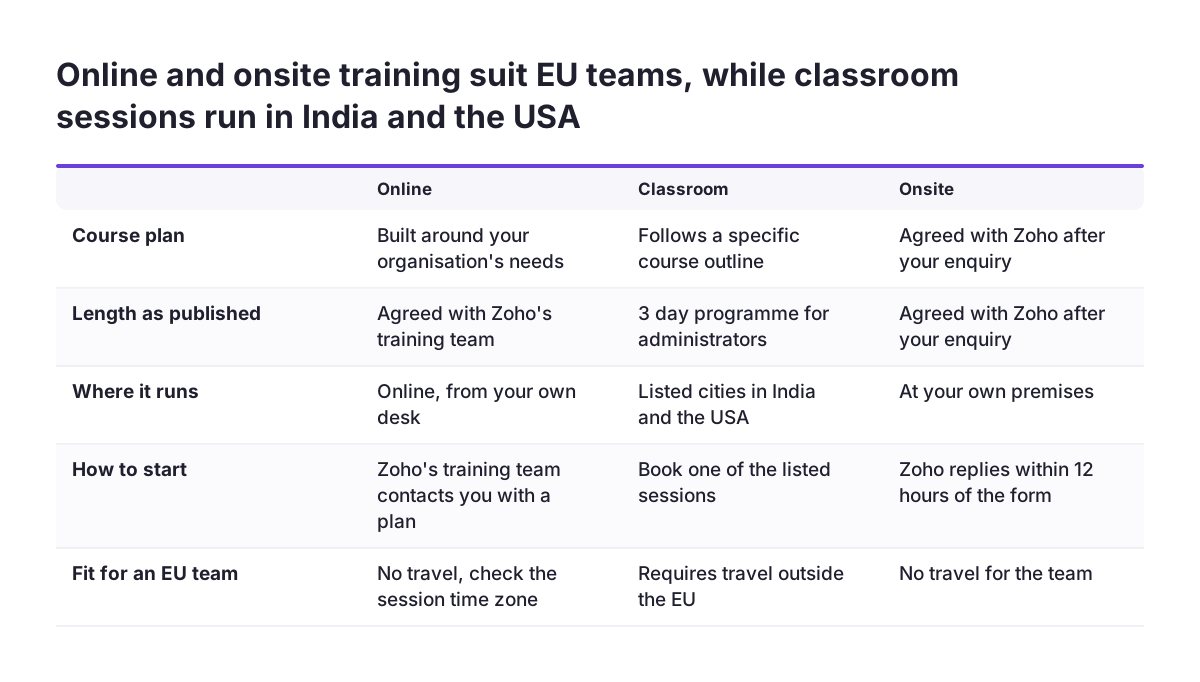
Zoho's training programmes page describes courses for four roles: sales representatives, sales managers, developers and CRM administrators. They come in three delivery formats, and the difference between them matters more than the course titles.
- Online training is the customized option. Zoho's training team contacts you with a course plan built around your organisation's needs.
- Classroom training is described as a 3-day instructor-led programme that enables CRM administrators to set up and run their organisation's account. It moves from account setup basics on Day 1 to automation, process management and module customization by Day 3. Zoho states plainly that it follows a specific course outline and will not be personalized.
- Onsite training means Zoho sends its experts to your company to deliver a programme tailored to your business. Zoho says it replies to onsite enquiries within 12 hours.
Two details on the same page are worth knowing before you book. Zoho cancelled upcoming classroom sessions because of COVID-19 and introduced a virtual classroom schedule instead. The developer course is described as a four-day online programme on implementing additional functions in Zoho CRM with the Developer Tools.
At the end of classroom training, participants receive participation certificates and learning materials. Treat these as proof of attendance. If a role in your company requires a formal certification, confirm Zoho's current offer directly, because the training page does not describe an exam.
Cost and time at a glance
The table below summarises what Zoho's own pages say about each resource. Where the "Cost" column says "not stated", the page gives no price, so ask Zoho for a quote before you plan a budget.
| Resource | Question it answers | Time as published | Cost as published |
|---|---|---|---|
| Getting-started checklist | What do I set up first? | Not stated | Not stated |
| Documentation | How does this feature work and where is the setting? | Reference, as needed | Not stated |
| Ebooks | How do others use Zoho CRM well? | Not stated | Free |
| Intro videos | What does the interface look like? | 51 seconds each | Not stated |
| Deluge webinar series (2025) | What can scripting do in CRM? | 3 days, one-hour sessions | Free |
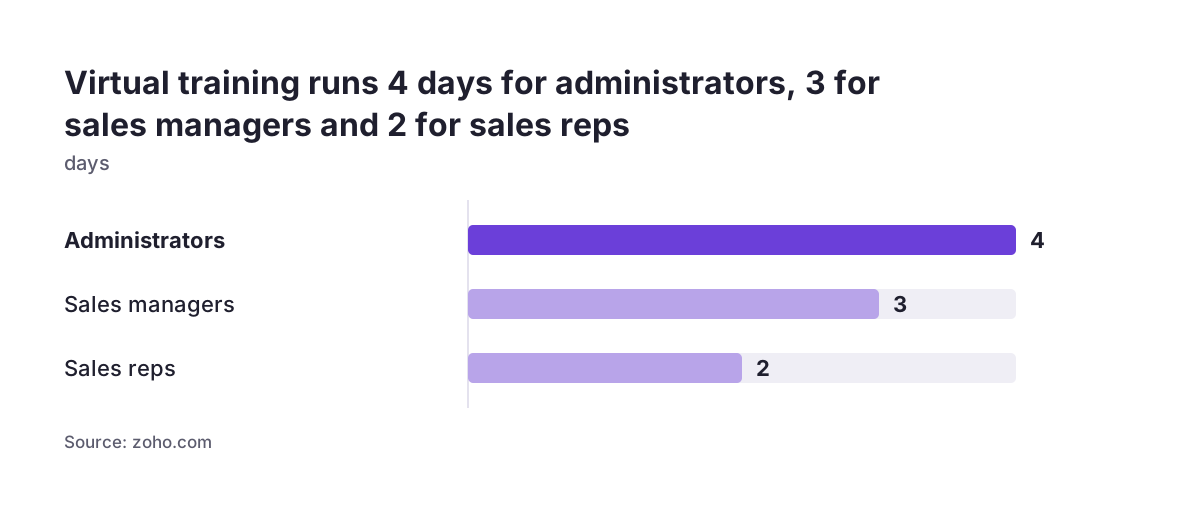
| Virtual training for administrators | How do I configure and run the account? | 4 days, 7 hours | Not stated |
| Virtual training for sales managers | How do I manage a team in the CRM? | 3 days, 6 hours | Not stated |
| Virtual training for sales reps | How do I work my leads and deals? | 2 days, 5 hours | Not stated |
| Virtual training for developers | How do I extend CRM with Developer Tools? | 4 days, 4 hours 30 minutes | Not stated |
| Onsite training | Can Zoho train us on our own business? | Tailored | Not stated |
One inconsistency is worth noting. The classroom FAQ calls the programme 3 days, while the schedule listings on the same page show 4-day sessions from 9 AM to 4 PM. Confirm the length when you book.
The order that works for an administrator
The administrator learns first, because every other person's training depends on the configuration they build. Sequence matters more than volume here: reading documentation before you know the basics wastes time, and booking an intensive course before your requirements are clear means you cannot apply what you learn.
- Checklist and orientation. Work through the getting-started checklist and watch the two short intro videos so the vocabulary and the interface are familiar.
- Write down your process. Before any course, list your sales stages, the fields you need and who sees what. The training will make far more sense against a concrete plan.
- Administrator training. Take the virtual administrator programme, or the online option if you want the plan adjusted to your organisation. The classroom format covers the same ground from setup to automation but will not be personalized.
- Documentation as reference. Use the documentation on customization, automation and security while you configure, one feature at a time.
- Webinars for changes. Follow the webinars that cover recent changes, particularly while the video library is being refreshed for the new interface.
- Scripting only if needed. Turn to Deluge material and the Developer Guide only when standard automation cannot do the job or you need to connect another system.
Keep the community bookmarked throughout. Many configuration questions have been asked before, and searching there is often faster than a ticket.
The order that works for salespeople and sales managers
Salespeople should learn on the system they will actually use, not on a blank demo account. That means their training starts once the administrator has configured the pipeline, fields and views, even if only in a first version.
For salespeople
Start with the SDR course on the resources page. SDR stands for sales development representative, the person who qualifies incoming leads, and Zoho describes the course as covering organizing your day, talking to leads, using Zoho CRM and meeting sales targets. It is a good grounding in working habits as well as software.
Then take the virtual training for sales reps, listed at 2 days, 5 hours. Follow it with a short internal session on your own configuration: which fields are mandatory, what each stage means in your company and what the manager will look at on Monday morning.
For sales managers
Sales managers have their own virtual programme, listed at 3 days, 6 hours. Schedule it before the salespeople start, so the manager can answer the team's early questions and use the reports from day one.
Route salespeople's product questions through the administrator rather than straight to Zoho support. The administrator knows which behaviour is standard and which comes from your own configuration, and that distinction usually settles the question in minutes.
A worked example: one administrator, one manager, six salespeople
Take a distribution company moving from spreadsheets to Zoho CRM. The operations manager will act as administrator, and there is one sales manager and six salespeople. Here is how Zoho's own material maps onto the first weeks.
Week 1. The operations manager works through the getting-started checklist, watches the "Introduction to Zoho CRM" and "Navigating CRM for Everyone" clips, and writes a one-page description of the sales process: stages, required fields and who owns which accounts. Meanwhile they request Zoho's online training, so the course plan can reflect that page.
Weeks 2 and 3. The administrator completes the administrator programme, listed at 4 days, 7 hours in its virtual form, and configures the pipeline in parallel, checking each feature against the documentation. The sales manager takes the sales manager programme during the same period.
Week 4. The six salespeople complete the SDR course and the sales rep programme, then spend half a day on the configured account entering real opportunities. The administrator collects the questions that come up and answers them from the documentation or the community, escalating to a Zoho support ticket only when neither helps.
What this plan does not cover is importing the spreadsheet history, deciding how duplicate customers are merged, or connecting the accounting system. Those are design and data tasks rather than training tasks, which leads to the next section.
Where self-study stops and a partner starts
Zoho's training teaches features. The harder decisions are about modelling your business: which modules you need, how records relate to each other and which processes to automate. Zoho itself says its classroom training follows a fixed outline and will not be personalized, which is a fair description of where generic material ends.
A Zoho customer story shows the typical trigger. YEDA Research and Development, the commercial arm of the Weizmann Institute of Science with fewer than 50 employees, turned to a local Zoho partner because it needed complex workflows and many-to-many relationships across researchers, patents and commercial partners. According to the case study, the resulting system reduced data entry time by 20% to 50%.
In practice, the signals that you have reached this point are consistent:
- Your data does not fit the standard modules without custom relationships.
- You need to bring years of history across, as described in our guide to migrating to Zoho CRM without losing your sales history.
- Another system, such as an ERP or webshop, must exchange data with CRM through APIs or Deluge.
- Nobody in-house has the time to be administrator alongside their existing job.
Training and a partner are not alternatives. At Svennis we ask the future administrator to complete Zoho's administrator training before we start configuring, so our handover sessions discuss their own setup instead of repeating generic screens.
What this means for a company in the EU
Zoho's training pages are written for a global audience, and a few details affect European teams directly. The classroom sessions listed on the training page were in Chennai, Bengaluru, Hyderabad and Mumbai in India, and in New Jersey, Orlando and San Diego in the USA. For most EU companies that makes the virtual and online formats, or onsite training, the practical choices.
Time zones matter for live formats. The Deluge series offered an EMEA session each day, so check that the webinars and virtual sessions you plan to join have a slot that fits your working day before you commit a team to them.
Regulation is the second point. Zoho's documentation explains the security features, but deciding how your configuration meets GDPR obligations, such as which personal data you store and for how long, is your responsibility and depends on your processes. Sectors handling sensitive data need more care here; our page on Zoho CRM for healthcare shows what that involves.
National requirements differ between member states and should not be assumed to apply elsewhere. A Romanian company, for example, may want to check company tax codes against the national registry, which is a specific integration such as ANAF validation for Zoho CRM. Plan country-specific needs as separate items in your project, not as something general training will cover.
Practical next steps
You can start most of this today without spending anything beyond your own team's time. Work through the steps in order and you will know within a few weeks whether Zoho's material is enough on its own.
- Name your administrator. One person owns the configuration and the learning plan. Give them protected time for it.
- Open the resources page. Complete the getting-started checklist and bookmark the documentation and the community.
- Write your process on one page. Stages, required fields, ownership rules and the reports management wants. This makes every course more useful.
- Request a training plan. Contact Zoho about the online or onsite format and ask for durations and prices in writing, since the training page does not list prices.
- Sequence the roles. Administrator first, sales manager next, salespeople last, each on the configured account.
- Check for the partner signals. Custom relationships, historic data, integrations or no internal capacity mean you need design help, not more courses.
If you reach step six, our Zoho CRM implementation page explains how we set up the system with your team, so the training your people complete applies to a configuration built around your business.