What a CRM for small business should do for you
A CRM for small business is the system that keeps your contacts, leads, deals and customer history in one shared place. Everyone can see where a sale stands and what should happen next. Choosing one is rarely hard at the start. The difficulty appears a year or two later, when the free plan runs out of seats, the price per user climbs, or the data has become too messy to trust.
This guide treats the decision as a question of cost and fit. It looks at what free plans actually include and how prices step up as you add users. It also covers which integrations matter, how to move existing data, what to check on security, and the order in which to set things up.
Most of the figures here come from a low-cost CRM guide published by the US Chamber of Commerce and from Zoho's own small business CRM page, so prices are quoted in US dollars as those sources list them. Check the current euro pricing and the terms for your country before you sign anything, because vendors can price and package differently across markets.
The aim is simple. Pick a system you can start on cheaply and grow into, instead of one you will have to replace once the business gets busier.
What one small business buyer actually needed
A public discussion on Reddit shows the problem clearly. The poster works for two small businesses with the same owner, one in house remodelling and one in screen installation. They use a job management tool they are happy with for tracking jobs and vendors, plus a well-known marketing-led CRM that they describe as perfect for their marketing emails.
Look at what that CRM does for them day to day. Calls come in through a cloud phone system that is integrated so every call is tracked. Email tracking alerts them when a lead opens an email and how many times. The job tool is connected, new leads land in the CRM, and the website forms feed it too. Their favourite part is the dashboards and reports for tracking KPIs and leads.
Their conclusion is that the CRM is too expensive, and they want the same benefits for less money. That is a fair aim, as long as the replacement keeps what makes the current setup useful.
This is the typical position of a growing small business. The value is not in one feature but in the connections: phone, forms, email and job data flowing into one record, with reporting on top. Any cheaper replacement has to reproduce those connections, or the saving disappears into manual work. Write your own list in the same way before you compare prices.
What free plans really include
Free plans are a reasonable place to start, but their limits vary widely. The US Chamber of Commerce guide to low-cost CRM tools covers ten options: five vendors offer a free plan, and all ten are priced at $25 or less per month.
| Free plan | Limits as listed in the guide |
|---|---|
| A marketing-led vendor | 2 users, 1,000 contacts |
| Zoho CRM | 3 users |
| A sales-focused vendor | 3 users, with 24/5 phone, chat and email support |
| A marketing suite vendor | 15 users, 250 contacts |
| A collaboration suite vendor | Unlimited users |
The pattern matters more than the names. Some free plans cap users tightly but allow a decent contact list, while others allow many users but very few contacts. A plan with 250 contacts will not hold a real customer base for long, and a two-user cap stops working the day you hire a third salesperson.
The same guide notes that free CRMs suit solo owners and companies with one or two sales reps, while paid software adds more automation, insights and collaboration tools. Even free plans support pipeline management. Treat a free plan as a trial period with real data, and plan the step to a paid tier from the beginning.
How the price ladder works as you grow
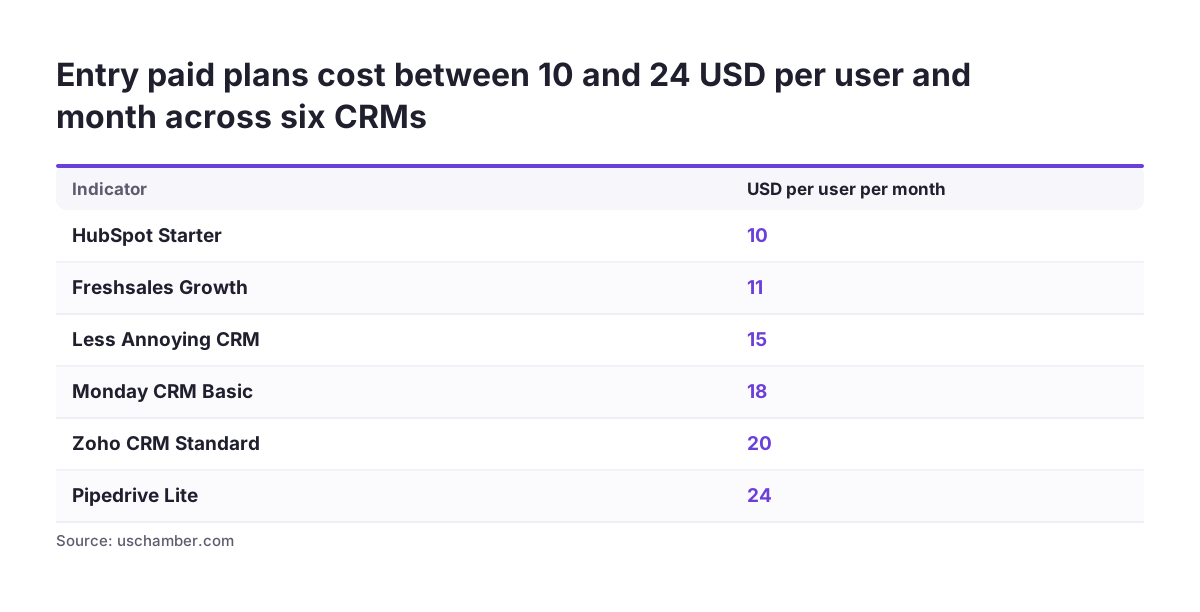
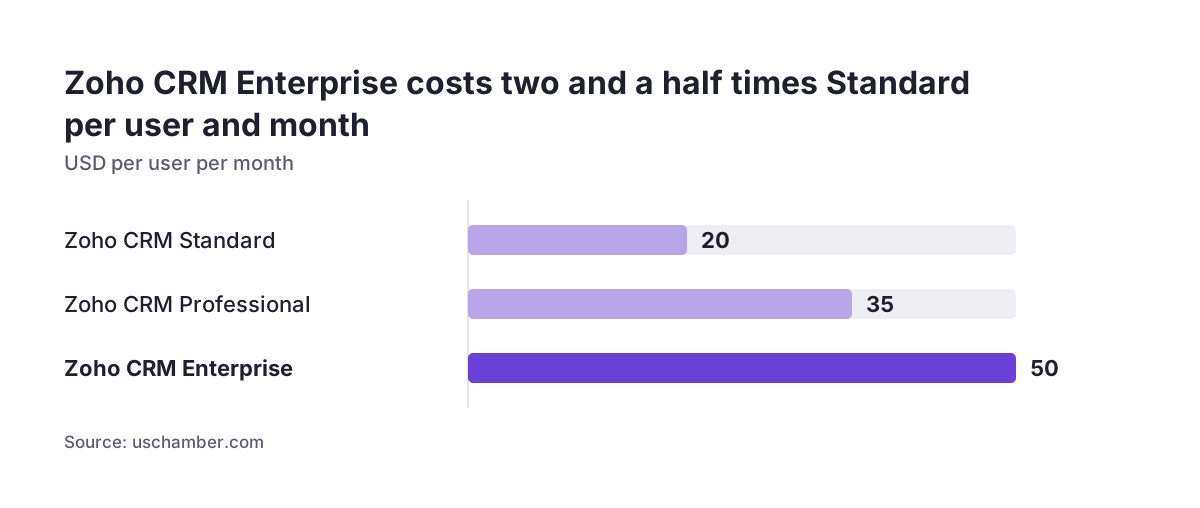
CRM pricing is usually charged per user per month, so your cost is driven by headcount and by the tier you need. Zoho CRM, as the US Chamber guide describes it, scales from a free version for three users to an enterprise system at $50 per user per month.
A quick calculation shows why this matters. Five users on a $50 tier cost $250 a month, and ten users cost $500 a month. The Reddit poster's complaint was not about any single feature but about paying a recurring sum for the combination they used.
The better question is therefore which tier you actually need. The guide notes that paid versions add sales forecasting and AI features, while free plans already cover pipeline management. If your team mainly needs a pipeline, contact history and a few reports, an entry tier may cover you for a long time.
Questions to put to each vendor
- Can users be on different tiers, or must everyone share the same plan?
- What happens to your data and settings if you move down a tier?
- Are integrations, automation or reports locked to higher tiers?
- Is the listed price for monthly or annual billing?
Get written answers before you commit. Pricing pages change, and a short email from the vendor is easier to rely on later.
Integrations decide whether the CRM saves time
As the Reddit case shows, the connections carry most of the value. Zoho lists integrations with office suites such as Google Workspace and with other widely used office and email tools, and with telephony and productivity apps such as Twilio, a team messaging app and Zapier. It also connects to company Twitter, Facebook and LinkedIn accounts, and to WordPress and Unbounce for websites and landing pages.
Within its own suite, Zoho CRM integrates with Books, SalesIQ, Campaigns, Mail and Projects. The US Chamber guide highlights the link with Zoho Campaigns for automating email marketing, which is the part the Reddit poster valued most in their current tool. The same guide mentions one other vendor with over 100 app integrations, including e-signature tools and business phone systems.
Count integrations by what you use, not by the length of the list. Map each tool you rely on today: phone, email, website forms, accounting, job or project tracking. For each one, check whether the connection is native, runs through a connector such as Zapier, or needs custom work, and whether it is included in the tier you plan to buy.
A connector adds another subscription and another point of failure, so native links are usually worth a small premium for the tools you use every day. Keep connectors for the occasional tasks.
Moving your data without carrying the mess across
Most small businesses are not starting from zero. You have spreadsheets, an inbox full of leads, and perhaps an older CRM. Zoho offers a migration system called Zwitch to bring existing sales data into Zoho CRM, and the US Chamber guide notes that most paid CRM versions include features for cleaning up data.
Cleaning matters more than moving. Duplicate contacts, inconsistent company names and half-filled fields will follow you into the new system and undermine every report you build on it. A migration is the one moment when you have a good reason to fix this.
A practical migration sequence
- Export everything from your current tools, including notes and activity history where possible.
- Remove duplicates and agree on standard formats for names, phone numbers and countries.
- Decide which fields you really need and drop the rest.
- Import a small sample first and check it field by field.
- Run the full import, then stop new entries in the old system.
Most cloud-based CRM tools offer free trials, according to Zoho, so do your sample import during the trial. It tells you far more about fit than a sales demo does.
Security and personal data
Your CRM will hold personal data about customers and prospects, so security is not optional. Zoho lists encryption, audit logs, IP restrictions and two-factor authentication among Zoho CRM's security features. Use these four as a baseline checklist when you compare any system.
Features only help if they are switched on. Make two-factor authentication mandatory for every user from the first day. Audit logs let you see who changed or exported what, which is useful when a record goes wrong or an employee leaves. IP restrictions can limit access to known networks if your team works from fixed locations.
Treat the GDPR as part of the selection, not an afterthought. Before you buy, ask the vendor where your data is hosted, what data processing terms they offer, and how you can export or delete a person's records on request. Keep the answers with your other compliance documents.
Also decide early who can see what. A small team often gives everyone full access, and that becomes hard to undo later when you add freelancers or new staff.
Forecasting and AI: when paying more makes sense
Paid tiers are where forecasting and AI appear. According to the US Chamber guide, Zoho CRM offers an AI assistant that analyses sentiment in emails and calls, enriches customer profiles and forecasts sales. These features depend on having enough clean, consistent data to work with.
For a business with a handful of deals a month, a forecast is only as good as the pipeline behind it. The priority is disciplined data entry: every deal with a stage, a value and an expected close date. Once that habit exists, forecasting and AI features start to earn their cost.
Vendor case studies show what is possible when the basics are in place. On Zoho's small business page, the CEO of Sherpa reports a 65% increase in the sales pipeline and a 60% reduction in lead-to-prospect time after adopting Zoho CRM. Treat figures like these as one company's result, not a forecast for yours.
A sensible rule is to buy the tier your process needs today. Upgrade when you have several months of clean data and a specific question you want the AI features to answer.
A setup order that holds up as you grow
How you configure the CRM matters as much as which one you choose. Svennis has delivered over 200 implementations, and the order below is the one that keeps small systems usable as they grow.
- Define your pipeline. Write down the stages a deal really goes through, in your own words, and keep them few.
- Agree required fields. Decide the minimum every lead and deal must have, such as source, value and next step.
- Connect the daily tools. Link email, phone and website forms first, since these feed new leads in automatically.
- Import clean data. Follow the migration sequence above, starting with a sample.
- Set roles and permissions. Give each person the access their job needs, with two-factor authentication on.
- Build three reports. Start with new leads by source, pipeline by stage and deals won per month.
- Add automation last. Automate a step only after the team does it the same way every time.
For a business like the one in the Reddit example, with two companies under one owner, decide at step one whether both share a pipeline or need separate ones. Changing that structure later means reworking data, reports and permissions together.
Practical next steps
You can make this decision in a few focused weeks rather than months. The steps below keep it grounded in your own processes and numbers.
- List every tool your team uses daily and what it must pass to the CRM.
- Count your users now and in 18 months, along with your current number of contacts.
- Shortlist two or three systems whose free or entry plans fit those numbers.
- Calculate the monthly cost at your expected headcount on the tier you will realistically need.
- Start a free trial and import a cleaned sample of your real data.
- Test each integration on your list, then check the security settings and data export options.
- Write down your pipeline stages and required fields before the full rollout.
If the trial shows that a system handles your leads, calls, emails and reports without workarounds, and the cost still makes sense at your future headcount, you have found one you are unlikely to outgrow soon. Keep your notes from the trial, since they become the specification for your setup.