Zoho Books pricing in short: a free plan and five paid plans, priced per organisation
Zoho Books pricing runs from a free plan to five paid plans: Standard, Professional, Premium, Elite and Ultimate. On Zoho's US page, the paid plans cost $15 to $240 per organisation per month when billed annually. Billed monthly, they cost $20 to $275. Your real bill depends on plan limits, add-ons and whether you buy Books alone or inside Zoho One.
Zoho Books pricing is the monthly fee per organisation for whichever of the six plans you choose, plus the add-ons you buy on top. Zoho quotes the fee per organisation, so you budget separately for each organisation you run in Books. Zoho Books is a cloud service, so you pay nothing for installation.
The commercial terms are light. Zoho describes Books as a pay-as-you-go service, so you do not sign a contract or commit to staying subscribed. You can try the product free for 14 days before you subscribe. Zoho's US page states that its prices exclude local taxes, so VAT comes on top of every figure in this post.
The sections below cover the free plan, then the paid plans side by side. After that come the limits that push you up a tier and the add-ons that raise the bill. The final sections cover prices for EU companies and the standalone versus Zoho One decision.
The Zoho Books free plan: revenue threshold, invoice cap and missing add-ons
The Zoho Books free plan stays free as long as your revenue for the financial year stays under a threshold. Zoho sets that threshold in local currency. It is $50K on the US page, 50K AUD on the Australian page and 200,000 SAR on the Saudi page. Check the threshold on the page for your own region before you plan around the free plan.
The free plan has tight limits beyond revenue:
- One user plus one accountant.
- Up to 1,000 invoices a year.
- No add-ons, except document autoscans, which are capped at 50 scans per month.
- Up to 5 scheduled reports.
- Integrations with other Zoho apps only, according to Tech.co's Zoho Books pricing review.
Support on the free plan is email only. On the US page, the support team answers Monday to Friday, 9 am to 9 pm ET.
The free plan suits a sole trader or a very small company with one person doing the books and an external accountant. Once a second colleague needs a login, or you send more than 1,000 invoices a year, you need a paid plan. Crossing the revenue threshold also moves you to a paid plan, even if nothing else changes.
Zoho Books paid plan prices, users and invoice limits compared
Zoho Books paid plans differ in price, included users and the number of invoices you can create each year. The table uses the Zoho Books US pricing page for prices and users, and Zoho's own published annual invoice limits. All prices are per organisation per month, excluding local taxes.
| Plan | Billed annually | Billed monthly | Users included | Invoices per year |
|---|---|---|---|---|
| Standard | $15 | $20 | 3 | 5,000 |
| Professional | $40 | $50 | 5 | 10,000 |
| Premium | $60 | $70 | 10 | 25,000 |
| Elite | $120 | $150 | 10 | 100,000 |
| Ultimate | $240 | $275 | 15 | 100,000 |
Annual billing saves the most on the cheaper plans. The discount is 25% on Standard and 20% on Professional and Elite. On Premium it is about 14%, and on Ultimate about 13%. Monthly billing costs more, but it keeps the pay-as-you-go flexibility if you expect to change plans soon.
Support also improves as you move up. Tech.co notes that Standard adds phone and live chat to email support. Tech.co also found no human representatives available at weekends. All plans include a built-in AI chatbot that can help with tasks such as creating invoices. If you want to take automation further than that, our sister site covers AI for invoicing.
Plan limits that force an upgrade: bills, API calls, scans, reports and inventory
Plan limits, not user counts, are what usually push a company into a higher Zoho Books tier. Zoho's Canadian page states that expenses work in all plans, but bills work only from Professional upward. If you record supplier bills rather than simple expenses, Standard is out from day one.
The other limits that matter in practice, by plan:
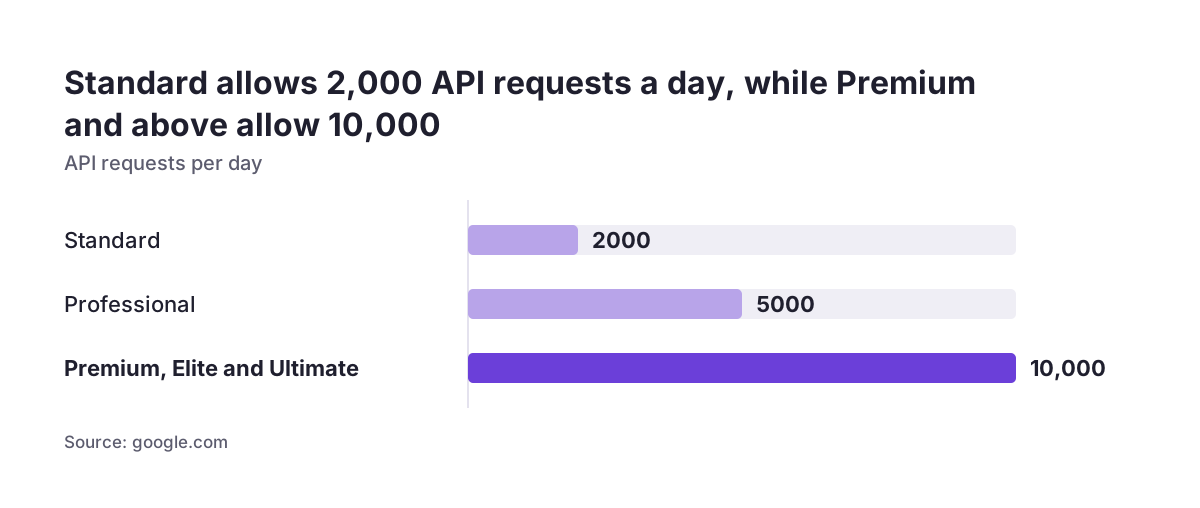
- API requests per day: 2,000 on Standard, 5,000 on Professional and 10,000 on Premium, Elite and Ultimate. Every integration that reads or writes Books data draws on this allowance.
- Outgoing Zapier actions: available from Premium, via webhooks. Incoming Zapier actions work in all plans.
- Receipt autoscans: 200 per month on Standard and Professional, 1,000 on Premium and above.
- Scheduled reports: 50 on Standard, 200 on Professional and above.
- Report exports: up to 100,000 records in one asynchronous export on Free to Premium, up to 1,000,000 on Elite and Ultimate.
- Revenue recognition: Premium offers only the Evenly Distributed Method, with monthly, yearly and once recognition.
Elite is the inventory and e-commerce tier. On the US page it adds connections to online sales channels such as Etsy, eBay and Amazon, and integration with up to 2 Shopify stores. Tech.co adds serial number tracking, shipping tracking and management of up to five warehouses. If you do not sell physical goods through those channels, Elite's price buys you little beyond higher volume limits.
Zoho Books add-ons that raise the bill: users, BillPay, WhatsApp and Analytics
Zoho Books add-ons are the second layer of cost, and the free plan supports none of them except document autoscans. On a paid plan, the add-ons below can change the monthly total noticeably. All prices come from Zoho's US page, per month, excluding local taxes.
- Extra users: $3 per user per month, or $2.50 billed annually, for each user beyond your plan's allowance.
- BillPay: vendor batch payments for $59 per month billed annually, or $69 billed monthly.
- WhatsApp credits: bought separately for the WhatsApp integration, so the integration itself does not cover message volume.
- Zoho Analytics integration add-on: bought separately from Zoho Analytics if you want to analyse Books data alongside other data sources.
BillPay is the add-on to examine first. At $59 a month on annual billing, it costs more than a Professional plan. It is worth paying for if your team pays many suppliers in batches. If you pay a handful of bills a month, it rarely is.
The Analytics add-on matters once finance wants one view across sales, service and accounting data. In that case, scope the reporting before you buy. Our Zoho Analytics implementation service describes how we approach that kind of reporting setup.
Extra users or a higher Zoho Books plan: a worked example
Buying extra users is usually cheaper than upgrading Zoho Books when the only thing you need is more seats. The arithmetic below uses Zoho's US prices on annual billing, per organisation per month.
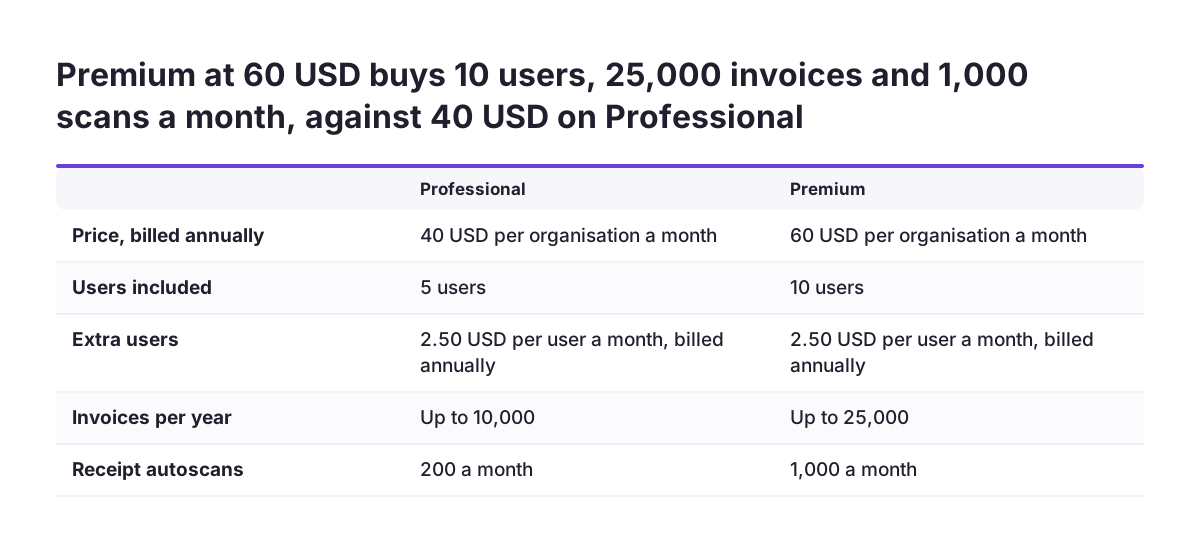
Take a team of seven people on Professional, which includes five users. Two extra users at $2.50 each bring the total to $45. Premium, at $60, includes ten users. That makes the upgrade $15 a month dearer for the same seven people. It pays off only if you need something Premium adds, such as outgoing Zapier webhooks, 1,000 autoscans a month or 10,000 API requests a day.
The same logic holds higher up. Twelve users on Premium cost $60 plus two extra users, so $65. Elite also includes ten users, so twelve users there cost $125. Ultimate includes fifteen users, but at $240 it makes sense only for its other capabilities. User count alone never justifies Elite or Ultimate.
When Svennis scopes a Books subscription, we count next year's bills, invoices and integrations before anyone looks at user numbers. A plan picked on seats alone tends to hit the bills rule or the API allowance soon after go-live. That check often settles the choice between Professional and Premium faster than any feature list.
Zoho Books prices for EU companies: regional pages, local taxes and currency
Zoho Books prices vary by region, so an EU company should price from the page Zoho shows for its own region, not from the US figures. The pages in this post show how much the regional versions differ. That applies to currency, tax treatment, thresholds and even features.
Tax treatment is the first difference. The US and Canadian pages state that prices exclude local taxes. The Australian page states that its prices include GST. Before you compare a quote with your budget, check whether VAT is in the figure or added on top.
Currency and price levels are the second difference. Standard costs $15 a month billed annually on the US page. It costs C$15 on the Canadian page and A$16.50 on the Australian page. Do not convert one region's price and assume it applies to you.
Features can differ too. The Saudi page lists Saudi e-invoicing Phase 2, VAT tracking and VAT returns from Standard upward. Those features exist because of local rules. Each EU member state also has its own VAT and invoicing obligations, so confirm that the edition offered in your region covers your country's requirements. If you trade in several EU countries, factor that check into the plan choice from the start.
Standalone Zoho Books or Zoho One: how to compare the cost
Zoho One costs less than standalone Zoho Books only when you would otherwise pay for several other Zoho apps separately. If Books is the only Zoho application you need, a standalone Books plan is almost always the simpler purchase. The Zoho Books pricing pages cited here do not list Zoho One prices, so you need a current Zoho One quote for your region to compare.
A fair comparison adds up everything you would buy separately. Start with your Books plan and its add-ons from the sections above. Then add the separate subscriptions for any other Zoho apps you plan to run, such as Zoho CRM or Zoho Desk. Zoho's Canadian page lists both as Books integrations.
Include the Zoho Analytics add-on if finance needs blended reporting. Set that total against the Zoho One quote for the same number of people.
Two practical points change the result. First, Books plans are priced per organisation, so a group with several organisations multiplies the standalone cost. Second, the apps you add later count as much as the ones you use today.
Our guide to Zoho licences and plans, Zoho One or single apps walks through that decision in more depth. If CRM is central, compare Zoho CRM Plus with Zoho One as well. Plan the Zoho CRM and Zoho Books integration before you buy either.
Next steps to price Zoho Books for your company
To price Zoho Books with confidence, work from your own volumes rather than the plan names. These steps take an afternoon with your current accounting data:
- Count last year's invoices, supplier bills and receipts, and estimate next year's growth.
- Rule out plans that fail on volume or features, starting with the bills rule on Standard.
- List every integration that will call the Books API, and check the daily request allowance.
- Price extra users on the cheapest qualifying plan before you consider an upgrade.
- Add only the add-ons you will use, with BillPay and Analytics checked first.
- Open the pricing page for your region and confirm the currency, VAT treatment and local features.
- If you need other Zoho apps, get a Zoho One quote and compare it with the full standalone total.
- Use the 14-day free trial to test your real invoice and bill workflow before you subscribe.
If the comparison points to a single app, our Zoho Books setup service covers configuration and go-live. If it points to the bundle, the Zoho One implementation page explains how we roll out several apps together.