Self-billing credit notes in Zoho Books: the short answer
Self-billing credit notes in Zoho Books are recorded as self-billed credit notes in the Vendor Credits module. You must first enable them in General settings. You use one whenever you need to reduce or cancel the amount payable on a self-billed invoice you issued for a supplier. You never use an ordinary vendor credit for that job.
A self-billed credit note is a document you create on behalf of a vendor to reduce or cancel the amount payable on an earlier self-billed invoice. Zoho's help page on self-billed credit notes says so directly. When the payable amount needs to be reduced, or the transaction is cancelled, "you must create a self-billed credit note instead of a vendor credit."
Your organisation may not show the self-billing modules. Zoho documents them for specific editions, so check yours first. If they are missing, issue your self-billed documents from bills instead. Give those bills their own numbering and wording, agreed with the supplier.
The rest of this guide covers both routes. It also covers the table of which document fits which situation, and the agreement you and your supplier should sign before the first document exists.
Self-billing means the customer writes the supplier's invoice
Self-billing is an arrangement in which you, the customer, raise the invoice that your supplier would normally send you. Zoho's help page on self billed invoices describes the case where "customers decide to raise a bill for themselves (self bill) on behalf of their vendors (suppliers)."
The practical difference is who sets the price. Under self-billing, the value of the purchase is determined by you rather than the supplier, after the goods or services have been delivered. That suits buyers who measure what they received, such as volumes collected or work completed, and then pay on that basis.
Zoho's help pages state three further features of self-billing:
- A self biller can raise self bill invoices for multiple suppliers.
- The supplier should not raise its own invoices for the same supplies.
- The supplier should notify the customer of any change in its VAT treatment, and the agreement must reflect that change.
Self-billing changes who writes the invoice, not who supplies the goods. That is why corrections need care. When the value turns out lower than the self-billed invoice stated, the correction should normally come from you, in the same self-billed form, as your agreement with the supplier sets out.
Checking your Zoho Books edition and enabling the self-billing modules
The self-billing modules in Zoho Books depend on the edition, so check your organisation before planning anything. Zoho's help document on self billed invoices states that it "is applicable only to Zoho Books - UAE, KSA and Bahrain editions." A guide from the e-invoicing vendor envoice describes the same modules in a Zoho Books organisation used for Malaysian e-invoicing.
That guide gives the settings path. Open Settings > Setup & Configurations > General. Under "Select the modules you would like to enable", tick the modules you need:
- Self Billed Invoice
- Self Billed Credit Note
- Self Billed Debit Note
Zoho's own self-billed credit notes page confirms the order of work: "Before creating self-billed credit notes, you must enable it in the settings."
Your organisation may not list these modules under General. In that case, Zoho Books gives you no dedicated self-billing document. The fallback is to record self-billed documents as ordinary bills, with their own numbering sequence and clear wording on each one. The section on numbering and template wording below explains how to keep them recognisable.
In either case, decide this before the first supplier signs. Changing routes halfway through a year leaves two kinds of record for the same arrangement.
Which Zoho Books document fits which correction
Zoho Books gives each correction its own document, and choosing the wrong one is the most common error. The deciding questions are who issued the original document, and whether the amount goes up or down. The table below maps each situation to the document Zoho's help pages name for it.
| Situation | Document in Zoho Books | Where you create it |
|---|---|---|
| You must reduce the amount payable on a self-billed invoice | Self-billed credit note | From the self-billed invoice, a bill, or the Vendor Credits module |
| The self-billed transaction is cancelled | Self-billed credit note | From the self-billed invoice or the Vendor Credits module |
| You must increase the amount payable on a self-billed invoice | Self-Billed Debit Note | Self-billing modules, once enabled |
| Your supplier issues its own credit against a normal bill | Vendor credit | Vendor Credits module |
| Your customer returns goods you sold, for example damaged ones | Credit note | Sales > Credit Notes |
A vendor credit, in Zoho's definition, is "a document you record when your vendor issues a credit against a bill." The supplier is the author. A self-billed credit note is authored by you on the supplier's behalf. Both sit in the same Vendor Credits module, but they describe different events. The sales credit note is separate again. A vendor issues it to a customer for the value of goods returned.
Gutschrift in Germany: one word, two documents to keep apart
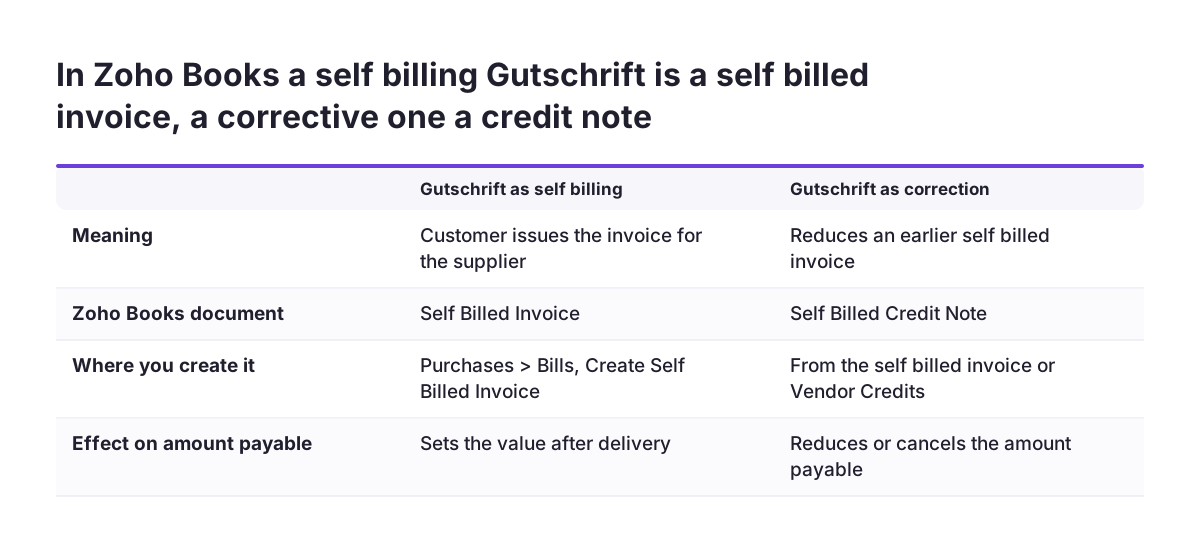
In German business usage, "Gutschrift" can mean two different things. It can mean a self-billing document, where the customer issues the invoice for the supplier. It can also mean a corrective credit note that reduces an earlier invoice. If your team, your supplier or your adviser uses the word, ask which one is meant before anyone records anything.
In Zoho Books the two meanings land in different places:
- A Gutschrift in the self-billing sense is the self-billed invoice itself. You create it from Purchases > Bills, or as a bill if your edition has no self-billing modules.
- A Gutschrift in the correction sense, applied to a self-billed invoice, is a self-billed credit note.
- A correction your supplier issues to you against its own invoice is a vendor credit.
Mixing the two meanings causes real damage. Book a self-billing document as a credit note and your payables run the wrong way: the supplier is owed money, yet the record shows a credit. Book a correction as a new self-billed invoice and you duplicate the purchase.
Use the word Gutschrift only on the self-billed invoice itself. There it is the German form of the mention Self-billing that EU VAT law requires. Never use it as the title of a correction. Settle the vocabulary in the written agreement with each supplier.
This guide does not set out German VAT rules. Confirm the exact titles with your adviser.
Worked example: a self-billed invoice and a later reduction
This worked example follows one self-billed purchase through Zoho Books, from invoice to correction. Imagine your company buys haulage from a carrier that has agreed in writing to self-billing. After each month you count the completed trips and bill yourself for them.
- Go to Purchases > Bills, click the drop-down next to New in the top right corner, and choose Create Self Billed Invoice. Enter the trips you counted. Under self-billing, you set this value after delivery.
- Record the payment. If you pay only part of it, enter that amount, and the status becomes Partially Paid. The self-billed invoice appears in the list with your other bills, where you can edit, print, clone or download it as a PDF.
- Suppose a trip later turns out to have been cancelled. Do not create a vendor credit. Open the self-billed invoice and create a self-billed credit note from it.
- Zoho Books creates the self-billed credit note in Closed status and applies the credit to the self-billed invoice automatically. The invoice status changes to Partially Paid or Paid, depending on the credit amount.
- Attach the evidence for the change, such as the cancellation message. You can upload up to 5 files of at most 10 MB each.
- Send the supplier the PDF. Zoho Books prints it with the title Self-Billed Credit Note.
If you count an extra trip instead, the payable amount goes up. Zoho's page says to create a Self-Billed Debit Note in that case. You can also start from Vendor Credits. Choose Save as Draft, or Save as Open to record an open credit you can apply later or refund.
Numbering and template wording for self-billed documents
Self-billed documents need wording and numbering that show, at a glance, that you issued them for the supplier. In the self-billing module, Zoho Books handles the title for you. Self-billed credit notes use the Vendor Credits PDF template. Zoho changes the document title on the printed PDF to Self-Billed Credit Note "to comply with self-billing regulations."
Zoho's help page does not describe a separate number series for self-billed credit notes. Agree with each supplier how documents will be numbered and referenced, and write that into the agreement. Each self-billed credit note should name the self-billed invoice it corrects. Creating it from that invoice keeps the link inside Zoho Books.
The fallback route needs more discipline. If your edition has no self-billing modules and you issue self-billed documents from bills, follow these rules:
- Use a reference sequence reserved for self-billed documents, never shared with bills your suppliers send you.
- Put the words Self-billing on every self-billed invoice, and state that the customer issued it on behalf of the supplier under a self-billing agreement.
- Keep corrections in their own sequence too, referring to the original document.
Check one printed test document before the first real one goes out. Your adviser can confirm that the wording meets the rules where you and the supplier are registered.
Finding self-billed credit notes and reporting on them
Zoho Books lists self-billed credit notes in the Vendor Credits module, beside ordinary vendor credits. An icon next to the document number marks the self-billed ones. That icon helps when you scroll. It does not help much when you need a complete list for a supplier statement or an audit.
Advanced search cannot filter for self-billed credit notes alone, according to Zoho's help page. Use the self-billed credit notes custom view instead. Make that view the starting point for anyone who reconciles supplier accounts.
Self-billed credit note data also flows into the standard payables reports:
- Vendor Balance Summary
- AP Aging Summary
- AP Aging Details
- Vendor Credit Details
When we set this up at Svennis, we add the custom view and run Vendor Credit Details against one test self-billed credit note before go-live. The mistake we most often find afterwards is a reduction booked as an ordinary vendor credit, which then sits outside the self-billed view. If you need reporting beyond these payables reports, such as self-billed volumes per supplier over time, Zoho Analytics reporting on your finance data can take the Zoho Books data further.
What the self-billing agreement should say before the first document
A written self-billing agreement between you and each supplier comes before any document in Zoho Books. Zoho's help page for its Gulf editions says the agreement covers the terms of supply and a time period, usually 12 months. It should be renewed when that period ends.
Most of the points below come from Zoho's description of self-billing. You can adapt them for your own agreements:
- The period the agreement covers, and who starts the renewal.
- How the supplier accepts each self-billed invoice, for example by approving it or raising an objection within a set number of days.
- Confirmation of the supplier's VAT status, and that it will not issue its own invoices for these supplies.
- The supplier's duty to tell you about any change in its VAT treatment, written into the agreement.
- How you determine the value after delivery, and what evidence you share.
- How corrections work: self-billed credit notes for reductions and cancellations, debit notes for increases.
- The numbering, references and document wording you will use.
The last two points are the ones agreements tend to leave out. They are also the ones that settle the Gutschrift confusion in advance. Store the signed agreement with the supplier record. Attach a copy to the first self-billed document, which accepts up to 5 files of 10 MB each.
What self-billing means for a company in the EU
For an EU company, self-billing in Zoho Books is a software question and a VAT question, and only the first is settled by Zoho's pages. VAT rules on self-billing are set at EU level and in national law. Member states can differ in the details, so this guide states them only in general terms. Take your country's specific conditions from your tax adviser, not from software help pages.
The general logic in Zoho's Gulf-edition help page is a useful starting point. There, the tax on a self-billed invoice is the supplier's output VAT and the self biller's input VAT. The same help page adds that the supplier accounts for VAT even if the self bill invoice is not raised or the bill is unpaid. Treat these as questions to put to your adviser, not as rules for your country.
E-invoicing adds another layer where it applies. The envoice guide shows how Malaysia's e-invoicing system files self-billed documents. A self-billed invoice, a self-billed credit note and a self-billed refund note each go in as a separate document type. If your country introduces or already runs e-invoicing, check how each self-billed document reaches the authority before you rely on a PDF alone. Cross-border suppliers deserve the same check, as the rules on both sides apply.
Next steps for setting up self-billing in Zoho Books
Setting up self-billing in Zoho Books goes fastest in a fixed order. The order below covers the agreement, the settings and the checks in the right sequence:
- Ask your tax adviser which conditions apply to self-billing in your country and for each cross-border supplier.
- Draft the written agreement, including corrections, numbering and document wording.
- Open Settings > Setup & Configurations > General and check whether the self-billing modules appear for your organisation.
- If they do, enable Self Billed Invoice, Self Billed Credit Note and Self Billed Debit Note. If they do not, set up the bill-based route with its own reference sequence and wording.
- Create one test self-billed invoice and one test self-billed credit note, print both, and check the titles.
- Save the self-billed credit notes custom view and show it to whoever reconciles supplier accounts.
If your purchases start in Zoho CRM, read how to set up the Zoho CRM and Zoho Books integration before you add self-billing on top. When you want help with editions, settings and payables reporting together, start with our Zoho Books setup service.