
Round robin lead assignment in Zoho CRM, in short
Round robin lead assignment rules in Zoho CRM share new leads in turn across a pool of sales reps. Each rep gets a fair share, and no manager has to hand leads out by hand. You build them as assignment rules on the Leads module and add criteria such as country or product. Then you cover the cases a pure rotation ignores: absences, shift hours and users who have left.
Two terms carry the rest of this guide. An assignment rule is, in Zoho's own definition, an automation feature that assigns records in every module automatically based on certain conditions. Round robin lead assignment is a sequential method. The first lead goes to the rep at the top of the list, that rep moves to the bottom, and the next lead goes to the new top.
Speed is the main reason to automate assignment. Zoho's help centre cites research that about 24% of U.S. companies take about 24 hours on average to make their first move toward a lead. A lead that sits unowned overnight is a lead nobody is calling.
A rotation on its own is fair only on paper. Zoho's own solutions page says that round robin distributes leads equitably but does not account for reps' availability throughout the day. The sections below show how to close that gap and the others that appear in live systems.
Assignment rule building blocks: criteria, pools and owners
Every assignment rule in Zoho CRM combines a module, criteria a record must match, and an owner the matching record goes to. Zoho describes the benefit as queue management capabilities: work lands in the right queue the moment it arrives. For leads, typical criteria are lead source, country or sales territory, product interest and lead priority.
Zoho Desk's documentation explains the two ways an owner can be chosen, and the same vocabulary helps in Zoho CRM:
- Direct Assignment routes a record to one specific person or team every time the conditions match.
- Round Robin Assignment routes records across a pool of people, aiming at a balanced workload.
Desk also splits round robin into variants. Load-based assignment sends work to the person with the fewest open items until a configured capacity is reached. Skill-based assignment picks the person whose skills best match the criteria. Sequential assignment follows a fixed order based on the alphabetical order of agent names. Desk's comparison notes that direct assignment supports neither capacity limits nor skill-based routing.
Zoho CRM adds a third option to the assignment rule: an owner suggested by Zia, Zoho's AI assistant. Zia looks at existing assignment patterns, reps' everyday activities, their online status and their workload before it suggests an owner. That makes Zia owner suggestion a practical case of AI in lead management. Only CRM administrators can open the Zia tab in assignment rules, so plan who configures it.
Which leads assignment rules reach, and which ones they miss
Assignment rules in Zoho CRM do not fire for every lead source, so check your sources before you trust the rotation. According to a post in Zoho's community, assignment rules work for imported leads and contacts and for leads captured through web forms. The same post reports that they do not work for leads captured from SalesIQ, Zoho Desk or Zoho Campaigns, such as newsletter subscribers. It adds that the rule works only if the data is inside the web form.
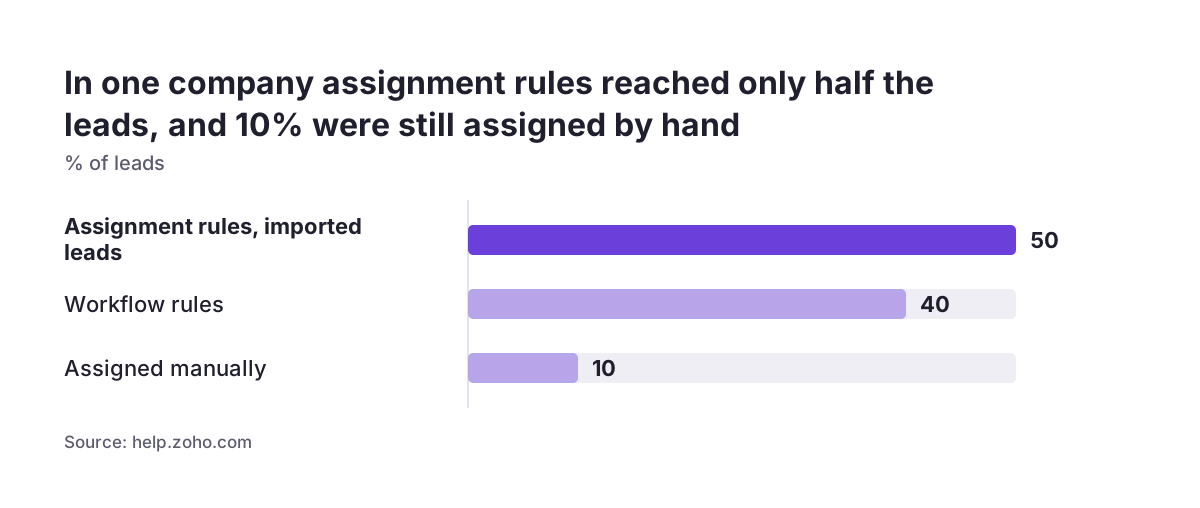
The poster's company shows what a mixed setup looks like in practice. Assignment rules cover 50% of its leads, the imported ones only. Workflow rules cover another 40%, and 10% are still assigned manually.
A second community poster reports that the native round robin applies only to record imports and not to existing records. That poster still assigns leads by hand after a contact interacts with an email campaign. Both posts are users' own observations, and Zoho changes its product often. Treat them as items to test in your account, not as settled facts.
Zoho's user education team has gathered its answers in a single article, announced in the FAQs on assignment rules post. It covers whether rules can trigger for records created by workflow rules, and the order of execution when several automations run. If you are moving leads in from another system, plan the import with your rules in mind; the guide to migrating to Zoho CRM without losing your sales history covers the import itself.
Four ways to share leads in Zoho CRM, compared
Zoho CRM gives you four practical ways to decide who owns a new lead, and most live systems combine two or three of them. The table compares each method by how it picks the owner, what it needs, and where it falls short.
| Method | How it picks the owner | What it needs | Main gap |
|---|---|---|---|
| Assignment rule, direct owner | The same user every time the criteria match | Criteria fields filled in when the lead is created | No balancing; one person takes every matching lead |
| Assignment rule, round robin pool | The next rep in turn from a pool | A pool of reps who are actually working | Ignores availability during the day |
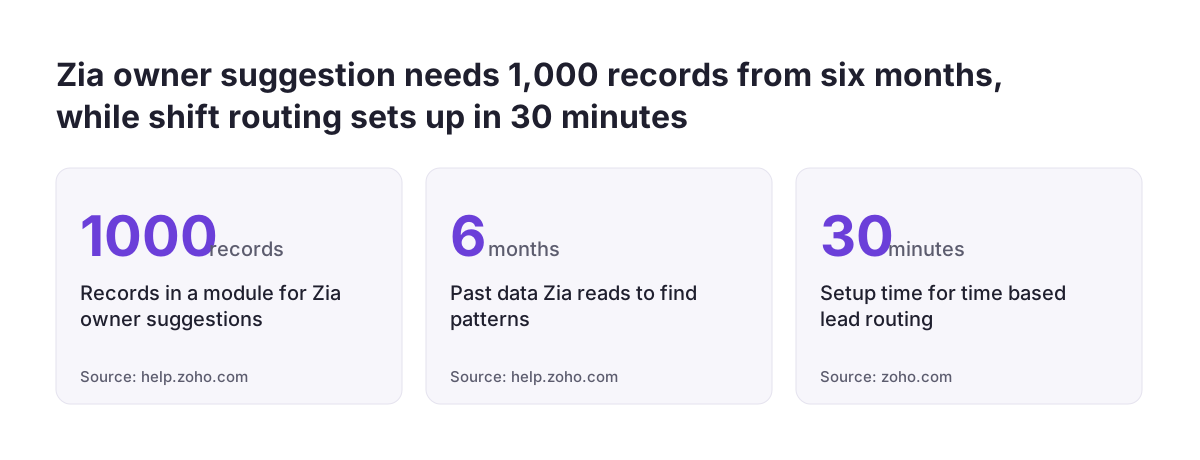
| Zia owner suggestion | The most probable owner who is still under the daily threshold | At least 1,000 records in the module over the past six months, more than one user, history assigned by criteria | Pattern data updates monthly and cannot be refreshed by hand |
| Workflow rule with a Deluge custom function | Your own logic, such as the hour the lead was created | Enterprise edition or above, the right permissions and a connection | Code and user IDs to maintain when the team changes |
For a small team with one lead source, a round robin pool plus a fallback owner is usually enough. Zia owner suggestion only becomes available once your Leads module has enough assigned history. A custom function earns its upkeep when shifts or time zones decide who should get the lead.
Worked example: country pools with round robin and a fallback owner
Take a company that sells two product lines across several EU countries, with five reps and one sales manager. Leads arrive through a web form that asks for Country and Product. The goal is to route each lead by country and product, share it fairly, and never leave it unowned. The rep names below are illustrative.
- Make the routing fields mandatory on the form. A rule cannot match a value that is missing, and the community report above says the rule works only when the data is inside the web form.
- Rule 1, German-speaking leads. Criteria: Country is Germany or Austria. Owner: a round robin pool of Anna and Jonas.
- Rule 2, service contracts. Criteria: Product is the service contract line. Owner: Marta directly, because she is the only specialist.
- Rule 3, everything else. No criteria beyond the module. Owner: a round robin pool of Elena and Tomas.
- Fallback. Name the sales manager as the default user, so a lead that cannot go to a pool member still has an owner.
Rule order matters. Zoho CRM processes rules by priority, so the narrow rules come first and the catch-all rule comes last. If the catch-all sat at the top, every lead would go to Elena and Tomas.
Before switching on, push a sample set of test leads through the form. Use one lead per country and product combination, plus one with an unexpected country. Check that each test lead lands with the owner you planned, then delete the test records.
Holidays and absences: availability checks, thresholds and the default user
A plain round robin rotation hands the next lead to the next rep whether or not that rep is at work. During holidays or sick leave, the absent rep's share simply waits. Zoho CRM gives you three ways to deal with absences.
The availability check and the default user
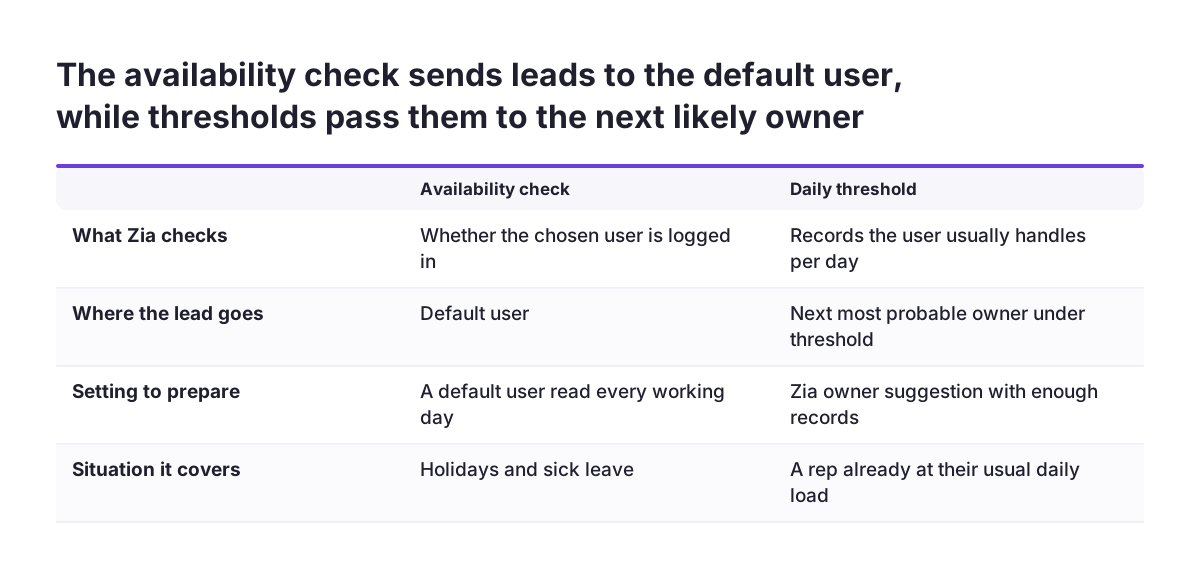
The Zia owner suggestion settings include an option to check user availability before assigning a record. When it is on and the chosen user is not logged in, the record goes to the default user. Choose a default user whose leads someone reads every working day, such as a team lead or a shared sales account.
Daily thresholds
Zia uses a user threshold, the number of records a user usually handles each day. If the most probable owner has reached that threshold, Zia picks the next most probable user instead. When you set individual limits under the threshold tab, Zia uses your limits rather than computing its own.
Taking a rep out of the pool
For planned leave, the simplest fix is to remove the rep from the pool before the leave starts and add them back on return. Put both changes in the team calendar, with a named person responsible for each.
Zoho Desk goes further than the CRM options described in the pack. Its round robin preferences can include or exclude offline agents, set limits per agent and per department, and assign backlogged items once agents become available. If your sales team needs that behaviour in Zoho CRM, expect to build it with a custom function.
Shift hours and time zones: time-based routing with a workflow and a function
Time-based lead routing assigns each lead to the rep who is working at the hour the lead is created. Zoho publishes a ready-made solution for assigning leads by creation time. It combines a workflow rule with a custom Deluge function, and Zoho puts the implementation time at 30 minutes. Its example code assigns leads to three sales reps who work different shifts.
The solution has firm prerequisites, and each one belongs on your checklist:
- Edition: Enterprise and above. The guide to Zoho CRM editions and pricing shows what that means for your licence.
- Permissions: Manage Extensibility to create connections and write custom functions, and Manage Automation to create and update workflow rules.
- Connection: a Zoho CRM connection with the ZohoCRM.modules.ALL scope, created under Setup > Developer Hub > Connections.
- User IDs: open Setup > Users, select each rep and copy the numeric ID from the URL.
Two details catch people out. The example calls the v8 API at zohoapis.com, and Zoho says the endpoint must match your account's data centre. Zoho's own example of a different endpoint is zohoapis.in for India. Zoho also notes that the same code works for other modules if you change the module name and parameters.
Users with the Manage Sandbox permission can test the function in a sandbox first. A sandbox test is the safest way to see what happens at the hour boundaries between shifts.
Inactive users, leavers and new hires: keeping the assignment pool current
Round robin pools go stale when the team changes but the rules do not. A rep who has left, moved to account management or gone on long leave can stay in a pool for weeks. Each lead routed to that person waits for a follow-up that never comes.
When Svennis reviews a live Zoho CRM, we filter open leads by owner and look first at users who have left or changed role, because that is where untouched leads usually sit. The fix is rarely technical. Someone simply needs to own the pool membership.
Make a rule review part of every team change. These events should trigger a review:
- a new hire who should start receiving leads;
- a leaver whose open leads need a new owner;
- a role change that moves a rep out of sales;
- a restructure that redraws territories or product lines.
Custom functions need the same care. A time-based function stores user IDs in its code. When a rep leaves, the ID stays in the function until someone edits it. Zia owner suggestion adapts more slowly than you might expect. It learns from the past six months of data and updates its pattern data only once a month, so a restructure takes time to show in its suggestions.
Testing and monitoring so nobody is left without leads
A lead assignment setup is only fair if you check the results, not just the rules. Zoho's Desk guidance gives two principles that apply equally to CRM: test rules with a sample set before enabling them, and avoid several round robin patterns for the same category. Overlapping rules make it hard to predict who receives a lead.
Use this checklist before go-live and during the first weeks after it:
- Send one test lead per criteria combination and confirm each owner.
- Send one test lead from every source, including SalesIQ, Zoho Desk and Zoho Campaigns, and confirm it gets an owner.
- Build a saved view of open leads owned by the default user and read it every working day.
- Compare leads received per rep each week, and look for anyone at zero.
- List leads owned by inactive users or users outside sales.
- Check that no lead matches two rules aimed at the same category.
If you use Zia owner suggestion, check its contributing fields too. Zia derives these automatically, and you cannot add new ones. You can, however, uncheck fields you do not want it to consider. If an administrator lacks permission for a contributing field, Zia shows that field's value as three asterisks. That is a sign to review field permissions before you trust the pattern.
What lead routing means for a company selling across EU countries
A company selling into several EU member states usually routes leads by country first, because language and local knowledge decide who can close the deal. A German-speaking lead sent to a rep who does not speak German is a slower lead, however fair the rotation. Country pools, as in the worked example, keep fairness within a language group.
Absence planning gets harder across borders. A team spread over several member states does not share one public holiday calendar or, in many cases, one time zone. A rotation that works on a normal Tuesday can quietly fail on a national holiday in one country. Put each country's holidays in the pool owner's calendar, or use time-based routing for the overlap hours.
Data residency affects the technical setup. Zoho runs separate data centres, including one in the EU. If your account is hosted there and you use a custom function that calls the API, change the endpoint to match your data centre, as Zoho's solution page instructs.
Clean country data matters as much as the rule itself. Routing on Country fails when the field is empty or misspelled. For Romanian B2B leads, a check of the company's tax code, such as ANAF CUI/CIF validation for Zoho CRM, gives you reliable company data to route on. Web shops feeding leads into the CRM face the same issue; see Zoho CRM for e-commerce.
Next steps for setting up lead assignment in your Zoho CRM
Start with a written routing map before you touch any settings. List every lead source, the criteria that decide the owner, the reps in each pool and the fallback owner. A one-page map makes the rule order obvious and shows which sources the rules may miss.
Then work through these steps in order:
- Make the routing fields mandatory on every web form that creates leads.
- Build the narrow rules first and a catch-all rule last, each with a round robin pool or a direct owner.
- Name a default user whose leads someone reads every working day.
- Test every criteria combination and every lead source with sample leads.
- Decide whether you need Zia thresholds or a time-based custom function, and check your edition first.
- Add a rule review to your process for hires, leavers and restructures.
Review the weekly lead counts per rep for the first month. If one rep is at zero or one owner is collecting everything, the rules need another look. If you would rather have the routing designed and tested with you, the Zoho CRM implementation page explains how Svennis sets up and configures Zoho CRM for European teams.
Sources
- Zoho CRM Online Help: Record Owner Suggestion in Assignment Rule
- Zoho Community: Assignment rule and Zoho modules
- Zoho Community: Lead Assignment Automation
- Zoho Community: FAQs on Assignment rules
- Zoho Community: Round Robin vs Direct Assignment in Zoho Desk
- Zoho CRM Solutions: Assign leads by creation time