Why the planning half decides a Zoho Creator project
Planning a custom app in Zoho Creator means answering several questions on paper before anyone opens the builder. You decide what the app must do, which data it holds, who uses it and where it connects to the rest of your Zoho setup. Zoho describes Creator as a low-code platform that enables rapid application development. That speed is exactly why the planning matters: forms are quick to build, and it is easy to find six months later that the structure underneath cannot carry the next requirement.
This guide covers the half of the project that decides the outcome. It defines the terms Creator uses and walks through a worked example with the real menu paths in Zoho One. It also gives you a checklist table, a section on what changes for a company operating in the EU, and a view on when Creator is the wrong tool.
Creator itself now leans into planning. Its product page describes three agents. A Plan Agent shapes an idea you describe into a business requirement document, a Build Agent adds modules and workflows, and a Test Agent generates and runs test cases.
Those agents can draft documents and structures, but they cannot decide for you which records belong together, who may see them or which system owns a customer. Those decisions stay with you, and the rest of this post is about making them well.
Start with what the app must do
Before you draw a single field, learn the four building blocks Zoho's Marketplace documentation uses. A form is where data is collected when a user enters it in fields. A report holds the data collected from forms and gives you a view of it. A workflow is a set of rules triggered by a specific event, which then performs an action automatically. Deluge is Creator's scripting language, with drag-and-drop code snippets for logic the visual builder cannot express on its own.
With those terms in hand, write a short purpose statement of three to five sentences. Name the process the app supports, who starts it, what event ends it and what result the business needs at the end. Then list the events that should trigger something automatically, such as a record being submitted or a status changing.
Mark every requirement as either needed at launch or wanted later. The wanted-later list matters as much as the launch list, because the data model has to leave room for it even if nothing is built yet.
Zoho's Marketplace guide to building a custom application lists three starting routes. You can build from scratch with Creator's components, customise an existing application template, or import a file from local storage, a URL or a cloud service. If your process lives in a spreadsheet today, treat an import as a starting point to check against your plan, not as the plan itself.
Map the data model and its relationships
A data model is the list of things your app keeps records about, the fields each one has and how they relate to each other. Typical examples are customers, contracts, visits, assets and approvals. In Creator, each form collects one kind of record, so your data model is effectively the list of forms and the links between them.
For each relationship, write down its direction and its count. For example, one customer has many contracts, and one contract has many visits. Decide which form points to which. Also decide which records are owned by another Zoho app and only referenced in Creator, a question the integration section below returns to.
Two details from Zoho's Creator best practices page belong in this step. The page covers Creator version 6 and notes that feature availability depends on your pricing plan.
- Indexing fields is a back-end process that you have to ask Zoho Creator support to enable. If you expect to search or filter large volumes by a particular field, list it now.
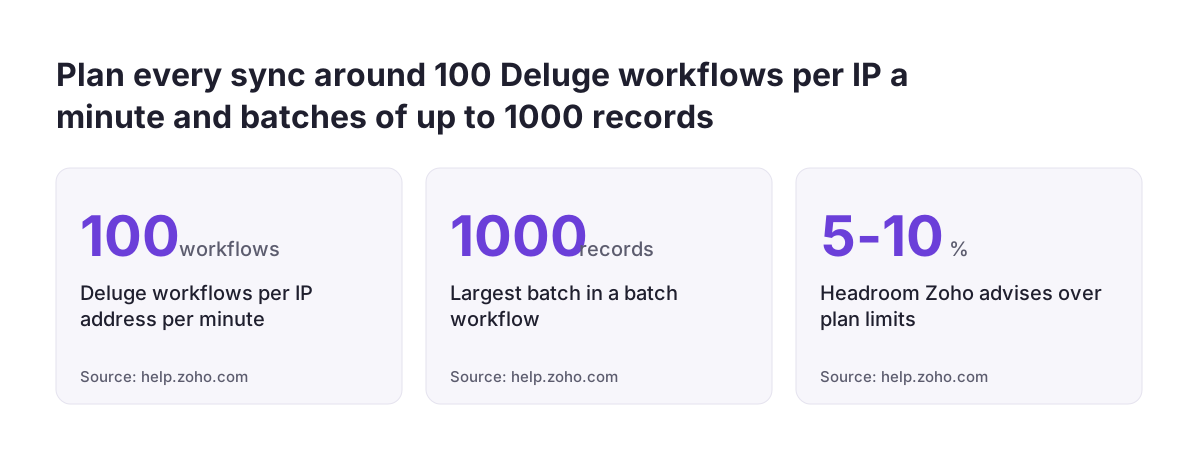
- Batch workflows can process records in batches of up to 1000. Bulk updates, such as annual contract renewals, should be designed around that from the start.
At Svennis we ask clients to sketch every form and its links to other records on one page before anyone opens the builder. The rebuilds we see at clients usually trace back to a relationship that was stored as plain text instead of a link between records.
Design the forms and reports people will actually use
Once the data model is settled, turn to the screens. The useful question is what each person needs to enter and what each person needs to see on a normal working day. Asking which fields exist leads to screens nobody reads.
Creator lets you build multiple reports from a single form, so you rarely need a second form just to show the same data differently. A technician can see today's jobs, a manager can see overdue jobs and finance can see jobs ready to invoice, all drawn from one form. Creator also has pages, which show data collected from forms together on a single page. They suit a daily overview better than several separate reports do.
Keep pages light. Zoho's best practices page warns that adding more than 10 to 15 components to a page may increase the cognitive load for users. If a role needs more than that, split the page by task.
Decide early which screens will be used on phones. Zoho's developer overview lists Creator as supporting web, Android, iOS and PWA. A form filled in on a phone in a customer's basement needs fewer fields and bigger choices than one filled in at a desk. For each role, write one line naming the form they fill in, the report they open first and the device they use.
Decide who builds, who uses and who may see what
Split the people involved into three groups: those who build and maintain the app, the staff who use it, and anyone outside the company who might need access. Each group has a different effect on cost, security and maintenance.
For builders, Zoho One lets an admin assign developers to a custom app through Assign Users and then the Developer role. Name at least two people, so that changes do not depend on one person's availability.
For users, count heads carefully. Zoho states that Creator uses per-user pricing with monthly and annual plans. The number of internal users therefore drives the running cost, and your user count belongs in the plan before anyone asks for a quote.
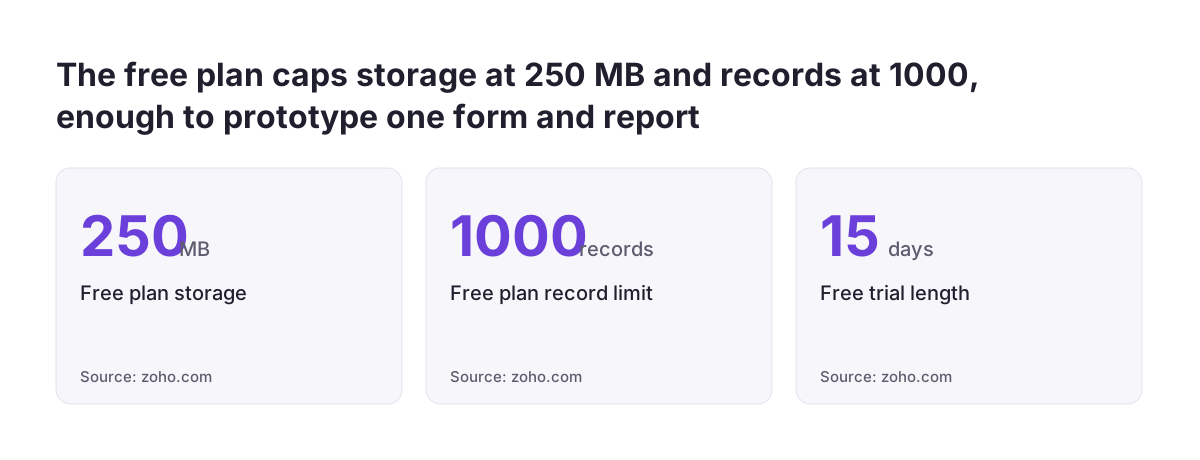
The free plan is limited to one user, one application, 250MB of storage and 1,000 records. It suits a prototype, not a team rollout. Zoho also offers a 15-day free trial and a Flex plan for requirements that do not fit the standard plans.
Zoho's best practices page recommends keeping at least 5 to 10 percent more plan limits than you need, so the app can absorb spikes in user activity. Size your plan against peak weeks, not average ones.
For visibility, write a simple matrix listing each role against each form, and mark whether that role may create, view, edit or delete records. At the same time, flag every field that holds personal data. Zoho advises that fields collecting or containing PII and ePHI should be encrypted.
Settle where Creator meets Zoho CRM, Books and other apps
The most expensive planning gap is an unclear owner for shared data. For every kind of record in your data model, name the system of record, meaning the one app where that record is created and corrected. Customers usually belong in Zoho CRM and invoices in Zoho Books. Creator should hold the process-specific data that neither of those apps was designed for.
Then decide how the data moves. Zoho says Creator has over 1,000 prebuilt connectors. In a community discussion on r/Zoho, one commenter suggested that Creator's API is a good start for basic data syncing. The same commenter suggested Zoho Flow or Deluge scripting inside Creator for logic-heavy workflows between systems. Write down, for each flow, the trigger, the direction and what should happen when the other system is unavailable.
Check the volumes against Zoho's published throttles. Only 100 Deluge workflows can run per IP address per minute. The Deluge Zia task allows up to 7 simultaneous in-flight requests per user and 10 per organisation when it uses Zoho GenAI.
If you plan AI features, note the model choice. Zoho GenAI is Zoho's in-house LLM, available at no additional cost, and Zoho says your data stays within its ecosystem when you use it. Creator also accepts your own key from OpenAI, Google or Anthropic, and lets users pull data from any AI assistant via MCP. Treat each of these as another integration to plan, the same way you would plan any AI automation. Where cross-app reporting is the goal, consider whether Zoho Analytics should carry it instead of Creator reports.
A worked example: a service-visit app in Zoho One
Take a company already on Zoho One that wants to track service visits for customers held in Zoho CRM and bill them in Zoho Books. On paper, the plan looks like this.
- Forms: Service Contract, Service Visit and Technician. One contract has many visits, and each visit has one technician.
- Owned elsewhere: the customer, which lives in Zoho CRM and is only referenced, and the invoice, which is created in Zoho Books.
- Reports: "Today's visits" for each technician on mobile, "Overdue visits" for the manager and "Visits to invoice" for finance, all from the Service Visit form.
- Access: technicians edit their own visits, managers view all visits, and finance views completed visits only.
- Encrypted fields: any personal contact details stored on a visit.
Only then does the build start. The Zoho One admin guide notes that the steps differ between the three user interface versions Zoho One supports.
- In the Unified UI, go to Directory, then Applications, then Add Application, and under Custom App click Build.
- In the One Experience UI, click the Admin Panel icon, then App Management, then Create App from Scratch. In the Spaces UI, start from the Directory Settings icon in the top-right corner.
- If Creator has not been added yet, click Add Zoho Creator and finish that step first.
- Once the app is built, go to the Creator dashboard and open My Applications. Hover over the app, click More and then Add to Zoho One.
- Assign the named developers through Assign Users and the Developer role.
The planning checklist in one table
Use this table as the agenda for a planning session. Each row should have a written answer before the build starts. A blank row is a decision that will be made later, under time pressure, by whoever happens to be building.
| Question | What to write down | Why it matters later |
|---|---|---|
| What must the app do? | A purpose statement, the trigger events and a launch list versus a later list | Stops scope drifting into a second, unplanned app |
| What records does it hold? | Forms, fields and relationships, with direction and count | Relationships are the hardest thing to change once data exists |
| Which fields are searched at volume? | A list of candidate fields for indexing | Indexing is enabled through Zoho Creator support, not by you |
| What does each role see daily? | One form, one first report and one device per role | Keeps pages under the 10 to 15 component guidance |
| Who may do what? | A matrix of create, view, edit and delete for each role and form | Access rules are cheaper to design than to retrofit |
| Which fields hold personal data? | A list of personal data fields and which of them to encrypt | Security measures that fit the risk under the GDPR, and Zoho's own encryption advice |
| Who owns shared records? | A system of record for each entity, plus the sync direction | Prevents duplicate customers across CRM, Books and Creator |
| How many users, at peak? | Internal users, developers and headroom of 5 to 10 percent | Per-user pricing and plan limits follow from this |
When Zoho Creator is the wrong tool
Planning sometimes shows that Creator is not the answer, and it is better to find that out on paper. There are three common cases.
The requirement needs pro-code
Zoho's developer overview compares Creator with Catalyst, which it describes as a full-stack platform to build, test, host, deploy and optimise solutions. Catalyst requires pro-code skills. Its frontend uses Java, JavaScript, HTML and CSS and TypeScript, and its backend uses Java and Node.js with a relational database, file storage and cache.
Creator is no-code or low-code. It uses visual builders and templates, and you can extend it with JavaScript widgets and with Deluge, Java and Node.js scripting. Zoho's own Catalyst examples include a data scraper with alerts, a real-time autodialer and a bot for X. If your plan reads like those, Catalyst is the better fit.
A ready-made app already covers it
Zoho offers prebuilt Creator applications, including function-specific apps that solve problems common to any industry. On the free plan or trial you can install any one of them. Before you build a sales tracker from scratch, also check whether a standard product such as Zoho Bigin already does the job.
The process is not stable yet
If the purpose statement keeps changing, the data model will keep changing too. Settle the process first, then build.
What this means for a company in the EU
GDPR applies across the EU, and the data model is where you find out which personal data your app will hold. The personal data fields you flagged, encrypted or not, tell you which categories of personal data belong in your record of processing. Every external flow in your integration plan sends personal data to another recipient, and you should be able to explain it to a customer or a regulator. Where a flow sends data outside the EEA, for example to an external AI provider, note the safeguard it relies on.
On the vendor side, Zoho states that Creator is independently audited against SOC 2, HIPAA and HDS and describes it as GDPR compliant, and that Zoho is ISO 27001, 27017 and 27018 certified. None of that makes your app compliant: as the controller, you stay responsible for how it handles personal data.
Zoho also says Creator can run on Zoho Cloud, AWS, Azure, GCP, on-premise or hybrid. Your governance requirements should decide the hosting choice before you build. Record that decision alongside your wider data security review.
For companies working across several member states, language matters. Zoho lists Creator with support for more than 60 languages, including French, Spanish and Portuguese. Plan field labels and report names with translation in mind, so staff in each country read the same app in their own language instead of using a copy.
Do not assume that a rule from one member state applies in the others. Retention periods, invoicing requirements and employment records can differ by country. Where your app touches any of them, write down each country's requirement separately and confirm it with a local adviser before you design the fields.
Practical next steps
You can do most of the planning in a week with the people who run the process. Work through the steps in this order.
- Write the purpose statement in three to five sentences, with a launch list and a later list.
- Draw the data model on one page: forms, relationships and the fields to index or encrypt.
- Fill in the role matrix and the one-line screen plan for each role, including the device.
- Name a system of record for each shared entity and describe every sync: trigger, direction and failure handling.
- Count users at peak, add 5 to 10 percent headroom, and compare the result with the per-user plans and the Flex option.
- Prototype one form and one report on the free plan or the 15-day trial, and let a real user try it before you commit to the full build.
Keep the finished checklist table with the app, because it doubles as documentation for whoever maintains it later. If you want to see how Creator fits alongside the rest of your Zoho applications before you commit, the Zoho Creator overview on this site covers the scope of a typical build.