Why European Businesses Can't Just Pick Any CRM
If you Google "best CRM for small business," you'll get a hundred listicles written for the American market. They'll recommend tools based on US pricing tiers, US integrations, and US-centric workflows. And for a European business, about half of that advice is wrong.
European businesses operate in a fundamentally different environment:
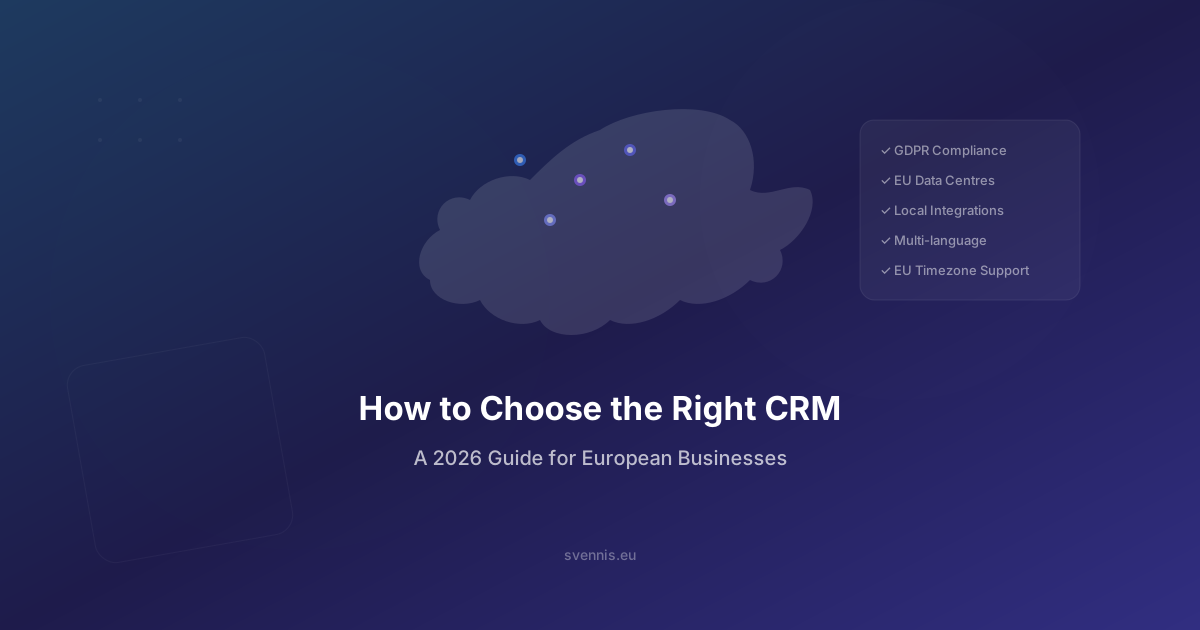
- GDPR isn't optional - it's the law. Your CRM must handle data subject access requests, consent management, and right to erasure natively.
- Multi-currency is the default - a German company selling to Switzerland, the UK, and Scandinavia deals with EUR, CHF, GBP, NOK, SEK, and DKK on a daily basis.
- Local business tools matter - your CRM needs to connect to DATEV (Germany), SmartBill (Romania), bexio (Switzerland), or Visma (Nordics) - not just QuickBooks and Stripe.
- Language and localization go deeper than UI translation - email templates, quote layouts, and knowledge base articles need to work in 2-5 languages simultaneously.
At Svennis Cloud Solutions, we've implemented CRM systems for European businesses across 15+ countries since 2011. This guide distils what we've learned from 200+ projects into a practical framework for evaluating your options.
GDPR Compliance: The Non-Negotiable Starting Point
Before you evaluate features, pricing, or integrations, ask one question: Where will my customer data physically reside? If the answer isn't "in the EU," you need to dig deeper.
What Your CRM Must Support for GDPR
- EU data centres: Your customer data must be stored in the EU. Some CRM vendors offer this only on higher-priced tiers or as an add-on. Zoho CRM stores data in EU data centres (Amsterdam, Dublin) on all plans.
- Data Processing Agreement (DPA): Your CRM vendor must provide a GDPR-compliant DPA. Check whether it's included automatically or requires a separate request.
- Right to erasure (Article 17): When a customer requests deletion of their data, your CRM must be able to find and permanently delete all their records - including associated emails, notes, and activity logs. This should be a one-click operation, not a manual hunt through multiple modules.
- Consent tracking: Your CRM must record when and how consent was given for marketing communications, data processing, and profiling. This isn't a "nice to have" - it's a legal requirement.
- Data portability (Article 20): Customers can request a copy of their data in a machine-readable format. Your CRM must support data export at the individual record level.
- Audit trails: You need to prove who accessed or modified customer data and when. Built-in audit logs are essential.
How Major CRMs Compare on GDPR
- Zoho CRM: GDPR features built into all plans. EU data centres included. DPA available automatically. Privacy settings allow granular control over consent, data retention, and erasure.
- Salesforce: GDPR-compliant but features are spread across different tiers and add-ons. EU data residency requires Hyperforce configuration. Shield (for encryption and audit) is an additional paid product.
- HubSpot: GDPR tools available on all plans, but EU data hosting became available only recently and requires specific configuration.
Our recommendation: Don't just ask "Is this CRM GDPR-compliant?" Ask for a specific data processing addendum, confirm the physical location of data centres, and test the right to erasure workflow yourself during your trial. A surprising number of "GDPR-compliant" CRMs make erasure a manual, error-prone process.
Multi-Currency and Tax: The Hidden Complexity
If your business only operates in a single Eurozone country, currency might not be a concern. But the moment you sell to the UK, Switzerland, Scandinavia, or Central Europe, your CRM needs to handle multiple currencies - and the tax implications that come with them.
What to Look For
- Automatic exchange rate updates: Your CRM should pull live exchange rates (from the ECB or equivalent) rather than requiring manual entry. At Svennis, we built a custom integration that syncs ECB exchange rates directly into Zoho CRM for our clients - this is one of our published Marketplace extensions.
- Multi-currency deals and invoices: A deal should be recordable in GBP while your reporting currency is EUR. The CRM must handle the conversion both at the deal level and in aggregate pipeline reports.
- VAT and reverse charge handling: Intra-EU B2B sales typically use the reverse charge mechanism. Your CRM (or its integration with your invoicing system) must support different VAT rates per country, reverse charge marking, and proper tax reporting.
- Currency-specific price books: If you sell a product at €100 in Germany and CHF 95 in Switzerland, your CRM's price book system must support currency-specific pricing - not just a converted equivalent.
Real-World Example
When we implemented Zoho CRM for clients selling across EU markets, one of the most impactful features was multi-currency pipeline reporting. Before the CRM, their sales manager was manually converting GBP, CHF, and NOK amounts in a spreadsheet to get a consolidated pipeline view in EUR. This took 2-3 hours per week and was frequently inaccurate. With Zoho CRM, the dashboard updates in real time with automatic ECB rate conversion.
Tax Integration Matters
The CRM itself doesn't need to be a tax engine - but it must connect seamlessly to one. Key integrations to verify:
- Germany: DATEV export compatibility (the dominant accounting standard)
- Romania: ANAF (national tax authority) e-invoice integration - we've built this as a custom connector for multiple clients
- Switzerland: bexio or Abacus connectivity
- Nordics: Visma, Fortnox, or e-conomic integration
- UK: Making Tax Digital (MTD) compliance through Xero or Sage connectivity
Local Tool Integration: Your CRM Must Connect to What You Already Use
This is where US-centric CRM reviews miss the mark entirely. They'll tell you a CRM integrates with "2,000+ tools" - but what they mean is 2,000 tools popular in the US. If your business runs on European software, the integration picture looks very different.
The European Tech Stack Reality
Across our 200+ implementations, here are the integrations European businesses most commonly need:
- ERP/Accounting: SAP Business One, DATEV, Sage, bexio, SmartBill, Exact Online, Visma
- E-commerce: PrestaShop, Shopify, WooCommerce, Magento
- Email/Communication: Microsoft 365 (dominant in EU enterprise), Google Workspace
- Payment: Mollie, Adyen, GoCardless (more common than Stripe in many EU markets)
- Document management: DocuSign, HelloSign, or EU-specific e-signature tools
- Marketing: Mailchimp, ActiveCampaign, or CRM-native tools
Native vs. Custom Integration
Check whether a CRM offers your required integrations natively (built-in or official marketplace), through iPaaS middleware (Zoho Flow, Zapier, Make), or whether you need custom API development.
- Native: Best reliability, lowest maintenance. Zoho's marketplace has 2,500+ extensions, including many European tools.
- iPaaS/Middleware: Good for simple data sync. Zoho Flow is included free with Zoho CRM and connects 900+ apps. Zapier and Make work but add monthly costs.
- Custom API: Required for complex, bidirectional integrations. This is where having the right implementation partner makes a massive difference.
Svennis Integration Track Record
Custom integrations are our core differentiator. We've built and deployed:
- SAP Business One ↔ Zoho CRM for Salus Controls - syncing customers, orders, inventory, and invoices bidirectionally
- PrestaShop ↔ Zoho CRM for Tehnodent - automating order-to-CRM flow with real-time sync
- ANAF (Romanian tax API) ↔ Zoho - automated e-invoice submission and validation
- BNR & ECB exchange rates ↔ Zoho - automatic daily currency updates
- SmartBill ↔ Zoho CRM - invoicing automation with fiscal compliance
All five of our published Zoho Marketplace extensions are rated 5/5. This isn't theoretical capability - it's proven, production-grade integration work.
Language and Localization: More Than Just UI Translation
If your team operates in multiple countries, "the CRM supports multiple languages" isn't enough. You need to dig into exactly what's localized and what isn't.
Key Localization Checkpoints
- CRM interface language: Can each user set their own language? Zoho CRM supports 28 languages, allowing your German sales rep to work in German while your Swedish colleague works in Swedish - in the same CRM instance.
- Email templates: Can you create email templates in multiple languages and automatically select the right one based on the contact's language preference? This is critical for automated follow-ups and marketing sequences.
- Quote and invoice layouts: When you send a quote to a French client, it should be in French. When you send one to a German client, in German. Your CRM must support multiple document layouts with language-specific headers, terms, and formatting.
- Knowledge base: If you use Zoho Desk or a similar support tool, your knowledge base should support multi-language articles with language-based routing.
- Custom fields and picklists: Can dropdown options (like industry, lead source, or deal stage) be translated? Or will your Italian rep see English stage names?
- Date and number formatting: 03/04/2026 means March 4th in the US and April 3rd in Europe. Your CRM must respect locale-specific formatting for dates, currencies, and number separators (comma vs. period).
Real-World Localization Challenge
A common scenario we encounter: a company headquartered in the Netherlands with sales teams in Germany, France, and the UK. The CRM needs to:
- Display in Dutch, German, French, and English simultaneously
- Send automated emails in the recipient's preferred language
- Generate invoices in the correct language with country-specific tax formatting
- Show reports in the manager's language regardless of the data's source language
Zoho CRM handles all of these scenarios. Salesforce does too, but the configuration is significantly more complex and often requires developer involvement. HubSpot's multi-language support has improved but still has gaps in quote/invoice localization.
Total Cost Comparison: Zoho vs Salesforce vs HubSpot for a 20-Person EU Team
Comparing CRM pricing is notoriously difficult because vendors structure their tiers differently and hide costs in add-ons. Here's an honest comparison for a 20-person European sales team that needs a full-featured CRM.
Annual License Cost (Enterprise Tier)
- Zoho CRM Enterprise: €40/user/month = €800/month = €9,600/year
- Salesforce Enterprise: €165/user/month = €3,300/month = €39,600/year
- HubSpot Sales Hub Enterprise: €150/user/month = €3,000/month = €36,000/year
Hidden Costs You Must Factor In
- Salesforce extras: CPQ (€75/user/month), Pardot/Marketing Cloud (€1,250+/month), Sandbox for testing (Enterprise tier only), Shield for encryption/audit ($$). Realistic "all-in" for 20 users: €55,000-70,000/year.
- HubSpot extras: The "free CRM" gets expensive fast. Marketing Hub Professional (€800/month), custom reporting (Enterprise only), calculated properties (Enterprise only). Realistic "all-in": €48,000-60,000/year.
- Zoho extras: Most features included in Enterprise. Zoho One (all 50+ apps) is €45/user/month. Realistic "all-in" with Zoho One: €10,800/year. Even adding Zoho Analytics Premium: €14,000-16,000/year.
Implementation Cost
- Zoho CRM: Typical implementation with a partner like Svennis: €5,000-15,000 (depending on customization complexity). Timeline: 2-8 weeks.
- Salesforce: Typical implementation: €20,000-80,000. Timeline: 2-6 months. Requires certified Salesforce developers.
- HubSpot: Typical implementation: €8,000-25,000. Timeline: 3-10 weeks. HubSpot requires paid onboarding for Enterprise.
3-Year Total Cost of Ownership
- Zoho CRM + implementation: €38,800-57,800
- HubSpot + implementation: €152,000-205,000
- Salesforce + implementation: €185,000-290,000
The difference is stark. Over three years, Zoho CRM can save a 20-person team €100,000-230,000 compared to Salesforce - money that can be invested in custom integrations, training, and business growth instead of software licenses.
Why Your Implementation Partner Matters More Than the Software
Here's something most CRM comparison articles won't tell you: the implementation partner you choose has more impact on your CRM success than the software platform itself.
A perfectly configured Zoho CRM that matches your sales process will outperform a poorly implemented Salesforce every single time. And vice versa. The tool is only as good as how it's set up.
What to Look For in an Implementation Partner
- Partner tier: Zoho has four tiers - Authorized, Partner, Advanced, and Premium. Premium is the highest, awarded to partners with proven expertise and client satisfaction. Only a few partners in all of Europe hold Premium status. Svennis is one of them.
- European experience: A partner based in India or the US may be cheaper, but they won't understand GDPR nuances, European tax systems, or the integration landscape of EU business tools. They won't work in your timezone, and they won't have experience with your local software stack.
- Custom development capability: Can they build the integrations you need? Not just connect Zapier, but build real, bidirectional API integrations with your ERP, invoicing, and e-commerce systems? Svennis has 5 published Marketplace extensions - all rated 5/5 - proving this capability.
- Track record with similar businesses: Ask for case studies. Not generic logos, but specific stories. We can tell you exactly how we digitalised 47 World Class fitness clubs, integrated SAP for Salus Controls, connected PrestaShop for Tehnodent, and automated customer support for UPEX.
- Ongoing support: Implementation isn't the end - it's the beginning. Your CRM needs to evolve as your business grows. Look for a partner who offers ongoing support, training, and optimization - not just a one-time setup.
Ready to Choose the Right CRM?
Choosing a CRM is one of the most impactful technology decisions your European business will make. The platform you select will shape your customer relationships, sales processes, and operational efficiency for years.
At Svennis Cloud Solutions, we offer a free strategy call where we:
- Assess your current processes and technology stack
- Map your specific European requirements (GDPR, multi-currency, local integrations)
- Provide an honest recommendation - including whether Zoho is the right fit or not
- Outline a realistic implementation timeline and budget
With 14+ years of experience, 200+ implementations, and Zoho Premium Partner status, we've helped businesses across 15+ European countries make this decision with confidence.
Book your free strategy call here - 30 minutes that could save you years of CRM frustration.
Apply the same discipline to AI, which every vendor in this comparison is now selling as standard. We wrote down what it actually does for an ordinary business, and what it does not, at Svennis AI.