An AI chatbot for customer service pays off inside your existing help desk
An AI chatbot for customer service earns its keep when it works inside the channels and help desk your team already uses. It must also send each request to the right place the first time. A standalone bot on top of your tools can answer questions. A connected one resolves them, or hands them to the right person with the context attached.
An AI chatbot for customer service is a conversational tool, usually powered by AI, that talks with customers to resolve support requests. In Tidio's definition, it answers questions, looks up orders and fixes common issues without a human agent. That definition leaves out the hard part, which is what happens when the bot cannot finish the job.
The wider subject of AI for customer support also covers reply drafting, summaries and knowledge work. This post stays on one decision: where the bot lives and how it routes. It covers the following points in order:
- why connected bots resolve more requests
- what first-time-right routing means
- a working example in Microsoft Teams in front of Zoho Desk
- handover rules, model choice, pricing, Zoho options and measurement
Connected chatbots resolve more requests than standalone ones
Chatbots connected to your business systems resolve a larger share of requests than bots that follow a script. Tidio puts rule-based bots at around 30 to 45% resolution. By the same source, the average AI chatbot handles 68% of conversations from start to finish without a human.
The bigger jump comes from access to data and actions. Tidio reports that agentic platforms connected to order, billing and CRM systems routinely reach 70 to 85% resolution. An agentic platform here means a bot that can act in other systems, not just reply. Kenyt.AI describes the mechanism: APIs connect the chatbot to CRM, ERP or e-commerce platforms, so answers can use purchase histories and account details.
A standalone bot is still a legitimate choice. Tidio notes that, as of 2026, Intercom's Fin can run standalone on top of a help desk you already own. The bot's usefulness then depends on how much of your data and workflow it can reach. Omind's guide recommends integration with your CRM or ticketing system through open APIs, so you avoid data silos.
If your support data sits in Zoho, the options for connecting Zoho CRM to other systems set the ceiling for what any customer service bot can look up or change.
First-time-right routing: what it is and why it decides the outcome
First-time-right routing is the share of requests that reach the correct team, queue or person on the first attempt, with no reassignment. It matters because every misrouted ticket waits twice. It waits once in the wrong queue and again in the right one. Customers experience that as slowness, even when each agent replied quickly.
A chatbot inside your help desk has a structural advantage for routing. Kenyt.AI notes that chatbots can gather information from customers and redirect inquiries to suitable representatives. Doing that well requires your categories, teams and assignment rules. Those live in the help desk, not in a separate bot product.
Speed does not compensate for a misroute. A chatbot platform's guide on measuring customer service satisfaction puts it plainly: "A faster response that does not solve the problem is not an improvement." An instant reply that lands the customer in the wrong queue only moves the delay further down the line.
For this reason, routing accuracy is a better first target for a customer service chatbot than the share of conversations it closes alone. Correct routing improves every request, including the ones the bot never could have answered. Deflection only improves the requests the bot can finish by itself.
A Claude service desk in Microsoft Teams in front of Zoho Desk
Svennis built an IT service desk for Asset Services Group (Message Direct) that runs on Claude inside Microsoft Teams and fronts Zoho Desk. Their Head of Technology is quoted on the record in the published case study on the Teams IT assistant, reporting 99.7% first-time-right routing and a 40% efficiency gain.
Three design features of that service desk carry over to customer service:
- The channel is Microsoft Teams, where staff already work, so there is no new portal to adopt.
- Zoho Desk remains the system of record behind the assistant, so tickets stay where agents track them.
- The headline measure is routing accuracy, not how many conversations the assistant closed alone.
The example is an internal IT desk, not a public website bot. The principle still transfers to customer-facing service. Put the assistant in the channel your customers already use, and keep your help desk as the place where work is assigned and tracked. Some consultancies sell the bot as a separate layer with its own inbox. That splits your service history across two tools.
The general pattern is often described as an AI service desk assistant. It sits in front of the help desk, collects the details an agent needs, classifies the request and creates or assigns the ticket. Whether it then answers routine questions itself is a second decision, taken once routing works.
The handover to a person decides customer satisfaction
The handover path decides the outcome more than answer quality does, according to the chatbot satisfaction guide. Satisfaction drops when people are trapped in a loop with no way to reach a person. A bot that routes well makes the handover short and lands it with the right agent.
Klarna shows the same lesson at large scale. eesel AI reports that Klarna's assistant handled 2.3 million conversations in its first month, two-thirds of its customer service chats. Klarna's February 2024 release said issues were resolved in under two minutes, down from 11. Klarna nevertheless moved away from a pure AI-first model, so that customers can "always speak to a real person".
A good handover carries the context with it. Omind's guide says the agent must access the chatbot's conversation history to understand the customer's concern. When the bot writes into the same help desk the agent uses, the transcript can sit on the ticket. With a bolt-on bot, check how the transcript reaches the agent before you buy.
Design the handover first and the bot's answers second. A customer service chatbot with average answers and a clean route to a person will outperform one with excellent answers and no exit.
Requests a customer service chatbot should always pass to a person
Judgement calls, complaints and anything involving money or account access belong with a person, says the chatbot satisfaction guide. A customer service chatbot should recognise these requests and route them straight away instead of attempting an answer. That rule is easier to enforce when the bot uses the same categories as your help desk.
Omind makes the broader point. AI chatbots suit routine inquiries and simple issues, while human agents are vital for complex scenarios and situations that need empathy. The same guide lists the routine work: answering FAQs, troubleshooting common problems and completing simple transactions such as password resets or appointment scheduling.
A practical split for most service teams has three groups:
- Bot resolves: FAQs, order and status lookups, password resets, appointment changes.
- Bot routes with context: complaints, payment questions, account access, anything that needs judgement.
- Bot states the wait: requests outside business hours that nobody can pick up yet.
Write these groups down as rules before you configure anything. They become the routing logic, the test cases and the measure of whether the bot behaves.
Choosing the model: Claude Haiku 5.5 for routing, larger models for harder answers
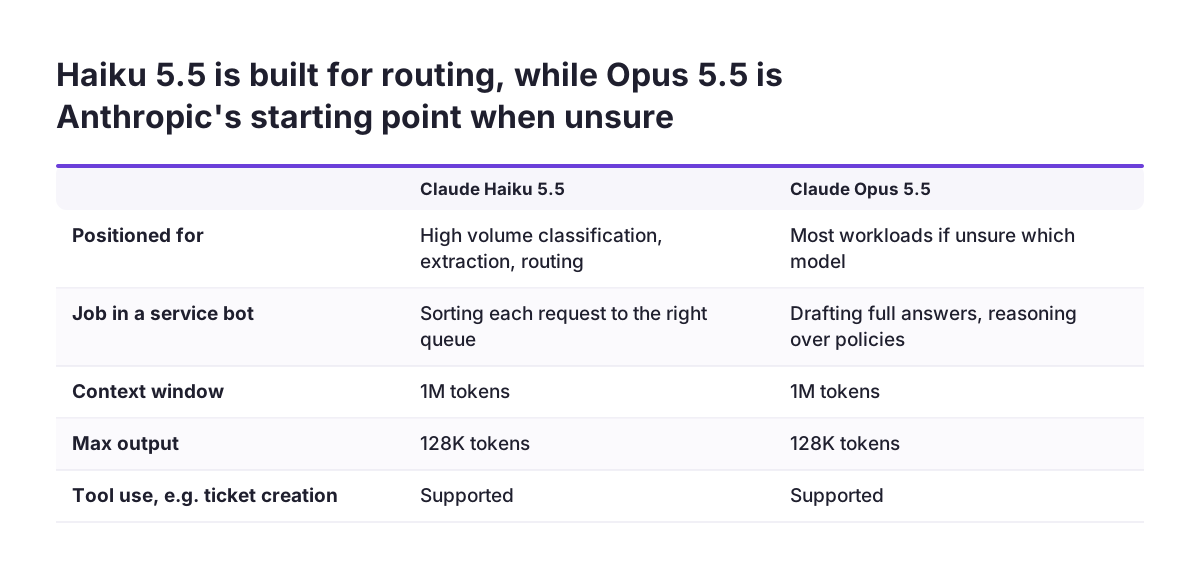
Routing is a classification task, so it rarely needs the largest model. Anthropic's models overview positions Claude Haiku 5.5 for high-volume, latency-sensitive tasks such as classification, extraction and routing. Its price starts from $0.10 per million input tokens and $0.50 per million output tokens.
Drafting full answers or reasoning over long policies is a different job. Anthropic suggests starting with Claude Opus 5.5 for most workloads if you are unsure, at $4 input and $20 output per million tokens. Claude Sonnet 5.5 sits between, at $2 and $10. All current models support multilingual input, vision and tool use. Tool use means the model can call functions you define, such as a ticket lookup.
Anthropic's documentation adds an operational warning. Your organisation's settings can still make a request fail even when the model supports a tool. An administrator can, for example, disable web search. Test the assistant under the same account settings it will run with in production.
If you already use Zoho, the choice is not only between Claude models. The comparison of Zia and Claude inside Zoho covers when the built-in AI is enough. When the assistant needs live records, the guide to connecting an AI assistant to Zoho through MCP explains a safe setup.
What customer service AI costs: per resolution, per agent or per token
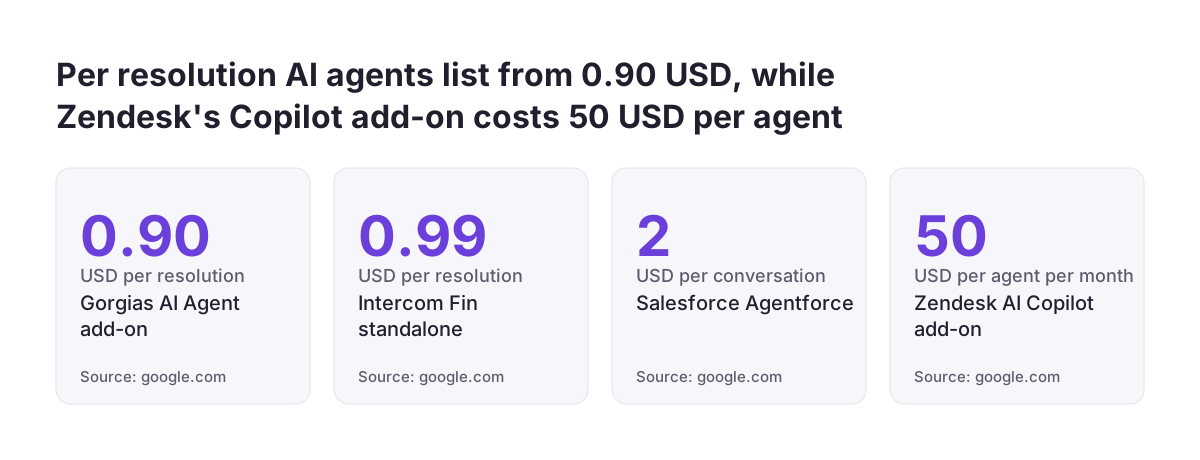
Customer service AI is priced in three ways, and the pricing unit shapes your incentives. The listed prices below come from Botpress's 2026 roundup and Anthropic's models overview.
| Product | Pricing unit | Listed price (USD) |
|---|---|---|
| Intercom Fin (standalone) | Per resolution | $0.99, 50-resolution minimum |
| Gorgias AI Agent add-on | Per resolution | $0.90 |
| Salesforce Agentforce | Per conversation | $2 |
| Zendesk AI Copilot add-on | Per agent per month | $50 |
| Claude Haiku 5.5 (raw model) | Per million tokens | From $0.10 input, $0.50 output |
Per-resolution pricing ties cost to outcomes. It also makes the definition of "resolved" a commercial question, so read it closely. Per-agent pricing ignores volume entirely. Token pricing is only the raw model cost, and the integration work is a separate budget line. Botpress notes that Agentforce implementation often requires paid consultants at $2,000 to $6,000 or more per agent.
Compare options on one figure: the fully loaded cost per correctly resolved interaction, as the chatbot satisfaction guide defines it. For reference, Tidio cites Lorikeet (2026) for routine cost per resolution falling from $8 to $12 with a human to $1 to $3 with AI.
Zoho Desk and Zoho SalesIQ options to check before a custom assistant
If your service already runs on Zoho, check the built-in AI options before you build anything. Tidio lists Zoho Desk with a free plan for 3 agents, Express from $7 per user per month, Standard at $14 and Professional at $23. The full Zia AI set sits on the Enterprise tier at $40. Tidio also counts 360+ integrations for Zoho Desk, including the full Zoho ecosystem.
For website chat, Zendesk's buyer's guide describes Zoho SalesIQ chatbots working in up to 30 languages, with automatic language detection. Its Answer Bot can connect with Zia or OpenAI for answers outside your knowledge base. The catch, per the same guide, is that both AI and hybrid chatbots are only in the Enterprise plan. A hybrid chatbot combines rule-based or menu-based flows with AI responses.
A custom assistant earns its place in two situations:
- Your customers or staff work in a channel your built-in chat does not reach.
- Your routing rules depend on data or logic the built-in tools cannot read.
For AI on the agent side of Zoho Desk, the guide to setting up Zia reply drafts in Zoho Desk covers getting useful drafts from the built-in AI.
Measuring a customer service chatbot: routing, resolution and satisfaction separately
Measure the bot and the handover separately, or you will not know which part is failing. The chatbot satisfaction guide warns that a single mixed score hides whether the bot or the handover is the weak part. It recommends asking for satisfaction after resolved conversations, not after every message.
The following measures cover a customer service chatbot without double counting:
- First-time-right routing: the share of requests that reach the correct queue with no reassignment.
- First contact resolution: issues resolved without repeat contact or hidden escalation.
- Response time: median first response by channel and request category.
- Cost: fully loaded cost per correctly resolved interaction.
- Satisfaction: reported separately for bot-only sessions and sessions with a handover.
The last four definitions come from the same satisfaction guide. Kenyt.AI suggests also watching average response time, cost to serve and customer retention across all channels. Take a baseline from your help desk before launch. Without it, no one can say whether the bot improved anything.
Telling customers they are talking to a bot, and when a person will reply
In the EU, the AI Act expects disclosure for systems that interact with people, as the chatbot satisfaction guide notes. Make it clear at the start of each conversation that the customer is talking to an AI assistant. Confirm the exact obligations for your use with your legal advisers.
Honest timing matters as much as the label. The same guide advises that, if nobody is available, you name the actual response time instead of showing an open chat window nobody is watching. A bot that routes a late-evening request correctly and says when the team will pick it up is more useful than one that pretends to be live. After-hours coverage, defined in the guide as correctly answered inquiries outside business hours, is worth tracking on its own.
Language is part of being clear with customers across Europe. Tidio cites that over 76% of customers prefer to shop in their own language. Current Claude models are multilingual, and Zoho SalesIQ detects up to 30 languages. Decide which languages the bot answers in, and which ones go straight to a person who speaks them.
Next steps: pilot routing on one channel before adding answers
Start with routing on a single channel, prove it, then let the bot answer routine requests. The steps below keep the pilot small and measurable:
- Pull a recent sample of tickets and note where each one should have gone and where it actually went.
- Pick the channel your customers or staff already use most, and plan the assistant there.
- Write the handover rules: money, complaints, account access and judgement calls go to a person.
- Connect the assistant to your help desk so tickets, categories and transcripts stay in one place.
- Measure first-time-right routing against your current reassignment rate before adding any automated answers.
- Add answers for FAQs and simple transactions once routing holds, and report bot-only satisfaction separately.
If your Zoho setup is not yet ready for an assistant, the seven decisions for an AI-ready Zoho implementation cover the data and structure to fix first. Clean categories and clear queue ownership help any chatbot more than a larger model does.
Sources
- Anthropic: Models overview
- Tidio: Customer service chatbot that automates support
- Zendesk: 13 best customer service chatbots in 2026, a buyer's guide
- Botpress: The 11 Best AI Agents for Customer Support in 2026
- Kenyt.AI: AI Chatbot for Customer Service, Benefits and Use Cases
- AI Chatbots: Measure Customer Service Satisfaction
- Omind: AI Chatbots for Customer Service Operations
- eesel AI: The 7 best customer service chatbot examples for 2026