
Contract signing from Zoho CRM with Zoho Sign: the short answer
Contract signing from Zoho CRM with Zoho Sign runs through the free Zoho Sign extension for Zoho CRM. You install the extension and build a Zoho Sign template with merge fields. You then send the contract from the deal and track each request inside the CRM. Teams that need automatic sending or custom modules add a custom function on top.
The Zoho Sign extension for Zoho CRM is a free add-on from Zoho Corporation. Its Marketplace listing says it gets "business documents and attachments digitally signed directly from your CRM modules". The Zoho Sign for Zoho CRM listing on the Zoho Marketplace shows more than 51,000 installs. It also shows a first publication date of 7 July 2016 and the price as free.
A merge field is a placeholder in a template that Zoho fills with data from the CRM record when you send. Examples are the customer's name or the deal amount. Getting merge fields right is where most setups go wrong. Getting the deal stage to follow the signature is the second weak point.
This guide covers the following:
- the three ways to send a contract from a deal
- how to install the extension and build templates
- a worked example from deal to signed contract
- the automatic route with a tag and a custom function
- status tracking and the stage update
- where Zoho Contracts fits
- what an EU company should check before it relies on the setup
Three ways to send a contract for signature from Zoho CRM
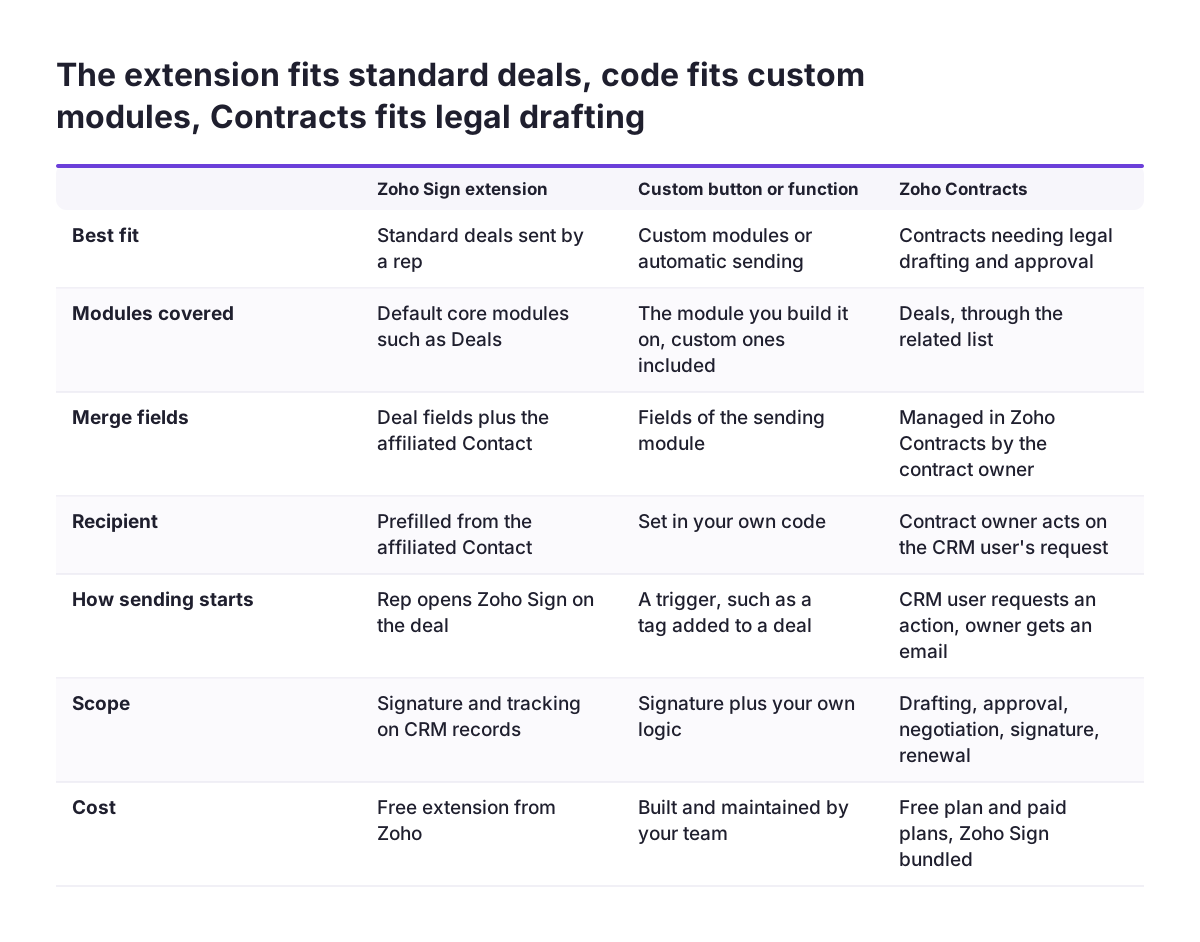
You can send a contract for signature from Zoho CRM in three ways. You can use the Zoho Sign extension, a custom function you build yourself, or Zoho Contracts with its own CRM integration. Each route differs in how sending starts, how the request is tracked and how much your team has to build. Choose the route before anyone builds templates.
The extension is the standard route: a person sends the document directly from the CRM record. A custom function suits teams that want sending without a click. In the Zoho Community thread on sending for signature via CRM, a user triggered the request when a tag was added to a deal. Zoho Contracts adds drafting and lifecycle management, but community users report limits in its CRM integration.
| Route | How sending starts | Tracking in CRM | Known limits | Choose it when |
|---|---|---|---|---|
| Zoho Sign extension | A person sends from the CRM record | Requests appear in the ZohoSign Documents module | Works within what the extension offers | You sell through standard deals and a person presses send |
| Custom function | A trigger you define, such as a deal tag | Only if your code creates the ZohoSign Documents record | Your team builds and maintains the code | You need sending without a click or your own logic |
| Zoho Contracts | From an opportunity, according to a community report | Through the Contracts integration | Counterpart details may need manual entry | Contracts need drafting, negotiation or renewals |
Most companies start with the extension. They move to a custom function only when a specific limit blocks them.
Installing the Zoho Sign extension and connecting it to Zoho CRM
To install the Zoho Sign extension, an administrator adds it to Zoho CRM from the Zoho Marketplace. The extension is listed in the E-Signature category. Its deployment type is the Zoho platform, so it runs inside your Zoho account and needs no separate server.
The Marketplace listing names Zoho Corporation as the developer and states that the app is published in accordance with the Marketplace review process. Because the extension is free, you can install it in a sandbox or test account first. That lets you build and test templates before reps see the send option in production.
You also need a connection if you plan to send documents from a custom function. A connection is a stored, authorised link between Zoho CRM and another service that your code can call. In the Zoho Community thread Send for Signature via CRM, the user had installed the extension and added Zoho Sign under Developer Space, Connections. Those two steps came before any code worked.
Three points are worth settling at installation:
- which users get to send documents
- which modules show the Zoho Sign options
- whether a connection is needed now or later
If you are still choosing a CRM edition, check what your plan includes in our guide to Zoho CRM editions, users and add-ons.
Zoho Sign templates and merge fields: where empty fields come from
A Zoho Sign template is a reusable document with signature fields and merge fields already placed. When a rep sends from a deal, Zoho fills those merge fields from the CRM. A good template means the rep never edits the contract text by hand.
Empty merge fields are the most common fault, and they usually come from a related record. A deal holds its own fields, such as amount and closing date. The customer's name, address and VAT number often sit on the Contact or Account instead. Check how each merge field reaches the template before you trust it.
Custom code raises the same risk, because the code must read related records itself. In the Send for Signature thread, the function failed on the line that mapped the account ID.
When Svennis sets this up for clients, we test every template against a real test deal before any rep sees the send option. The fields that come through empty are almost always the ones pulled from a related Contact or Account rather than the deal itself.
Rules that keep templates reliable
- One template per contract type, named so a rep can pick it without opening it.
- Every merge field mapped to a field that is mandatory at the deal stage where sending happens.
- A test deal with no Account and no Contact, to see what breaks.
Quotes need extra care. A Zoho tip linked from the Community thread notes something important about quotes sent automatically by email. They arrive "as an inline email content and not as a PDF attachment". If the customer must sign the quote, send the quote document through Zoho Sign rather than a plain email automation.
Sending a contract from a deal in Zoho CRM: a worked example
A worked example shows the extension route from start to finish. Take a sales rep with a deal called "Annual service agreement". The deal is linked to an Account and a primary Contact. The company has one Zoho Sign template for service agreements, with merge fields for the customer name, the deal amount and the start date.
- Check the deal. The rep confirms that the amount and start date are filled in and that a Contact is linked. That Contact becomes the recipient.
- Open the Zoho Sign option on the deal. The rep chooses the service agreement template and confirms the linked Contact as the recipient.
- Review the merged document. The rep checks that no field is blank, then sends.
- Track the request in CRM. The request appears in the ZohoSign Documents module, linked to the deal. The rep no longer has to search a mailbox for it.
- Act on the signature. When the customer signs, a workflow you configure moves the deal stage and notifies the owner. The tracking section below explains how.
In this example, the rep never leaves the deal, never uploads a file and never retypes customer data. The only manual decision is the choice of template. You can reduce that choice too, by limiting which templates each sales team sees.
Automatic contract sending with a deal tag and a custom function
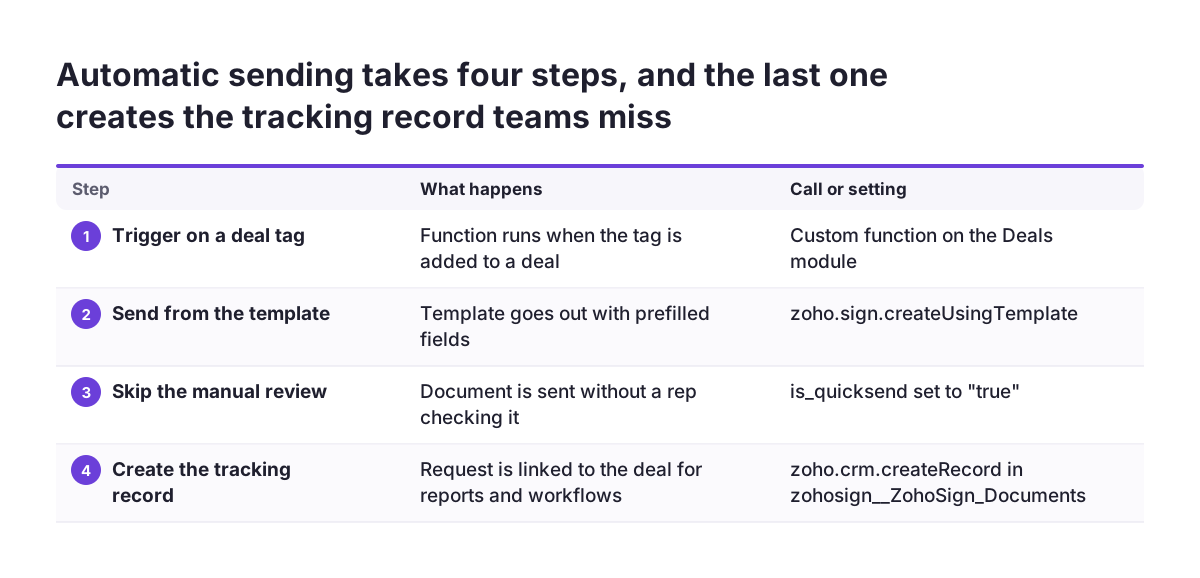
Automatic sending replaces the rep's click with a trigger, such as a tag added to a deal. The Community thread Send for Signature via CRM shows this pattern. The user wanted to trigger a Zoho Sign signature request custom function "when a specific tag is added to a deal".
The user's script follows three steps:
- It sends a template with prefilled fields through
zoho.sign.createUsingTemplate. - It sets the parameter
is_quicksendto"true", so the document goes out without a manual review. - It creates a record in the
zohosign__ZohoSign_Documentsmodule withzoho.crm.createRecord.
The third step is the one teams miss. When you send through your own code, the CRM does not get its tracking record unless the code creates it. Without that record, the deal shows no contract and any workflow that waits for a signature never fires.
The thread also shows a typical failure. The function stopped on line 57 with an "undefined variable" error. The failing line was recordmap.put("zohosign__Account",accountid);, because the account ID had not been defined at that point. Read the account from the deal first.
Then test the function on a deal without an Account. Decide what should happen in that case before the trigger goes live.
Use quick send only when the template needs no human check. For contracts with negotiated terms, keep a person in the loop.
Tracking signature status and moving the deal stage on signing
Signature tracking in Zoho CRM centres on the ZohoSign Documents module. Each request has a record there, linked to the deal it came from. That record is what reports, views and workflows read, so it must exist for every document, however it was sent.
To move the deal stage when the contract is signed, add a workflow rule on the ZohoSign Documents module. Trigger it when the document record shows the contract as signed. Then update the linked deal's stage, for example to Closed Won, and notify the deal owner. Check the exact field and value the extension writes in your own account before you build the rule. Then test it with a real signature on a test deal.
Status updates teams usually miss
- Declined or expired requests. Give these their own rule, so the deal returns to negotiation instead of sitting still.
- Documents sent by custom functions. These are tracked only if the code creates the ZohoSign Documents record.
- Several documents on one deal. Decide which document closes the deal, or the first signed annex will move the stage.
- Manual stage changes. Stop reps from setting Closed Won by hand while a contract is still unsigned, or your pipeline reports will drift.
A simple view of deals with an open signature request, sorted by sending date, gives sales managers a daily chase list.
When Zoho Contracts belongs in the flow, and its limits with Zoho CRM
Zoho Contracts is contract lifecycle management (CLM) software: it manages a contract from drafting through negotiation, signature and renewal. It belongs in the flow when your contracts need more than a signature on a fixed template. Zoho has announced an update to Zoho Contracts with enhancements to its Zoho CRM integration, regional settings and reports.
Community users report clear limits in the CRM integration. One user wrote that, after three hours with tech support, the Contracts and Sign integration turned out to be limited to opportunities. According to that user, you cannot start a contract from Accounts, Vendors or Contacts. Counterpart details for a new vendor or contact had to be entered manually in Contracts, even when the contact already existed in CRM.
The same user noted that Contracts settings let you choose the contract scope and map fields from Accounts and Contacts to Contracts. Another forum topic reports that account contacts sync with the CRM Contacts module, while vendor contacts do not. These reports may predate the latest update, so test the current behaviour in your own account.
Decide early which tool owns your contracts. In the Zoho Community thread Migrating Sign documents to Contracts, a user asked how to move documents already signed in Zoho Sign into Contracts if no connector exists. Starting in the right tool avoids that migration question later.
What contract signing from Zoho CRM means for a company in the EU
For an EU company, the first question is which type of electronic signature each contract needs. Requirements differ by contract type and by member state. Confirm with your legal adviser which of your contracts need more than a standard electronic signature before you build templates for them.
Signed contracts also hold personal data, so GDPR applies to where they are stored and who can open them. With the extension, the signed document and its tracking record sit in Zoho CRM as well as Zoho Sign. Apply the same role and field permissions to the ZohoSign Documents module that you apply to deals. Add the module to the records you check when you answer a data subject request.
Zoho Contracts adds a further place where personal data can live. A community report says vendor contacts in Zoho Contracts are not synced with the CRM Contacts module, while account contacts are. If you use Contracts, include it in your records of processing and in every data subject request.
For a company trading in several countries, plan one template per language and legal entity rather than one template with conditional text. Our page on Zoho Sign e-signatures, GDPR and security covers the product from an EU perspective.
Next steps: a checklist before you switch on contract signing
Before you switch on contract signing from Zoho CRM, work through the setup in this order. Each step depends on the one before it. Skipping ahead is how deals end up with blank merge fields or stages that never move.
- Pick the route. Use the extension for standard deals, a custom function for automatic sending or your own logic, and Zoho Contracts when drafting and negotiation matter.
- Install and connect. Add the extension from the Zoho Marketplace and create the Zoho Sign connection if code will send documents.
- Build one template per contract type. Map every merge field to a field that is mandatory at the sending stage.
- Test with awkward deals. Include a deal with no Account, a deal with two documents and a declined request.
- Build the workflow rules. Cover signed, declined and expired, and lock manual Closed Won while a request is open.
- Check permissions and legal requirements. Restrict the ZohoSign Documents module and confirm which contracts need a stronger signature type.
If your deal pipeline itself is not yet stable, fix that first. Signature automation built on loose stages only moves the mess faster. To plan the CRM side together with signing, see how we approach a Zoho CRM implementation in Europe.