Choose accounting software for small business by how it connects to your other systems
The right accounting software for small business is the package that connects cleanly to the CRM, invoicing and inventory tools you already run. Its plan limits and price also have to fit your size. Most products cover the core bookkeeping well enough. The connections between systems decide how much retyping your team does every month.
Accounting software for small business is software that records your financial transactions for tax and accounting purposes and produces financial statements and cash flow insights. That is how Nav's small business accounting software guide defines it. The definition covers the ledger only. It says nothing about where your customers, quotes and stock levels live.
Manual work is still common. According to research cited by Act!, almost one-third of small businesses manage their expenses with manual processes such as pen and paper or Microsoft Excel. A Sage report from May 2025, quoted by money.co.uk, puts the time lost to financial admin at 24 days. Software only wins that time back if data flows into it without being typed twice.
This post sets out what to check, compares the plan limits of four common products, and uses Zoho Books as a worked example of choosing for fit. It also covers when Zoho Books is the wrong choice.
Core features every small business accounting package should cover
Every accounting package you shortlist should handle a basic set of tasks without add-ons. These are the minimum. They rarely separate one product from another.
The baseline features to confirm are:
- Bank feeds that pull transactions from your business accounts automatically.
- Bank reconciliation, which means matching your records against bank statements to catch errors.
- Invoicing with your own branding and automated payment reminders.
- Expense tracking and financial reports you can adjust to your business.
- Tax calculation based on the rules that apply to you.
- Access for your accountant or bookkeeper.
Most small business accounting software today is cloud-based, according to Nav. A cloud accounting program has nothing to install, and you reach your accounts from anywhere. Many products also calculate taxes automatically based on current laws, as Zoftware's guide to free accounting software notes.
Software does not replace bookkeeping knowledge, however. Tipalti reports that 64% of business owners do their own bookkeeping. About 70% of small businesses have no external accountant or bookkeeper to close the books. Tipalti adds that you still need a general understanding of principles such as double-entry accounting to get accurate reports.
Double-entry accounting records every transaction with a matching debit and credit. Wazen warns that accounting mistakes can cost a business money or lead to legal issues, especially around tax compliance.
Integration with CRM, invoicing and inventory decides your daily workload
The connections between your accounting software and your other systems determine how often your team re-enters the same data. A quote agreed in the CRM becomes an invoice. Stock that leaves the warehouse changes your cost of sales. A payment received should close the loop for the salesperson who won the deal.
Many accounting platforms can integrate with CRM systems, payment gateways and inventory management systems, according to Zoftware. The word "can" hides a lot of variation. Some products offer a native connection maintained by the vendor. Others rely on third-party apps or a connector you build and maintain yourself.
Three questions separate a useful integration from a brochure tick:
- Which records move: customers only, or also products, quotes, invoices and payments?
- Which direction they move: one way, or both ways with a clear owner for each field?
- Who fixes it when it breaks: the vendor, a marketplace developer or your own team?
If you are still choosing a CRM as well, our guide on how to choose a small business CRM you will not outgrow covers that side of the decision. Choosing the two together usually beats choosing them years apart.
Map your current systems before you compare accounting products
A one-page map of your current systems is the most useful document in an accounting software decision. List every tool that touches money: CRM, quoting, online shop, payment provider, stock list, payroll and the spreadsheets that sit between them. Then mark which tool is the master record for customers, products and invoices.
The map turns a vague feature comparison into concrete tests. If your CRM is the master for customers, the accounting product must accept customers from it rather than create its own. If your stock lives in a separate tool, the accounting product must receive cost and quantity changes from it. Products that cannot do this for your specific tools drop off the list early.
At Svennis we agree which system owns customers, items and invoices before we connect any accounting software to a CRM. When clients skip that step, we see the same customer created twice, once in each system, and the reconciliation work moves to the month-end close.
The map also shows where spreadsheets are holding the business together. If several rows on your map say "spreadsheet", our checklist of signs your business has outgrown spreadsheets helps you decide what to replace first.
Prices and plan limits of four common accounting products
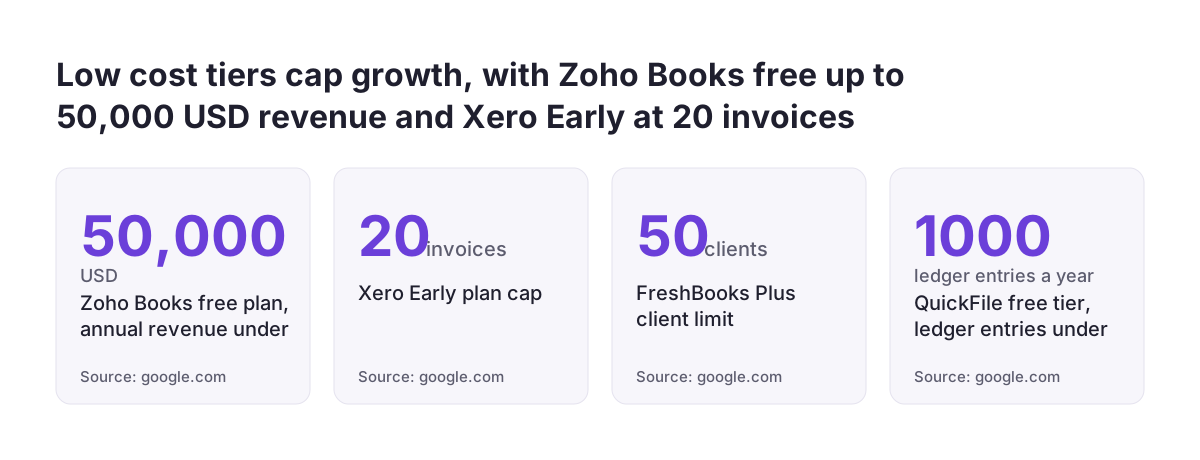
Plan limits matter more than headline prices, because a cheap tier that caps invoices or users forces an upgrade as soon as you grow. The figures below are US list prices from Beancount.io's 2026 comparison, checked on 14 September 2026. Prices in your country and currency will differ, so treat them as a guide to plan structure.
| Product | Entry pricing (US list) | Limit worth knowing | Connections to other systems |
|---|---|---|---|
| Zoho Books | Free plan; Standard around $15/month billed annually | Free while annual revenue stays under $50,000, one user plus accountant | Integrates with Zoho CRM; narrower outside the Zoho ecosystem |
| Xero | Early from $25/month | Early is capped at 20 invoices and 5 bills | Connects with over 1,000 third-party apps |
| QuickBooks Online | Simple Start from $38/month | Inventory tracking starts at Plus, $140/month | Broader third-party range than Zoho Books |
| Wave | Starter free; Pro $19/month | Automatic bank imports need Pro; email-only support | Fewer app integrations than the Zoho Books free plan |
Watch introductory offers. QuickBooks frequently discounts the first three months by 50% before full pricing applies, according to the same comparison. Xero has announced further US price increases from 1 October 2026. For a general sense of the market, money.co.uk puts entry-level plans at £10 to £20 a month and mid-range plans at £30 to over £100.
Zoho Books as a worked example of choosing for ecosystem fit
Zoho Books is cloud-based, all-in-one accounting software for small businesses, with automated bank feeds, customised invoices and payment reminders, as money.co.uk describes it. Its strongest argument is fit with other Zoho applications rather than any single feature.
Zoho Books integrates with Zoho CRM, Nav confirms. According to Business.org, cited by Zoftware, it also includes CRM, payroll and point-of-sale integrations. For a business that already sells from Zoho CRM, a native connection between quotes, customers and invoices removes the most common retyping step. If you also manage stock in Zoho, our guide to inventory management software for small business in Zoho covers that layer.
The free plan is a real starting point rather than a demo. Nav lists automated payment reminders, online payments and bank reconciliation in it. Nav also notes that moving from the Zoho Books free plan to a paid tier is easier than outgrowing Wave, which may force a switch of software.
Where no native connection exists between two Zoho apps, Zoho Flow for a small business shows how to build simple workflows between them. If you expect to run several Zoho apps, compare buying them one by one with a bundle such as Zoho One before you commit.
When Zoho Books is the wrong accounting software for your business
Zoho Books is a weaker choice when the rest of your stack sits outside Zoho. Beancount.io notes that outside the Zoho ecosystem, its third-party integrations are more limited than those of QuickBooks or Xero. If your CRM, shop and payroll come from other vendors, that limitation hits exactly where the integration argument matters most.
Xero is the obvious comparison for a mixed stack. money.co.uk reports that Xero connects with over 1,000 third-party apps. Act! notes that Xero extends through native integrations, for example payroll through Gusto. Beancount.io adds that Xero offers unlimited users on every plan, which helps when several people need access.
QuickBooks suits businesses that want a widely supported product with tiered versions. Nav lists QuickBooks Online, QuickBooks Self Employed and QuickBooks Online Advanced. If you need inventory tracking, budget for the Plus tier, which Beancount.io lists at $140 a month on US pricing.
Very small businesses with simple needs may not need integration at all. Wave's Starter plan is free for core accounting and invoicing. Its free service targets mainly US customers and excludes payroll, according to Unbiased, so check those points if you operate in Europe.
National tax and e-invoicing rules can rule an accounting product out
Local tax rules can disqualify an accounting product regardless of how well it integrates. EU VAT law already sets common rules for invoices. E-invoicing and digital reporting for most sales between businesses in different member states become mandatory from 2030. Rules for sales inside one country still differ, so check your own member state's requirements with your accountant before you shortlist.
Two examples from outside the EU show how much these rules can matter. In the UK, Making Tax Digital requires digital records and submission through compatible software. For income tax it applies from April 2026 to sole traders and landlords with qualifying income above £50,000, according to money.co.uk. In Saudi Arabia, Wazen describes mandatory e-invoicing phases set by the tax authority ZATCA.
Phase One of the ZATCA rules covers issuing and storing invoices electronically. Phase Two covers integration with ZATCA itself.
Free tiers often leave out these compliance features, so check whether the exact plan you plan to use supports Making Tax Digital before you rely on it. Wave users need separate bridging software to submit to HMRC. The general lesson holds in any country: confirm compliance on the exact tier you plan to buy.
Your accountant's tools count too. DATEV, a European company, makes tax software widely used in Germany, according to Tipalti. If your accountant works in a specific system, ask how your data will reach it.
Data export and migration: check your exit before you commit
Every accounting product choice should include a plan for leaving it. Most accounting packages let you export data, typically as CSV files, according to Unbiased. Unbiased also warns that migrating that data into a new system can be complex.
A CSV export of transactions is not the same as a working set of books. Your chart of accounts, which is the set of accounts that matches the types of transactions your business records, has to be rebuilt or mapped. Open invoices, customer balances and tax settings need checking line by line. Integrations you built against the old product stop working on the day you switch.
Three practical checks reduce that risk:
- Run a test export during the trial and open it to see what is actually included.
- Confirm that customer and product identifiers survive the export, so integrations can be reconnected.
- Choose a product whose paid tiers cover the next few years of growth, so you upgrade rather than migrate.
The upgrade point matters most for free plans. Nav's comparison of Zoho Books and Wave makes exactly this distinction: one has a paid path inside the same product, the other may require a full switch.
Next steps for choosing small business accounting software
A short, ordered process gets you from a long list of products to a confident choice. The steps below take the integration-first approach from this post and turn it into actions.
- Draw your systems map and mark the master record for customers, products and invoices.
- Confirm the tax and e-invoicing requirements in your country with your accountant.
- Shortlist two or three products that support your existing CRM, shop and stock tools natively.
- Compare plan limits, such as invoice caps, user counts and revenue ceilings, against your next few years of growth.
- Use the free trial or free plan to connect one real system and push a test invoice through end to end.
- Run a test export and check what you would take with you if you left.
If your stack is mostly Zoho, start the trial with Zoho Books connected to Zoho CRM. If your stack is mixed, test Xero or QuickBooks against your actual apps. In both cases, judge the product by the invoice that arrives without anyone retyping it.
Sources
- money.co.uk: Best accounting software for small businesses 2026
- Act!: 5 best accounting software for small businesses
- Wazen: Best Accounting Software for Small Businesses
- Nav: The Best Small Business Accounting Software 2025
- Tipalti: What's the Best Accounting Software for Small Businesses?
- Unbiased: Top 10 best free accounting software for small businesses
- Beancount.io: Best Accounting Software for Small Businesses in 2026
- Zoftware: Free Accounting Software for Small Businesses