
What Zoho CRM API limits actually measure
Zoho CRM API limits come in two forms, and each shapes your integration design differently. The first is a daily pool of API credits. Every call draws from it. The second is a concurrency limit, which caps how many calls can be in progress at the same moment.
Zoho states that it enforces these limits based on your purchased user licences and add-on credits, to keep the service available to everyone and to prevent abuse. The credit pool is not a calendar day. It runs on a rolling 24-hour window, and each credit you consume is freed 24 hours after you used it.
What is missing matters just as much. According to the Zoho CRM V8 limits documentation, there are no time-based restrictions. You can make any number of calls in a minute, as long as the number of concurrent calls stays within the limit. So you do not need to throttle "requests per minute". You need to budget credits across a day and control how many calls run in parallel.
If you are planning any link between Zoho CRM and an ERP, a webshop or a billing tool, these two numbers decide how the sync must be built. This guide explains both limits, what individual operations cost and which design patterns keep an integration inside them.
How your daily credit allowance is calculated
Each edition has a base allowance plus a per-licence amount, up to an edition maximum. The current V8 documentation gives these figures for a rolling 24-hour window:
| Edition | Allowance | Maximum |
|---|---|---|
| Free | 5,000 credits | 5,000 credits |
| Standard/Starter | 50,000 + 250 per user licence + add-on credits | 100,000 credits |
| Professional | 50,000 + 500 per user licence + add-on credits | 3,000,000 credits |
| Enterprise/Zoho One | 50,000 + 1,000 per user licence + add-on credits | 5,000,000 credits |
| Ultimate/CRM Plus | 50,000 + 2,000 per user licence + add-on credits | Unlimited |
In practice, a Professional organisation with 20 users gets 50,000 + (20 x 500) = 60,000 credits per rolling day. An Enterprise organisation with 50 users gets 100,000. Trial editions carry the same credit limits as the corresponding paid edition, so a trial is a fair test of load.
One caution: an older Zoho community post, Kaizen #34 on API credits, quotes lower base figures and lower maximums. The principle it describes still holds: your usable pool is the lower of the calculated allowance and the edition maximum. For numbers, check the live documentation page and the usage view in your own account before you size anything.
What each operation costs in credits
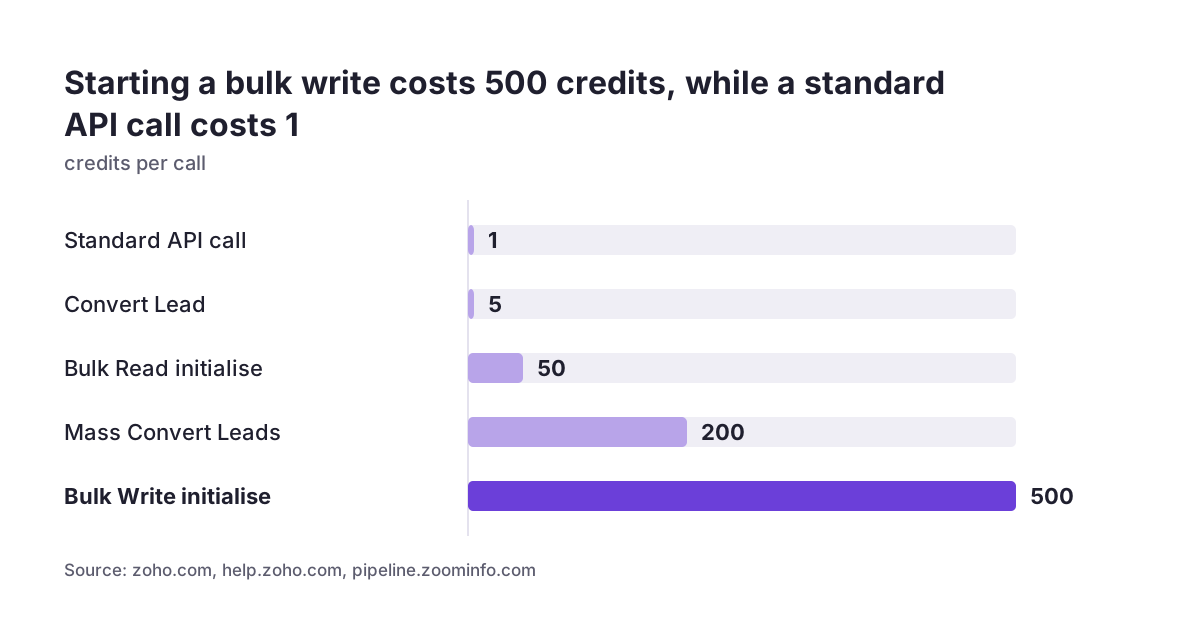
Credits are not a simple count of requests. Zoho deducts them based on the type of call, how performance-intensive it is and how much memory the operations use. The V8 documentation says most calls cost 1 credit, but some cost more. Convert Lead, for example, costs 5.
The cost differences that matter most for integration design are these:
- Insert, update and upsert: 1 credit for every 10 records, with up to 100 records per call.
- Add or remove tags on multiple records: 1 credit for every 50 records, with up to 500 records per call.
- Bulk Read initialise: 50 credits. Bulk Write initialise: 500 credits.
- Mass Convert Leads: 200 credits, according to ZoomInfo's overview of the Zoho CRM API.
- GraphQL: charged by the type and number of resources queried, with a maximum of 10 credits per call.
The practical consequence is that the same data volume can cost very different amounts depending on how you send it. Suppose you push 5,000 order updates a day. Sent one record per call at 1 credit each, that is 5,000 credits. Sent in batches of 100 at 1 credit per 10 records, it is 500 credits and only 50 calls. A daily pool of 60,000 absorbs either figure, but the batched version leaves room for every other integration, and it keeps concurrency low as well.
Concurrency and sub-concurrency limits
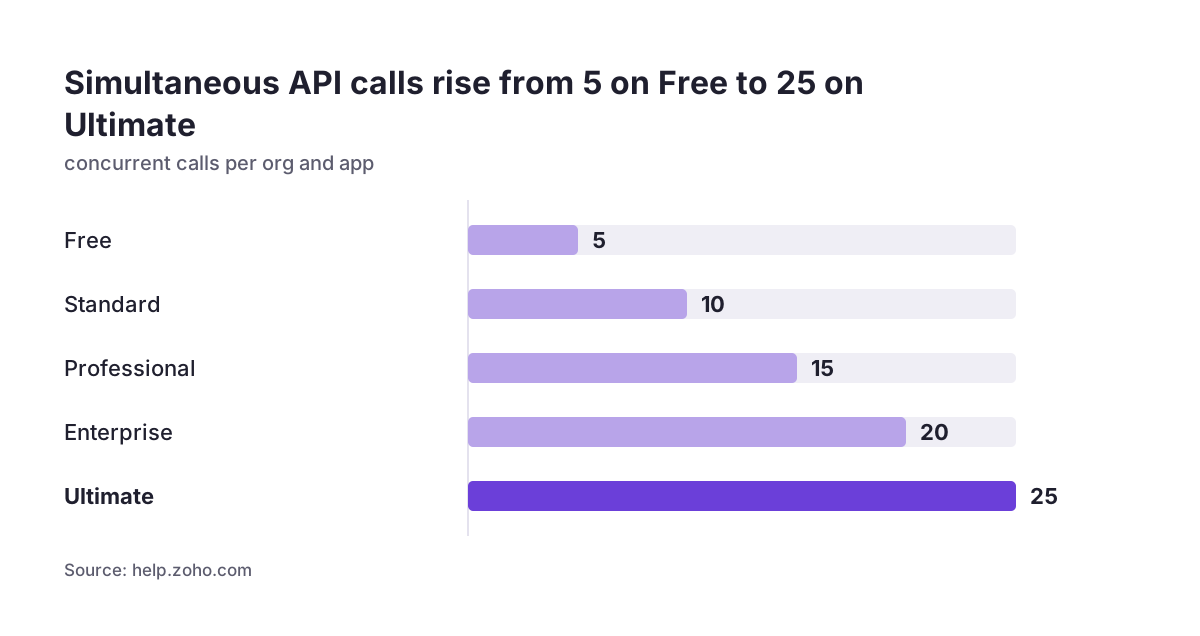
The concurrency limit is the maximum number of API calls that can be active at the same time, per organisation per app. Zoho gives these caps by edition: Free 5, Standard 10, Professional 15, Enterprise 20 and Ultimate 25.
A second, tighter layer sits on top. Some APIs use far more computing resources than others, so they have a sub-concurrency limit of 10 across all editions. The V8 documentation names Convert Lead, Send Mail, the Query API and the Composite API. Zoho's Vertical Solutions documentation also lists Get Records with custom view or sort parameters, inserts and updates of more than 10 records, and searches called from a function. Heavy batch writes therefore share a cap of 10 even on an Ultimate organisation.
Developers have asked Zoho what "simultaneously active" means in practice. One community thread on the concurrency definition asks whether it means open connections that have not yet resolved. The safe assumption is yes. A slow call holds its slot for as long as it runs, so long-running queries reduce your effective parallelism.
Scope matters too. The V8 documentation defines the cap per organisation per app. ZoomInfo's summary describes the limits as per organisation, with several integrations on one CRM instance sharing the cap. Design as if all your integrations, plus your own Deluge automations, compete for the same slots. Concurrency limits apply to Deluge integration tasks at organisation level, although sub-concurrency limits do not.
What happens when you hit a limit
Both limits fail the same way. When you exhaust your credits, or exceed the concurrency or sub-concurrency limit, Zoho returns HTTP 429 with the error code TOO_MANY_REQUESTS. Your code cannot tell from the status alone which limit it hit, so the handling logic needs context.
Zoho gives you one early warning. Once usage reaches 50% of your daily available credit limit (excluding paid add-on credits), responses include an X-API-CREDITS-REMAINING header with the remaining credits, including add-ons. If your integration logs that header, you can alert someone long before the pool runs dry.
The two failures call for different responses:
- Concurrency 429: short-lived. Waiting briefly and retrying with fewer parallel workers usually succeeds, because slots free up as calls complete.
- Credit 429: can last hours. Credits come back only as each one passes its 24-hour mark, so retrying in a tight loop just burns effort. Pause non-urgent work and keep what remains for critical flows.
Also watch for partial success. Some calls return 207 Multi-Status when part of a batch succeeds. A batch of 100 records can return with some rows rejected, and your sync has to record which ones failed rather than treat the whole call as done.
Design pattern: batch writes and use bulk jobs for volume
The cheapest improvement in most integrations is batching. Send up to 100 records per insert, update or upsert call instead of one call per record. Upsert is especially useful for syncs, because the integration does not need a separate read to decide whether to create or update.
For very large jobs, the Bulk APIs push and retrieve data asynchronously. Their fixed start-up cost (50 credits to initialise a bulk read, 500 for a bulk write) makes them a poor fit for a handful of records but efficient for a nightly export or a large one-off load. This is typically how historical data is moved when you migrate to Zoho CRM. The Composite API can also combine up to five calls in one request, which helps when a record and its related items must be written together. It does fall under the sub-concurrency limit of 10.
For reads, prefer fewer, larger queries. COQL, the SQL-style Query API, returns up to 2,000 records per call and supports JOINs and subqueries. One well-written query can replace dozens of paged record fetches. Keep queries selective, though. They count against sub-concurrency and hold a slot while they run.
A good rule: size the batch to the data, not to the event. An order from a webshop can trigger a single upsert, but a nightly stock or price update from an ERP should always go in batches.
Design pattern: react to changes instead of polling
Polling is the most common way integrations waste credits. A job that asks Zoho CRM every few minutes whether anything changed spends credits around the clock, mostly to learn that nothing did. Over a rolling 24-hour window, that background noise adds up and competes with real work.
The Notification APIs send a notification to your callback URL whenever data changes in the CRM, so your system only acts when there is something to act on. Two caveats from ZoomInfo's review apply. Every subscription needs an expiry time, so your integration must renew subscriptions on a schedule. And Zoho's public documentation does not describe retry behaviour for notification deliveries. You should run an occasional reconciliation job that catches anything a missed notification left behind.
Do not forget automation inside the CRM. Deluge integration tasks count toward the same credit pool at the same rate as the equivalent API. A call to zoho.crm.searchRecords() costs what the Search Records API costs. A workflow that fires a function on every record edit can quietly consume more than your external integrations.
The Credits by Application section of the API Dashboard shows how many credits each application consumed over a period. Check it before blaming the ERP connector. Our SAP Business One and Zoho CRM integration is an example of a sync where the split between event-driven updates and scheduled batches decides most of the credit budget.
Design pattern: one queue, controlled parallelism and sensible retries
Because every integration draws on the same limits, the architecture that holds up best puts all writes to Zoho CRM through one controlled path. That path owns three things: the number of workers running in parallel, the batch size and the retry policy.
At Svennis we route every system that writes to a client's Zoho CRM through a single queue with its parallelism set below the edition's concurrency cap, so a burst from one source cannot starve the others or the CRM's own automations. When we see integrations fail at clients, it is usually because each connector was built on its own and all of them retried at full speed at the same moment.
A workable retry policy looks like this:
- On a 429, back off with increasing waits and reduce parallelism before retrying.
- If the credit header shows a low remaining balance, treat the 429 as a credit problem and pause low-priority jobs.
- Make every write idempotent, for example by upserting on an external ID, so a retried batch does not create duplicates.
- Record rejected rows from partial successes separately and retry only those.
Authentication belongs in the same path. Zoho CRM uses OAuth 2.0 only, and access tokens expire after one hour. A central component that refreshes tokens avoids a burst of failed calls when every connector discovers an expired token at once. If you are weighing custom Zoho integrations against separate off-the-shelf connectors, this shared control layer is one of the strongest arguments for building it properly.
When buying more credits is the right answer
Sometimes the workload is simply larger than the allowance. Zoho's pay-as-you-go model lets the super-admin raise the credit limit under Setup > Developer Hub > APIs and SDKs, in the Credits tab. The account must be a paid account. Offline-purchased or one-time paid accounts must email Zoho instead. You can add up to 500,000 extra credits, or the gap between your edition's maximum and your current limit, whichever is lower.
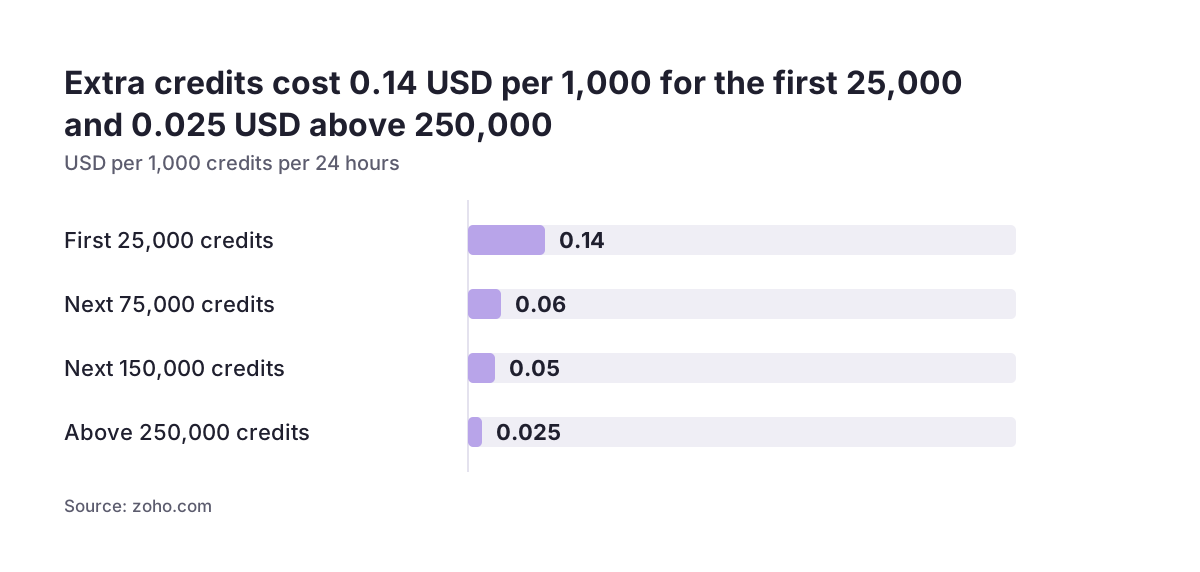
Pricing on the Zoho CRM credits dashboard page is tiered per 1,000 credits in a 24-hour period:
- First 25,000: USD 0.14
- Next 75,000: USD 0.06
- Next 150,000: USD 0.05
- Above 250,000: USD 0.025
Zoho's example puts 75,000 additional credits at USD 6.50 per day, and 100,000 add-on credits at USD 240 billed monthly. You pay only for extra credits actually consumed, not the limit you set. In Zoho's worked example, 252,886 credits consumed on one day cost USD 15.50 despite a limit of 270,000. Add-on credits are charged monthly on usage even if your subscription is yearly, and they cannot be used on trial accounts.
The trade-off is clear. If a sync is inefficient, extra credits pay for waste every day. Fix batching and polling first. Buy credits when a well-built integration still needs them, or when an edition upgrade would cost more than the add-on.
Practical next steps
Before you build or rework an integration, put numbers on the table. The steps below take a few hours and prevent most limit problems.
- Find your real allowance. Calculate it from your edition and licence count, then compare it with the usage figures in the API dashboard. Usage stats go back up to three months.
- Estimate daily consumption per flow. For each integration, multiply daily record volume by the credit cost of the operation, using batched costs rather than per-record ones. Include Deluge functions.
- Check parallelism. Count how many workers each connector runs and add them up against your edition's cap, remembering the sub-concurrency limit of 10 for heavy operations.
- Replace polling with notifications where the source system can receive them, and schedule subscription renewal plus a periodic reconciliation.
- Log the credit header and 429 responses, and alert when remaining credits drop sharply.
- Test in a sandbox. Zoho's free Developer Edition lets you test integrations without touching production data.
If your integration volume is still growing, review the numbers again at each licence change, because your allowance moves with them. For e-commerce setups, where order peaks drive API load, our page on Zoho CRM for e-commerce covers how webshop traffic maps onto CRM records. When you are choosing an edition, weigh the credit and concurrency figures alongside features on our Zoho CRM implementation page.
Sources
- Zoho CRM API V8: Limits
- Zoho CRM API V8: Increase API Credits from the Dashboard
- Zoho CRM V8 APIs
- Zoho Community: Kaizen #34 - API Credits
- Zoho Community: Kaizen #203 - Handling API Limits and Error Responses
- Zoho Community: Concurrent Limit Definition in CRM REST API
- Zoho Vertical Solutions API: Limits
- ZoomInfo: Zoho CRM API features and limits