Error handling and retries in Zoho Flow: what happens by default
Error handling and retries in Zoho Flow come down to three things. Zoho Flow reruns some failed tasks automatically for up to 24 hours. Other failures wait for you to rerun them by hand. Your flow design decides whether anyone notices. If you add nothing, a failure can sit in the execution list while the business assumes the data arrived.
Error handling is the part of an integration that decides what happens when a step fails. Should it try again, take another path or stop? Should it tell a person? Zoho Flow gives you part of this for free and leaves the rest to you.
The risk is quiet failure. One Zoho community user described a flow that had worked for over a year and then stopped importing orders from forms to Books, CRM or email. The user ended up importing orders manually until it was fixed. A similar complaint about a Zoho CRM custom function says that when it fails, "it fails silently", and the failures are not recorded anywhere.
This guide covers what Zoho Flow retries on its own and what it never retries. It shows how to rerun without creating duplicate records and how to decide which failures need a person.
Auto rerun retries API and internal errors for 24 hours
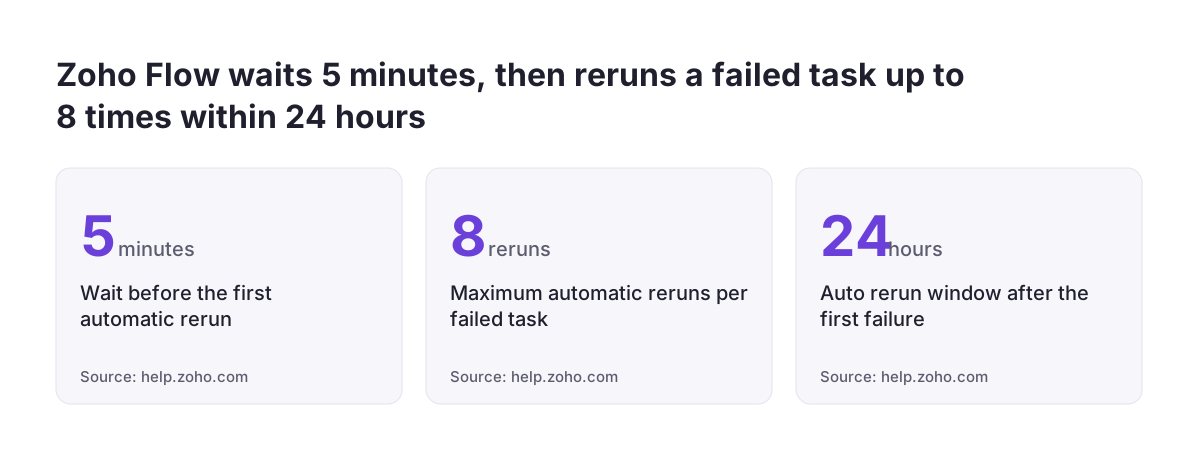
Auto rerun is Zoho Flow's automatic retry for executions that failed because of Zoho Flow's own internal errors or because a connected app returned an API error. According to Zoho's help article on rerunning failed executions, the attempts continue at set intervals for 24 hours after the first failure.
The schedule is fixed. Zoho Flow waits five minutes before the first rerun. The flow then resumes from the action that failed, not from the beginning. A failed task is rerun at most eight times before the execution is marked as failed. Counted from the original failure, the reruns run at:
- 5 minutes
- 10 minutes
- 30 minutes
- 1 hour
- 3 hours
- 6 hours
- 12 hours
- 24 hours
Auto rerun covers API errors with these status codes from connected apps:
- 408, a request that timed out
- 409, a conflict caused by multiple simultaneous updates
- 429, rate limiting from too many requests
- 500, 503 and 504, server-side errors
Three more details matter when you plan around auto rerun. Your task count is only deducted when a task runs successfully, so reruns do not use up your allowance. You cannot rerun a failed task manually during the 24-hour window. If you edit the flow before an upcoming rerun, the later reruns use the edited configuration. That last point helps: you can fix a mapping while the retries are still pending.
Manual rerun with Resume or Restart, and why Restart can duplicate records
Manual rerun is how you run an execution again when Zoho Flow will not retry it on its own. The help article lists the cases. They include incomplete or improper flow configuration and invalid data mapping, which is when a field from one app is mapped wrongly into another. These are errors in your design, so retrying them unchanged would only fail again.
Zoho Flow gives you two manual options:
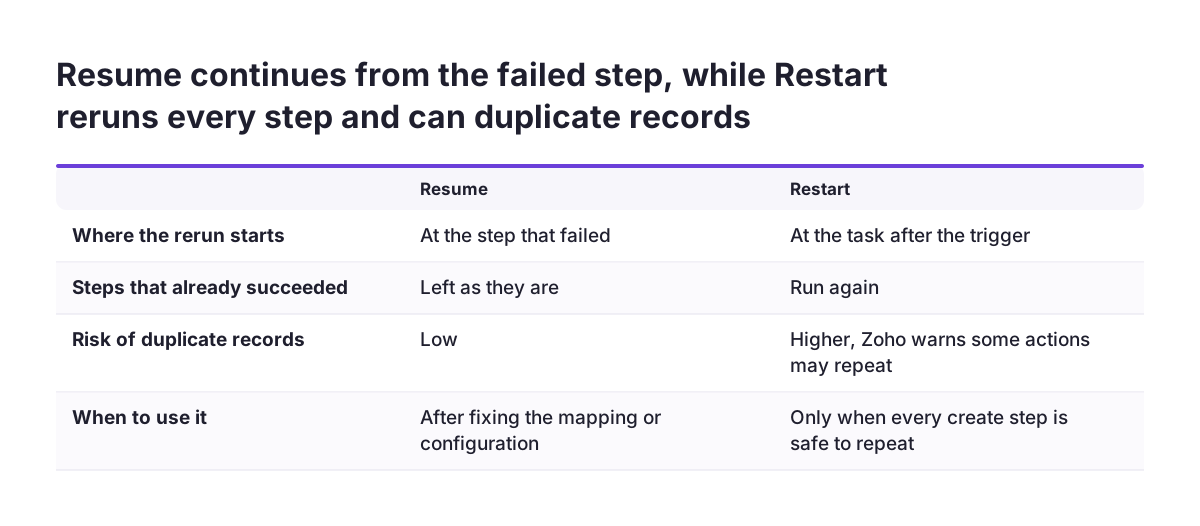
- Resume continues the execution immediately from the step that failed.
- Restart starts again from the task after the trigger and runs every step, including the ones that already succeeded.
Restart carries a warning in Zoho's own documentation. Because it reruns successful steps, it "might cause some actions to fail, create duplicate entries in the connected apps". Restart also does not work if the trigger was changed after the failure.
The practical rule is simple. Fix the cause, then use Resume whenever the failed step comes after any step that creates a record. Use Restart only when you know every earlier step is safe to repeat.
You can select up to 100 executions for manual rerun at once, and each one runs independently. That suits a backlog after a mapping fix. It also means a mistaken Restart can multiply duplicates across up to 100 records in one go.
Trigger and connection failures that Zoho Flow never retries
Auto rerun does not apply to triggers, so a failure at the start of a flow gets no automatic second attempt. A trigger is the event that starts a flow, such as a new form entry or a new booking. Zoho's help article names webhook triggers and realtime app triggers explicitly. It also excludes flows that are switched off or deleted, and tasks that already ran successfully.
This gap explains the most damaging quiet failures. In the community case above, the user tried to switch the flow back on. Zoho Forms then returned an INVALID_OAUTHTOKEN error, meaning the stored login that connects Zoho Flow to the app was no longer valid. A broken connection at the trigger produces no failed execution to rerun. Orders simply stop arriving.
Platform outages are a second category. One user reported that internal errors were thrown for any URL invoked through Deluge, Zoho's scripting language. Every one of the user's organisations was affected, and the user later confirmed the service was back. Auto rerun is designed for internal errors of this kind on actions, but not on triggers.
For triggers and connections, you need a check outside the flow itself. Compare what should have arrived with what did. A daily count of new orders in Zoho Books against the form submissions is often enough to spot a silent stop.
On-error actions and fallback paths inside a Zoho Flow
On-error actions let you put steps directly in a Zoho Flow that run when an action fails. A Zoho community post welcomed the feature: "you can now put actions right in your Flow for error handling". The same user called it "a great addition from a functional standpoint". The user's only reservation was that it makes the builder "a bit hairy" to read.
A fallback path is an alternative route a flow takes when the normal route cannot complete. Typical fallbacks for a Zoho CRM, Desk or Books integration include:
- Writing the failed record's key fields to a holding place where a person can review them.
- Creating a task for a named owner instead of the record the flow meant to create.
- Sending a notification that names the flow, the record and the error.
Custom functions need their own pattern. A custom function is a script you add as a step in a flow. One user asked how to terminate a flow from inside a custom function when conditions are not met. The workaround the user already knew is reliable: have the function return a status variable, then add a decision step that checks it and routes failures to the fallback path. The flow then fails visibly instead of passing bad data on.
Keep the error branches readable. Give each one a clear name and keep the same branch structure across flows, so a colleague can follow it.
Retrying a Zoho Flow without creating duplicate records
Duplicate records appear when a step that creates something runs twice. Zoho Flow can do this in two ways: a manual Restart that repeats successful steps, or a rerun after the target app accepted the record but the response never came back. Auto rerun lists a 408 timeout among its retried errors, and a timeout tells you nothing about whether the record was written.
The fix is to make every create step safe to repeat. An action is safe to repeat when running it twice leaves the same result as running it once. In practice:
- Pick a stable identifier for each record, such as the form entry ID, booking ID or order number.
- Store that identifier in a field on the record you create in Zoho CRM, Desk or Books.
- Before any create step, look up the target app for a record with that identifier.
- Create only if nothing is found; otherwise update or skip.
At Svennis we check every create step in a flow for a stable identifier and a lookup in front of it before go-live. Restart is the option people reach for first when something fails, and without that lookup it doubles invoices and contacts.
The same logic protects you after edits. Reruns pick up the edited configuration, so adding a lookup now protects executions that are still waiting to retry.
Alerting a person when a Zoho Flow fails
An alert is only useful if it reaches someone who can act on it, with enough detail to act. A message saying "a flow failed" sends a person searching the execution list. A good alert names four things: the flow, the record identifier, the step that failed and the error text the app returned.
App error messages are often too thin to act on, which is why the alert must carry context. One user's flow linked Zoho Bookings, Zoho CRM and Zoho Campaigns. It always failed at the last step with "Error in subscription. Please retry after sometime." The user had reset the connector without success. The only lead found was that it matched error code 2001 in Campaigns, "which doesn't help with debugging".
Decide the alert's timing as well as its content. A 429 rate-limit error that clears on the second rerun needs no person. An alert on every first failure trains people to ignore alerts. Route alerts in two tiers:
- Immediate alerts for failures that auto rerun will not fix: mapping errors, configuration errors and failed custom function checks.
- A daily summary of executions that are still retrying or that finally failed after the eighth rerun.
Give every flow a named owner. An alert sent to a shared mailbox nobody owns is a quiet failure with extra steps.
Which Zoho Flow failures need a person: a decision table
The question for each failure is whether waiting fixes it or whether someone has to change something. The table below sorts the failure types in Zoho's documentation and the community cases. It shows what Zoho Flow does by default and who should act.
| Failure | What Zoho Flow does | Who acts |
|---|---|---|
| Timeout (408), rate limit (429), server error (500, 503, 504) | Auto rerun for 24 hours, up to eight times | Nobody at first; owner reviews if still failing next day |
| Conflict from simultaneous updates (409) | Auto rerun from the failed action | Owner checks the record for duplicates or overwrites |
| Invalid data mapping | No auto rerun; waits for manual rerun | Owner fixes mapping, then uses Resume |
| Incomplete or improper configuration | No auto rerun; waits for manual rerun | Builder fixes the flow, then uses Resume |
Trigger or connection failure, e.g. INVALID_OAUTHTOKEN | Not rerun; no execution may exist | Admin reconnects; owner reconciles missed records |
| Flow switched off or deleted | Not rerun | Owner confirms whether this was intended |
| Repeated app error with an unclear message | Depends on the error type | Owner investigates in the target app and raises it with Zoho if needed |
Read the table from the right-hand column. Every row with "Owner" or "Admin" needs a named person before the flow goes live, not after the first incident.
Worked example: hardening a Bookings to CRM to Campaigns flow
Take the community flow described above and harden it step by step. The flow runs whenever a new booking is scheduled in Zoho Bookings. It routes the appointment details through a decision tree, returns the matching Zoho CRM contact and adds that contact to a Zoho Campaigns list.
Step 1: protect the trigger
The booking trigger gets no auto rerun. Add a weekly check that compares bookings in Zoho Bookings with contacts added to the Campaigns list. A gap means the trigger or its connection stopped.
Step 2: make the CRM step safe to repeat
Look up the CRM contact by email before any create step. Store the booking ID on the contact. A Restart then finds the contact instead of creating a second one.
Step 3: add an on-error path to the Campaigns step
Attach an on-error action to the "add to list" step. The action alerts the flow owner with the booking ID, the contact's CRM record and the returned error text, such as error code 2001.
Step 4: decide the rerun
If the error is a temporary API error, let the reruns run their course. If it is a mapping or configuration problem, fix it and use Resume. The CRM step already succeeded, so it does not need to run again.
For a simpler starting point, see first Zoho Flow workflows for a small business.
What Zoho Flow error handling means for a company operating in the EU
For a company in the EU, a failed flow is also a data question. The records a flow moves between Zoho CRM, Desk and Books often contain personal data. When you route failed records to a holding place or an alert, that personal data travels with them. Under GDPR, decide who may see failed records and alerts, and how long they are kept, as you would for any other copy of customer data.
Keep alerts lean for that reason. The record identifier and the error text are usually enough for an owner to open the record in the source app. Full names, addresses and invoice details do not need to sit in an email inbox.
Companies trading in several EU countries face a practical issue too. Different entities, teams and languages may share one flow. Name one owner per flow, not per country. Agree whether alerts go out in one shared working language. Time zones matter less than ownership: with a 24-hour rerun window, a clear owner who checks the daily summary will catch what auto rerun could not fix.
Where flows feed accounting in Zoho Books, a duplicate invoice is more than a data-quality problem. It can reach a customer or a tax report before anyone spots it. Treat any flow that creates financial records as one that must be safe to repeat before it goes live.
Next steps: read your flow history and harden one flow
Start with the flow that would hurt most if it stopped for a week, usually the one creating orders, invoices or tickets. Work through it in this order:
- Open its execution list and note every failure from the last month, with its error text.
- Sort each failure with the decision table above: will waiting fix it, or does a person need to act?
- Find every create step and add a lookup on a stable identifier in front of it.
- Add an on-error path to the steps most likely to fail, with an alert to a named owner.
- Set up an outside check that compares records in and records out, to catch trigger and connection failures.
Then agree the rerun rule with your team: Resume after a fix, Restart only when every earlier step is safe to repeat. Write it down next to the flow's owner.
When your flows span several systems, or Zoho Flow is no longer the right tool for a connection, review your options on the custom Zoho integrations page before rebuilding anything.
Sources
- Zoho Flow: Rerun failed executions
- Zoho Community: On Error Actions - Great Addition!
- Zoho Community: Zoho Flow to Campaigns, "Error in subscription"
- Zoho Community: Terminate the flow from within a custom function
- Zoho Community: Custom Function Error Handling
- Zoho Community: Zoho Flow stopped working
- Zoho Community: ZOHO DELUGE / FLOW DOWN